Author Archives: Bill Wilder

Unknown's avatar

About Bill Wilder

My professional developer persona: coder, blogger, community speaker, founder/leader of Boston Azure cloud user group, and Azure MVP

Examine User Identity and Claims from Visual Studio Debugger

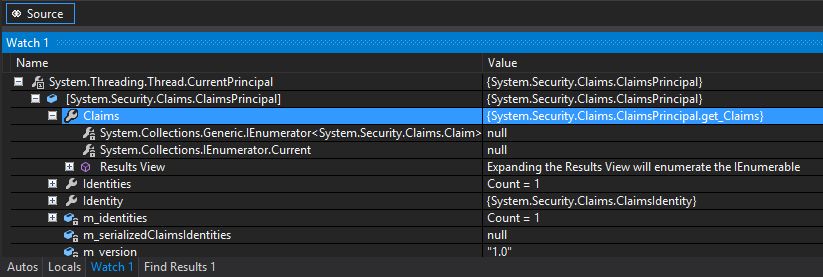
When debugging a claims-aware application (you ARE using claims, aren’t you?), sometimes it is useful to answer the question “which user is logged in (if any) and (if so) which claims are associated with said user.”

Assuming you are using Visual Studio and .NET 4.5, the simple solution is to add the following to one of your Visual Studio Watch windows:

System.Threading.Thread.CurrentPrincipal

[If you happen to be debugging ASP.NET code, you could save a little typing and instead add User to your Watch window. User should have the same value as the CurrentPrincipal in the context of ASP.NET. For ASP.NET WebForms User is a property of the Page class (Page.User), while for ASP.NET MVC User is a property of both the Controller class (Controller.User) and the HttpContext class (HttpContext.User).]

Drill in, and you will see something like the following:

image

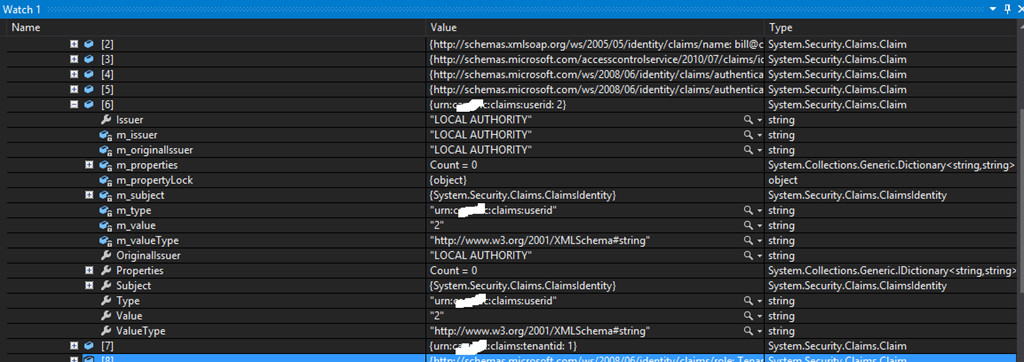
If you then right-click on the Results View entry under Claims (the one that says “Expanding the Results View will enumerate the IEnumerable”) and, uhh, click on that entry to expand the results view, you will see all the claims.

In my case, some claims were flowing through Windows Azure Access Control Service (ACS), and these list the ACS namespace as the Issuer. Other claims were added at runtime by my code using a ClaimsAuthenticationManager module, and these list LOCAL AUTHORITY as the Issuer.

image

Alternatively, you can add the more complex direct expression to your Watch window – using the cast to coerce the right values:

((System.Security.Claims.ClaimsPrincipal)(System.Threading.Thread.CurrentPrincipal))

This will also do the job – with a little less drilling.

Visual Studio Ultimate 2012’s “Generate Dependency Graph” helps quickly visualize system dependencies

Recently I was exercising some of the OData APIs for manipulating a Windows Azure Access Control Service (ACS) namespace. I found some nice sample code, but the sample code was super-extensive (even including a Windows Phone sample), but my needs were humble (I wanted to manipulate ACS Reply-To addresses). After cutting out a few of the obvious projects so I could find “the code that mattered” I was still left with a heap of projects and libraries to weed out to get to the essential code – and it was tedious and error-prone to manually do this (if I was too aggressive, I broke the solution so it would no longer build). Frustration! How could I efficiently zoom in on the code I cared about so I could ensure I understood its requirements and dependencies?

This was two easy steps:

1. Create a simple program to exercise the code I cared about. This was a Console app I called TestRealmLib.exe.

2. Figure out everything that TestRealmLib.exe really depended upon.

Step one was easy since I knew the functionality I wanted to exercise.

Step two was easy once it dawned on me to use the right tool for the job: Visual Studio Ultimate 2012’s Generate Dependency Graph tool found under the ARCHITECTURE menu option.

NOTE: My understanding is that this feature is only fully available with Visual Studio Ultimate 2012, partially available in Premium (view but not create), and not available in lower editions – compare what’s included in which Visual Studio editions here: http://www.microsoft.com/visualstudio/eng/products/compare. I only have personally used it with Visual Studio Ultimate 2012 on solutions with C# projects (though I understand C++ is also supported, and assume any .NET language would work as well).

Running this for the whole solution, and rearranging the nodes with my mouse, quickly let me see where all the dependencies were.

image

I was quickly able to see that the modules I dragged to the right-hand side of the graph were not necessary, and those few on the left were the key. That was the answer I needed, but there are other interesting features. For example…

The thicker dependency lines represent more dependencies than the thinner lines. To drill in, right-click on a dependency line. Here’s what you get when you choose Advanced > Show Contributing Links on New Code Map:

image

Also note the “red dot” in the Code Map – this is indicating that I currently have a breakpoint set in there – yes, this is debugger-aware.

There are a bunch of other nifty features with this that you can check out here. These include dependency analysis, “Show Contributing Links” (on the dependency VisualStudioDependecyGraphWithLegendlink to show which parts of module you are calling), and more. The UI gestures you’d expect all do something reasonable – like double-click, right-click, whether on nodes or lines. You can double-click a class or method name to jump to your C# code. And don’t forget to turn on the Legend (from toolbar at top of graph, not shown in my screen grabs) and explore the other features.

There is also a nice video demonstration in Channel 9: http://channel9.msdn.com/Series/Visual-Studio-2012-Premium-and-Ultimate-Overview/Visual-Studio-Ultimate-2012-Understand-your-code-dependencies-through-visualization

Talk: What’s New in Windows Azure – New England Microsoft Dev Group

A couple of nights ago, I had the privilege of speaking at the New England Microsoft Dev Group in Waltham, MA. The topic covered a general and high-level overview of the broad capabilities of the Windows Azure Cloud Platform, with some specific topics added by attendees as well. It turned out to be an interactive session with good questions from the group.

We agreed I would come back after the summer for an architecture-focused session; the session presented was more feature & technology-oriented.

A few followups:

The deck I used is pretty short, but here in case you are interested:

My book, if you are interested, is described here (note: my next talk to the group will cover material more closely associated with the book, which is more focused on patterns and architecture in the context of designing effective cloud applications).

Talk: Architecting for the Cloud at Nashua Cloud .NET User Group

Last night I had the privilege of speaking at the Nashua .NET Cloud User Group in Nashua, NH. It was an engaged group to be sure – thanks for all the great questions.

A few followups:

  • Azure VM pricing: the $0.013/hour pricing mentioned for Extra Small instances of the Infrastructure as a Service (IaaS) Virtual Machine is shown here to be a promotional price, with the regular price of $0.02/hour (two cents per hour) kicking in on June 1. The architectures we spoke of in the talk used Platform as a Service (PaaS) Virtual Machines and the pricing for those is very similar, though slightly lower, and is shown here.
  • How many customers does Azure have: here is the 10,000 number that Udai shared, which is from was about three years ago when most of the tech world had not yet even heard of Azure. More recently,  it was mentioned there are 200,000 Azure customers and it has passed $1 billion in revenue. So, according to those numbers, it appears to have grown 20x in a little less than three years. Additional interesting numbers mentioned here and here.
  • We focused on use of Cloud Services last night, but we also mentioned Virtual Machines (part of what Microsoft is calling Infrastructure Services, like IaaS) and Web Sites, noting all use different approaches. You can read more about all of them here where you’ll see write-ups for each specific area.
  • I mentioned that Blob Storage is also being used to support the persistent disks on the Infrastructure Services Virtual Machines, in part-enabled by new high performance network architecture. I wrote about some of this before in a blog post titled Azure Cloud Storage Improvements Hit the Target.

The deck I used follows.

Architecting for the Cloud — NH Azure — 15-Mar-2013 — Bill Wilder (blog.codingoutloud.com)

My book, if you are interested, is described here. And the Boston Azure Cloud User Group can be found here.

Cloud Architecture Patterns book

Clash of the Clouds Followup

Last night, Mark Eisenberg and I represented the Windows Azure Cloud Platform in a Clash of the Clouds panel discussion/debate opposite Erik Sebesta  and Ed Brennan who represented the Open Source cloud alternatives. Erik & Ed declared OpenStack to be the strongest of the open source options today, so it became about Azure vs. OpenStack.

While I will not attempt to reproduce the discussion (sorry!, though there are a few photos), I do want to follow up on a few questions that I offered to provide references on. If you have further questions, please feel free to put a comment on this post. Also, at the end of this post, you will find a link to the short “Azure in 3 minutes or less” deck we used to introduce the Windows Azure Cloud Platform at the very beginning (per the ground rules of the panel – we limited the intro to 3 minutes).

  • In response to the question about scalability of Windows Azure Blobs, here is the write-up I referenced on Windows Azure Storage Scalability Targets. Here is an additional (more comparative) discussion (follow links) you may find helpful: Azure Cloud Storage Improvements Hit the Target.
  • In response to the question about pricing, check out the Windows Azure pricing calculator. Note that for the Microsoft Server products (e.g. Windows Server, or SQL Server on Windows Azure SQL Database (offered as a service) or on a Virtual Machine (that you manage)), the cost of the license is baked into the hourly rental cost.
  • In response to the question about the ability to support different types of apps (whether new ones from startups, existing ones from big company, etc.), see the spectrum of offerings described here: https://www.windowsazure.com/en-us/develop/net/fundamentals/compute/. In a nutshell, Web Sites is for hosting (with a free Tier) for basic, low-scale sites, but these can scale very nicely too), Cloud Services is for building Cloud-Native applications using PaaS (which my book focuses on), Virtual Machines (parallel to what OpenStack offers in terms of managed VMs) is more useful for applications you want to run in the cloud with minimal change, and Virtual Networking allows many options for connecting your data center with a secure private network on Windows Azure among other options.
  • In response to the question about openness, any programming language or platform can access the Windows Azure services through REST APIs, but here is the list of those with first-class SDKs: http://www.windowsazure.com/en-us/downloads/
  • For any further follow-up questions feel free leave a COMMENT below and I will update this post.

Windows Azure is not the only full-service, rock-solid cloud platform out there, but I hope you got an appreciation for how it might help you and why you might wish to choose it for your applications and services. If you are interested in learning more about Windows Azure, you may wish to check out the Boston Azure User Group, which has been meeting regularly at NERD since October 2009. Our next meeting is in just a few days: Tuesday May 9.

The SLIDE DECK we used for the 3 minute intro is here:


Talk (Guest Speaker at BU): Architecting to be Cloud Native – On Windows Azure or Otherwise

Tonight I had the honor of being a guest lecturer at a Boston University graduate cloud computing class – BU MET CS755, Cloud Computing, taught by Dino Konstantopoulos.

The theme of my talk was Architecting to be Cloud Native – On Windows Azure or Otherwise. The slide deck I used is included below.

Night class is tough. Thanks for a warm reception – so congratulations and many thanks to those of you able to stay awake until 9:00 PM (!).

clip_image001.png I hope to see all of you at future Boston Azure events – to get announcements, Join our Meetup Group. We are also the world’s first/oldest Azure User Group. Here are a couple of upcoming events:

Feel free to reach out with any questions (twitter (@codingoutloud) or  email (codingoutloud at gmail)) — especially if it will be “on the midterm” – and good luck in the cloud!

Bill Wilder

book-cover-medium.jpg

Talk: Azure Best Practices – How to Successfully Architect Windows Azure Apps for the Cloud

Webinar Registration:

  • Azure Best Practices – How to Successfully Architect Windows Azure Apps for the Cloud @ 1pm ET on 13-March-2013
  • VIEW RECORDING HERE: http://bit.ly/ZzQDDW 

Abstract:

Discover how you can successfully architect Windows Azure-based applications to avoid and mitigate performance and reliability issues with our live webinar
Microsoft’s Windows Azure cloud offerings provide you with the ability to build and deliver a powerful cloud-based application in a fraction of the time and cost of traditional on-premise approaches.  So what’s the problem? Tried-and-true traditional architectural concepts don’t apply when it comes to cloud-native applications. Building cloud-based applications must factor in answers to such questions as:

  • How to scale?
  • How to overcome failure?
  • How to build a manageable system?
  • How to minimize monthly bills from cloud vendors?

During this webinar, we will examine why cloud-based applications must be architected differently from that of traditional applications, and break down key architectural patterns that truly unlock cloud benefits. Items of discussion include:

  • Architecting for success in the cloud
  • Getting the right architecture and scalability
  • Auto-scaling in Azure and other cloud architecture patterns

If you want to avoid long nights, help-desk calls, frustrated business owners and end-users, then don’t miss this webinar or your chance to learn how to deliver highly-scalable, high-performance cloud applications.

Deck:

Book:

The core ideas were drawn from my Cloud Architecture Patterns (O’Reilly Media, 2012) book:

book-cover-medium.jpg

Hosted by Dell:

image

Azure Cloud Storage Improvements Hit the Target

Windows Azure Storage (WAS)
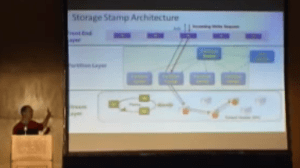
Brad Calder SOSP talk from http://www.youtube.com/watch?v=QnYdbQO0yj4

Brad Calder delivering SOSP talk

Since its initial release, Windows Azure has offered a storage service known as Windows Azure Storage (WAS). According to the SOSP paper and related talk published by the team (led by Brad Calder), WAS is architected to be a “Highly Available Cloud Storage Service with Strong Consistency.” Part of being highly availably is keeping your data safe and accessible. The SOSP paper mentions that the WAS service retains three copies of every stored byte, and (announced a few months before the SOSP paper) another asynchronously geo-replicated trio of copies in another data center hundreds of miles away in the same geo-political region. Six copies in total.

WAS is a broad service, offering not only blob (file) storage, but also a NoSQL store and a reliable queue.

Further, all of these WAS storage offerings are strongly consistent (as opposed to other storage approaches which are sometimes eventually consistent). Again citing the SOSP paper: “Many customers want strong consistency: especially enterprise customers moving their line of business applications to the cloud.” This is because traditional data stores are strongly consistent and code needs to be specially crafted in order to handle an eventually consistent model. This simplifies moving existing code into the cloud.

The points made so far are just to establish some basic properties of this system before jumping into the real purpose of this article: performance at scale. The particular points mentioned (highly available, storage in triplicate and then geo-replicated, strong consistency, and supporting also a NoSQL database and reliable queuing features) were highlighted since they may be considered disadvantages – rich capabilities that may be considered to hamper scalability and performance. Except that they don’t hamper scalability and performance at all. Read on for details.

Performance at Scale

A couple of years ago, Nasuni benchmarked the most important public cloud vendors on how their services performed on cloud file storage at scale (using workloads modeled after those observed from real world business scenarios). Among the public clouds tested were Windows Azure Storage (though only the blob/file storage aspect was considered), Amazon S3 (an eventually consistent file store), and a couple of others.

In the first published result in 2011, Nasuni declared Amazon S3 the overall winner, prevailing over Windows Azure Storage and others, though WAS fininshed ahead of Amazon in some of the tests. At the time of these tests, WAS was running on its first-generation network architecture and supported capacity as described in the team’s published scalability targets from mid-2010.

In 2012, Microsoft network engineers were busy implementing a new data center network design they are calling Quantum 10 (or Q10 for short). The original network design was hierarchical, but the Q10 design is flat (and uses other improvements like SSD for journaling). The end result of this dramatic redesign is that WAS-based network storage is much faster, more scalable, and as robust as ever. The corresponding Q10 scalability targets were published in November 2012 and show substantial advances. EDIT: the information on scalability targets and related factors is kept up to date in official documentation here.

Q10 was implemented during 2012 and apparently was in place before Nasuni ran its updated benchmarks between November 2012 and January 2013. With its fancy new network design in place, WAS really shined. While the results in 2011 were close, with Amazon S3 being the overall winner, in 2012 the results were a blowout, with Windows Azure Storage being declared the winner, sweeping all other contenders across the three categories.

“This year, our tests revealed that Microsoft Azure Blob Storage has taken a significant step ahead of last year’s leader, Amazon S3, to take the top spot. Across three primary tests (performance, scalability and stability), Microsoft emerged as a top performer in every category.” -Nusani Report

The Nasuni report goes on to mention that “the technology [Microsoft] are providing to the market is second to none.”

Reliability

One aspect of the report I found very interesting was in the error rates. For several of the vendors (including Amazon, Google, and Azure), Nasuni reported not a single error was detected during 100 million write attempts. And Microsoft stood alone for the read tests: “During read attempts, only Microsoft resulted in no errors.” In my book, I write about the Busy Signal Pattern which is needed whenever transient failures result during attempts to access a cloud service. The scenario described in the book showed the number of retries needed when I uploaded about four million files. Of course, the Busy Signal Pattern will still be needed for storage access and other services – not all transient failures can be eliminated from multitenant cloud services running on commodity hardware served over the public internet – and while this is not a guarantee there won’t be any, it does bode well for improvements in throughput and user experience.

And while it’s always been the case you can trust WAS for HA, these days it is very hard to find any reason – certainly not peformance or scalability – to not consider Windows Azure Storage. Further, WAS, S3, and Google Storage all have similar pricing (already low – and trending towards even lower prices) – and Azure, Google, and Amazon have the same SLAs for storage.

References

Note that the Nasuni report was published February 19, 2013 on the Nasuni blog and is available from their web site, though is gated, requiring that you fill out a contact form for access. The link is here: http://www.nasuni.com/blog/193-comparing_cloud_storage_providers_in

Other related articles of interest:

  1. Windows Azure beats the competition in cloud speed test – Oct 7, 2011 – http://yossidahan.wordpress.com/2011/10/07/windows-azure-beats-the-competition-in-cloud-speed-test/
  2. Amazon bests Microsoft, all other contenders in cloud storage test – Dec 12, 2011 –
  3. Only Six Cloud Storage Providers Pass Nasuni Stress Tests for Performance, Stability, Availability and Scalability – Dec 11, 2011 – http://www.nasuni.com/news/press_releases/46-only_six_cloud_storage_providers_pass_nasuni_stress
  4. Dec 3, 2012 – http://www.networkworld.com/news/2012/120312-argument-cloud-264454.html – Cloud computing showdown: Amazon vs. Rackspace (OpenStack) vs. Microsoft vs. Google
  5. http://www.networkworld.com/news/2013/021913-azure-aws-266831.html?hpg1=bn – Feb 19, 2013 – Microsoft Azure overtakes Amazon’s cloud in performance test

Talk: Architecting for the Cloud at Boston Code Camp #19

On Saturday March 9, 2013, I teamed up with Joan Wortman on a talk at the 19th (!) Boston Code Camp. Some of the patterns I discuss require some different thinking about application architecture, including aspects that impact the user experience (UX). I teamed up with Joan Wortman (who is a UX expert) to better include some context around how to deal with some of these UX challenges as they intersect with architecture.

I also hope to see many of the attendees at future Boston Azure meetings (held at same location as the Boston Code Camp – NERD in Cambridge, MA). Also feel free to post follow-up questions to this post or email me (codingoutloud on gmail) or ask me on twitter where I am @codingoutloud.

Here are a couple of questions that came up in the talk:

  1. How much does the cloud cost? As I mentioned, this is a question that deserves some discussion since it is not as simple as looking at the pricing calculator (which can be found here). Sometimes it will be less costly, sometimes more costly. (I did point out there is a free tier for Windows Azure Web Sites.) One major factor is the cost of resources (which is trending down over time). Another major factor is the impact of reducing resource usage when it is not needed; for example, consider a Line of Business application which is used only during business hours in North America and can be turned off completely (accruing no VM usage charges) during non-business hours/weekends/holidays; as another example consider that you don’t need to own resource for the “spike” at the Superbowl (like Shazam scenario described by Joan) since you can “give it all back” (stop paying) once the rush is over. There are also other considerations when you get into DR and HA and geo-distribution. (I wrote about RPO and RTO terms in the context Engineering for DR in the Cloud recently.) And still another factor is understanding what you are paying for — don’t forget the Iceberg idea — so do not compare pricing with those of traditional hosting (unless that’s what you really want) since hosting is not cloud computing!
  2. Why can I only access 32 messages at a time from the Windows Azure Storage Queue? This is the same limit when we talk about “peeking” (looking at what’s on the queue without removing it) and retrieving messages for exclusive access. I don’t know why this particular limit was chosen (why not 20? why not 100?) so could only speculate on that. The bottom line is that all messages can be accessed – sometimes requiring more than one call. I wish I had time to probe into the application scenario that would benefit from grabbing so many messages at once, but due to time constraints did not do that. I will answer the question further if I get a follow-up question.
  3. Where can I find the mail app that Joan mentioned? The Mailbox app is for iOS and can be found in your app store or directly on iTunes here: https://itunes.apple.com/us/app/mailbox/id576502633?mt=8 (and there’s a lot of press – such as this story here).
  4. OTHER QUESTIONS? Send ’em along!

Hope to see you at Boston Azure:

clip_image001_thumb.png

Much of the material for the talk also appears in my book:

Cloud Architecture Patterns book

Talk: How is Architecting for the Cloud Different?

On Thursday 07-February-2013 I spoke at DevBoston about “How is Architecting for the Cloud Different?”

Here is the abstract:

If my application runs on cloud infrastructure, am I done? Not if you wish to truly take advantage of the cloud. The architecture of a cloud-native application is different than the architecture of a traditional application and this talk will explain why. How to scale? How do I overcome failure? How do I build a system that I can manage? And how can I do all this without a huge monthly bill from my cloud vendor? We will examine key architectural patterns that truly unlock cloud benefits. By the end of the talk you should appreciate how cloud architecture differs from what most of use have become accustomed to with traditional applications. You should also understand how to approach building self-healing distributed applications that automatically overcome hardware failures without downtime (really!), scale like crazy, and allow for flexible cost-optimization.

Here are the slides:

How is Architecting for the Cloud Different — DevBoston — 06-Feb-2013 — Bill Wilder (blog.codingoutloud.com)

Here is the book we gave away copies of (and from which some of the material was drawn):

book-cover-medium.jpg

Ready to learn more about Windows Azure? Come join us at the Boston Azure Cloud User Group!

Boston Azure cloud user group logo