Category Archives: Programming

Related to some aspect of programming, software development, related tools, or supporting technologies, related standards, etc.

Dumping objects one property at a time? A Pretty-Printer for C# objects that’s Good Enough™

Over the years, I’ve written a lot of code that simple dumps out an object’s properties. Sometimes this is for debugging, sometimes it is for output to Console.WriteLine. But a lot of those cases are plain old BORING, and the only reason I end up typing in obj.foo, obj.bar, and obj.gizmo is that I was too lazy to figure out how to easily stringify an entire object at a time – so I kept doing it one property (and sub-property (and sub-sub-property ..)) at a time.

I know that ToString() is supposed to help out (in .NET at least), but you probably noticed how uncommon it is for this to be usefully implemented.

There’s a better way.

A Pretty-Printer for C# objects that’s usually Good Enough™

The simple way to dump objects that’s often good enough (but not always good enough) is to use Json.NET’s object serializer.

Add Json.NET using NuGet, then using a code snippet like the following to dump out an object named someObject :

Console.WriteLine(Newtonsoft.Json.JsonConvert.SerializeObject(
someObject
, Formatting.Indented));

That’s pretty much it. That’s the whole trick.

Note: You can use Formatting.None instead of Formatting.Indented if you want a more compact output (though harder to read).

Here are a couple of reasons why is isn’t always better:

  • You get the WHOLE object graph (no filtering – but see this and this)
  • Fields appear in JSON in the order they appear in the object – you don’t get to change it
  • Not easily massaged (e.g., do you want only a certain number of decimal places?)
  • (Probably more since I just started using this…)

Useful in other languages

This hack applies to any language that supports JSON serializers and formatters. For example, in Python, check out the json module.

Examples in C#

Here is are a couple of examples using a CORS tool I was fiddling with. In these examples, the serviceProperties object is of type ServiceProperties, a class from the Windows Azure Storage SDK for .NET.

Dump Just CORS:
Newtonsoft.Json.JsonConvert.SerializeObject(
serviceProperties.Cors, Formatting.Indented);

"Cors": {
   "CorsRules": [
   {
      "AllowedOrigins": [
      "*"
   ],
   "ExposedHeaders": [
      "*"
   ],
   "AllowedHeaders": [
      "*"
   ],
   "AllowedMethods": 1,
   "MaxAgeInSeconds": 36000
   }
   ]
}

Dump Entire Properties object:

Newtonsoft.Json.JsonConvert.SerializeObject(serviceProperties, Formatting.Indented);

{
   "Logging": {
      "Version": "1.0",
      "LoggingOperations": 0,
      "RetentionDays": null
   },
   "Metrics": {
      "Version": "1.0",
      "MetricsLevel": 0,
      "RetentionDays": null
   },
      "HourMetrics": {
      "Version": "1.0",
      "MetricsLevel": 0,
      "RetentionDays": null
   },
   "Cors": {
      "CorsRules": [
      {
         "AllowedOrigins": [
            "*"
         ],
         "ExposedHeaders": [
            "*"
         ],
         "AllowedHeaders": [
            "*"
         ],
         "AllowedMethods": 1,
         "MaxAgeInSeconds": 36000
      }
      ]
   },
   "MinuteMetrics": {
      "Version": "1.0",
      "MetricsLevel": 0,
      "RetentionDays": null
   },
   "DefaultServiceVersion": null
}

To use another concrete example, consider a simple program that I wrote a while back called DumpAllWindowsCerts.cs. The program just iterates through the Certificate Store on the current machine and dumps out a bunch of information. It uses Console.WriteLine statements to do this.

To compare the old and new outputs, I jumped to the LAST Console.WriteLine statement in the file and changed it to a JsonConvert.SerializeObject statement. Here’s what happened.

Note that the old Console.WriteLine statement was very limited since the contents of these objects varied a lot, so I had kept is simple (I didn’t know what I wanted, really). But the JSON output is pretty reasonable.

————————————————– Console.WriteLine

OID = Key Usage
OID = Basic Constraints [Critical]
OID = Subject Key Identifier
OID = CRL Distribution Points
...

————————————————– JSON.NET

{
   "KeyUsages": 198,
   "Critical": false,
   "Oid": {
      "Value": "2.5.29.15",
      "FriendlyName": "Key Usage"
   },
   "RawData": "AwIBxg=="
}
{
   "CertificateAuthority": true,
   "HasPathLengthConstraint": false,
   "PathLengthConstraint": 0,
   "Critical": true,
   "Oid": {
      "Value": "2.5.29.19",
      "FriendlyName": "Basic Constraints"
   },
   "RawData": "MAMBAf8="
}
{
   "SubjectKeyIdentifier": "DAED6474149C143CABDD99A9BD5B284D8B3CC9D8",
   "Critical": false,
   "Oid": {
      "Value": "2.5.29.14",
      "FriendlyName": "Subject Key Identifier"
   },
   "RawData": "BBTa7WR0FJwUPKvdmam9WyhNizzJ2A=="
}
{
   "Critical": false,
   "Oid": {
      "Value": "2.5.29.31",
      "FriendlyName": "CRL Distribution Points"
   },
   "RawData": "MDkw...9iamVjdC5jcmw="
}

Talk: Windows Azure Web Sites are PaaS 2.0

Last night I had the chance to speak as part of the Some prefer PaaS over IaaS clouds event at the Boston Cloud Services Meetup. Thanks J Singh for inviting me and I enjoyed speaking with many of the attendees.

Some info:

Also, for those interested, next week I am giving an extended version of this talk where there will be more time (60-75 minutes) – and I promise the demos will not be inhibited by screen resolution problems! This will be at the Boston Azure User Group meeting on Tuesday Jan 21 which will take place at the NERD Center at 1 Memorial Drive in Cambridge, with pizza provided (thanks to Carbonite).

Talk: Make the Cloud Less Cloudy: A Perspective for Software Development Teams: It’s all about Productivity

Today I gave a talk at Better Software Conference East 2013 about how the cloud impacts your development team. The talk was called “Making the Cloud Less Cloudy: A Perspective for Software Development Teams” and was heavy with short demos on making your dev team more productive, then a slightly longer look into how you can evolve your application to fully go cloud-native with some interesting patterns. All the demos showed off the Windows Azure Cloud Platform, though, as I explained, most of the techniques are general and can be used with other platforms such as Amazon Web Services (AWS).

Tweet stream: twitter.com/#bsceadc

http://bsceast.techwell.com/sme-profiles/bill-wilder

http://bsceast.techwell.com/sessions/better-software-conference-east-2013/make-cloud-less-cloudy-perspective-software-developmen

The deck doesn’t mention this explicitly, but all of my demos (and my slide presentation) were done from the cloud! Yes, I was in the room, but my laptop was remotely connected to a Windows Azure Virtual Machine running in Microsoft’s East US Windows Azure data center. It worked flawlessly. 🙂

Here’s the PowerPoint Deck:

Talk: Telemetry: Beyond Logging to Insight

Today I spoke at the NYC Code Camp. My talk was Telemetry: Beyond Logging to Insight and focused on Event Tracing for Windows (ETW), ETW support in .NET 4.5, some .NET 4.5.1 additions, Semantic Logging Application Block (SLAB), Semantic Logging, and a number of other tools and ideas for using logging and other means to generate insight and answer questions. In order to allow this, “logging” needs to be structured, which ETW facilitates. In order for the structured data to make sense, developers need to be disciplined, which the Semantic Logging mindset supports.

The talk abstract and the slide deck used are both included below.

ABSTRACT

What is my application doing? This question can be difficult to answer in distributed environments such as the cloud. Parsing logs doesn’t cut it anymore. We need insight. In this talk we look at current logging approaches, contrast it with Telemetry, mix in the Semantic Logging mindset, and then use some new-fangled tools and techniques (enabled by .NET 4.5) alongside some old-school tools and techniques to see how to apply this goodness in our code. Event Tracing for Windows (ETW), the Semantic Logging Application Block, and several other tools and technologies will play a role.

DECK

Telemetry with Event Tracing for Windows (ETW), EventSource, and Semantic Logging Application Block (SLAB) — NYC CC — 14-September-2013 — Bill Wilder (blog.codingoutloud.com)

Talk (Guest Speaker at BU): Architecting to be Cloud Native – On Windows Azure or Otherwise

Tonight I had the honor of being a guest lecturer at a Boston University graduate cloud computing class – BU MET CS755, Cloud Computing, taught by Dino Konstantopoulos.

The theme of my talk was Architecting to be Cloud Native – On Windows Azure or Otherwise. The slide deck I used is included below.

Night class is tough. Thanks for a warm reception – so congratulations and many thanks to those of you able to stay awake until 9:00 PM (!).

clip_image001.png I hope to see all of you at future Boston Azure events – to get announcements, Join our Meetup Group. We are also the world’s first/oldest Azure User Group. Here are a couple of upcoming events:

Feel free to reach out with any questions (twitter (@codingoutloud) or  email (codingoutloud at gmail)) — especially if it will be “on the midterm” – and good luck in the cloud!

Bill Wilder

book-cover-medium.jpg

Talk: Azure Best Practices – How to Successfully Architect Windows Azure Apps for the Cloud

Webinar Registration:

  • Azure Best Practices – How to Successfully Architect Windows Azure Apps for the Cloud @ 1pm ET on 13-March-2013
  • VIEW RECORDING HERE: http://bit.ly/ZzQDDW 

Abstract:

Discover how you can successfully architect Windows Azure-based applications to avoid and mitigate performance and reliability issues with our live webinar
Microsoft’s Windows Azure cloud offerings provide you with the ability to build and deliver a powerful cloud-based application in a fraction of the time and cost of traditional on-premise approaches.  So what’s the problem? Tried-and-true traditional architectural concepts don’t apply when it comes to cloud-native applications. Building cloud-based applications must factor in answers to such questions as:

  • How to scale?
  • How to overcome failure?
  • How to build a manageable system?
  • How to minimize monthly bills from cloud vendors?

During this webinar, we will examine why cloud-based applications must be architected differently from that of traditional applications, and break down key architectural patterns that truly unlock cloud benefits. Items of discussion include:

  • Architecting for success in the cloud
  • Getting the right architecture and scalability
  • Auto-scaling in Azure and other cloud architecture patterns

If you want to avoid long nights, help-desk calls, frustrated business owners and end-users, then don’t miss this webinar or your chance to learn how to deliver highly-scalable, high-performance cloud applications.

Deck:

Book:

The core ideas were drawn from my Cloud Architecture Patterns (O’Reilly Media, 2012) book:

book-cover-medium.jpg

Hosted by Dell:

image

Azure Cloud Storage Improvements Hit the Target

Windows Azure Storage (WAS)

Brad Calder SOSP talk from http://www.youtube.com/watch?v=QnYdbQO0yj4

Brad Calder delivering SOSP talk

Since its initial release, Windows Azure has offered a storage service known as Windows Azure Storage (WAS). According to the SOSP paper and related talk published by the team (led by Brad Calder), WAS is architected to be a “Highly Available Cloud Storage Service with Strong Consistency.” Part of being highly availably is keeping your data safe and accessible. The SOSP paper mentions that the WAS service retains three copies of every stored byte, and (announced a few months before the SOSP paper) another asynchronously geo-replicated trio of copies in another data center hundreds of miles away in the same geo-political region. Six copies in total.

WAS is a broad service, offering not only blob (file) storage, but also a NoSQL store and a reliable queue.

Further, all of these WAS storage offerings are strongly consistent (as opposed to other storage approaches which are sometimes eventually consistent). Again citing the SOSP paper: “Many customers want strong consistency: especially enterprise customers moving their line of business applications to the cloud.” This is because traditional data stores are strongly consistent and code needs to be specially crafted in order to handle an eventually consistent model. This simplifies moving existing code into the cloud.

The points made so far are just to establish some basic properties of this system before jumping into the real purpose of this article: performance at scale. The particular points mentioned (highly available, storage in triplicate and then geo-replicated, strong consistency, and supporting also a NoSQL database and reliable queuing features) were highlighted since they may be considered disadvantages – rich capabilities that may be considered to hamper scalability and performance. Except that they don’t hamper scalability and performance at all. Read on for details.

Performance at Scale

A couple of years ago, Nasuni benchmarked the most important public cloud vendors on how their services performed on cloud file storage at scale (using workloads modeled after those observed from real world business scenarios). Among the public clouds tested were Windows Azure Storage (though only the blob/file storage aspect was considered), Amazon S3 (an eventually consistent file store), and a couple of others.

In the first published result in 2011, Nasuni declared Amazon S3 the overall winner, prevailing over Windows Azure Storage and others, though WAS fininshed ahead of Amazon in some of the tests. At the time of these tests, WAS was running on its first-generation network architecture and supported capacity as described in the team’s published scalability targets from mid-2010.

In 2012, Microsoft network engineers were busy implementing a new data center network design they are calling Quantum 10 (or Q10 for short). The original network design was hierarchical, but the Q10 design is flat (and uses other improvements like SSD for journaling). The end result of this dramatic redesign is that WAS-based network storage is much faster, more scalable, and as robust as ever. The corresponding Q10 scalability targets were published in November 2012 and show substantial advances. EDIT: the information on scalability targets and related factors is kept up to date in official documentation here.

Q10 was implemented during 2012 and apparently was in place before Nasuni ran its updated benchmarks between November 2012 and January 2013. With its fancy new network design in place, WAS really shined. While the results in 2011 were close, with Amazon S3 being the overall winner, in 2012 the results were a blowout, with Windows Azure Storage being declared the winner, sweeping all other contenders across the three categories.

“This year, our tests revealed that Microsoft Azure Blob Storage has taken a significant step ahead of last year’s leader, Amazon S3, to take the top spot. Across three primary tests (performance, scalability and stability), Microsoft emerged as a top performer in every category.” -Nusani Report

The Nasuni report goes on to mention that “the technology [Microsoft] are providing to the market is second to none.”

Reliability

One aspect of the report I found very interesting was in the error rates. For several of the vendors (including Amazon, Google, and Azure), Nasuni reported not a single error was detected during 100 million write attempts. And Microsoft stood alone for the read tests: “During read attempts, only Microsoft resulted in no errors.” In my book, I write about the Busy Signal Pattern which is needed whenever transient failures result during attempts to access a cloud service. The scenario described in the book showed the number of retries needed when I uploaded about four million files. Of course, the Busy Signal Pattern will still be needed for storage access and other services – not all transient failures can be eliminated from multitenant cloud services running on commodity hardware served over the public internet – and while this is not a guarantee there won’t be any, it does bode well for improvements in throughput and user experience.

And while it’s always been the case you can trust WAS for HA, these days it is very hard to find any reason – certainly not peformance or scalability – to not consider Windows Azure Storage. Further, WAS, S3, and Google Storage all have similar pricing (already low – and trending towards even lower prices) – and Azure, Google, and Amazon have the same SLAs for storage.

References

Note that the Nasuni report was published February 19, 2013 on the Nasuni blog and is available from their web site, though is gated, requiring that you fill out a contact form for access. The link is here: http://www.nasuni.com/blog/193-comparing_cloud_storage_providers_in

Other related articles of interest:

  1. Windows Azure beats the competition in cloud speed test – Oct 7, 2011 – http://yossidahan.wordpress.com/2011/10/07/windows-azure-beats-the-competition-in-cloud-speed-test/
  2. Amazon bests Microsoft, all other contenders in cloud storage test – Dec 12, 2011 –
  3. Only Six Cloud Storage Providers Pass Nasuni Stress Tests for Performance, Stability, Availability and Scalability – Dec 11, 2011 – http://www.nasuni.com/news/press_releases/46-only_six_cloud_storage_providers_pass_nasuni_stress
  4. Dec 3, 2012 – http://www.networkworld.com/news/2012/120312-argument-cloud-264454.html – Cloud computing showdown: Amazon vs. Rackspace (OpenStack) vs. Microsoft vs. Google
  5. http://www.networkworld.com/news/2013/021913-azure-aws-266831.html?hpg1=bn – Feb 19, 2013 – Microsoft Azure overtakes Amazon’s cloud in performance test

Beyond IaaS for the IT Pro (Part 21 of 31)

[This post is part 21 of the 31 Days of Server (VMs) in the Cloud Series – I contributed the article below, but all others have been contributed by others – please find the index for the whole series by clicking here.]

As technology professionals we need to be careful about how we spend our time. Unless we want short careers, we find time to keep us with at least some new technologies, but there isn’t time in anyone’s day to keep up with every technology. We have to make choices.

For the IT Pro looking at cloud technologies, the IaaS capabilities are a far more obvious area on which to spend time than PaaS capabilities. In this post, we’ll take a peek into PaaS. The goal is to clarify the difference between IaaS and PaaS, understand what PaaS is uniquely good for, and offer some reasons why a busy IT Pro might want to invest some time learning about PaaS.

While the concepts in this point can apply generally to many platforms – including public and private clouds, Microsoft technologies and competing solutions – this post focuses on IaaS and PaaS capabilities within the Windows Azure Cloud Platform. Virtual machines and SQL databases are highlighted since these are likely of greatest interest to the IT Pro.

The Options – From Ten Thousand Feet

The NIST Definition of Cloud Computing (SP800-145) defines some terms that are widely used in the industry for classifying cloud computing approaches. One set of definitions delineates Software as a Service (SaaS), Platform as a Service (PaaS), and Infrastructure as a Service (IaaS). You can read the NIST definitions for more details, but the gist is this:

Service Model What You Provide Target Audience Control & Flexibility Expertise Needed Example
SaaS Users Business Users Low App usage Office 365
PaaS Applications Developers Medium App design and mgmt Windows Azure Cloud Services
IaaS Virtual Machines IT Pros High App design and mgmt
+ VM/OS mgmt
Windows Azure Virtual Machines (Windows Server, Linux)

Generally speaking, as we move from SaaS through PaaS to IaaS, we gain more control and flexibility at the expense of more cost and expertise needed due to added complexity. There are always exceptions (perhaps a SaaS solution that requires complex integration with an on-premises solution), but this is good enough to set the stage. Now let’s look at the core differences between PaaS and IaaS as they relate to the IT Pro.

Not All VMs are Created Equal

Even though Windows Azure has vastly more to offer (more on that later), the most obvious front-and-center offering is the humble VM. This is true both for PaaS and IaaS. So what distinguishes the two approaches?

The VMs for PaaS and IaaS behave very differently. The PaaS VM has a couple of behaviors that may surprise you, while the IaaS VM behavior is more familiar. Let’s start with the most far-reaching difference: On a PaaS VM, local storage is not durable.

This has significant implications. Suppose you install software (perhaps a database) on a PaaS VM and it stores some data locally. This will work fine… at least for a short while. At some point, Azure will migrate your application from one node to another… and it will not bring local data with it. Your locally-stored database data, not to mention any custom system tuning you did during installation, are gone. And this is by design. (For list of scenarios where PaaS VM drive data is destroyed, see the bottom of this document.)

How can this possibly be useful: a VM that doesn’t hold on to its local data…

You might wonder how this can possibly be useful: a VM that doesn’t hold on to its data. The fact of the matter is that it is not very useful for many applications written with conventional (pre-cloud) assumptions (such as guarantees around the durability of data). [PaaS may not be good at running certain applications, but is great at running others. So please keep reading!]

PaaS VM Local Storage

The PaaS VM drives use conventional server hard drives. These can fail, of course, and they are not RAID or high-end drives; this is commodity hardware optimized for high value for the money. And even if drives don’t outright fail, there are scenarios where the Azure operating environment does not guarantee durability of locally stored data (as referenced earlier).

IaaS VM Local Storage

On the other hand, IaaS VMs do have persistent/durable local drives. This is what makes them so much more convenient to use – and why they have a more familiar feel to IT Pros (and developers). But these drives are not the local server hard drives (other than the D: drive which is expected to be used only for temporary caching), they use a high capacity, highly scalable data storage service known as the Windows Azure Blob service (“blobs” for short, where each blob is roughly equivalent to a file, and each drive referenced by the VM is a VHD stored as one of these files). Data stored in blobs is safe from hardware failure: it is stored in triplicate by the blob service (each copy on a different physical node), and is even then geo-replicated in the background to a data center in another region, resulting (after a few minutes of latency) in an additional three copies.

IaaS VMs have persistent/durable local storage backed by blobs… this makes them so much more convenient to use – and more familiar to IT Pros

Storing redundant copies of your data offers a RAID-like feel, though is more cost-efficient at the scale of a data center.

Since blobs transparently handle storage for IaaS VMs (operating system drive, one or more data drives) and is external to any particular VM instance, in addition to being a familiar model, it is extremely robust and convenient.

Summarizing Some Key Differences

PaaS VM IaaS VM
Virtual Machine image Choose from Win 2008 SP2, Win 2008 R2, and Win 2012. There are patch releases within each of these families. There are many to choose from, including those you can create yourself. Can be Windows or Linux.
Hard Disk Persistence Not durable. Could be lost due to hardware failure or when moved from one machine to another. Durable. Backed by a blob (blobs are explained below).
Service Level Agreement (SLA) 99.95% for two or more instances (details). No SLA offered for single instance. 99.95% for two or more instances. 99.9% for single instance. (Preliminary details.)

SLA details for the IaaS VM are preliminary since the service is still in preview as of this writing.

SQL Database Options: PaaS vs IaaS

Windows Azure offers a PaaS database option, formerly called SQL Azure, and today known simply as SQL Database. This is really SQL Server behind the scenes, though it is not exactly the same as SQL Server 2012 (“Denali”).

SQL Database is offered as a service. This means with a few mouse clicks (or a few lines of PowerShell) you can have a database connection string that’s ready to go. Connecting to this database will actually connect you to a 3-node SQL Server cluster behind the scenes, but this is not visible to you; it appears to you to simply be a single-node instance. Three copies of your data are maintained by the cluster (each on different hardware).

Consider the three copies of every byte to be great for High Availability (HA), but offers no defense against Human Error (HE). If someone drops the CUSTOMER table, that drop will be immediately replicated to all three copies of your data. You still need a backup strategy.

One big benefit of the SQL Database service is that the server is completely managed by Windows Azure… with the flip side of that coin being that an IT Pro simply cannot make any adjustments to the configuration. Note that SQL tuning and database schema design skills have not gone anywhere; this is all just as demanding in the cloud as outside the cloud.

SQL Database Service has a 150 GB Limit

SQL Database has some limitations. The most obvious is that you cannot store more than 150 GB in a single instance. What happens when you have 151 GB? This brings to light another PaaS/IaaS divergence: the IaaS approach is to grow the database (“scale up” or “vertical scaling”) while the PaaS approach is to add additional databases (“scale out” or “horizontal scaling”). For the SQL Database service in Windows Azure, only the “horizontal scaling” approach is supported – it becomes up to the application to distribute its data across more than one physical database, an approach known commonly as sharding, where each shard represents one physical database server. This can be a big change for an application to support since the database schema needs to be compatible, which usually means it needs to have been originally designed with sharding in mind. Further, the application needs to be built to handle finding and connecting to the correct shard.

For PaaS applications that wish to support sharding, the Federations in SQL Database feature provides robust support for handling most of the routine tasks. Without the kind of support offered by Federations, building a sharding layer can be far more daunting. Federations simplifies connection string management, has smart caching, and offers management features that allow you to repartition your data across SQL Database nodes without experiencing downtime.

The alternative to SQL Database is for you to simply use an IaaS VM to host your own copy of SQL Server. You have full control (you can configure, tune, and manage your own database, unlike with the SQL Database service where these functions are all handled and controlled by Windows Azure). You can grow it beyond 150 GB. It is all yours.

But realize that in the cloud, there are still limitations. All public cloud vendors offer a fixed menu of virtual machine sizes, so you will need to ensure that your self-managed IaaS SQL Server will have enough resources (e.g., RAM) for your largest database.

Any database can outgrow its hardware, whether on the cloud or not.

It is worth pointing out that any database can outgrow its hardware. And the higher end the hardware, the more expensive it becomes from a “capabilities for the money” point of view. And at some point you can reach the point where (a) you can’t afford sufficiently large hardware, or (b) the needed hardware is so high end that it is not commercially available. This will drive you towards a either a sharding architecture, or some other approach to make your very large database smaller so that it will fit in available hardware.

SQL Database Service is Multitenant

Another significant difference between the SQL Database service and a self-hosted IaaS SQL Server is that the SQL Database service is multitenant: your data sits alongside the data of other customers. This is secure – one customer cannot access another customer’s data – but it does present challenges when one customer’s queries are very heavy, and another customer [potentially] experiences variability in performance as a result. For this reason, the SQL Database service protects itself and other customers by not letting any one customer dominate resources – this is accomplished with “throttling” and can manifest in multiple ways, from a delay in execution to dropping a connection (which the calling application is responsible for reestablishing).

Don’t underestimate the importance of properly handling of throttling. Applications need to be written to handle these scenarios in order to function correctly. Throttling can happen even if your application is doing nothing wrong.

Handling the throttling should not be underestimated. Proper throttling handling requires that application code handle certain types of transient failures and retry. Most existing application code does not do this. Blindly pointing an existing application at a SQL Database instance might seem to work, but will also potentially experience odd errors occasionally that may be hard to track down or diagnose if the application was written (and tested) in an environment where interactions with SQL Server always succeeded.

The self-managed IaaS database does not suffer this unpredictability since you presumably control which application can connect and can manage resources more directly.

SQL Database Service has Additional Services

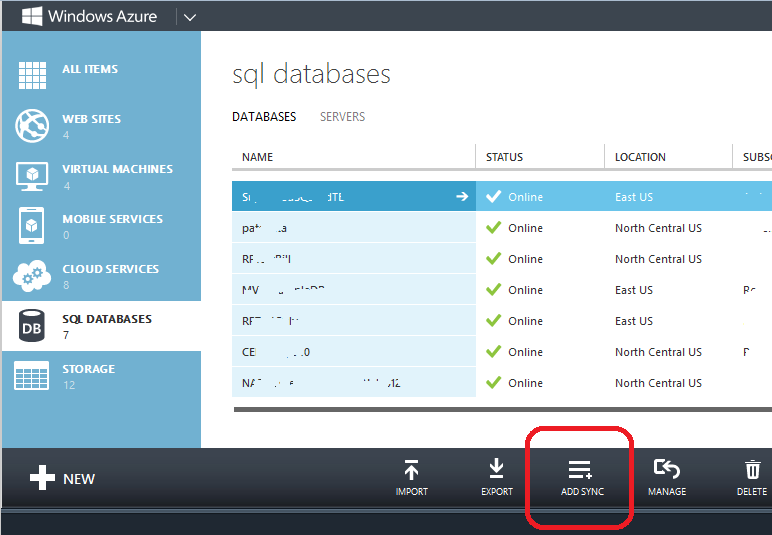
The SQL Database service has some easy to enable features that may make your like easier. One example is the database sync service that can be enabled in the Windows Azure Portal. You can easily configure a SQL Database instance to be replicated with one or more other instances in the same or different databases. This can help with an offsite-backup strategy, mirroring globally to reduce latency, and is one area where PaaS shines.
image

SQL Database Service is SQL Server

Windows Azure today offers the SQL Database service based on SQL Server 2012. If your application (for some reason) needs an older version SQL Server (perhaps it is a vendor product and you don’t control this), then your hands are tied.

Or perhaps you want another database besides SQL Server. Windows Azure has a partner offering MySQL, and other vendor products will likely be offered over time. NoSQL Databases are also becoming more popular. Windows Azure natively offers the NoSQL Windows Azure Table service, and a few examples of other third-party ones include MongoDB, Couchbase, RavenDB, and Riak. Unless (or until) these are offered as PaaS services through the Windows Azure Store, your only option will be to run them yourself in an IaaS VM.

WazOps Features and Limitations

The main thrust of PaaS is to make operations efficient for applications designed to align with the PaaS approach. For example, applications that can deal with throttling, or can deal with a PaaS VM being migrated and losing all locally stored data. This is all doable – and without degrading user experience – it just so happens that most applications that exist today (and will still exist tomorrow) don’t work this way.

The PaaS approach can be used to horizontally scale an application very efficiently (whether computational resources running on VMs or database resources sharded with Federations for SQL Database), overcome disruptions due to commodity hardware failures, gracefully handle throttling (whether from SQL Database or other Azure services not discussed), and do so with minimal human interaction. But getting to this point is not automatic.

WazOps – DevOps, Windows Azure style! – is the role that will build out this reality. There are auto-scaling tools, both external services, and some that we can run ourselves — like the awesome WASABi auto-scaling application block from Microsoft’s Patterns & Practices group – that can be configured to scale an application on a schedule or based on environmental signals (like the CPU is spiking in a certain VM).

There is also the mundane. How to script a managed deployment so our application can be upgraded without downtime? Windows Azure PaaS services have features for this, such as the in-place update and the VIP Swap. But we still need to understand them and create a strategy to use them appropriately.

Further, there are at least some of the same-old-details. For example, it is easy to deploy an SSL certificate to my PaaS VM that is being deployed to IIS… but it still will expire in a year and someone still needs to know this – and know what to do about it before it results in someone being called at 2:00 AM on a Sunday.

Should IT Pros Pass on PaaS?

Clearly there are some drawbacks to running PaaS since most existing applications will not run successfully without some non-trivial rework, but will work just fine if deployed to IaaS VMs.

However, that does not mean that PaaS is not useful. It turns out that some of the most reliable, scalable, cost-efficient applications in the world are architected for this sort of PaaS environment. The Bing services behind bing.com take this approach, as only one example. The key here is that these applications are architected assuming a PaaS environment. I don’t use the term “architected” lightly, since architecture dictates the most fundamental assumptions about how an application is put together. Most applications that exist today are not architected with PaaS-compatible assumption. However, as we move forward, and developer skills catch up with the cloud offerings, we will see more and more applications designed from the outset to be cloud-native; these will be deployed using these PaaS facilities.

A stateless web-tier (with no session affinity in the load balancer) is a good example today of an application that could run successfully in a PaaS environment – though I’ll be quick to note that other tiers of that application may not run so well in PaaS. Which bring up an obvious path going forward: hybrid applications that mix PaaS and IaaS. This will be a popular mix in the coming years.

Hybrid Applications

Consider a 3-tier application with a web tier running in IIS, a service tier, and a SQL Server back-end database. If built with conventional approaches, not considering the PaaS cloud, none of these three tiers would be ready for a PaaS environment. So we could deploy all three tiers using IaaS VMs.

As a software maintenance step, it would be reasonable to upgrade the web site (perhaps written in PHP or ASP.NET) to be stateless and not need session affinity (Windows Azure PaaS Cloud Services do not support session affinity from the load balancer). These types of changes may be enough to allow the web tier to run more efficiently using PaaS VMs, while still interacting with a service tier and database running on IaaS VMs.

A future step could upgrade the service tier to handle SQL Database throttling correctly, allowing the SQL Server instance running on an IaaS VM to be migrated to the SQL Database service. This will reduce the number of Windows servers and SQL Servers being managed by the organization (shifting these to Windows Azure), and may also simplify some other tasks (like replicating that data using the Data Sync Service). Each services and VM also has its own direct costs (our monthly bill to Microsoft for the Windows Azure Cloud services we consume), which are detailed in the pricing section of the Windows Azure Portal.

Still another future step could be to migrate the middle tier to be stateless – but maybe not. All of these decisions are business decisions; perhaps the cost-benefit is not there. It depends on you application and your business and the skills and preferences of the IT Pros and developers in the organization.

Conclusions

I’ll summarize here with some of the key take-aways for the IT Pro who is new to PaaS services:

  1. Be aware of the challenges in migrating existing applications onto either PaaS VMs or SQL Database. If the application is not architected with the right assumptions (stateless VMs, SQL operations that may be throttled, 150 GB limit), it will not work correctly – even though it might seem to work at first. IaaS VMs will often present a better option.
  2. SQL Database does not support all of the features that SQL Server 2012 support. Though it does have some special ones of its own: always runs as a three-node cluster for HA, and has Federation support.
  3. PaaS is increasingly the right choice for new applications that can be built from the outset. Assumes that team understands PaaS and has learned the needed skills! (I wrote a book – Cloud Architecture Patterns – to illuminate these new skills.)
  4. Pure IaaS and pure PaaS are not the only approaches. Hybrid approaches will be productive.
  5. PaaS will gain momentum long-term due to the economic benefits since they can be cheaper to run and maintain. There are direct costs which are easy to measure (since you get a detailed bill) and indirect/people costs which are more challenging to measure.
  6. WazOps (DevOps with an Azure spin) will be the role to deliver on the promise of PaaS going forward. Not only with the well-informed WazOps professional help avoid issues of going too fast (see earlier points which speak to not all applications being PaaS-ready), but also understand the business drivers and economics of investing to move faster where appropriate for your business.

Feedback always welcome and appreciated. Good luck in your cloud journey!

[This post is part 21 of the 31 Days of Server (VMs) in the Cloud Series – please return to the series index by clicking here]

Azure FAQ: How to Use .NET 4.5 with Windows Azure Cloud Services?

Microsoft released version 4.5 of its popular .NET Framework in August 2012. This framework can be installed independently on any compatible machine (check out the .NET FrameworkThe Azure FAQ Deployment Guide for Administrators) and (for developers) come along with Visual Studio 2012.

Windows Azure Web Sites also support .NET 4.5, but what is the easiest way to deploy a .NET 4.5 application to Windows Azure as a Cloud Service? This post shows how easy this is.

Assumption

This post assumes you have updated to the most recent Windows Azure Tools for Visual Studio and the latest SDK for .NET.

For any update to a new operating system or new SDK, consult the Windows Azure Guest OS Releases and SDK Compatibility Matrix to understand which versions of operating systems and Azure SDKs are intended to work together.

You can do this with the Web Platform Installer by installing Windows Azure SDK for .NET (VS 2012) – Latest (best option) – or directly here (2nd option since this link will become out-of-date eventually).

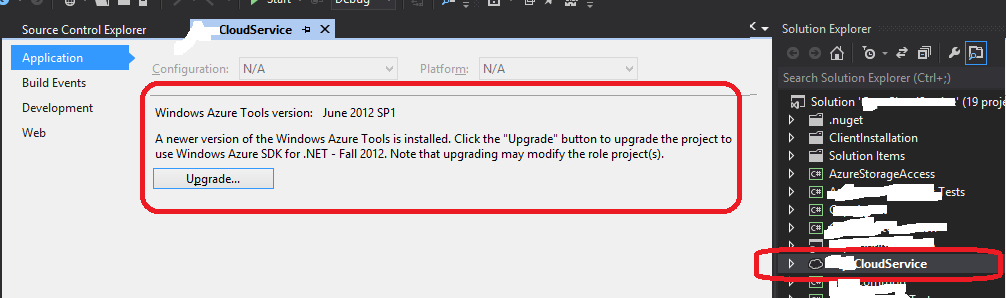
Also pay close attention to the release notes, and don’t forget to Right-Click on your Cloud Service, hit Properties, and take advantage of some of the tooling support for the upgrade:

UpgradeFall2012

Creating New ASP.NET Web Role for .NET 4.5

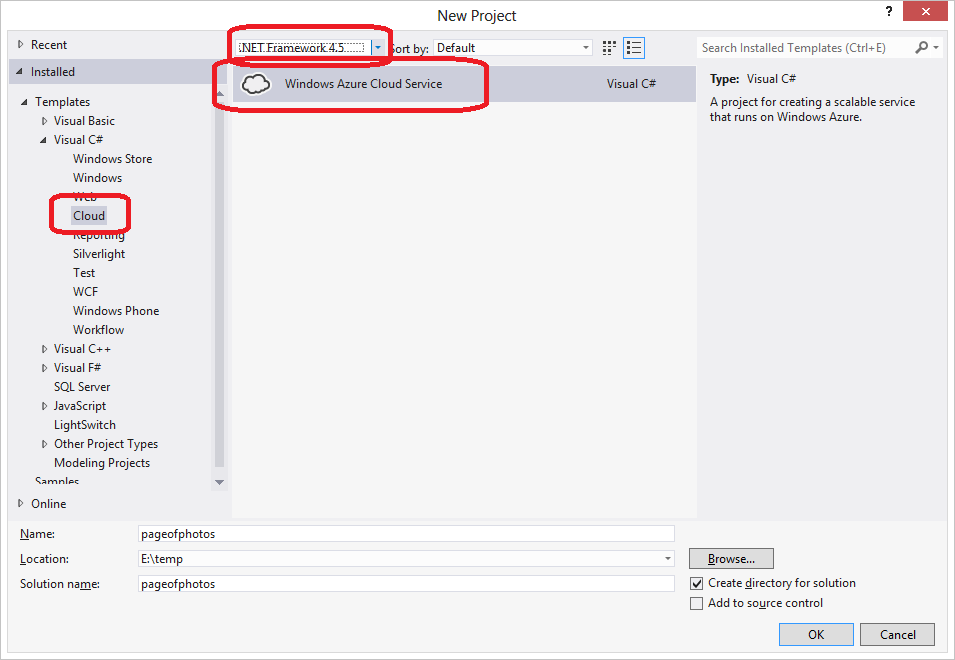
Assuming you have up-to-date bits, a File | New from Visual Studio 2012 will look something like this:

image

Select a Cloud project template, and (the only current choice) a Windows Azure Cloud Service, and be sure to specify .NET Framework 4.5. Then proceed as normal.

Updating Existing ASP.NET Web Role for .NET 4.5

If you wish to update an existing Web Role (or Worker Role), you need to make a couple of changes in your project.

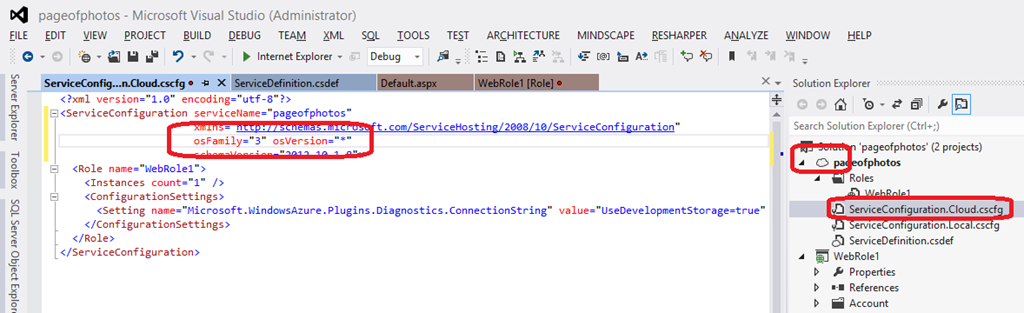
First, update the Windows Azure Operating System version use Windows Server 2012. This is done by opening your Cloud project (pageofphotos in the screen shot) and opening ServiceConfiguration.Cloud.cscfg.

image

Change the osFamily setting to be “3” to indicate Windows Server 2012.

   osFamily=”3″

As of this writing. the other allowed values for osFamily are “1” and “2” to indicate Windows Server 2008 SP2 and Windows Server 2008 R2 (or R2 SP1) respectively. The up-to-date settings are here.

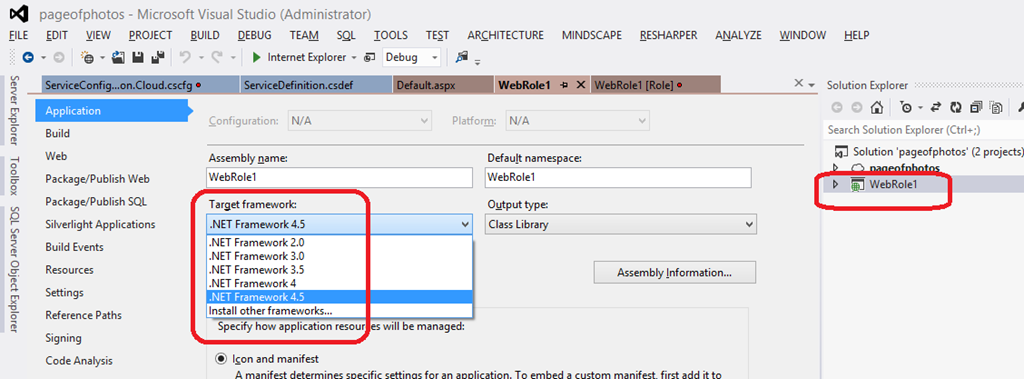
Now you are set for your operating system to include .NET 4.5, but none of your Visual Studio projects have yet been updated to take advantage of this. For each project that you intend to update to use .NET 4.5, you need to update the project settings accordingly.

image

First, select the project in the Solution Explorer, right-click on it, and choose Properties from the pop-up menu. That will display the screen shown. Now simply select .NET Framework 4.5 from the available list of Target framework options.

If you open an older solution with the newer Azure tools for Visual Studio, you might see a message something like the following. If that happens, just follow the instructions.

WindowAzureTools-dialog-NeedOct2012ToolsForDotNet45

That’s it!

Now when you deploy your Cloud Service to Windows Azure, your code can take advantage of .NET 4.5 features.

Troubleshooting

Be sure you get all the dependencies correct across projects. In one project I migrated, I realized the following came up because I had a mix of projects that needed to stay on .NET 4.0, but those aspects deployed to the Windows Azure Cloud could be on 4.5. If you don’t get this quite right, you may get a compiler warning like the following:

Warning  The referenced project ‘CapsConfig’ is targeting a higher framework version (4.5) than this project’s current target framework version (4.0). This may lead to build failures if types from assemblies outside this project’s target framework are used by any project in the dependency chain.    SomeOtherProjectThatReferencesThisProject

The warning text is self-explanatory: the solution is to not migrate that particular project to .NET 4.5 from .NET 4.0. In my case, I was trying to take advantage of the new WIF features, and this project did not have anything to do with Identity, so there was no problem.

How to Enable ASP.NET Trace Statements to Show Up In Windows Azure Compute Emulator

As you may be aware, Windows Azure has a cloud simulation environment that can be run on a desktop or laptop computer to make it easier to develop applications for the Windows Azure cloud. One of the tools is the Compute Emulator which simulates the running of Web Roles and Worker Roles as part of Cloud Services. The Compute Emulator is handy for seeing what’s going on with your Cloud Services, including display of logging trace messages from your application or from Azure. A small anomaly in the developer experience is the use of System.Diagnostics.Trace is configured to output to the Compute Emulator – but only when invoked from Web Role or Worker Role processes; trace statements from ASP.NET code (at least when using full IIS) do not appear. This is because ASP.NET processes lack the DevelopmentFabricTraceListener in the Trace.TraceListeners collection (as described long ago by fellow Windows Azure MVP Andy Cross (@andybareweb)).

The assembly needed in Andy’s instructions is hard to find these days (it lives in the GAC) and is undocumented. And you only want to do this in debug code running in your local Cloud Simulation environment anyway. So explicitly referencing the needed assembly feels a little dirty since you’d never want it to be deployed accidentally to the cloud.

The Solution

I’ve taken these considerations and created a very simple to use method that you can easily call from ASP.NET code — probably from Application_Start in Global.asax.cs — and not worry about it polluting your production code or causing other ills. The code uses reflection to load the needed assembly to avoid the need for an explicit reference, and the dynamic loading is only done under the proper circumstances; loading the assembly would never be attempted in a cloud deployment.

The Code


// Code snippet for use in Windows Azure Cloud Services.
// The EnableDiagnosticTraceLoggingForComputeEmulator method can be called from ASP.NET
// code to enable output from the System.Diagnostics.Trace class to appear in the
// Windows Azure Compute Emulator. The method does nothing when deployed to the cloud,
// when run outside the compute emulator, when run other than in DEBUG, or run repeatedly.
//
// The code uses Reflection to dynamically load the needed assembly and create the
// specific TraceListener class needed.
//
// EXAMPLE INITIALIZING FROM Global.asax.
// protected void Application_Start()
// {
// // .. other config
// EnableDiagnosticTraceLoggingForComputeEmulator();
// }
//
// EXAMPLE BENEFIT – ASP.NET MVC Controller
// public ActionResult Index()
// {
// Trace.TraceInformation("This message ONLY show up in the Windows Azure Compute Emulator" +
// " if EnableDiagnosticTraceLoggingForComputeEmulator() has been called!");
// return View();
// }
//
// Bill Wilder | @codingoutloud | Nov 2012
// Original: https://gist.github.com/4099954
using System.Reflection;
using System.Diagnostics;
[Conditional("DEBUG")] // doc on the Conditional attribute: http://msdn.microsoft.com/en-us/library/system.diagnostics.conditionalattribute.aspx
void EnableDiagnosticTraceLoggingForComputeEmulator()
{
try
{
if (RoleEnvironment.IsAvailable && RoleEnvironment.IsEmulated)
{
const string className =
"Microsoft.ServiceHosting.Tools.DevelopmentFabric.Runtime.DevelopmentFabricTraceListener";
if (Trace.Listeners.Cast<TraceListener>().Any(tl => tl.GetType().FullName == className))
{
Trace.TraceWarning("Skipping attempt to add second instance of {0}.", className);
return;
}
const string assemblyName =
"Microsoft.ServiceHosting.Tools.DevelopmentFabric.Runtime, Version=1.0.0.0, Culture=neutral, PublicKeyToken=31bf3856ad364e35";
//var path = Assembly.ReflectionOnlyLoad(assemblyName).Location;
//Assembly assembly = Assembly.LoadFile(path);
var assembly = Assembly.LoadFile(assemblyName);
var computeEmulatorTraceListenerType = assembly.GetType(className);
var computeEmulatorTraceListener = (TraceListener)Activator.CreateInstance(computeEmulatorTraceListenerType);
System.Diagnostics.Trace.Listeners.Add(computeEmulatorTraceListener);
Trace.TraceInformation("Diagnostic Trace statements will now appear in Compute Emulator: {0} added.", className);
}
}
catch (Exception)
{
// eat any exceptions since this method offers a No-throw Guarantee
// http://en.wikipedia.org/wiki/Exception_guarantees
}
}


Bill is the author of the book Cloud Architecture Patterns, recently published by O’Reilly. Find Bill on twitter @codingoutloud or contact him for Windows Azure consulting.

Cloud Architecture Patterns book