Category Archives: Bill gave a talk

Spoke on Azure Cloud at Harvard

Recently (back towards the end of November), I teamed up with Jim O’Neil to talk about Azure and Cloud Computing to a class of students at Harvard University. Jim and I were guest lecturers for CSCI E-175 Cloud Computing and Software as a Service, a graduate school class taught by Zoran B. Djordjevic.

Jim set up the platform, then in my half I focused on storage, then scaling and robustness architecture and design patterns for the cloud and how they are enabled by the Azure platform. My slides are here: bill-wilder-azure-services-and-patterns-for-cloud-native-apps-harvard-19-nov-2010.

The class was feisty – in a really good way – with lots of smart questions and spirited discussion. Due to all the questions and discussion, we went at least an hour over the scheduled class time, but nobody disengaged. A really good session.

“Cloud Computing 101, Azure Style!” and “Building Cloud-Native Applications on Azure” – Two Talks I Presented at New England Code Camp 14

Yesterday I attended New England Code Camp 14 (check out the #necc14 twitter stream while it lasts). I enjoyed many talks:

  1. Maura Wilder on JavaScript Debugging (@squdgy)
  2. Jason Haley on Comparing the Azure and Amazon Cloud Platforms (@haleyjason)
  3. Jim O’Neil on Dissecting the Azure @Home Application (@jimoneil)
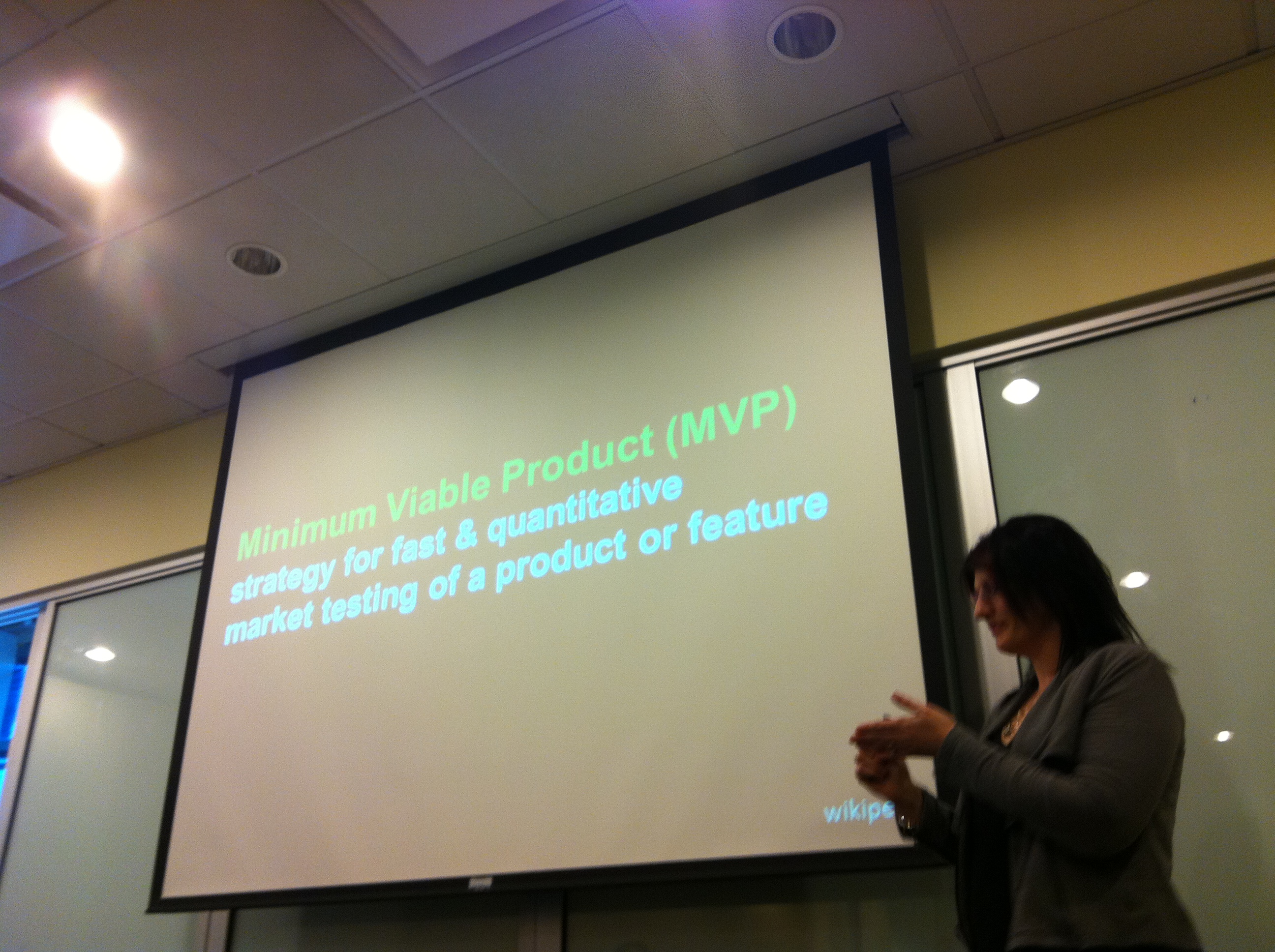
  4. Abby Fichtner on Lean Startups (@hackerchick)
  5. MC’d by Abby, various folks talking about their experiences at startups — 4 talks jam-packed into a fast-paced one-hour session:
    1. Vishal Kumar of savinz.com (“mint.com for shopping”)
    2. Allison Friedman (@rateitgreen) of Rate It Green (“yelp for the green building industry”)
    3. Sean Creely (@screeley) of Embedly (“make friendly embedded links”) – a Y Combinator company providing a service for turning tweets containing media links into something more user friendly (e.g., embed inline YouTube video rather than a link taking you to YouTube)
    4. Marc Held (@getzazu) of getzazu.com (“alarm clock 2.0”)

At Uno’s afterwards, I enjoyed chatting with many folks, including Veronica and Shawn Robichaud (all the way from Maine!), John from BUGC and Blue Fin, Slava Kokaev, entrepreneurs Marc, Billy, Brian, Vishal, and Dan Colon, dev evangelists Jim O’Neil and Chris Bowen, Yilmaz Rona from Trilogy, and of course Maura.

At the Code Camp, I presented twice on Azure-focused topics:

  1. Cloud Computing 101: Azure Style! – an introduction to cloud computing, and an overview of the services that Microsoft’s cloud stack offers
  2. Building Cloud-Native Applications with Azure – a mind-blowing tour of some of the changes that await the technology community as we move our world into the cloud

The Boston Azure User Group is one year old! You can follow the group on twitter @bostonazure. You can also follow me on twitter @codingoutloud. And I hope to see you at the next Boston Azure meeting on Thurs October 21 from 6:00-8:30 PM at NERD (registration and more info).

Azure 101 Talk Presented at Boston Azure User Group’s September Meeting

Last week on Thursday I gave a talk to the Boston Azure User Group[†]: a high level introduction to Windows Azure titled Azure 101 (you can download the Azure 101 slide deck).

I shared the stage with Mark Eisenberg of Microsoft who walked us through some of the features coming in the November update of Windows Azure. One of the sites Mark showed was the Open Source Windows Azure Companion.

Hope to see you next month when Ben Day will talk about how Windows Azure and Silverlight can play nice together.

For up to date information on Boston Azure, follow Boston Azure on twitter (@bostonazure),  keep an eye on the group’s web site (bostonazure.org), or add yourself to the low-volume email announcement list.

[] Yes, I also founded and run the Boston Azure User Group, but it is my first time having the honors as the main speaker.

Vermont Code Camp – Building Cloud-Native Applications with Azure

I attended Vermont Code Camp 2 yesterday (11-Sept-2010) at the University of Vermont.  Many thanks to the awesome crew of Vermonters who put on an extremely well-organized and highly energetic event! I look forward to #vtcc3 next year. (Twitter stream, while it lasts: #vtcc2)

I presented a talk on Building Cloud-Native Applications using Microsoft Windows Azure. My slides are available as a PPT download and on slideshare.net.

<aside>Maura and I went to Vermont a day early. We put that time to good use climbing to the summit of Vermont’s highest mountain: Mt. Mansfield. We hiked up from Underhill State Park, up the Maple Ridge Trail, over to the Long Trail, up to the summit, then down the Sunset Ridge Trail (map). It was a really tough climb, but totally worth it. I think the round trip was around 7 miles.

</aside>

Gave Azure Storage Talk at VB.NET User Group Meeting

I gave a talk at the Thurs Sept 2, 2010 New England VB.NET user group meeting. Andy Novick covered SQL Azure, and I covered the rest (Blobs, Tables, Queues, Drives, and CDN).

My slides can be downloaded here (which is hosted on Azure Blob storage!).

I also have  plans for a few more Azure-related talks in the near future:

  1. First up is Building Cloud-Native Applications with Windows Azure – at the Vermont Code Camp on Saturday, September 11, 2010.
  2. I am the main speaker at the September 23, 2010 Boston Azure meeting – topic is Azure 101 – the basics. (Then for the October 21, Ben Day will be (most likely) talking about how to integrate Silverlight and Azure.)
  3. I am also planning one or two talks at the New England Code Camp 14 on Saturday October 2 (I haven’t submitted abstracts yet, but probably talks similar to (a) Demystifying Windows Azure and Introduction to Cloud Computing with Azure, and (b) Building Cloud-Native Applications with Windows Azure)

Here is the abstract for the Building Cloud-Native Applications with Windows Azure talk at VT Code Camp:

Cloud computing is here to stay, and it is never too soon to begin understanding the impact it will have on application
architecture. In this talk we will discuss the two most significant architectural mind-shifts, discussing the key patterns
changes generally and seeing how these new cloud patterns map naturally into specific programming practices in Windows
Azure. Specifically this relates to (a) Azure Roles and Queues and how to combine them using cloud-friendly design
patterns, and (b) the combination of relational data and non-relational data, how to decide among them, and how to
combine them. The goal is for mere mortals to build highly reliable applications that scale economically. The concepts
discussed in this talk are relevant for developers and architects building systems for the cloud today, or who want to be
prepared to move to the cloud in the future.

A Key Architectural Design Pattern for Cloud-Native Windows Azure Applications

I gave a talk for the Windows Azure User Group in which I discussed a key Architectural Design Pattern for Cloud-Native Windows Azure applications. The main pattern involves roles and queues, and I’ve been calling either “Two Roles and a Queue” or “TRAAQ” or “RQR” (the ‘rocker!’ pattern!) – though is the same one that Steve Nagy has been calling the Asynchronous Work Queue Pattern (thanks Steve).

The deck from this presentation is here: bill-wilder-two-roles-and-a-queue-AzureUG.net-windows-azure-virtual-user-group-14-july-2010

Follow me on twitter @codingoutloud.

Follow the Boston Azure User Group on twitter @bostonazure.

Presented on Windows Azure at Hartford Code Camp

Today at Hartford Code Camp #3 in Connecticut, I presented two talks on Windows Azure.

The first talk was an introduction to Cloud Computing, with a Microsoft slant towards Windows Azure. The second drilled into the Two Roles and a Queue (TRAAQ) design pattern – a key pattern for architecting systems for the cloud.

The PowerPoint slides are available here:

Also plugged the Boston Azure User Group to those attending my talks! Hope to see some of you at NERD in Cambridge, MA for talks and hands-on-coding sessions. Details always at bostonazure.org.

Two Azure Talks at New Hampshire Code Camp

Today gave two talks at the New Hampshire Code Camp 2 in Concord, NH.

My talks were Azure Demystified – What is Cloud Computing? What is Windows Azure? and Why should we care? followed by Two Roles and a Queue – The most important design pattern for Windows Azure Cloud apps.

The PowerPoint slides are available right here:

Also plugged the Boston Azure User Group to those attending my talks! Hope to see some of you at NERD in Cambridge, MA for talks and hands-on-coding sessions. Details always at bostonazure.org.

Two Roles and a Queue – Creating an Azure Service with Web and Worker Roles Communicating through a Queue

Two Roles and a Queue Lab from Boston Azure Firestarter

At the Firestarter event on May 8, 2010, I spoke about Roles and Queues and worked through a coding lab on same. The final code is available in a zip file. The Boston Azure Firestarter – Bill Wilder – Roles and Queues deck can be downloaded – though since there were so many questions we didn’t get to covering a number many of the slides! – this was a hot topic!

The remainder of this post contains the narrative for the LAB we did as a group at the Firestarter. It probably will not stand alone super well, but may be of interest to some folks, so I’ve posted it.

The following procedure assumes Microsoft Visual Web Developer 2010 Express on Windows 7. The same general steps apply to Visual Studio 2008, Visual Studio 2010, and Web Developer 2008 Express versions, though details will vary.

0. Open Microsoft Visual Web Developer 2010 Express and select File | New Project

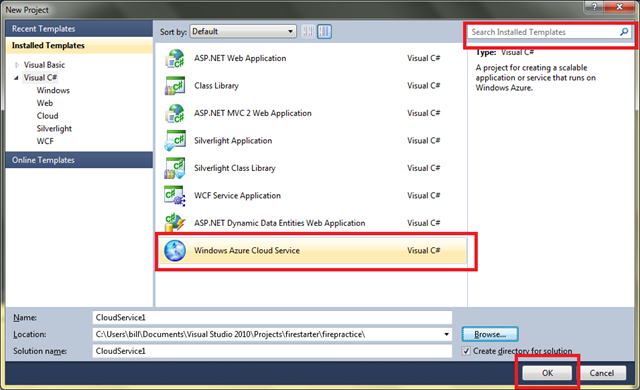
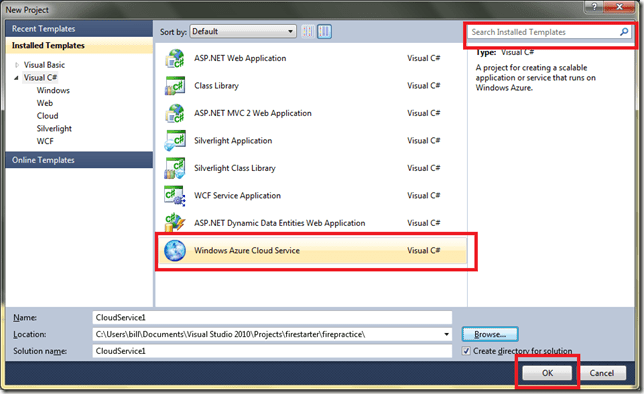
1. Select Windows Azure Service and click Okay:
image

If you have trouble finding the Windows Azure Service template, you can type “Azure” into the search box in the top-right to narrow the options. Also, if you don’t have the Windows Azure SDK installed, you will need to install that before proceeding – but there will be a link provided by Visual Web Developer 2010 Express that will direct you to the right page. Install it if you need to and try again up to this point.

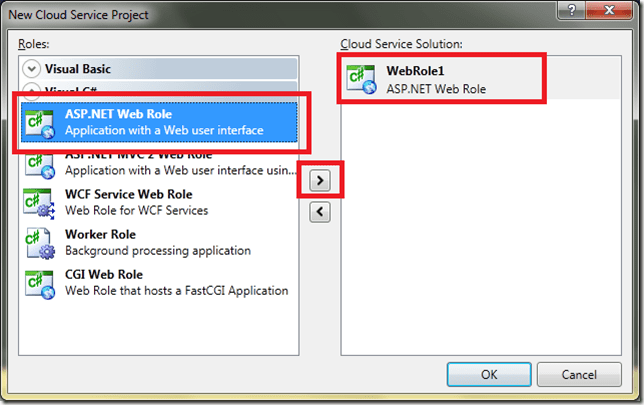
2. You will see a special dialog box for New Cloud Service Project from which you will add both a Web Role

image

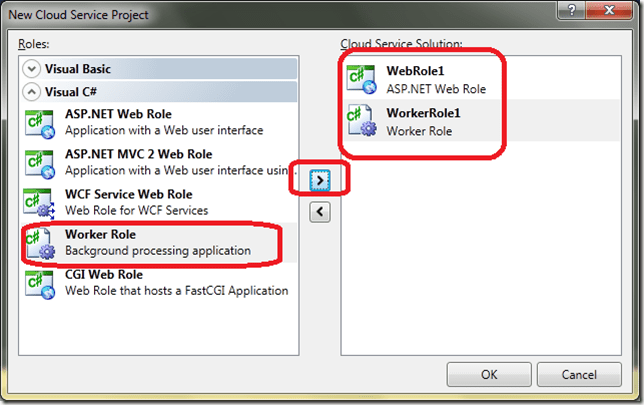
and a Worker Role

image

Verify that both WebRole1 and WorkerRole1 are in the list on the right side, then click OK.

3. Before you begin making code changes, you can run your new application. You can run it in the debugger by pressing the F5 key.

You will probably get the following error message:

image

The error message is telling you that you need to close Visual Web Developer 2010 Express and restart it with elevated privileges.

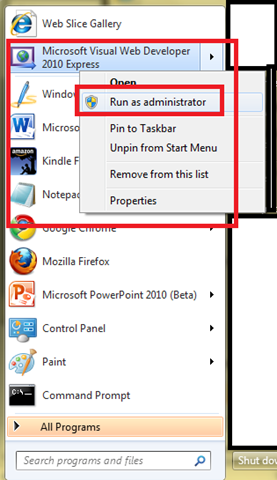
4. To start any Windows program with elevated privileges , right-click on the application then choose Run as administrator from the pop-up menu:

image

Before it obeys your request to run as administrator, Windows 7 will double-check by popping up a security dialog.

Now you can reload your project and try running it again. The app should run and you should see a blank web browser page.

5. Once you’ve proven your application runs, it is time to make some changes.

Make the code changes indicated for the Two Roles and A Queue Lab in CODING STEP 1.

Note: the “coding step 1” and future coding steps were handouts (paper!) at the Boston Azure Firestarter on Sat May 8, 2010. In lieue of reproducing them here, I will post the final solution.

This lab will establish some WebRole basics.

6. When done applying CODING STEP 1, run the application again.

7. After demonstrating your application runs, Deploy it to Azure.

This is a simple application so it helps us get through the initial deployment with minimal challenges.

8. Apply CODING STEP 2 – Add Queue (in local dev fabric storage)

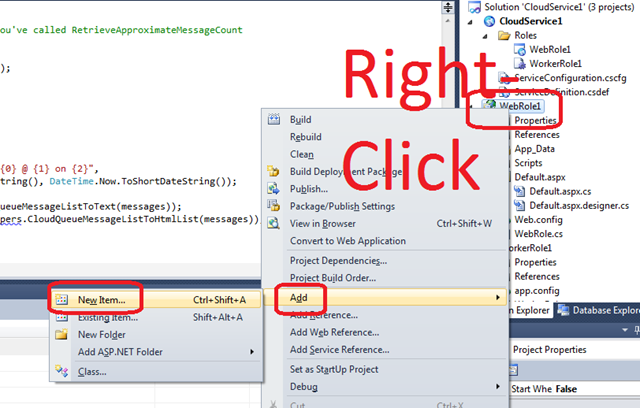
9. CODING STEP 3 – Add “DumpQueue” method and “FirestarterWebRoleHelpers.cs”

image

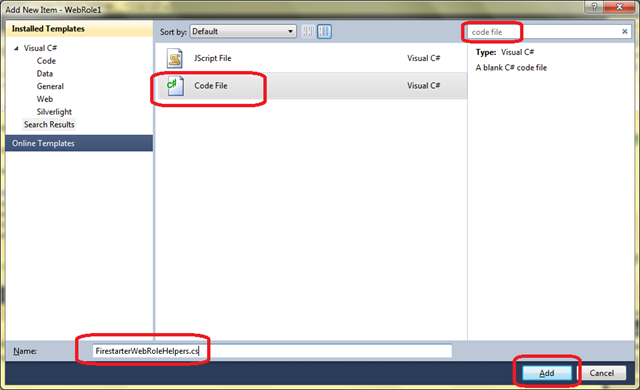
You will get the following dialog box – type “code file” into the search area on the top-right, select Visual C# Code File, and type in the filename “FirestarterWebRoleHelpers.cs” as shown and click Add:

image

The new file “FirestarterWebRoleHelpers.cs” will open in the editor. It should be empty to begin with. Cut and Paste in the contents from http://bostonazure.org/files/FirestarterWebRoleHelpers.cs.txt.

Why? The contents of this file has little to do with Windows Azure, so we don’t want to focus on it. But we want to use some utility routines from it so that we can focus on Azure concepts.

10. CODING STEP 4 – Adding Cloud-based Queue

First we need to configure the cloud.

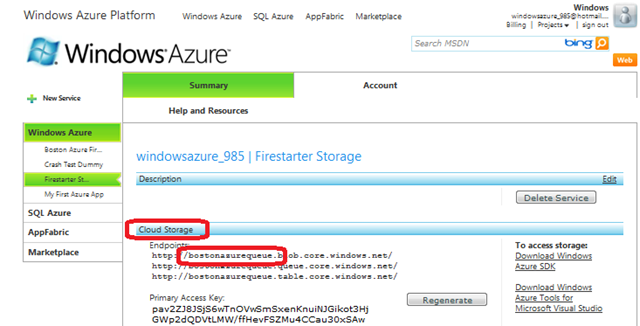
Go to http://windows.azure.com and log in. You may wish to consult instructions on redeeming a token at https://blog.codingoutloud.com/2010/05/06/redeeming-an-azure-token/ or http://bit.ly/dgCuMn

image

Your storage account has a subdomain, as circled above. This – and the Access Key – need to be added to your Web Role and Worker Role so that they can access (and share the same queue within) cloud-hosted storage.

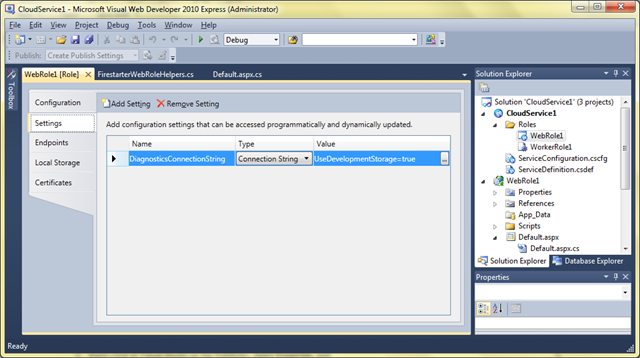
Right-click in Visual Studio on the WebRole1, select Properties, and select the Settings tab on the left. It will appear something like this:

image

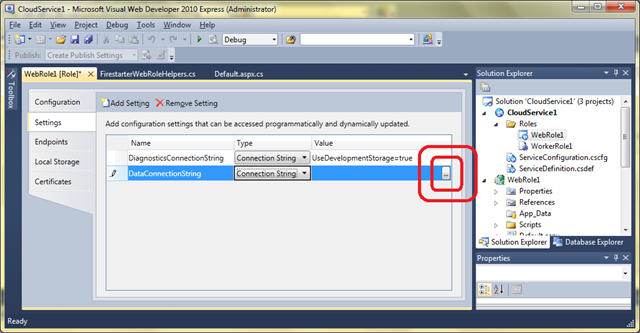
Now click on Add Setting and give the new item the name “DataConnectionString”, the Type “Connection String”, and click on the “…”
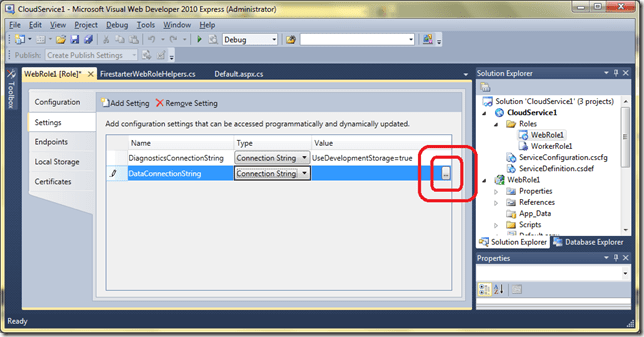
image

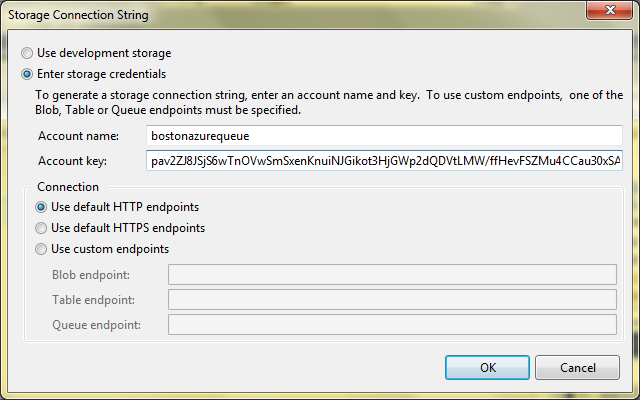
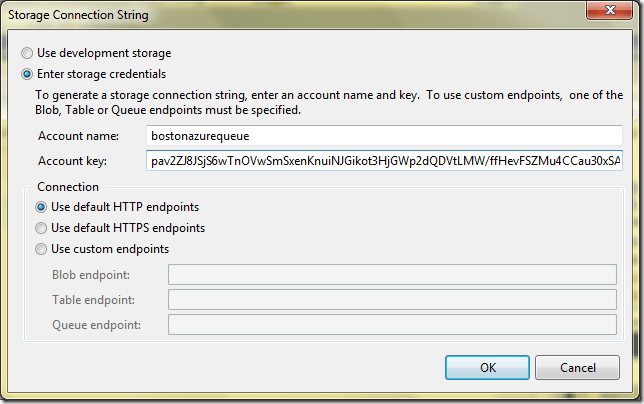
This will bring up the Storage Connection String editor – fill in the fields – where your “Account name” is the same as the subdomain shown on the Storage Service (see above – in that screen shot it is “bostonazurequeue”) and the Key can be either Primary or Secondary Access Key (from same area in the Azure Portal):
image

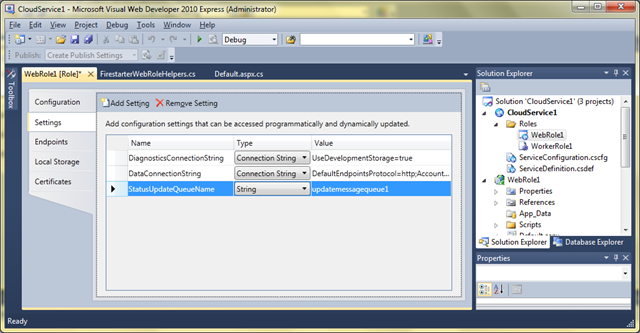
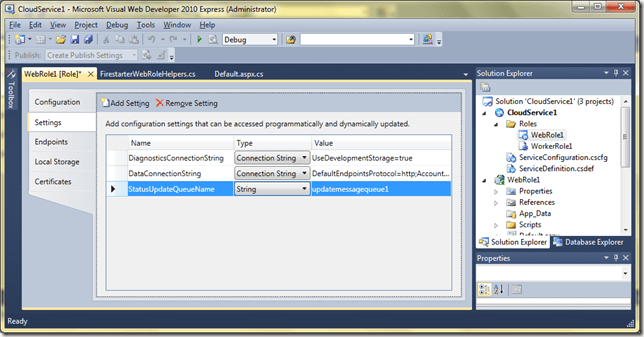
You are NOT DONE in the screen yet. Also add a Setting named “StatusUpdateQueueName”– of Type “String” – with Value “updatemessagequeue1” as follows:
image

Click OK.

11. Now REPEAT BOTH STEPS for WorkerRole1.

Yes, add both Settings also to WorkerRole1 – they both will end up with the same settings. You can “cheat” with cut and paste in the .cscfg and .csdef files.

12. Enable Cloud-hosted Queue from Web Role

Now you are ready go on to make the code changes to use this new configuration item.

Apply CODING STEP 4: Enabling the Cloud-hosted Queue from the Web Role

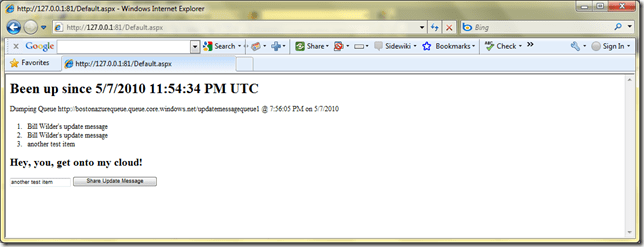
Now run your application using cloud storage for the queue:
image

Note that you can also examine the contents of the queue online by visiting http://myAzureStorage.com and providing the same credentials you used when setting up the DataConnectionString above for both the Web and Worker roles.

13. Enable Cloud-hosted Queue from Worker Role

Now you are ALMOST ready go on to make the code changes to use this new configuration item.

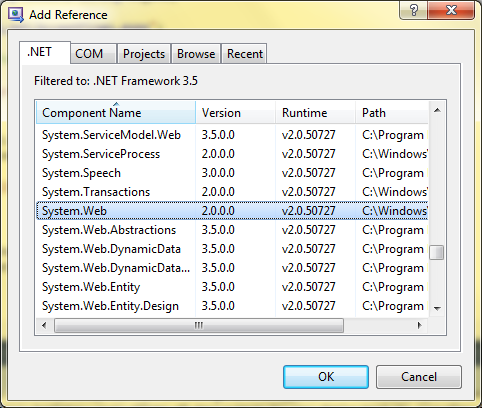
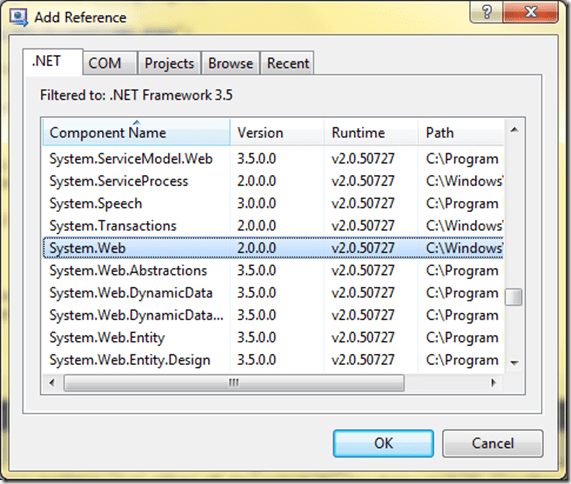
Before applying the coding, we need to add a project reference (otherwise you won’t be able to Resolve use of networking classes used in the FirestarterWorkerRoleHelpers.). In Visual Studio on the right side, under the Solution Explorer, right-click on the References element underneath WorkerRole1 and select Add Reference, then from the .NET tab, select System.Web and click okay:
image

Also, similar to step 9 above, add a new Code File called “FirestarterWorkerRoleHelpers.cs” to hold some additional needed (but not core to Azure) code.

The new file “FirestarterWorkerRoleHelpers.cs” will open in the editor. It should be empty to begin with. Cut and Paste in the contents from http://bostonazure.org/files/FirestarterWorkerRoleHelper.cs.txt.

Now you can apply Apply CODING STEP 5: Enabling the Cloud-hosted Queue from the Worker Role.

14. Deploying to Staging Area in Cloud to Staging

15. Cutover from Staging to Production

16. Add in secret Twitter posting code from your Worker Role…

Yes, this can be done by including a hash character (#) as part of the message you type into your web application.
At New England Code Camp #13, Gave Talks on Azure and Prism

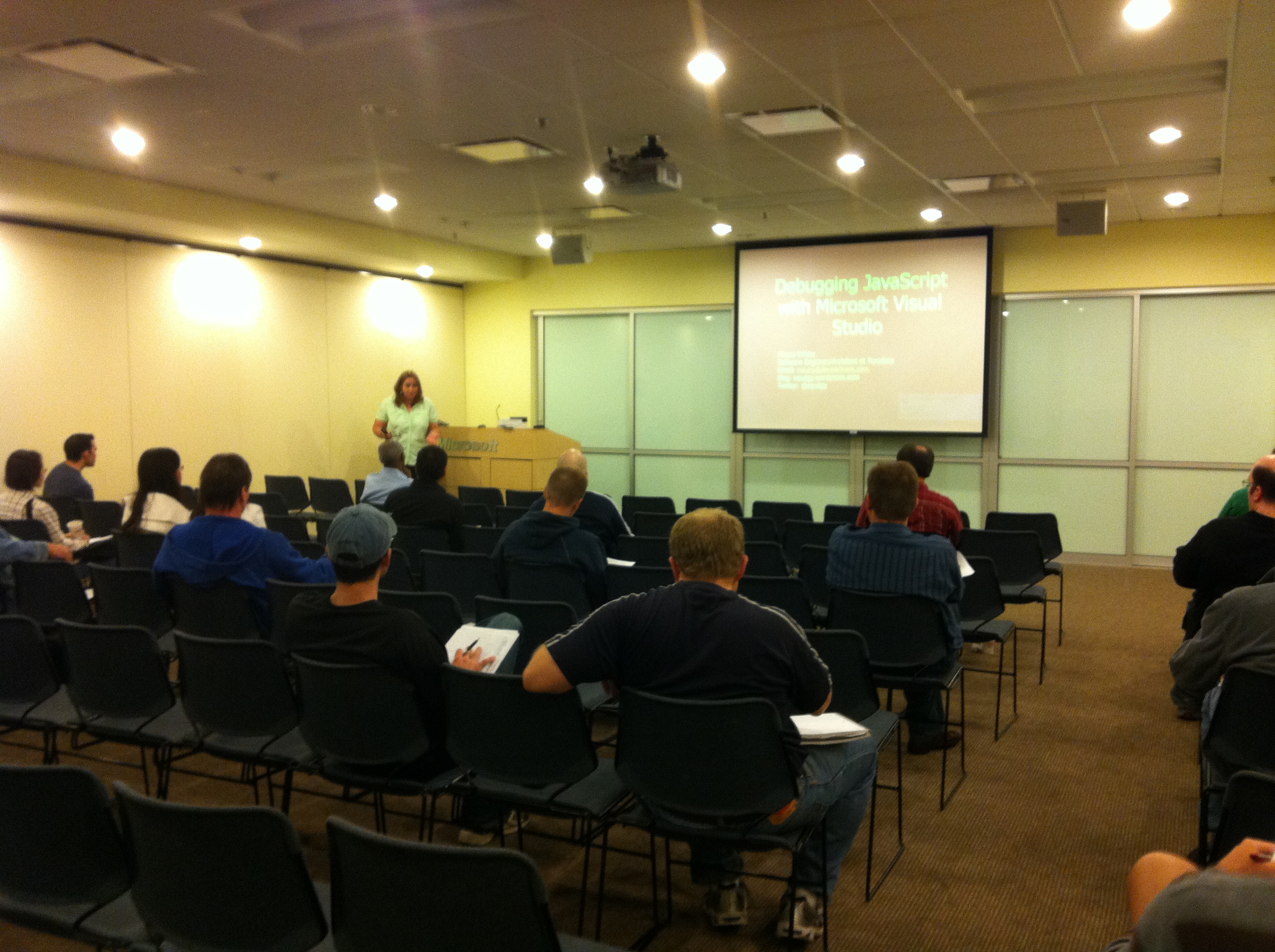
At today’s New England Code Camp #13, I gave talks on Azure and Prism.

1. Azure Talk

2. Prism Talk