Category Archives: Azure

Related to Microsoft’s Windows Azure platform

Stupid Azure Trick #1 – Rename Your Windows Azure Subscription

As a consultant, I have access to a number of my clients’ Windows Azure Subscriptions. When you have many subscriptions to sort through, it is not very helpful if they have subscription names like Subscription-1 or Free Trial – especially when you have multiple of them by these names!

But fear not, you are not stuck with the name. You can change it to something more useful.

BACKGROUND:  How does a “subscription” fit into Windows Azure? When you log into Windows Azure, you log into an “account” where an account is tied to some login credential. Once logged in, that account can see zero, one, or more subscriptions. A subscription can have cloud resources allocated against it, such as virtual machines and web sites and databases. In the simplest case (e.g., not under an enterprise agreement), the subscription is also the unit of billing, typically tied to a credit card and possibly attached to an MSDN account or free trial.

How to Change the Name of Your Windows Azure Subscription

  1. Navigate to https://manage.windowsazure.com and sign in.
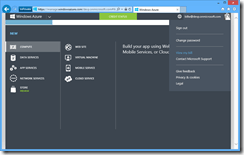
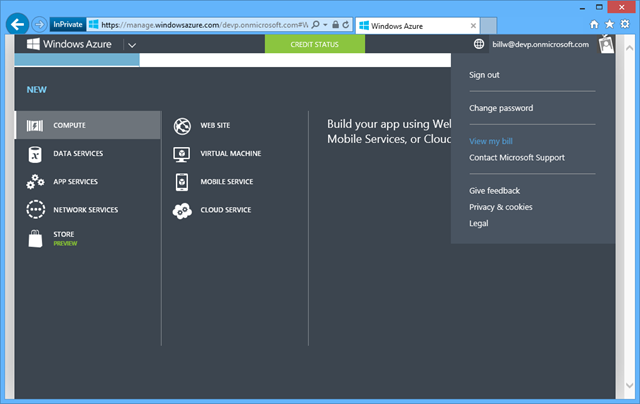
  2. Once signed in, in the top-right corner, click on your account name, and then “View my bill” from the drop-down menu:
    image
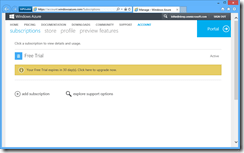
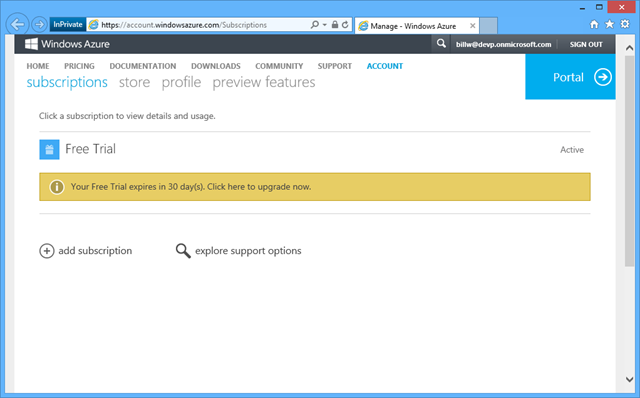
  3. This will take you to https://account.windowsazure.com/Subscriptions – and of course you could have navigated here directly, but I wanted to start from the more familiar portal experience.
    image
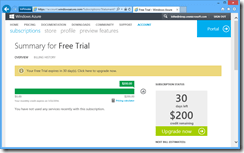
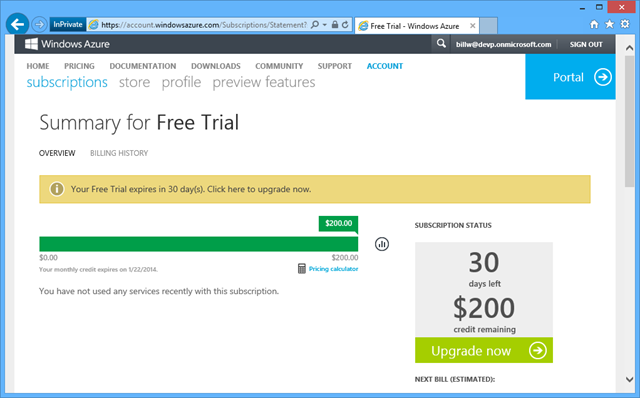
  4. In this example, the subscription we will rename is currently called “Free Trial” – click on that to bring up the details page specific to that subscription.
    image
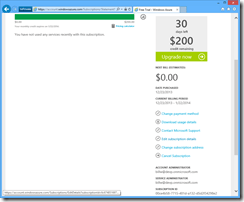
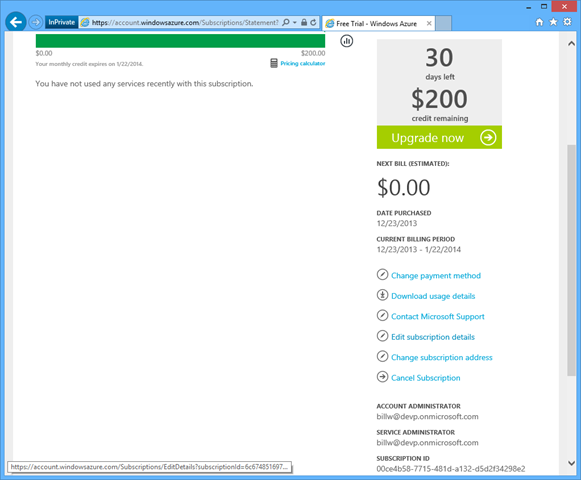
  5. Scroll down the page a bit until you see “Edit subscription details” along the right-hand side:
    image
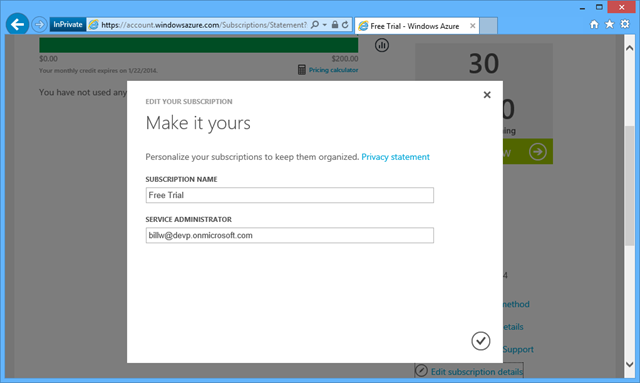
  6. Click on “Edit subscription details” to pop up a page that will allow you to change the subscription name or its service administrator:
    image
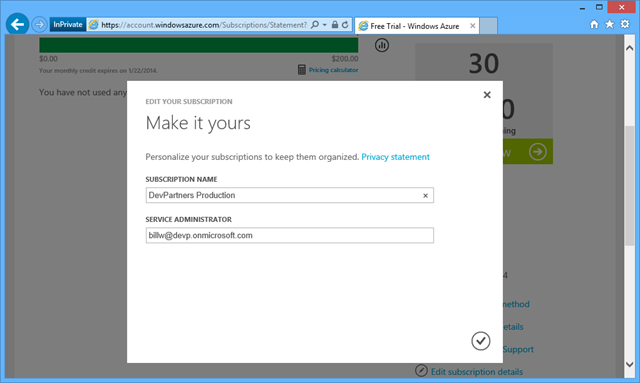
  7. Change the name to something more descriptive. Here I change my to “DevPartners Production” which indicates this subscription holds assets for DevPartners (which is my company), and these are Production assets (not Dev, Test, UAT, Play, Disposable, Demo, etc.). Some companies might prefer separate accounts for indvidual applications or teams.
    image
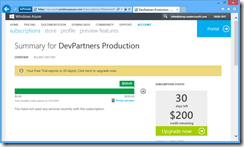
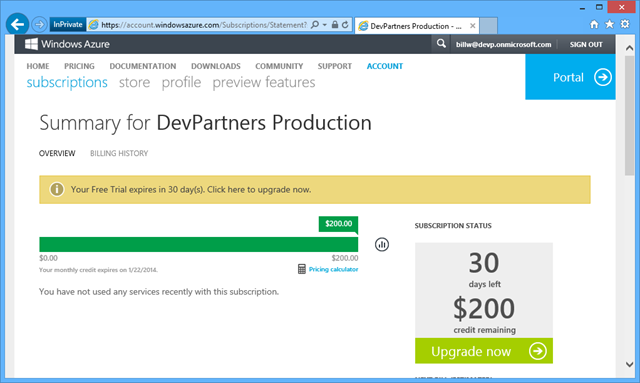
  8. Click the check mark, and you’ll see that your Windows Azure Subscription is now helpfully named:
    image

It only takes seconds to make this change, but think of all the mistakes and misunderstanding it could help prevent.

[This is part of a series of posts on #StupidAzureTricks, explained here.]


Stupid Azure Tricks are coming your way

I am writing a series of posts on Stupid Azure Tricks. The name is, of course, tongue-in-cheek, inspired by David Letterman‘s segments on Stupid Pet Tricks and Stupid Human Tricks.

A subtle difference is that Stupid Azure Tricks are actually useful tricks, but perhaps not widely known, sometimes the type of thing you’d only do once in a while (so hard to remember), and occasionally just something that’s interesting or cool (like this one).

The first one will be published tomorrow, the others will follow sporadically (though I’m going to try for once a week on Fridays for the first few). Click here to list the current list of Stupid Azure Tricks.

Talk: Make the Cloud Less Cloudy: A Perspective for Software Development Teams: It’s all about Productivity

Today I gave a talk at Better Software Conference East 2013 about how the cloud impacts your development team. The talk was called “Making the Cloud Less Cloudy: A Perspective for Software Development Teams” and was heavy with short demos on making your dev team more productive, then a slightly longer look into how you can evolve your application to fully go cloud-native with some interesting patterns. All the demos showed off the Windows Azure Cloud Platform, though, as I explained, most of the techniques are general and can be used with other platforms such as Amazon Web Services (AWS).

Tweet stream: twitter.com/#bsceadc

http://bsceast.techwell.com/sme-profiles/bill-wilder

http://bsceast.techwell.com/sessions/better-software-conference-east-2013/make-cloud-less-cloudy-perspective-software-developmen

The deck doesn’t mention this explicitly, but all of my demos (and my slide presentation) were done from the cloud! Yes, I was in the room, but my laptop was remotely connected to a Windows Azure Virtual Machine running in Microsoft’s East US Windows Azure data center. It worked flawlessly. 🙂

Here’s the PowerPoint Deck:

Azure FAQ: IP Addresses and DNS

The Azure FAQWhen deploying an application or service to Windows Azure, a public IP address is assigned, making it easy to host a web server, API, or other services. Here are some of the more frequently asked questions asked about these IP addresses.

Q. Will my IP Address be Stable?

Short answer: Yes. Longer answer: For Cloud Services and Virtual Machines (but not Azure Web Sites) the IP address – once assigned – is stable, provided you do not remove the deployment. If you delete the deployment, your IP address goes back into the pool. For most production cloud applications it would very unusual to ever delete the deployment, so this is reasonable. Windows Azure supports in-place updates as well as the VIP Swap approach for Cloud Services, both of which always preserve the IP Address. Windows Azure Web Sites also has an IP Address-preserving swap feature.

Q. Can I map a “Naked” Domain to my Azure App or Service?

Short answer: Yes. The formal name for a so-called “naked” domain is a zone apex. But regardless of what we call it, it is simply a domain without any subdomain prefix. The address “devpartners.com” is a “naked” or “apex” domain, whereas  “www.devpartners.com” is not. And it is not just about counting periods in the domain: “amazon.co.jp” is also an apex domain. A DNS Address Record – or “A Record” for short – is used to configure an apex domain, and an A Record must be mapped to an IP Address. As noted in the question immediately above, you can have a stable IP address in Windows Azure, so therefore a stable A Record is possible, so therefore you can definitely map an apex record to your Windows Azure application or service. You can also use a DNS Canonical Name Record – or “CNAME” for short – to refer to a subdomain in your service. This is easy since, in addition to the stable IP address support mentioned above, Windows Azure provides a DNS name you can assign CNAMEs against. In Cloud Services (which includes Virtual Machines) this is of the form mycloudservice.cloudapp.net. [As opposed to Azure Web Sites which are of the form mywebsite.azurewebsites.net.]

Q. Is the IP Address Range Known?

Short answer: Yes. Longer answer: Microsoft publishes the IP Address Ranges used, organized by data center. So this published list of ranges can be consulted to review the possible IP address ranges. Specifically, the IP Address Ranges are documented here (http://msdn.microsoft.com/en-us/library/windowsazure/dn175718.aspx) and are expressed in Classless Inter-Domain Routing (CIDR) format. Be aware that as capacity increases and new data centers come on line, these ranges will evolve (I assume mostly the number of addresses will grow).

Start Windows Azure Storage Emulator from a Shortcut

When building applications to run on Windows Azure you can get a lot of development and testing done without ever leaving your developer desktop. Much of this is due to the convenient fact that much code “just works” on Windows Azure. How can that be, you might wonder? Running on Windows Azure in many cases amounts to nothing different than running on Windows Server 2012 (or Linux, should you chose). In other words, most generic PHP, C#, C++, Java, Python, and <your favorite language here> code just works.

Once your code starts accessing specific cloud features, you face a choice: access those services in the cloud, or use the local development emulator. You can access most cloud services directly from code running on your developer desktop – it usually just amounts to a REST call under the hood (with some added latency from desktop to cloud and back) – it is an efficient and effective way to debug. But the development emulator gives you another option for certain Windows Azure cloud services.

A common use case for the local development emulator is to have web applications such as with ASP.NET, ASP.NET MVC, and Web API that run either in Cloud Services or just in a Web Site. This is an important difference because when debugging, Visual Studio will start the Storage Emulator automatically, but this will not happen if you debugging web code that does not run from a Cloud Service. So if your web code is accessing Blob Storage, for example, when you run it locally you will get a timeout when it attempts to access Storage. That is, unless you ensure that the Storage Emulator has been started. Here’s an easy way to do this. (Normally, you only need to do this once per login (since it keeps running until you stop it).)

In my case, it was very convenient to have a shortcut that I could click to start the Storage Emulator on occasion. Here’s how to set it up. I’ll explain it as a shortcut (such as on a Windows 8 desktop), but the key step is very simple and easily used elsewhere.

Creating the Desktop Shortcut

  1. Right-click on a desktop
  2. From pop-up menu, choose New –> Shortcut      image
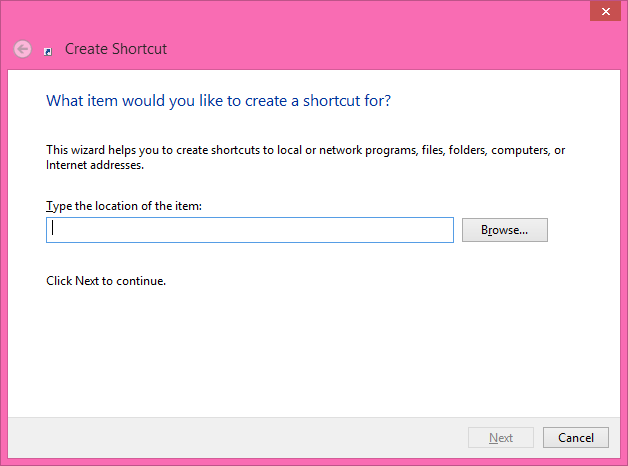
  3. You get a dialog box asking about what you’d like to create a shortcut for:image
  4. HERE’S IMPORTANT PART 1/2: click hit the Browse button and navigate to wherever your Windows Azure SDK is installed and drill into the image
  5. In my case this places the path "C:\Program Files\Microsoft SDKs\Windows Azure\Emulator\csrun.exe" into the text field.
  6. HERE’S IMPORTANT PART 2/2: Now after the end of the path (after the second double quote) add the parameter /devstore:start which indicates to start up the Storage Emulator.
  7. Click Next to reach the last step – naming the shortcut: image
  8. Perhaps change the name of the shortcut from the default (csrun.exe) to something like Start Storage Emulator: image
  9. Done! Now you can double-click this shortcut to fire up the Windows Azure Storage Emulator: image 

On my dev computer, the path to start the Windows Azure Storage Emulator was: "C:\Program Files\Microsoft SDKs\Windows Azure\Emulator\csrun.exe" /devstore:start

Now starting the Storage Emulator without having to use a Cloud Service from Visual Studio is only a double-click away.

RELATED

Talk: What’s New in Windows Azure – New England Microsoft Dev Group

A couple of nights ago, I had the privilege of speaking at the New England Microsoft Dev Group in Waltham, MA. The topic covered a general and high-level overview of the broad capabilities of the Windows Azure Cloud Platform, with some specific topics added by attendees as well. It turned out to be an interactive session with good questions from the group.

We agreed I would come back after the summer for an architecture-focused session; the session presented was more feature & technology-oriented.

A few followups:

The deck I used is pretty short, but here in case you are interested:

My book, if you are interested, is described here (note: my next talk to the group will cover material more closely associated with the book, which is more focused on patterns and architecture in the context of designing effective cloud applications).

Talk: Architecting for the Cloud at Nashua Cloud .NET User Group

Last night I had the privilege of speaking at the Nashua .NET Cloud User Group in Nashua, NH. It was an engaged group to be sure – thanks for all the great questions.

A few followups:

  • Azure VM pricing: the $0.013/hour pricing mentioned for Extra Small instances of the Infrastructure as a Service (IaaS) Virtual Machine is shown here to be a promotional price, with the regular price of $0.02/hour (two cents per hour) kicking in on June 1. The architectures we spoke of in the talk used Platform as a Service (PaaS) Virtual Machines and the pricing for those is very similar, though slightly lower, and is shown here.
  • How many customers does Azure have: here is the 10,000 number that Udai shared, which is from was about three years ago when most of the tech world had not yet even heard of Azure. More recently,  it was mentioned there are 200,000 Azure customers and it has passed $1 billion in revenue. So, according to those numbers, it appears to have grown 20x in a little less than three years. Additional interesting numbers mentioned here and here.
  • We focused on use of Cloud Services last night, but we also mentioned Virtual Machines (part of what Microsoft is calling Infrastructure Services, like IaaS) and Web Sites, noting all use different approaches. You can read more about all of them here where you’ll see write-ups for each specific area.
  • I mentioned that Blob Storage is also being used to support the persistent disks on the Infrastructure Services Virtual Machines, in part-enabled by new high performance network architecture. I wrote about some of this before in a blog post titled Azure Cloud Storage Improvements Hit the Target.

The deck I used follows.

Architecting for the Cloud — NH Azure — 15-Mar-2013 — Bill Wilder (blog.codingoutloud.com)

My book, if you are interested, is described here. And the Boston Azure Cloud User Group can be found here.

Cloud Architecture Patterns book

Clash of the Clouds Followup

Last night, Mark Eisenberg and I represented the Windows Azure Cloud Platform in a Clash of the Clouds panel discussion/debate opposite Erik Sebesta  and Ed Brennan who represented the Open Source cloud alternatives. Erik & Ed declared OpenStack to be the strongest of the open source options today, so it became about Azure vs. OpenStack.

While I will not attempt to reproduce the discussion (sorry!, though there are a few photos), I do want to follow up on a few questions that I offered to provide references on. If you have further questions, please feel free to put a comment on this post. Also, at the end of this post, you will find a link to the short “Azure in 3 minutes or less” deck we used to introduce the Windows Azure Cloud Platform at the very beginning (per the ground rules of the panel – we limited the intro to 3 minutes).

  • In response to the question about scalability of Windows Azure Blobs, here is the write-up I referenced on Windows Azure Storage Scalability Targets. Here is an additional (more comparative) discussion (follow links) you may find helpful: Azure Cloud Storage Improvements Hit the Target.
  • In response to the question about pricing, check out the Windows Azure pricing calculator. Note that for the Microsoft Server products (e.g. Windows Server, or SQL Server on Windows Azure SQL Database (offered as a service) or on a Virtual Machine (that you manage)), the cost of the license is baked into the hourly rental cost.
  • In response to the question about the ability to support different types of apps (whether new ones from startups, existing ones from big company, etc.), see the spectrum of offerings described here: https://www.windowsazure.com/en-us/develop/net/fundamentals/compute/. In a nutshell, Web Sites is for hosting (with a free Tier) for basic, low-scale sites, but these can scale very nicely too), Cloud Services is for building Cloud-Native applications using PaaS (which my book focuses on), Virtual Machines (parallel to what OpenStack offers in terms of managed VMs) is more useful for applications you want to run in the cloud with minimal change, and Virtual Networking allows many options for connecting your data center with a secure private network on Windows Azure among other options.
  • In response to the question about openness, any programming language or platform can access the Windows Azure services through REST APIs, but here is the list of those with first-class SDKs: http://www.windowsazure.com/en-us/downloads/
  • For any further follow-up questions feel free leave a COMMENT below and I will update this post.

Windows Azure is not the only full-service, rock-solid cloud platform out there, but I hope you got an appreciation for how it might help you and why you might wish to choose it for your applications and services. If you are interested in learning more about Windows Azure, you may wish to check out the Boston Azure User Group, which has been meeting regularly at NERD since October 2009. Our next meeting is in just a few days: Tuesday May 9.

The SLIDE DECK we used for the 3 minute intro is here:


Talk: Azure Best Practices – How to Successfully Architect Windows Azure Apps for the Cloud

Webinar Registration:

  • Azure Best Practices – How to Successfully Architect Windows Azure Apps for the Cloud @ 1pm ET on 13-March-2013
  • VIEW RECORDING HERE: http://bit.ly/ZzQDDW 

Abstract:

Discover how you can successfully architect Windows Azure-based applications to avoid and mitigate performance and reliability issues with our live webinar
Microsoft’s Windows Azure cloud offerings provide you with the ability to build and deliver a powerful cloud-based application in a fraction of the time and cost of traditional on-premise approaches.  So what’s the problem? Tried-and-true traditional architectural concepts don’t apply when it comes to cloud-native applications. Building cloud-based applications must factor in answers to such questions as:

  • How to scale?
  • How to overcome failure?
  • How to build a manageable system?
  • How to minimize monthly bills from cloud vendors?

During this webinar, we will examine why cloud-based applications must be architected differently from that of traditional applications, and break down key architectural patterns that truly unlock cloud benefits. Items of discussion include:

  • Architecting for success in the cloud
  • Getting the right architecture and scalability
  • Auto-scaling in Azure and other cloud architecture patterns

If you want to avoid long nights, help-desk calls, frustrated business owners and end-users, then don’t miss this webinar or your chance to learn how to deliver highly-scalable, high-performance cloud applications.

Deck:

Book:

The core ideas were drawn from my Cloud Architecture Patterns (O’Reilly Media, 2012) book:

book-cover-medium.jpg

Hosted by Dell:

image

Azure Cloud Storage Improvements Hit the Target

Windows Azure Storage (WAS)

Brad Calder SOSP talk from http://www.youtube.com/watch?v=QnYdbQO0yj4

Brad Calder delivering SOSP talk

Since its initial release, Windows Azure has offered a storage service known as Windows Azure Storage (WAS). According to the SOSP paper and related talk published by the team (led by Brad Calder), WAS is architected to be a “Highly Available Cloud Storage Service with Strong Consistency.” Part of being highly availably is keeping your data safe and accessible. The SOSP paper mentions that the WAS service retains three copies of every stored byte, and (announced a few months before the SOSP paper) another asynchronously geo-replicated trio of copies in another data center hundreds of miles away in the same geo-political region. Six copies in total.

WAS is a broad service, offering not only blob (file) storage, but also a NoSQL store and a reliable queue.

Further, all of these WAS storage offerings are strongly consistent (as opposed to other storage approaches which are sometimes eventually consistent). Again citing the SOSP paper: “Many customers want strong consistency: especially enterprise customers moving their line of business applications to the cloud.” This is because traditional data stores are strongly consistent and code needs to be specially crafted in order to handle an eventually consistent model. This simplifies moving existing code into the cloud.

The points made so far are just to establish some basic properties of this system before jumping into the real purpose of this article: performance at scale. The particular points mentioned (highly available, storage in triplicate and then geo-replicated, strong consistency, and supporting also a NoSQL database and reliable queuing features) were highlighted since they may be considered disadvantages – rich capabilities that may be considered to hamper scalability and performance. Except that they don’t hamper scalability and performance at all. Read on for details.

Performance at Scale

A couple of years ago, Nasuni benchmarked the most important public cloud vendors on how their services performed on cloud file storage at scale (using workloads modeled after those observed from real world business scenarios). Among the public clouds tested were Windows Azure Storage (though only the blob/file storage aspect was considered), Amazon S3 (an eventually consistent file store), and a couple of others.

In the first published result in 2011, Nasuni declared Amazon S3 the overall winner, prevailing over Windows Azure Storage and others, though WAS fininshed ahead of Amazon in some of the tests. At the time of these tests, WAS was running on its first-generation network architecture and supported capacity as described in the team’s published scalability targets from mid-2010.

In 2012, Microsoft network engineers were busy implementing a new data center network design they are calling Quantum 10 (or Q10 for short). The original network design was hierarchical, but the Q10 design is flat (and uses other improvements like SSD for journaling). The end result of this dramatic redesign is that WAS-based network storage is much faster, more scalable, and as robust as ever. The corresponding Q10 scalability targets were published in November 2012 and show substantial advances. EDIT: the information on scalability targets and related factors is kept up to date in official documentation here.

Q10 was implemented during 2012 and apparently was in place before Nasuni ran its updated benchmarks between November 2012 and January 2013. With its fancy new network design in place, WAS really shined. While the results in 2011 were close, with Amazon S3 being the overall winner, in 2012 the results were a blowout, with Windows Azure Storage being declared the winner, sweeping all other contenders across the three categories.

“This year, our tests revealed that Microsoft Azure Blob Storage has taken a significant step ahead of last year’s leader, Amazon S3, to take the top spot. Across three primary tests (performance, scalability and stability), Microsoft emerged as a top performer in every category.” -Nusani Report

The Nasuni report goes on to mention that “the technology [Microsoft] are providing to the market is second to none.”

Reliability

One aspect of the report I found very interesting was in the error rates. For several of the vendors (including Amazon, Google, and Azure), Nasuni reported not a single error was detected during 100 million write attempts. And Microsoft stood alone for the read tests: “During read attempts, only Microsoft resulted in no errors.” In my book, I write about the Busy Signal Pattern which is needed whenever transient failures result during attempts to access a cloud service. The scenario described in the book showed the number of retries needed when I uploaded about four million files. Of course, the Busy Signal Pattern will still be needed for storage access and other services – not all transient failures can be eliminated from multitenant cloud services running on commodity hardware served over the public internet – and while this is not a guarantee there won’t be any, it does bode well for improvements in throughput and user experience.

And while it’s always been the case you can trust WAS for HA, these days it is very hard to find any reason – certainly not peformance or scalability – to not consider Windows Azure Storage. Further, WAS, S3, and Google Storage all have similar pricing (already low – and trending towards even lower prices) – and Azure, Google, and Amazon have the same SLAs for storage.

References

Note that the Nasuni report was published February 19, 2013 on the Nasuni blog and is available from their web site, though is gated, requiring that you fill out a contact form for access. The link is here: http://www.nasuni.com/blog/193-comparing_cloud_storage_providers_in

Other related articles of interest:

  1. Windows Azure beats the competition in cloud speed test – Oct 7, 2011 – http://yossidahan.wordpress.com/2011/10/07/windows-azure-beats-the-competition-in-cloud-speed-test/
  2. Amazon bests Microsoft, all other contenders in cloud storage test – Dec 12, 2011 –
  3. Only Six Cloud Storage Providers Pass Nasuni Stress Tests for Performance, Stability, Availability and Scalability – Dec 11, 2011 – http://www.nasuni.com/news/press_releases/46-only_six_cloud_storage_providers_pass_nasuni_stress
  4. Dec 3, 2012 – http://www.networkworld.com/news/2012/120312-argument-cloud-264454.html – Cloud computing showdown: Amazon vs. Rackspace (OpenStack) vs. Microsoft vs. Google
  5. http://www.networkworld.com/news/2013/021913-azure-aws-266831.html?hpg1=bn – Feb 19, 2013 – Microsoft Azure overtakes Amazon’s cloud in performance test