Category Archives: Cloud Computing

What causes “specified container does not exist” error message in Windows Azure Storage?

In debugging some Windows Azure Storage code, I ran across a seemingly spurious, unpredictable exception in Azure Blob code where I was creating Blob containers and uploading Blobs to the cloud. The error would appear sometimes… at first there was no discernable pattern… and the code would always work if I ran my code again immediately after a failure. Mysterious…

A Surprising Exception is Raised

When there was an exception raised, this was the error message with some details:

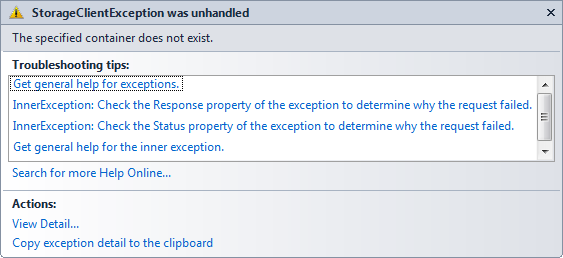
StorageClientException was unhandled - The specified container does not exist

The title bar reads “StorageClientException was unhandled” which is accurate, since that code was not currently in a try/catch block. No problem or surprise there, at least with that part. But the exception text itself was surprising: “The specified container does not exist.”

Uhhhh, yes it does! After calling GetContainerReference, container.CreateIfNotExist() was called to ensure the container was there. No errors were thrown. What could be the problem?

A Clue

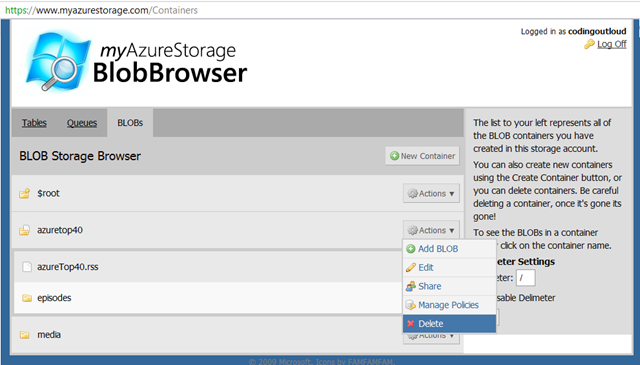
Okay, here’s a clue: while running, testing, and debugging my code, occasionally I would want a completely fresh run, so I would delete all my existing data stored in the cloud (that this code cared about at least) by deleting the whole Blob container (called “AzureTop40”). This was rather convenient using the handy myAzureStorage utility:

This seemed like an easy thing to do, since my code re-created the container and any objects needed. Starting from scratch was a convenience for debugging and testing. Or so I thought…

Azure Storage is Strongly Consistent, not Eventually Consistent

Some storage systems are “eventually consistent” – a technique used in distributed scalable systems in which a trade-off is made: we open a small window of inconsistency with our data, in exchange for scalability improvements. One example system is Amazon’s S3 storage offering.

But, per page 130 of Programming Windows Azure, “Windows Azure Storage is not eventually consistent; it is instantly/strongly consistent. This means when you do an update or a delete, the changes are instantly visible to all future API calls. The team decided to do this since they felt that eventual consistency would make writing code against the storage services quite tricky, and more important, the could achieve very good performance without needing this.”

So there should be no problem, right? Well, not exactly.

Is Azure Storage actually Eventually Strongly Consistent?

Okay, “Eventually Strongly Consistent” isn’t a real term, but it does seem to fit this scenario.

I’ve heard more than once (can’t find authoritative sources right now!??) that you need to give the storage system time to clean up after you delete something – such as a Blob container – which is immediately not available (strongly consistent) but is cleaned up as a background job, with a garbage collection-like feel to it. There seems to be a small problem: until the background or async cleanup of the “deleted” data is complete, the name is not really available for reuse. This appears to be what was causing my problem.

Another dimension of the problem was that there was no error from the code that purportedly ensured the container was there waiting for me. At least this part seems to be a bug: it seems a little eventually consistent is leaking into Azure Storage’s tidy instantly/strongly consistent model.

I don’t know what the Azure Storage team will do to address this, if anything, but at least understanding it helps suggest solutions. One work-around would be to just wait it out – eventually the name will be available again. Another is to use different names instead of reusing names from objects recently deleted.

I see other folks have encountered the same issue, also without a complete solution.

Vermont Code Camp – Building Cloud-Native Applications with Azure

I attended Vermont Code Camp 2 yesterday (11-Sept-2010) at the University of Vermont.  Many thanks to the awesome crew of Vermonters who put on an extremely well-organized and highly energetic event! I look forward to #vtcc3 next year. (Twitter stream, while it lasts: #vtcc2)

I presented a talk on Building Cloud-Native Applications using Microsoft Windows Azure. My slides are available as a PPT download and on slideshare.net.

<aside>Maura and I went to Vermont a day early. We put that time to good use climbing to the summit of Vermont’s highest mountain: Mt. Mansfield. We hiked up from Underhill State Park, up the Maple Ridge Trail, over to the Long Trail, up to the summit, then down the Sunset Ridge Trail (map). It was a really tough climb, but totally worth it. I think the round trip was around 7 miles.

</aside>

Gave Azure Storage Talk at VB.NET User Group Meeting

I gave a talk at the Thurs Sept 2, 2010 New England VB.NET user group meeting. Andy Novick covered SQL Azure, and I covered the rest (Blobs, Tables, Queues, Drives, and CDN).

My slides can be downloaded here (which is hosted on Azure Blob storage!).

I also have  plans for a few more Azure-related talks in the near future:

  1. First up is Building Cloud-Native Applications with Windows Azure – at the Vermont Code Camp on Saturday, September 11, 2010.
  2. I am the main speaker at the September 23, 2010 Boston Azure meeting – topic is Azure 101 – the basics. (Then for the October 21, Ben Day will be (most likely) talking about how to integrate Silverlight and Azure.)
  3. I am also planning one or two talks at the New England Code Camp 14 on Saturday October 2 (I haven’t submitted abstracts yet, but probably talks similar to (a) Demystifying Windows Azure and Introduction to Cloud Computing with Azure, and (b) Building Cloud-Native Applications with Windows Azure)

Here is the abstract for the Building Cloud-Native Applications with Windows Azure talk at VT Code Camp:

Cloud computing is here to stay, and it is never too soon to begin understanding the impact it will have on application
architecture. In this talk we will discuss the two most significant architectural mind-shifts, discussing the key patterns
changes generally and seeing how these new cloud patterns map naturally into specific programming practices in Windows
Azure. Specifically this relates to (a) Azure Roles and Queues and how to combine them using cloud-friendly design
patterns, and (b) the combination of relational data and non-relational data, how to decide among them, and how to
combine them. The goal is for mere mortals to build highly reliable applications that scale economically. The concepts
discussed in this talk are relevant for developers and architects building systems for the cloud today, or who want to be
prepared to move to the cloud in the future.

Three Types of Scaling in the Cloud: Scale Up, Scale Out, and now Scale Side-by-Side (with Juxtaposition Scaling)

Computer systems or individual applications have capacity limits. A web site might be working just fine with one or two or fifty users, but when use goes way up, it may no longer work correctly – or a tall. A desktop application may work fine for a long time – then one day, we try loading a really large file or data set, and it can’t handle it. These are scalability challenges.

After our system or application reaches its capacity limits, what are our options to make it work even with the new demands? In other words, how do we make it scale?

The  following scalability approaches  allow us to handle more computations (with vertical and horizontal scaling) or more system instances (with juxtaposition scaling).

There are other very important scaling patterns that we might address in a future post – such as the scalability using algorithms that embrace parallelism (such as Map/Reduce), NoSQL-like schema-less storage, and data sharding. These are not covered in this article.

Scale Up with More Powerful Hardware

The obvious option in many cases is to address a scalability problem with better, faster, more capable hardware. If we can’t load that giant spreadsheet model on a computer with 512MB of RAM, we install 2GB and give it another try. If it is still too slow, we can use a machine with a faster processor or faster hard disk.

This approach can also be applied to web servers, database servers, and other parts of your system. Got an architecture problem? Get some better hardware.

This approach is variously called “scaling up” or “vertical scaling” – since we are addressing the problem by substituting a more capable system (usually a single server), but one that is still logically equivalent.

The essential point here is that, generally speaking, the limits of scalability are due to the limits of a single computer (or perhaps the limits of an affordable single computer).

In Scaling Up (also known as Vertical Scaling) the limitation is hardware related in a very specific way: how much memory, disk, and processor a single server can support…

The key challenge with Scaling Up is that you might run out of hardware options. What happens if you are running on the fastest available machine, or it can’t take any more memory? You may be out of luck.

Scale Out with More Hardware Instances

Another option is some cases is to leave the existing machines in place, and add additional machines to the mix to share the burden. This is variously called “scaling out” or “horizontal scaling” – a metaphor suggestive of spreading out the system as we add more machines beside the existing ones.

The key point here are that systems need to be architected to support Scaling Out – though the benefit is that they can generally scale a lot more than a Scale Up system – and scalability is enabled by the software architecture.

In Scaling Out (also known as Horizontal Scaling) scalability must be architected into the system… it is not automatic and is generally more challenging than Scaling Up. You scale by running on more instances of the hardware – and having these hardware instances share the workload.

As mentioned, scaling out is an attribute of the architecture of the system. This is a great fit for the elastic nature of cloud computing platforms.

Scale Side-by-Side with More Systems

In the real world, not all of our scaling concerns are with “the” system – we tend to have many copies of systems. I recently heard that for every production instance of SAP, there are seven non-production instances. And in my own experience, organizations *always* need many instances of systems: for development, test, training and … then we have different versions of all these systems … and the list goes on.

It turns out that another great use of the cloud generally (including the Azure Cloud) is for spinning up these other instances of our system for many purposes – sometimes we don’t want 1 N-node app, we want N 1-node apps.

I dub this use of cloud to be “scaling side-by-side” or “juxtaposition scaling” – a metaphor suggestive of putting similar systems beside each other, since they are a related collection of sorts, even though the instances of systems scaled side-by-side to are not connected to, or operationally related to, any of the other instances.

Scaling Side-by-Side (also known as Juxtaposition Scaling) happens when you use the cloud’s elastic nature to create additional (often  temporary) instances of a system – such as for test or development.

Also, scaling side-by-side (juxtaposition scaling) is orthogonal to scaling up (vertical scaling) or scaling out (horizontal scaling). It is more about scaling to support more uses of more variants (versions, test regions, one for training, penetration testing, stress testing, …) for overall environmental efficiency.

And, finally, like other ways to leverage cloud infrastructure, to efficiently scale side-by-side you will benefit from some automation to easily provision an instance of your application. Azure has management APIs you can call to make the whole process automagic. Consider PowerShell for building your automation…

[It was in a conversation at the Hub Cloud Club with several folks, including William Toll and John Treadway. John mentioned the SAP statistic and also suggested that adding more instances is just another type of scaling in the cloud. I agreed and still agree. So I am giving that type of scalability a name… Scaling Side-by-Side or Juxtaposition Scaling. Neither seems to have any real hits in Google, but let’s see if this catches on.]

4 Reasons to embrace the “www” subdomain prefix in your Web Addresses, and how to do it right

In support of the www subdomain prefix

For web addresses, I used to consider the “www” prefix an anachronism and argued that its use be deprecated in favor of the plain-old domain. In other words, I used to consider forms such as bostonazure.org superior to the more verbose www.bostonazure.org.

I have seen the light and now advocate the use of the “www” prefix – which is technically a  subdomain – for clarity and flexibility. I now consider www.bostonazure.org superior to the overly terse bostonazure.org.

I am not alone in my support of the www subdomain. Not only is there a “yes www” group – found at www.yes-www.org – advocating we keep using the www prefix, there is also an “extra www” group – found at www.www.extra-www.org [sic] – advocating we go all in and start using two sets of www prefixes. While I’m not ready to side with the extra www folks (which would give us www.www.bostonazure.org), for those who do, you might want to know they offer the following nifty badge for your displaying pleasure.

image

While use of two “www” prefixes may one too many, here are 4 reasons to embrace a single “www’ prefix, followed by 2 tips on how to implement it correctly.

Four reasons to embrace the www prefix

traffic light

Reason #1: It’s a user-friendly signal, even if occasionally redundant

The main, and possibly best, reason is that it is user-friendly. Users have simply come to expect a www prefix on web pages.

The “www” prefix provides a good signal. You might argue that it is redundant: Perhaps the http:// protocol is sufficient? Or the “.com” at the end?

First, consider that the http:// protocol is not always specified; it is common to see sites advertised in the form www.example.com.

Second, consider that the TLD (top-level-domain) can vary – not every web site it a “dot com” – it might be a .org, .mil, or a TLD from another country – many of which may not be obvious as web addresses for the common user without a www prefix, even with the http:// protocol.

Third, consider that even if there are cases where the www is redundant, that is still okay. An additional, familiar signal to humans letting them know with greater confidence that, yes, this is a web address, is a benefit, not a detriment.

Today, most users probably think that the Web and the Internet are synonymous anyway. To most users, there is nothing but the www – we need to realize that today’s Internet is inhabited by regular civilians (not just programmers and hackers).  Let’s acknowledge this larger population by utilizing the www prefix and reducing net confusion (pun intended).

Reason #2: Go with the flow

The application and browser vendors are promoting the www prefix.

Microsoft Word and Microsoft Outlook – two of the most popular applications in the world – both automatically recognize www.bostonazure.org as a web address, while neither automatically recognizes bostonazure.org. (Both also auto recognize http://bostonazure.org.) Other text processing applications have similar detection capabilities and limitations.

Browsers also assume we want the www prefix; in any browser, type in just “twitter” followed by Ctrl-Enter – the browser will automatically put “http://www.” and append “.com” forming “http://www.twitter.com” (though then we are immediately redirected to http://twitter.com). [Note that browsers typically are actually configured to append something other than “.com” if that is not the most common TLD there; country specific settings are in force.] For the less common cases where you are typing in a .org or other non-default setting, the browser can only be so smart; you need to type some in fully on your own.

Reason #3: Advantages on high volume sites

While I have been aware of most of the raw material used in this blog post for years, this one was new to me.

High traffic web sites can get performance benefits by using www, as described in the Yahoo! Best Practices for Speeding Up Your Web Site, though there is a workaround (involving an additional images domain) that still would allow a non-www variant, apparently without penalty.

Reason #4: Azure made me do it!

It turns out that Windows Azure likes you to use the www prefix, as described by Steve Marx in his blog post on custom domain names in Azure. This appears to be due to the combined effects of how Azure does virtualization for highly dynamic cloud environments – plus limitations of DNS.

In fact, it was this discovery that caused me to rethink my long-held beliefs around the use of www. Though I didn’t find any posts that specifically viewed this exactly like I did, my conclusion is the following:

I concluded the Internet community has changed over the years and is now dominated by non-experts. The “www” affordance inserted into the URLs makes enough of a difference in the user experience for non-expert users that we ought to just use the prefix, even if expert users see it as redundant and repetitive – as I used to.

In other words, nobody is harmed by use of the www prefix, while most users benefit.

Two tips to properly configure the www prefix

One of the organizations promoting dropping the www – http://no-www.org/ – describes three classes of “no www” compliance:

  • Class A: Do what most sensible sites do and allow both example.com and www.example.com to work. This is probably the most easily supported in GoDaddy, and probably the most user-friendly, since anything reasonable done by the user just works.
  • Class B: Redirect traffic from example.com to www.example.com, presumably with a 301 (Permanent) http redirect; this approach is most SEO/Search Engine-friendly, while maintaining similar user-friendliness to Class A.
  • Class C: Have the www variant fail to resolve (so browser would give an error to the user attempting to access it). This is not at all user friendly, but is SEO-friendly.

So what are the two rules for properly configuring the www prefix?

Tip #1: Be user- and SEO-friendly with 301 redirect

Being user-friendly argues for Class A or Class B approach as mentioned above.

You don’t want search engines to be confused about whether the www-prefixed or the non-www variant is the official site. This is not Search Engine Optimization (SEO)-friendly; it will hurt your search engine rankings. This argues for Class B or Class C approach as mentioned above.

For the best of both worlds, the Class B approach is the clear winner. Set up a 301 permanent http redirect from your non-www domain to your www-prefixed variant.

You can set this up in GoDaddy with the Forward Subdomain feature in Domain Manager, for example.

You can also set it up with IIS :

Or with Apache:

Tip #2: Specify your canonical source for content

While the SEO comment above covers part of this, you also want to be sure that if you are on a host or environment where you are not able to set up a 301 redirect, you can at least let the search engines know which variant ought to get the SEO-juice.

In your HTML page header, be sure to set the canonical source for your content:

<head>
    <link rel="canonical" href="http://www.bostonazure.org/" />
    ...
</head>

Google honors this currently:

Google is even looking at cross-domain support for canonical tag (though other search engines have not announced plans for cross-domain support):

From an official Bing Webmaster blog post from Feb 2009, Bing will support it:

Reportedly, Bing and Yahoo! are not yet supporting this very well:

But it appears Bing and Yahoo! have either just implemented it, or perhaps they are about to:

You can also configure Google Webmaster Tools (and probably the equivalents in Bing and Yahoo!) to say which variant you prefer as the canonical source.

Unusual subdomain uses

There are some odd uses of subdomain prefixes. Some are designed to be extremely compact – such as URL shortening service bit.ly. Others are plain old clever – such as social bookmarking site del.i.cio.us. Still others defy understanding – in the old days (but not *that* old!), I recall adobe.com did not resolve – there was no alias or redirect, just an error – if you did not type in the www prefix, you were out of luck.

Another really interesting case of subdomain shenanigans is still in place over at MIT where you will find that www.mit.edu and mit.edu both resolve – but to totally different sites! This is totally legal, though totally unusual. There is also a web.mit.edu which happens to match mit.edu, but www.mit.edu is in different hands.

In the early days of the web, the Wall Street Journal was an early adopter and they used to advertise as http://wsj.com. These days both wsj.com and www.wsj.com resolve, but they both redirect to a third place, online.wsj.com. Also totally legal, and a bit unusual.

[edit 11-April-2012] Just noticed this related and interesting post: http://pzxc.com/cname-on-domain-root-does-work [though it is not http://www.pzxc.com .. :-)]

Credit for Traffic Light image used above:

  1. capl@washjeff.edu
  2. http://capl.washjeff.edu/browseresults.php?langID=2&photoID=3803&size=l
  3. http://creativecommons.org/licenses/by-nc-sa/3.0/us/
  4. http://capl.washjeff.edu/2/l/3803.jpg
A Key Architectural Design Pattern for Cloud-Native Windows Azure Applications

I gave a talk for the Windows Azure User Group in which I discussed a key Architectural Design Pattern for Cloud-Native Windows Azure applications. The main pattern involves roles and queues, and I’ve been calling either “Two Roles and a Queue” or “TRAAQ” or “RQR” (the ‘rocker!’ pattern!) – though is the same one that Steve Nagy has been calling the Asynchronous Work Queue Pattern (thanks Steve).

The deck from this presentation is here: bill-wilder-two-roles-and-a-queue-AzureUG.net-windows-azure-virtual-user-group-14-july-2010

Follow me on twitter @codingoutloud.

Follow the Boston Azure User Group on twitter @bostonazure.

Presented on Windows Azure at Hartford Code Camp

Today at Hartford Code Camp #3 in Connecticut, I presented two talks on Windows Azure.

The first talk was an introduction to Cloud Computing, with a Microsoft slant towards Windows Azure. The second drilled into the Two Roles and a Queue (TRAAQ) design pattern – a key pattern for architecting systems for the cloud.

The PowerPoint slides are available here:

Also plugged the Boston Azure User Group to those attending my talks! Hope to see some of you at NERD in Cambridge, MA for talks and hands-on-coding sessions. Details always at bostonazure.org.

May 2010 Boston Azure Meeting

May 27, 2010 Boston Azure Meeting

1. Michael Stiefel on use of relational databases in the cloud

At the May 27, 2010 Boston Azure meeting, Michael Stiefel was the main speaker. Michael gave a talk (slides here) on when you might want to use SQL Azure vs. “NoSQL” Azure in the cloud.

Some key phrases, highlights (very rough!):

  • “Latency exists” – you need to care about it – and the speed of light matters – analogy to digging a hole: how fast you move the shovel
  • “Bandwidth is limited” – you need to care about it – with hole-digging analogy, this is the size of shovel
  • Computational Power gets cheaper faster than Network Bandwidth
  • Connectivity is Not Always Available – welcome to the world of occasionally-connected devices like laptops on airplanes and the boom in mobile devices
  • Waiting for Data slows computation
  • Human Interaction – thinking time – can add latency to any operation
  • Economics dictates scale out, not up
  • Availability or Consistency? What is the Cost of an Apology?
  • How consistent do you need to be? Weigh cost of consistency vs. cost oc of lost business… Business Decision!
  • Design for Eventual Consistency

The meeting had around 25 people in attendance.

2. Discussion of Boston Azure Project

As part of the May meeting we discussed a proposal for the Boston Azure Project – an open source, collaborative, Azure-hosted coding project to “gently overengineer the bostonazure.org web site” – by Azurizing it. The proposal met with enough enthusiasm that it was adopted and we are moving forward with it.

3. Next: June 24 Meeting is All About The Code

In the June 24 meeting (RSVP here) we will get started on the Boston Azure Project. We will spend from 6:00 – 8:30 talking about it, organizing, and getting started. Bring your Azure-powered laptop!

Two Azure Talks at New Hampshire Code Camp

Today gave two talks at the New Hampshire Code Camp 2 in Concord, NH.

My talks were Azure Demystified – What is Cloud Computing? What is Windows Azure? and Why should we care? followed by Two Roles and a Queue – The most important design pattern for Windows Azure Cloud apps.

The PowerPoint slides are available right here:

Also plugged the Boston Azure User Group to those attending my talks! Hope to see some of you at NERD in Cambridge, MA for talks and hands-on-coding sessions. Details always at bostonazure.org.

Introducing the Boston Azure Project

Cloud Computing on Microsoft’s Windows Azure platform is still new, but will be big. I believe that. That believe fueled my interest in starting the Boston Azure cloud computing user group (henceforth in this blog post, simply “Boston Azure”) back in the fall, even before Azure was released. Boston Azure is a cloud computing community group focused on learning about Azure.

Currently Boston Azure meets monthly on the 4th Thursday of the month in Cambridge, MA in the USA. This is an in-person meeting. I have received a loud and clear vibe from the Boston Azure membership that there is a thirst for more hands-on stuff. That was fueled further first by the hands-on Azure SDK meeting we held April 29, then again by the all-day Firestarter held May 8. But we need more. So, I had this idea for an ongoing community coding project that we can hack on together at Boston Azure meetings and other times… I bounced the idea off the community at the May meeting… since I received a really positive response, I now officially declare I plan to go ahead with it…

Introducing the Boston Azure Project

Why are we doing this Project?

The community wants to code. There is a desire to learn a lot about programming in Windows Azure – and what better way to get really good at programming Windows Azure than by programming Windows Azure.

The primary goal of the project is to learn – to get good – really good – at Windows Azure.

How will the Project work?

To be hands-on, we need a project… so here’s a project to provide us with focus:

We shall build a “gently over-engineered” version of bostonazure.org.

This “gently over-engineered” version of bostonazure.org:

(a) will provide a productive environment where participants (developers and otherwise) can learn about Azure through building a real-world application by contributing directly to the project (through code, design, ideas, testing, etc., …), and

(b) will do so by taking maximum advantage of the technology in the Windows Azure platform in the advancement of the bostonazure.org web site (though thinking of it as “just a web site” is limiting – there is nothing stopping us from, say: adding an API; exporting OData or RSS feeds; being mobile-friendly for our visitors with iPhone, Android, and Windows Phone 7 devices; etc.), and

(c) will serve the collaboration and communication needs of the Boston Azure community, and

(d) will provide an opportunity for a little fun, meet other interesting people, and enhance our skills through sharing knowledge and learning from each other.

When will we code?

We will reserve time at Boston Azure meetings so we can collaborate in-person on a monthly basis. Participants are also free to hack at other times as well, of course.

Wait a second… Does it make sense to port a little web site like bostonazure.org to Azure?

It does not make sense – not in isolation. Go ahead and crunch the numbers on Windows Azure pricing and compare with an ISP-hosted solution. However, this is the “gently over-engineered” part: we are doing it this way to show off the capabilities of Windows Azure and learn a bunch in the process.

What is the output of the Project?

This project will be feature rich, easy to use, accessible, flexible… and open source.

Keep in mind: Since bostonazure.org is the web presence for Boston Azure community…

It Has To Work!

This project is for and by the community.

Anyone can contribute – at any seniority level, with any skill set, with many possible roles (not just developers).

Then how do we reconcile anyone can contribute with it has to work? The community process needs to be able to make the code work before we put it into production. We have to make this work. And we will.

So, now you’ve heard it all – the whole idea – at least the Big Picture. I will post more details later, but for now that’s it.

Next Steps

Please contact me (on twitter or by comment to this blog post or by email) if you want to be one of the very first participants – I would like a couple of folks to be in a “private beta” to get some details squared away before I make the CodePlex site public.

Update 23-June-2010: The project is now live on CodePlex at bostonazure.codeplex.com.