Category Archives: Azure

Related to Microsoft’s Windows Azure platform

You can’t add a reference to Microsoft.WindowsAzure.StorageClient.dll as it was not build against the Silverlight runtime

Are you developing Silverlight apps that would like to talk directly to Windows Azure APIs? That is perfectly legal, using the REST API. But if you want to use the handy-dandy Windows Azure Managed Libraries – such as Microsoft.WindowsAzure.StorageClient.dll to talk to Windows Azure Storage – then that’s not available in Silverlight.

As you may know, Silverlight assembly format is a bit different than straight-up .NET, and attempting to use Add Reference from a Silverlight project to a plain-old-.NET assembly just won’t work. Instead, you’ll see something like this:

Visual Studio error message from use of Add Reference in a Silverlight project: "You can’t add a reference to Microsoft.WindowsAzure.StorageClient.dll as it was not build against the Silverlight runtime. Silverlight projects will only work with Silverlight assemblies."

If you pick a class from the StorageClient assembly – let’s say, CloudBlobClient – and check the documentation, it will tell you where this class is supported:

Screen clipping from the StorageClient documentation with empty list of Target Platforms

Okay – so maybe it doesn’t exactly – the Target Platforms list is empty – presumably an error of omission. But going by the Development Platforms list, you wouldn’t expect it to work in Silverlight.

There’s Always REST

As mentioned, you are always free to directly do battle with the Azure REST APIs for Storage or Management. This is a workable approach. Or, even better, expose the operations of interest as Azure services – abstracting them as higher level activities. You have heard of SOA, haven’t you? 🙂

“Cloud Computing 101, Azure Style!” and “Building Cloud-Native Applications on Azure” – Two Talks I Presented at New England Code Camp 14

Yesterday I attended New England Code Camp 14 (check out the #necc14 twitter stream while it lasts). I enjoyed many talks:

  1. Maura Wilder on JavaScript Debugging (@squdgy)
  2. Jason Haley on Comparing the Azure and Amazon Cloud Platforms (@haleyjason)
  3. Jim O’Neil on Dissecting the Azure @Home Application (@jimoneil)
  4. Abby Fichtner on Lean Startups (@hackerchick)
  5. MC’d by Abby, various folks talking about their experiences at startups — 4 talks jam-packed into a fast-paced one-hour session:
    1. Vishal Kumar of savinz.com (“mint.com for shopping”)
    2. Allison Friedman (@rateitgreen) of Rate It Green (“yelp for the green building industry”)
    3. Sean Creely (@screeley) of Embedly (“make friendly embedded links”) – a Y Combinator company providing a service for turning tweets containing media links into something more user friendly (e.g., embed inline YouTube video rather than a link taking you to YouTube)
    4. Marc Held (@getzazu) of getzazu.com (“alarm clock 2.0”)

At Uno’s afterwards, I enjoyed chatting with many folks, including Veronica and Shawn Robichaud (all the way from Maine!), John from BUGC and Blue Fin, Slava Kokaev, entrepreneurs Marc, Billy, Brian, Vishal, and Dan Colon, dev evangelists Jim O’Neil and Chris Bowen, Yilmaz Rona from Trilogy, and of course Maura.

At the Code Camp, I presented twice on Azure-focused topics:

  1. Cloud Computing 101: Azure Style! – an introduction to cloud computing, and an overview of the services that Microsoft’s cloud stack offers
  2. Building Cloud-Native Applications with Azure – a mind-blowing tour of some of the changes that await the technology community as we move our world into the cloud

The Boston Azure User Group is one year old! You can follow the group on twitter @bostonazure. You can also follow me on twitter @codingoutloud. And I hope to see you at the next Boston Azure meeting on Thurs October 21 from 6:00-8:30 PM at NERD (registration and more info).

Azure 101 Talk Presented at Boston Azure User Group’s September Meeting

Last week on Thursday I gave a talk to the Boston Azure User Group[†]: a high level introduction to Windows Azure titled Azure 101 (you can download the Azure 101 slide deck).

I shared the stage with Mark Eisenberg of Microsoft who walked us through some of the features coming in the November update of Windows Azure. One of the sites Mark showed was the Open Source Windows Azure Companion.

Hope to see you next month when Ben Day will talk about how Windows Azure and Silverlight can play nice together.

For up to date information on Boston Azure, follow Boston Azure on twitter (@bostonazure),  keep an eye on the group’s web site (bostonazure.org), or add yourself to the low-volume email announcement list.

[] Yes, I also founded and run the Boston Azure User Group, but it is my first time having the honors as the main speaker.

What causes “specified container does not exist” error message in Windows Azure Storage?

In debugging some Windows Azure Storage code, I ran across a seemingly spurious, unpredictable exception in Azure Blob code where I was creating Blob containers and uploading Blobs to the cloud. The error would appear sometimes… at first there was no discernable pattern… and the code would always work if I ran my code again immediately after a failure. Mysterious…

A Surprising Exception is Raised

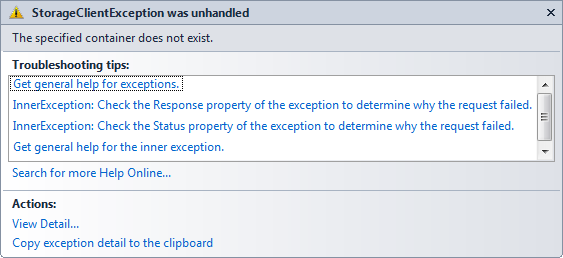
When there was an exception raised, this was the error message with some details:

StorageClientException was unhandled - The specified container does not exist

The title bar reads “StorageClientException was unhandled” which is accurate, since that code was not currently in a try/catch block. No problem or surprise there, at least with that part. But the exception text itself was surprising: “The specified container does not exist.”

Uhhhh, yes it does! After calling GetContainerReference, container.CreateIfNotExist() was called to ensure the container was there. No errors were thrown. What could be the problem?

A Clue

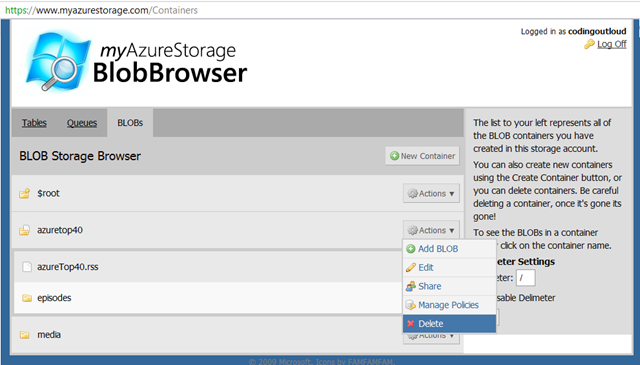
Okay, here’s a clue: while running, testing, and debugging my code, occasionally I would want a completely fresh run, so I would delete all my existing data stored in the cloud (that this code cared about at least) by deleting the whole Blob container (called “AzureTop40”). This was rather convenient using the handy myAzureStorage utility:

This seemed like an easy thing to do, since my code re-created the container and any objects needed. Starting from scratch was a convenience for debugging and testing. Or so I thought…

Azure Storage is Strongly Consistent, not Eventually Consistent

Some storage systems are “eventually consistent” – a technique used in distributed scalable systems in which a trade-off is made: we open a small window of inconsistency with our data, in exchange for scalability improvements. One example system is Amazon’s S3 storage offering.

But, per page 130 of Programming Windows Azure, “Windows Azure Storage is not eventually consistent; it is instantly/strongly consistent. This means when you do an update or a delete, the changes are instantly visible to all future API calls. The team decided to do this since they felt that eventual consistency would make writing code against the storage services quite tricky, and more important, the could achieve very good performance without needing this.”

So there should be no problem, right? Well, not exactly.

Is Azure Storage actually Eventually Strongly Consistent?

Okay, “Eventually Strongly Consistent” isn’t a real term, but it does seem to fit this scenario.

I’ve heard more than once (can’t find authoritative sources right now!??) that you need to give the storage system time to clean up after you delete something – such as a Blob container – which is immediately not available (strongly consistent) but is cleaned up as a background job, with a garbage collection-like feel to it. There seems to be a small problem: until the background or async cleanup of the “deleted” data is complete, the name is not really available for reuse. This appears to be what was causing my problem.

Another dimension of the problem was that there was no error from the code that purportedly ensured the container was there waiting for me. At least this part seems to be a bug: it seems a little eventually consistent is leaking into Azure Storage’s tidy instantly/strongly consistent model.

I don’t know what the Azure Storage team will do to address this, if anything, but at least understanding it helps suggest solutions. One work-around would be to just wait it out – eventually the name will be available again. Another is to use different names instead of reusing names from objects recently deleted.

I see other folks have encountered the same issue, also without a complete solution.

Vermont Code Camp – Building Cloud-Native Applications with Azure

I attended Vermont Code Camp 2 yesterday (11-Sept-2010) at the University of Vermont.  Many thanks to the awesome crew of Vermonters who put on an extremely well-organized and highly energetic event! I look forward to #vtcc3 next year. (Twitter stream, while it lasts: #vtcc2)

I presented a talk on Building Cloud-Native Applications using Microsoft Windows Azure. My slides are available as a PPT download and on slideshare.net.

<aside>Maura and I went to Vermont a day early. We put that time to good use climbing to the summit of Vermont’s highest mountain: Mt. Mansfield. We hiked up from Underhill State Park, up the Maple Ridge Trail, over to the Long Trail, up to the summit, then down the Sunset Ridge Trail (map). It was a really tough climb, but totally worth it. I think the round trip was around 7 miles.

</aside>

Gave Azure Storage Talk at VB.NET User Group Meeting

I gave a talk at the Thurs Sept 2, 2010 New England VB.NET user group meeting. Andy Novick covered SQL Azure, and I covered the rest (Blobs, Tables, Queues, Drives, and CDN).

My slides can be downloaded here (which is hosted on Azure Blob storage!).

I also have  plans for a few more Azure-related talks in the near future:

  1. First up is Building Cloud-Native Applications with Windows Azure – at the Vermont Code Camp on Saturday, September 11, 2010.
  2. I am the main speaker at the September 23, 2010 Boston Azure meeting – topic is Azure 101 – the basics. (Then for the October 21, Ben Day will be (most likely) talking about how to integrate Silverlight and Azure.)
  3. I am also planning one or two talks at the New England Code Camp 14 on Saturday October 2 (I haven’t submitted abstracts yet, but probably talks similar to (a) Demystifying Windows Azure and Introduction to Cloud Computing with Azure, and (b) Building Cloud-Native Applications with Windows Azure)

Here is the abstract for the Building Cloud-Native Applications with Windows Azure talk at VT Code Camp:

Cloud computing is here to stay, and it is never too soon to begin understanding the impact it will have on application
architecture. In this talk we will discuss the two most significant architectural mind-shifts, discussing the key patterns
changes generally and seeing how these new cloud patterns map naturally into specific programming practices in Windows
Azure. Specifically this relates to (a) Azure Roles and Queues and how to combine them using cloud-friendly design
patterns, and (b) the combination of relational data and non-relational data, how to decide among them, and how to
combine them. The goal is for mere mortals to build highly reliable applications that scale economically. The concepts
discussed in this talk are relevant for developers and architects building systems for the cloud today, or who want to be
prepared to move to the cloud in the future.

4 Reasons to embrace the “www” subdomain prefix in your Web Addresses, and how to do it right

In support of the www subdomain prefix

For web addresses, I used to consider the “www” prefix an anachronism and argued that its use be deprecated in favor of the plain-old domain. In other words, I used to consider forms such as bostonazure.org superior to the more verbose www.bostonazure.org.

I have seen the light and now advocate the use of the “www” prefix – which is technically a  subdomain – for clarity and flexibility. I now consider www.bostonazure.org superior to the overly terse bostonazure.org.

I am not alone in my support of the www subdomain. Not only is there a “yes www” group – found at www.yes-www.org – advocating we keep using the www prefix, there is also an “extra www” group – found at www.www.extra-www.org [sic] – advocating we go all in and start using two sets of www prefixes. While I’m not ready to side with the extra www folks (which would give us www.www.bostonazure.org), for those who do, you might want to know they offer the following nifty badge for your displaying pleasure.

image

While use of two “www” prefixes may one too many, here are 4 reasons to embrace a single “www’ prefix, followed by 2 tips on how to implement it correctly.

Four reasons to embrace the www prefix

traffic light

Reason #1: It’s a user-friendly signal, even if occasionally redundant

The main, and possibly best, reason is that it is user-friendly. Users have simply come to expect a www prefix on web pages.

The “www” prefix provides a good signal. You might argue that it is redundant: Perhaps the http:// protocol is sufficient? Or the “.com” at the end?

First, consider that the http:// protocol is not always specified; it is common to see sites advertised in the form www.example.com.

Second, consider that the TLD (top-level-domain) can vary – not every web site it a “dot com” – it might be a .org, .mil, or a TLD from another country – many of which may not be obvious as web addresses for the common user without a www prefix, even with the http:// protocol.

Third, consider that even if there are cases where the www is redundant, that is still okay. An additional, familiar signal to humans letting them know with greater confidence that, yes, this is a web address, is a benefit, not a detriment.

Today, most users probably think that the Web and the Internet are synonymous anyway. To most users, there is nothing but the www – we need to realize that today’s Internet is inhabited by regular civilians (not just programmers and hackers).  Let’s acknowledge this larger population by utilizing the www prefix and reducing net confusion (pun intended).

Reason #2: Go with the flow

The application and browser vendors are promoting the www prefix.

Microsoft Word and Microsoft Outlook – two of the most popular applications in the world – both automatically recognize www.bostonazure.org as a web address, while neither automatically recognizes bostonazure.org. (Both also auto recognize http://bostonazure.org.) Other text processing applications have similar detection capabilities and limitations.

Browsers also assume we want the www prefix; in any browser, type in just “twitter” followed by Ctrl-Enter – the browser will automatically put “http://www.” and append “.com” forming “http://www.twitter.com” (though then we are immediately redirected to http://twitter.com). [Note that browsers typically are actually configured to append something other than “.com” if that is not the most common TLD there; country specific settings are in force.] For the less common cases where you are typing in a .org or other non-default setting, the browser can only be so smart; you need to type some in fully on your own.

Reason #3: Advantages on high volume sites

While I have been aware of most of the raw material used in this blog post for years, this one was new to me.

High traffic web sites can get performance benefits by using www, as described in the Yahoo! Best Practices for Speeding Up Your Web Site, though there is a workaround (involving an additional images domain) that still would allow a non-www variant, apparently without penalty.

Reason #4: Azure made me do it!

It turns out that Windows Azure likes you to use the www prefix, as described by Steve Marx in his blog post on custom domain names in Azure. This appears to be due to the combined effects of how Azure does virtualization for highly dynamic cloud environments – plus limitations of DNS.

In fact, it was this discovery that caused me to rethink my long-held beliefs around the use of www. Though I didn’t find any posts that specifically viewed this exactly like I did, my conclusion is the following:

I concluded the Internet community has changed over the years and is now dominated by non-experts. The “www” affordance inserted into the URLs makes enough of a difference in the user experience for non-expert users that we ought to just use the prefix, even if expert users see it as redundant and repetitive – as I used to.

In other words, nobody is harmed by use of the www prefix, while most users benefit.

Two tips to properly configure the www prefix

One of the organizations promoting dropping the www – http://no-www.org/ – describes three classes of “no www” compliance:

  • Class A: Do what most sensible sites do and allow both example.com and www.example.com to work. This is probably the most easily supported in GoDaddy, and probably the most user-friendly, since anything reasonable done by the user just works.
  • Class B: Redirect traffic from example.com to www.example.com, presumably with a 301 (Permanent) http redirect; this approach is most SEO/Search Engine-friendly, while maintaining similar user-friendliness to Class A.
  • Class C: Have the www variant fail to resolve (so browser would give an error to the user attempting to access it). This is not at all user friendly, but is SEO-friendly.

So what are the two rules for properly configuring the www prefix?

Tip #1: Be user- and SEO-friendly with 301 redirect

Being user-friendly argues for Class A or Class B approach as mentioned above.

You don’t want search engines to be confused about whether the www-prefixed or the non-www variant is the official site. This is not Search Engine Optimization (SEO)-friendly; it will hurt your search engine rankings. This argues for Class B or Class C approach as mentioned above.

For the best of both worlds, the Class B approach is the clear winner. Set up a 301 permanent http redirect from your non-www domain to your www-prefixed variant.

You can set this up in GoDaddy with the Forward Subdomain feature in Domain Manager, for example.

You can also set it up with IIS :

Or with Apache:

Tip #2: Specify your canonical source for content

While the SEO comment above covers part of this, you also want to be sure that if you are on a host or environment where you are not able to set up a 301 redirect, you can at least let the search engines know which variant ought to get the SEO-juice.

In your HTML page header, be sure to set the canonical source for your content:

<head>
    <link rel="canonical" href="http://www.bostonazure.org/" />
    ...
</head>

Google honors this currently:

Google is even looking at cross-domain support for canonical tag (though other search engines have not announced plans for cross-domain support):

From an official Bing Webmaster blog post from Feb 2009, Bing will support it:

Reportedly, Bing and Yahoo! are not yet supporting this very well:

But it appears Bing and Yahoo! have either just implemented it, or perhaps they are about to:

You can also configure Google Webmaster Tools (and probably the equivalents in Bing and Yahoo!) to say which variant you prefer as the canonical source.

Unusual subdomain uses

There are some odd uses of subdomain prefixes. Some are designed to be extremely compact – such as URL shortening service bit.ly. Others are plain old clever – such as social bookmarking site del.i.cio.us. Still others defy understanding – in the old days (but not *that* old!), I recall adobe.com did not resolve – there was no alias or redirect, just an error – if you did not type in the www prefix, you were out of luck.

Another really interesting case of subdomain shenanigans is still in place over at MIT where you will find that www.mit.edu and mit.edu both resolve – but to totally different sites! This is totally legal, though totally unusual. There is also a web.mit.edu which happens to match mit.edu, but www.mit.edu is in different hands.

In the early days of the web, the Wall Street Journal was an early adopter and they used to advertise as http://wsj.com. These days both wsj.com and www.wsj.com resolve, but they both redirect to a third place, online.wsj.com. Also totally legal, and a bit unusual.

[edit 11-April-2012] Just noticed this related and interesting post: http://pzxc.com/cname-on-domain-root-does-work [though it is not http://www.pzxc.com .. :-)]

Credit for Traffic Light image used above:

  1. capl@washjeff.edu
  2. http://capl.washjeff.edu/browseresults.php?langID=2&photoID=3803&size=l
  3. http://creativecommons.org/licenses/by-nc-sa/3.0/us/
  4. http://capl.washjeff.edu/2/l/3803.jpg

A Key Architectural Design Pattern for Cloud-Native Windows Azure Applications

I gave a talk for the Windows Azure User Group in which I discussed a key Architectural Design Pattern for Cloud-Native Windows Azure applications. The main pattern involves roles and queues, and I’ve been calling either “Two Roles and a Queue” or “TRAAQ” or “RQR” (the ‘rocker!’ pattern!) – though is the same one that Steve Nagy has been calling the Asynchronous Work Queue Pattern (thanks Steve).

The deck from this presentation is here: bill-wilder-two-roles-and-a-queue-AzureUG.net-windows-azure-virtual-user-group-14-july-2010

Follow me on twitter @codingoutloud.

Follow the Boston Azure User Group on twitter @bostonazure.

Presented on Windows Azure at Hartford Code Camp

Today at Hartford Code Camp #3 in Connecticut, I presented two talks on Windows Azure.

The first talk was an introduction to Cloud Computing, with a Microsoft slant towards Windows Azure. The second drilled into the Two Roles and a Queue (TRAAQ) design pattern – a key pattern for architecting systems for the cloud.

The PowerPoint slides are available here:

Also plugged the Boston Azure User Group to those attending my talks! Hope to see some of you at NERD in Cambridge, MA for talks and hands-on-coding sessions. Details always at bostonazure.org.

May 2010 Boston Azure Meeting

May 27, 2010 Boston Azure Meeting

1. Michael Stiefel on use of relational databases in the cloud

At the May 27, 2010 Boston Azure meeting, Michael Stiefel was the main speaker. Michael gave a talk (slides here) on when you might want to use SQL Azure vs. “NoSQL” Azure in the cloud.

Some key phrases, highlights (very rough!):

  • “Latency exists” – you need to care about it – and the speed of light matters – analogy to digging a hole: how fast you move the shovel
  • “Bandwidth is limited” – you need to care about it – with hole-digging analogy, this is the size of shovel
  • Computational Power gets cheaper faster than Network Bandwidth
  • Connectivity is Not Always Available – welcome to the world of occasionally-connected devices like laptops on airplanes and the boom in mobile devices
  • Waiting for Data slows computation
  • Human Interaction – thinking time – can add latency to any operation
  • Economics dictates scale out, not up
  • Availability or Consistency? What is the Cost of an Apology?
  • How consistent do you need to be? Weigh cost of consistency vs. cost oc of lost business… Business Decision!
  • Design for Eventual Consistency

The meeting had around 25 people in attendance.

2. Discussion of Boston Azure Project

As part of the May meeting we discussed a proposal for the Boston Azure Project – an open source, collaborative, Azure-hosted coding project to “gently overengineer the bostonazure.org web site” – by Azurizing it. The proposal met with enough enthusiasm that it was adopted and we are moving forward with it.

3. Next: June 24 Meeting is All About The Code

In the June 24 meeting (RSVP here) we will get started on the Boston Azure Project. We will spend from 6:00 – 8:30 talking about it, organizing, and getting started. Bring your Azure-powered laptop!