Cloud Security – A Business Tradeoff?

I took notes during the Boston Cloud Computing Group Meetup 23-Sept-2009 – the raw notes are below, but a couple of more noteworthy highlights appear first with some of my views interspersed.

Executive Summary – Key Take-Aways & Highlights

Notes from Javed Ikbal’s talk (http://10domains.blogspot.com) are in regular type. My editorial comments and thoughts are in italics or bold italics – so don’t blame these on Javed. 🙂

  • Key take-away – going to the Cloud is waaaay more about Business Tradeoffs than it is about Technology.
  • “There are 2 kinds of companies – those which have had a [data security]breach, and those which are going to have a [data security] breach” -Javed
  • Centralization of data makes insider threat a bigger risk -Javed
  • “On premise does not mean people are doing the right thing” –Javed – right on! I bet the majority of the fortune five-million (as 37 Signals refers to the medium and small business market) have insufficient IT – they just don’t know it. Any stats?
  • Someone from the audience stated there are more breaches in on-premise data centers than in cloud. Therefore cloud is safer. I don’t buy the logic. There could so many more publicized breaches in on-premise systems simply because there are so many more on premise data centers today. So this is easy to misinterpret. We can’t tell either way from the data. My personal prediction: today if there is a data breach for data stored in the cloud, people will not be able to believe you were reckless enough to store it in the cloud; 5 years from now, if there is a data breach for data stored on premise, people will not be able to believe you were reckless enough to store it locally instead of in the cloud which everyone will then believe is the safest place.
  • Someone from audience commented that business value of losing data will be balanced against business cost of it being exposed. This comment did not account for the PROBABILITY of there being a breach – how do you calculate this risk? I bet it is easier to calculate this risk on the cloud than on premise (though *I* don’t know how to do this)
  • Comment from Stefan: We can’t expect all cloud services to be up all the time (we were chatting about Google and Amazon downtime, which has been well documented). I completely agree – And many businesses don’t have the data to fairly/accurately compare their own uptimes with those of the cloud vendors – and, further, if the cloud vendors did have 100% up-time, that may destroy the economies we are seeing on the cloud today (who cares if it is 100% reliable if it is 0% affordable – that’s too expensive to be interesting)
  • Off-premise security != in cloud – different security issues for different data – Javed In other words, treat SSN and Credit Card data differently than which books I bought last year. But I can think of LOTS of data that is seemingly innocuous, but that SOME PEOPLE will balk at having it classified  as “non-sensitive” – might be my bookmarks, movie rentals, books purchased, travel plans/history, many more… not just those that support identity theft and/or direct monetary loss (bank account hacks). I think it would be a fine idea for data hosts to publicly declare their data classification scheme – shouldn’t we all have a right to know?
  • I think IT generally – and The Cloud specifically – could benefit from the kind of thinking that went into GoodGuide.com.

Raw Notes Follow

The rest of these notes are a bit rough – and may or may not make sense – but here they are anyway…

Intros

  • Pizza & drinks, some social (sat next to Stefan Schueller from TechDroid Sytems and enjoyed chatting with him)
  • Went around the room introducing ourselves
  • People who were hiring / looking for work spoke up
  • Around 30 people in attendance
  • Meeting host: Aprigo – 460 Totten Pond rd, suite 660 – Waltham, MA  02451 – USA
  • Feisty audience! Lots of participation. This added to the meeting impact.

Twisted Storage talk

From Meetup description: Charles Wegrzyn – CTO at TwistedStorage Inc. (Check actually built an Open source cloud storage system back in ’05)

TwistedStorage is open source software that converts multiple storage
repositories, legacy or green-field, into a single petabyte-scale cloud
for unstructured data, digital media storage, and archiving. The Twisted
Storage Enterprise Storage Cloud provides federated search, electronic
data discovery with lock-down, and policy-driven file management
including indexing, retention, security, encryption, format conversion,
information lifecycle management, and automatic business continuity.

History of Building Storage Management software

  • Open Source
  • Been downloaded 75k times
  • Re-wrote – now version 4 – in Python

Common anti-pattern observed in real world:

  • Users storing “stuff” in Exchange since that was a convenient place to store it
  • Results in a LOT of email storage (and add’l capacity is easy to keep adding on)
  • Can’t find your data (too much to logically manage)
  • Backups inadequate
  • Complexity, complexity, complexity

The Twisted Storage Way

  • Federated storage silos w/ adaptors/agents
  • Provide enterprise capabilities spanning sites (access control, audits, search/indexing – including support for metadata, simplified administration and recovery)
  • Petabyte-scale
  • ILM = Information Lifecycle Management
  • Open Source
  • Work-flow (Python scripts, XML coming)
  • Policy-driven (“delete this after 2 years”, “encrypt me”) (Python scripts)

Twisted Storage Design Goals

  • Always available content (via replication)
  • No back-up or recovery needed (due to replication)
  • Linear scalability (scales out)
  • Able to trade off durability with performance
  • Supports old hardware
  • Minimal admin overhead
  • Support external storage systems and linkage
  • Portable – will run on Linux, Windows, (iPhone?) – due to portable Python implementation
  • Pricing: Enterprise Edition: $500 / TB up to 2 PB (annual), minimum $10k for first 20 TB (see web site for full story)
  • versus competition like Centera which charge $15k/Silo + Enterprise Edition
  • http://www.twistedstorage.com, cwegrzyn@twistedstorage.com

Info Security & Cloud Computing Talk

From Meetup description:  Javed Ikbal (principal and co-founder of zSquad LLC)- will talk about:   “Marketing, Uncertainty and Doubt: Information Security and Cloud Computing”

  • What is the minimum security due diligence that a company needs to do before putting it’s data in the cloud?
  • Since 2007, Amazon has been telling us they are “.. working with a public accounting firm to … attain certifications such as SAS70 Type II”  but these have not happened in 2+ years.
  • On one side of the cloud security issue we have the marketing people, whohype up the existing security and gloss over the non-existing. On the other side we have security services vendors, who hawk their wares by hyping up the lack of security. The truth is, there is a class of data for every cloud out there, and there is also someone who will suffer a data breach because they did not secure it properly.
  • We will look at Amazon’s EC2, risk tolerance, and how to secure the data in the cloud.
  • Javed is a principal and co-founder of zSquad LLC, a Boston-based information security consulting practice.

Javed is a Security Consultant

Also co-founded http://www.layoffsupportnetwork.com

Formerly worked in Fidelity (in security area)

Cloud Definition

  • Elastic – provision up/down on demand (technical)
  • Avail from anywhere (technical)
  • Pay-as-you-go (business model)

Cloud Challenges

  • Data stored in China – gov’t could get at it
  • We never have direct access
  • May be locked in? (for practical reasons)
  • March 7, 2009 from WSJ – Google disclosed that it exposed a “small number” of Google docs – users not supposed to be authorized were able to view them. Google estimated < 0.05% of all stored Google docs were impacted – BUT! – this is a LOT of documents. http://blogs.wsj.com/digits/2009/03/08/1214/
  • Sept 18, 2009 from NYT – a recent bug in Google Apps allowed students at several colleges to read each other’s emails – this impacted only a “small handful” of colleges (like Brown University, for 3 days)http://www.nytimes.com/external/readwriteweb/2009/09/18/18/18readwriteweb-whoops-students-going-google-get-to-read-ea-12995.html
  • Google’s official policy for paid customers states “at your sole risk” and no guarantee it will be uninterrupted, timely, secure, or free from errors
  • Amazon states it is not responsible for “deletioreach” – Javedn, destruction, loss” etc.
  • Google will not allow customers to audit Google’s cloud storage claims
  • Amazon says PCI level 2 compliance is possible with AWS, level 1 not possible
  • SAS 70 Type II reports not meaningful unless you can see which controls were evaluated
  • “on premise does not mean people are doing the right thing” –Javed
  • Perception of more breaches in on-premise systems – but there are so many more of them, it is easy to misinterpret
  • Business value of losing data will be balanced against business cost of it being exposed – but this does not account for the PROBABILITY of there being a breach – how do you calculate this risk? I bet it is easier to calculate this risk on the cloud than on premise (though *I* don’t know how to do this)
  • We can’t expect all cloud services to be up all the time – right, and many businesses don’t have the data to fairly/accurately compare their own uptimes with those of the cloud vendors – and, further, if the cloud vendors did have 100% up-time, that may destroy the economies we are seeing on the cloud today (it may be 100% reliable, but too expensive to be interesting)
  • Off-premise security != in cloud – different security issues for different data
  • “There are 2 kinds of companies – those which have had a [data security]breach, and those which are going to have a [data security] breach” -Javed
  • Centralization of data makes insider threat a bigger risk
  • Customers should perform on-site inspections of cloud provider facilities (but rare?)
  • Ask SaaS vendor to see 3rd party audit reports – SalesForce has one, Amazon does not (Google neither? What about Microsoft – not yet?)
  • Providers need to be clear about what you will NOT support – e.g., Amazon took 2 years to provide an answer… Amazon/AWS disclaimers are excellent models
  • Providers need to understand they may be subject to legal/regulatory discovery due to something a customer did
  • Unisys has ISO 27001-certified data centers (high cost, effort)

Creating Secure Software

  • Devs care about deadlines and meeting the requirements
  • If security is not in the requirements, it will not get done
  • if devs don’t know how to code securely, it will not get done right (if at all)
  • Train your devs and archs: one day will help with 90% of issues!
  • Build security into your software dev life-cycle
  • Let security experts, not necessarily developers, write the security requirements
  • Secure Code Review can be expensive –  bake in an application security audit into your schedule, to be done before going live
  • (high customer extensibility + low provider security responsibility) IaaS – PaaS – SaaS (low customer extensibility + high provider security responsibility)

Your First Code Camp Talk

I gave my first Code Camp talk earlier this year – at the New Hampshire Code Camp in Feb  2009. Have you ever thought about giving a Code Camp talk yourself, but have had trouble getting over the hump from “want to do” to “have done”?

I am considering giving a talk at the upcoming Boston (Waltham) Code Camp 12 titled “So, You Want to Give Your First Code Camp Talk” which will address that. Would that be of interest to you? If so, I’d like to hear from you in advance. Please comment either via comments to this blog post, or email me directly (to codingoutloud at gmail dot com).

What is blocking you from presenting?

From those of you who have successfully presented, do you have pointers for the aspiring speakers among us?

Inquiring minds want to know!

Azure Development Requirements

Executive Summary

This post describes some key aspects of your development environment that need to be in place in order to to write and test code for Windows Azure.

Windows XP does not natively support Azure Development

For all the developers running Windows XP face an obstacle to writing code for Windows Azure:  developing for Azure requires Windows 7, Windows Vista, or Windows Server 2008. The fundamental dependency is that the Azure Fabric Controller (which runs on your desktop for development purposes, simulating cloud behavior) relies on IIS 7, which (you guessed it!) ships with Vista, Windows 7, and Windows Server 2008.

One option is to upgrade your operating system. If you are not quite ready to do that, you have another option – use Virtual PC to run Windows 7 from Windows XP. (This technique also works to run a virtualized Windows 7 image from Vista – or even Win 7 itself – since maybe you don’t want to foul your machine with beta software, like a sandbox for Visual Studio 2010 while it is still in beta (beta 1 as of this writing)).

Essential Software to Develop for Azure

The four essentials are:

  • Have IIS 7.x on one of Windows Vista (Business or Ultimate, I believe) –or– Windows Server 2008 –or– Windows 7
  • Install Visual Studio 2010 – currently in beta (beta 1 as of this writing) – or Visual Studio 2008
  • Install Azure plug-in – currently in beta – to Visual Studio 2010 or Visual Studio 2008
  • Create an account on Azure hosting in order to deploy to/test on the cloud

I wrote a separate, detailed post on creating a virtual machine image for Windows 7 using Virtual PC 2007.

Creating a Windows 7 Virtual Machine Image using Microsoft Virtual PC 2007

cool-monkey-thinker

Executive Summary

This post describes how to install Microsoft Virtual PC 2007, followed by a detailed walk-through of how to create a virtual machine image of a fresh Windows 7 installation using Virtual PC 2007.

In this post I concentrate on creating a Virtual PC image for Windows 7, but the steps for the other operating systems are similar.

Note this post deals with concerns for Developers. This post does not cover use of (related) virtualization techniques which are very popular today on the server-side.

Why Use Virtual Machines?

There are several reasons to use a Virtual PC-managed virtual machine for development:

You don’t want to install Pre-Release software (like a CTP – Community Technology Preview, which means “very rough”) or beta software directly on your development machine. A virtual machine environment makes it easy to manage these without risking your real machine.

You want to experiment. You may want to try out some testing with 4 GB or RAM, then maybe with 1/2 GB or RAM – so you know what to expect. Or you to keep testing something that changes your machine – and need to “start from scratch” frequently.

You want to run multiple operating systems. You may want to run Windows 7 to make sure your apps run fine on it – but you also don’t want to give up XP quite yet. You can run Windows 7 within a Windows XP host.

You want to set up a machine configuration and reuse it. You go through a lot of trouble to get your configuration “just so” and now want to share that with colleagues – or with yourself (on your home machine).

Are there other Virtualization options?

If you are a developer running XP -or- are running Win 7 on hardware that does not support hardware virtualization, Virtual PC 2007 is very likely what you want.

If you are running Windows 7, you can look into Virtual PC (sometimes seen as Virtual PC 7) (which includes XP Mode). Unlike Virtual PC 2007 which will work regardless of whether you have hardware virtualization, Virtual PC will work ONLY WHEN your computer supports hardware virtualization. Does my PC support hardware virtualization (or XP Mode)?

Unlike Virtual PC 2007, Virtual PC is for Windows 7 will not work on XP (but will work on the Windows 7 beta, sometimes known as Vista :-).

Only one of Virtual PC -or- Virtual PC 2007 can be installed concurrently on any given machine.

From Microsoft, other vendors, and open source, there are other sources of virtualization technology, and some might even be compatible with Virtual PC or VHD. [Did you know VHD format is an open standard?]. Though, consider that Virtual PC 2007 does not cost anything beyond the Windows license you (presumably) already have. Microsoft has many virtualization solutions, some with different purposes, such as App-V which is more for enterprise roll-out of apps (get it? App-V) to minimize incompatibilities due to other apps or environmental changes.

For developers, let’s assume (for reasons stated above in prior section) that you want a parallel universe to run other software within – safely – like an early beta… Virtual Machine images make these scenarios possible and easy! Let’s get down to business and walk through how to install & configure these virtual images.

Ready to Get Started?

Enable Hardware Virtualization in your Computer

The newer your PC, the more likely it is that it supports hardware acceleration for Virtualization. If you have this, you want to enable it for better performance. You may need to enable it in your BIOS. Unfortunately, the specific instructions will vary by computer manufacturer, so you’ll need to search the web for steps to enable Hardware Assisted Virtualization.

Installing Virtual PC 2007

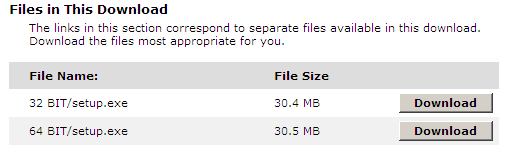
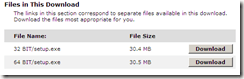
Visit the download page for Microsoft Virtual PC 2007 download page for Microsoft Virtual PC 2007 sp1 and then select the appropriate version for your system (that is, 32- or 64-bit version).
image

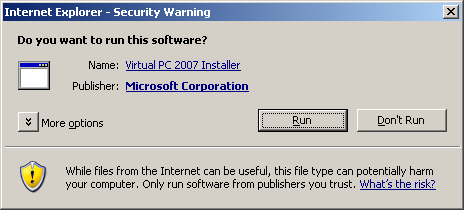
Once downloaded, install it.

image

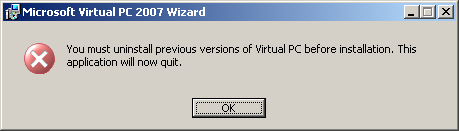
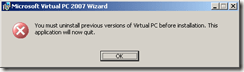
If you already have an earlier version of Virtual PC installed, you will likely see this self-explanatory message to uninstall the older version. If you are upgrading to Virtual PC 2007 sp1 from Virtual PC 2007, the installer will handle it for you.
image

Go to your trusty Add or Remove Programs applet and remove any remnants of old Virtual PC installs and proceed.

You can run Virtual PC 2007 and look in Help > About to see which version you are running. Version “Microsoft Virtual PC 6.0.192.0” is Virtual PC 2007 sp1, which is the one expected by the rest of this post.

Installing Microsoft Virtual PC 2007

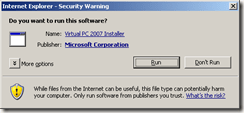
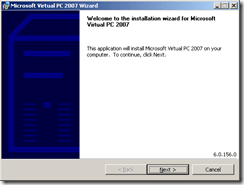
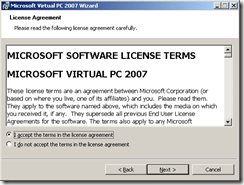
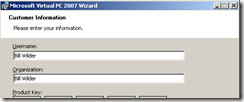
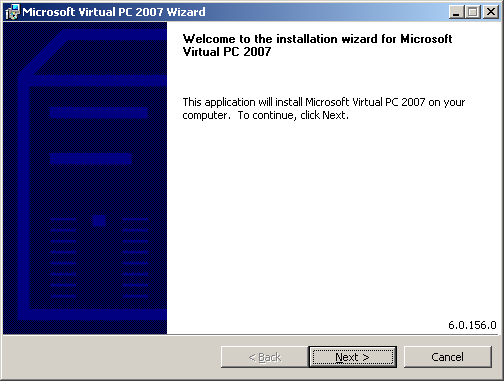
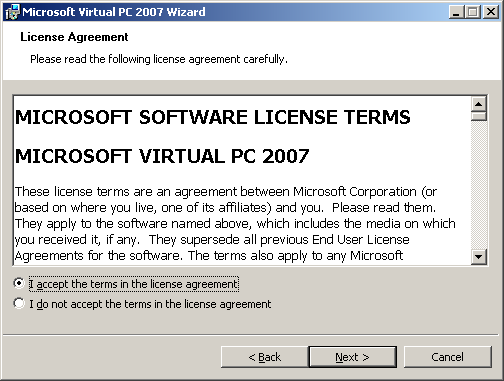
Run Virtual PC 2007 installer

image

image

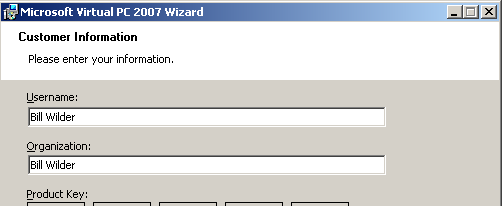
image

.. fill in your own info here, of course.
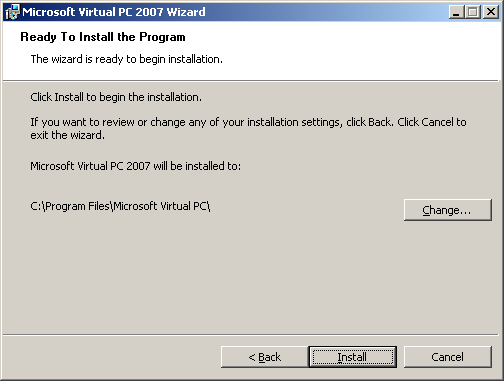
image

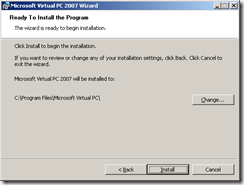
I kept the default installation location and let it rip. It completed around 2 minutes later.

NOW GET DOWN TO BUSINESS!

Create fresh Windows 7 virtual machine environment using Microsoft Virtual PC 2007

Download Your Windows 7 ISO Image

In order to install Windows 7, you need a copy of Windows 7. This could be a retail version of Windows 7 (from a DVD), but let’s make the assumption here that since you are a developer, you will be using a download image from MSDN that comes down as an ISO file, such as en_windows_7_professional_x86_dvd_x15-65804.iso. Note that you will need to install a 32-bit operating system to run under Virtual PC 2007. Log in to your MSDN account and select an appropriate version of Windows 7 to download, download it, and also be sure to copy the Activation Key (if applicable).

Run Upgrade Advisor

You may wish to run the Windows 7 Upgrade Advisor on your machine to make sure Windows 7 will be happy (as of this writing, the upgrade advisor tool is in beta). Assuming that goes well..

Run Virtual PC 2007

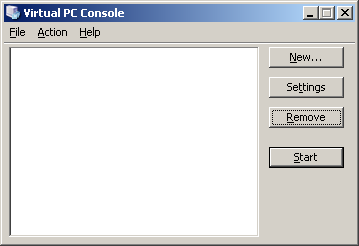
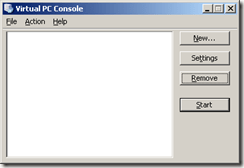
Run Microsoft Virtual PC 2007. From the opening screen, click the “New…” button:
image

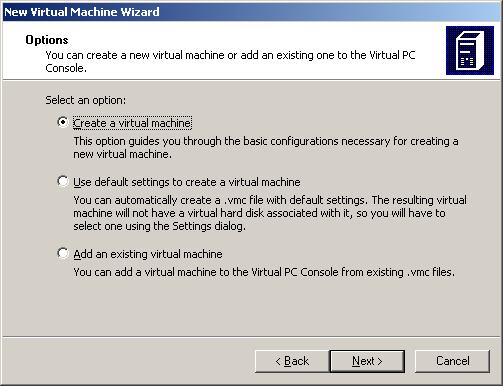
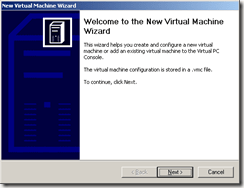
The wizard will start. Click the “Next >” button:
image

image

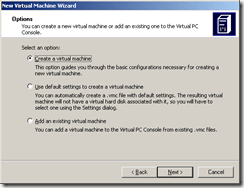
Select “Create a virtual machine” and click “Next >” button…

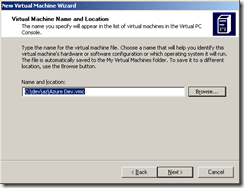
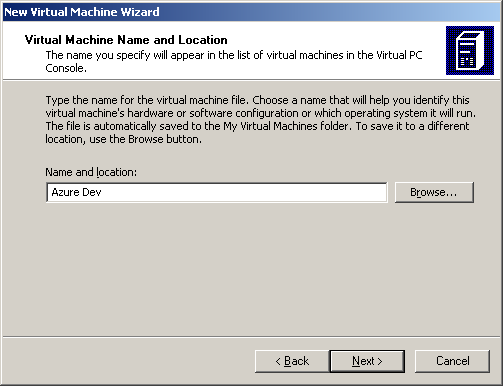
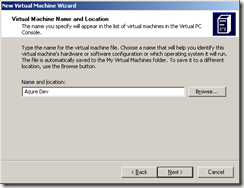
Give your new Virtual Machine an appropriate name:
image

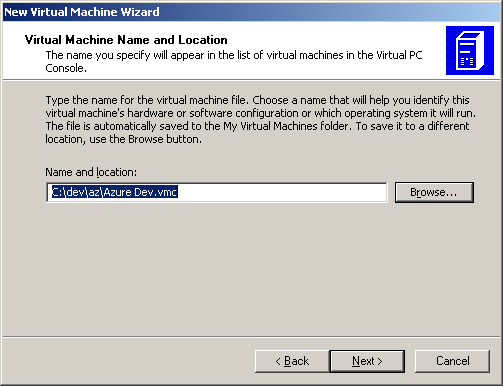
I also changed my location:

image

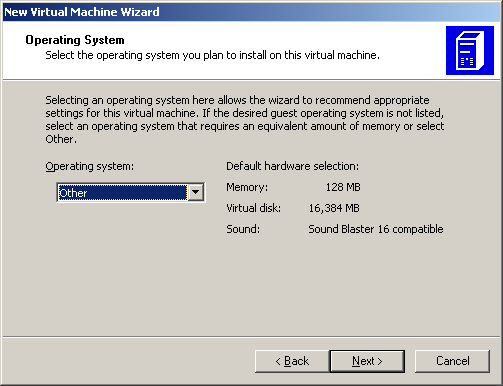
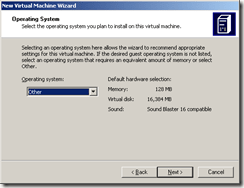
Select “Other” as Operating system and click “Next >” …
image

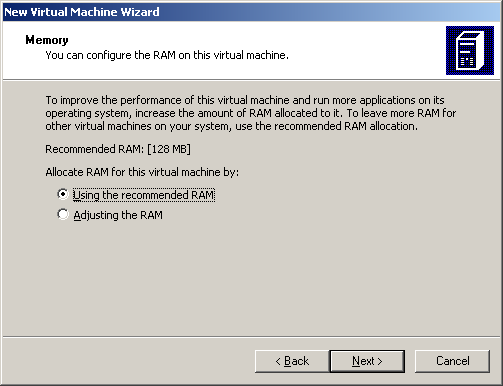
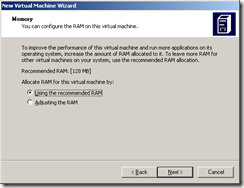
The recommended RAM will likely not be sufficient, so click “Adjusting the RAM” option:
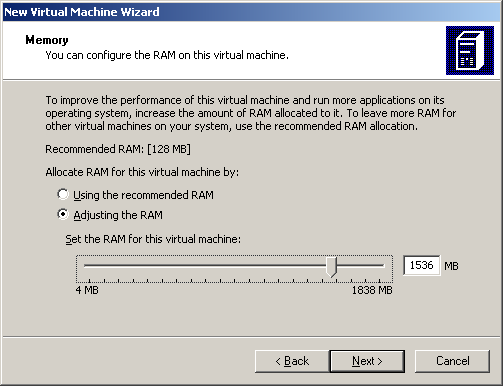
image

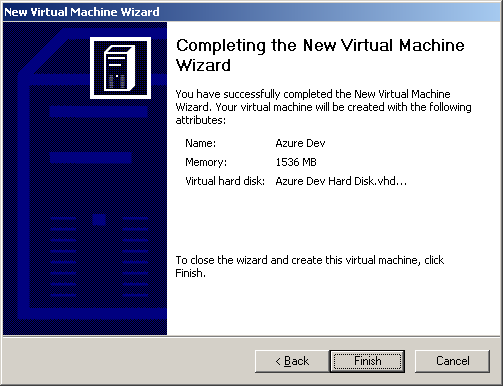
How much memory is right? Considering Windows 7 system requirements (which call for at least 1 GB in the 32-bit version) and Visual Studio 2010 (beta 1) system requirements (which also calls for 1 GB (though not an additional 1 GB), you will hopefully be able to allocate at least 1 GB. I have 3 GB on my host machine, so I allocated 1.5 GB (1024 MB + 512 MB = 1536 MB). These values can also be tweaked later using Virtual PC.
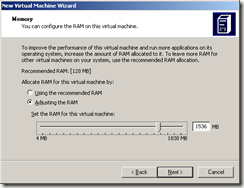
image

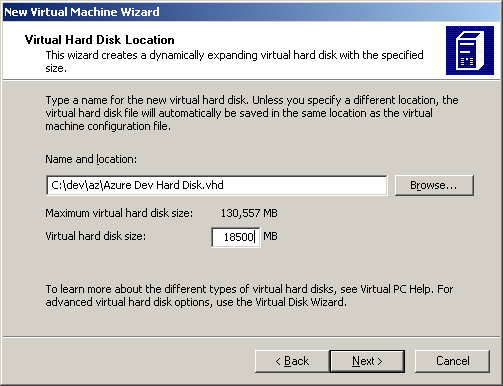
I chose to create a new virtual disk:
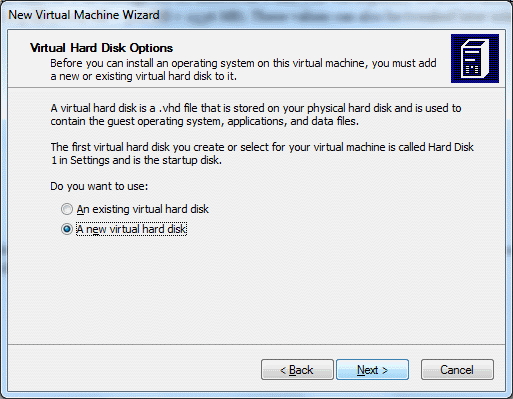
For disk space, you have another set of decisions – Windows 7 wants 15 GB, Visual Studio 2010 wants 3 GB, so I rounded up to a nice even 18.5 GB (since I don’t have an abundance of space here):
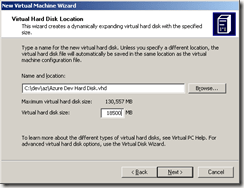
image

Click “Next >” and you are almost done with this step.
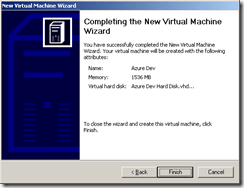
image

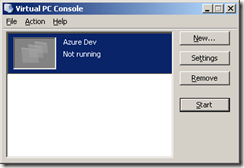
Click “Finish” and now we are in business within Virtual PC:
image

Click on “Azure Dev” (or whatever you called your image) and click “Start” button to proceed:

If you have trouble starting your virtual machine due to not enough memory available, as in the following message, you either need to adjust its memory requirements of free up some memory.

You might consider throttling back your Anti-Virus software which could be a big consumer of memory (I disabled the on-the-fly file-system protection). Also, of course, close all unnecessary processes. The long-term solution is to buy a 64-bit machine with oodles of memory and be happy with that.

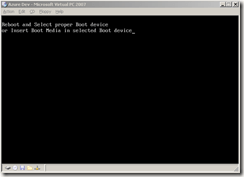
Once you have enough memory available, you will see the virtual machine complain very soon as it craps out after spinning up and thinking for a couple of minutes:
image

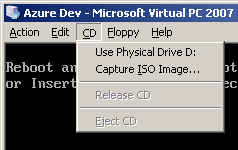
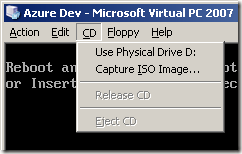
This is expected. You still need to install Windows 7 to move this along. To do this, make sure you have a ready-to-go image of Windows 7 as an ISO file (as you might download from MSDN) or physical media. You have two menu options, one for each of these cases:
image

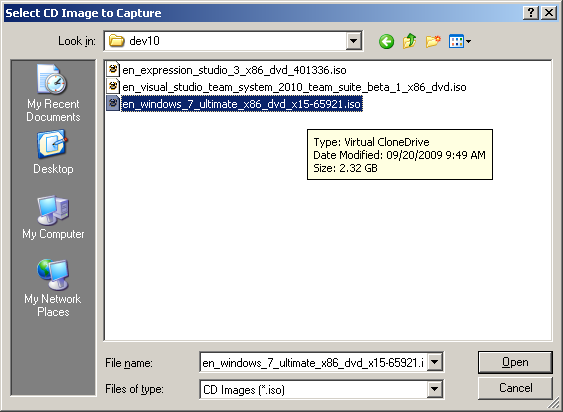
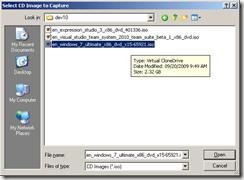
In my case, I selected “Capture ISO Image…” and installed from there. Note that you navigate your host file-system for the ISO image to capture – not the file-system on your virtual machine, since that does not yet exist.
image

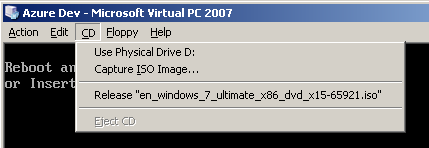
Click “Open” and notice how the CD menu on the virtual machine has been updated:
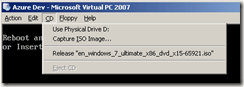
image

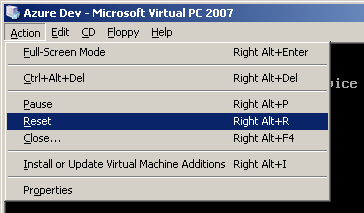
Now you can reboot your virtual machine to let the installation on the captured ISO image run (as if it was auto-starting to install on a physical machine). To reboot, choose Reset from the Action menu:
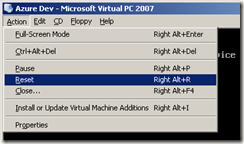
image

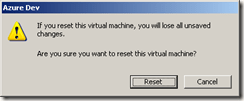
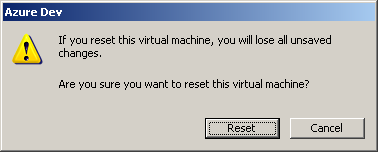
You will be warned:

image

But since you don’t have any unsaved changes to worry about, select the Reset button and proceed with the reset. (You have saved some information, you may be thinking, like memory and hard disk configuration; but that is all metadata about your image – not changes within the virtual machine itself – so there is no problem here.)

The reset begins…
image

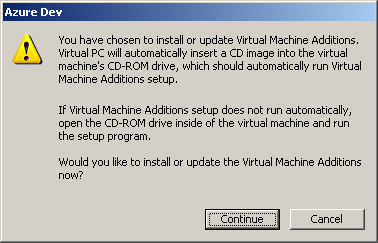
Here is a warning which we will come back to. Dismiss this for now:
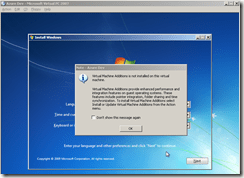
image

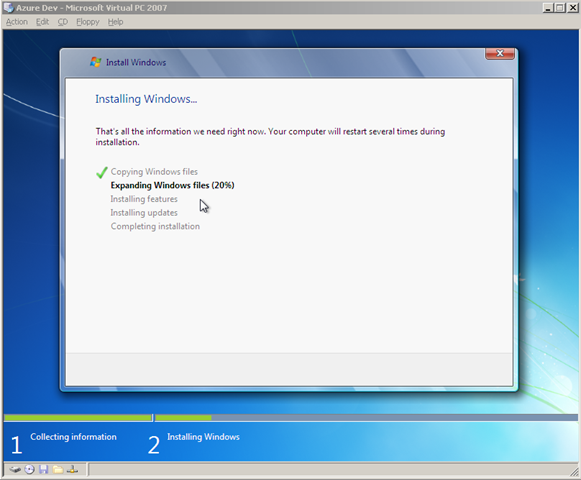
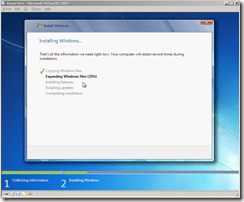
The system will chug and chug for a looong time – mine took around two hours to run (the good news is I let this run while I was watching the New England Patriots game this Sunday; the bad news is the Patriots fell to the Jets):
image

You will then proceed to install Windows 7 … mostly you will be just moving along without much fanfare, though you will need to name your “computer”, come up with a username (and optionally a password), and will need your Activation Key for Windows 7. Here is a good guide for installing Windows 7 on Virtual PC 2007. (And another.)

Don’t that forget the magic key/mouse combo to un-capture your mouse from the Virtual Machine is Right-Alt while dragging the mouse!!
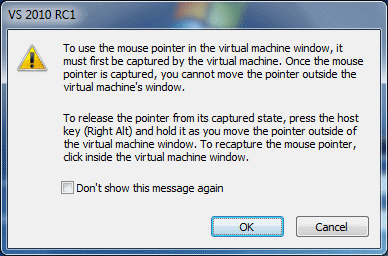
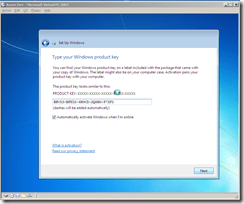
image

After you get Windows 7 all configured, you probably still want to come back and install some updates:
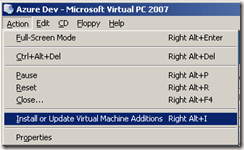
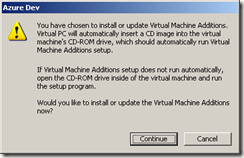
image

image

But that’s the end of the detailed tour. You should now have a usable baseline virtual machine image that you can reuse, share, play with, etc. Make sure you create a back-up copy! And have a look at the features which allow you to manage roll-backs.

Good luck!
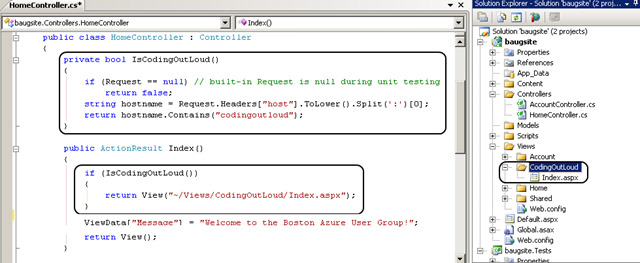
Boston Azure User Group

Coming soon – a new user group for the Boston/Cambridge/Waltham area:

The Boston Azure User Group will focus on Cloud Computing, specifically as it relates to Microsoft’s Windows Azure platform.

This group will likely kick-off in October 2009 – exact date to be determined – exact dates have now been determined – now working on the times 🙂  – see the Boston Azure User Group site for details and updates – and to join the mailing list.

What would YOU like to see covered in the meetings of the Boston Azure User Group? Please leave a comment with your thoughts / feedback.

And see you at the Boston Azure User Group!
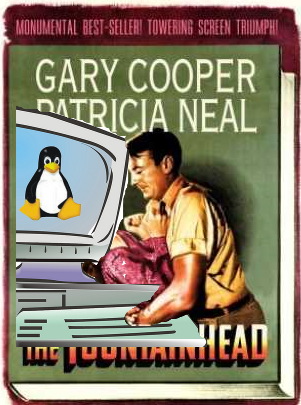
The Fountainhead of Open Source

Just watched the The Fountainhead movie from 1946 (yes, from netflix).

Howard Rourke hacking Open Source code

Howard Rourke hacking Open Source

Here is the plot summary, brought up-to-date:

  • Open Source is represented by the protagonist, a brilliant architect named Howard Rourke. Rourke is idealistic, does his own thing, is uncompromising, and is not driven by money or recognition – and certainly not by Big Business.
  • Big Business is  represented by newspaper magnate Gail Wynand. Wynand wields substantial influence and is in perpetual pursuit of any means to incite the populace – an energized populace buys more product.
  • Consultants and Certified Vendor X Developers and Vendor Partners are represented by  architect Peter Keating. Keating goes with the flow, producing whatever the powers that be say is desirable. At one point, he mentions to Ms. Francon he’s polling folks on what they think of Rourke’s latest building to which she responds (with some disdain) “why, so you’ll know what you think of it?”

Lessons:

  • Talent != influence. Keating’s influence is limited to those who recognize his greatness. Most only recognize as great what they are told to recognize as great.
  • Passion can be directed constructively (Rourke pours his love into his life’s work) or destructively (Wynand devotes his career to controlling the masses through his newspaper).

The movie is based a book of the same title. The author, Ayn Rand, became well known for her Objectivism philosophy of life, exemplified in the movie by Gary Cooper who played the lead character, Howard Roark. [I wonder what Richard Stallman thinks of the book?]

I wonder how many professional software developers identify more with Howard Rourke or Peter Keating? And which is more desirable?

Any my clean analogies fall apart when one considers the combinations of Big  Business and Open Source. Microsoft just announced CodePlex.org and the CodePlex Foundation “to enable the exchange of code and understanding among software companies and open source communities.”

A dirty little secret of Eclipse, Linux, Apache and other high-profile projects is that they also have professional, full-time staff – sponsored by Big Business (like IBM) – since the success of these endeavors is strategic for their business.

Maybe Open Source isn’t as pure as the romantic notion of developers from around the world contributing since it was a nice thing to do. The world-wide altruistic contributions may still be there in some cases, just supplemented by Big Business. Which is okay with me, though might not be with Howard Rourke.

Continue reading

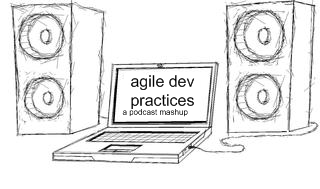
A Podcast Mashup for Agile Development Practices (hosted on SpokenWord.org)

Agile Development Practices Podcast

Delivered as a Podcast Mashup

Executive Summary

I’ve created a Podcast Mashup on SpokenWord.org. This is a hand-picked collection of episodes selected from assorted Podcasts (from other, currently-available sources, nothing originated by me!) which provided particularly insightful coverage of topics important in Agile Development Practices.

The RSS feed is here: http://feeds.feedburner.com/AgileDevPractices (wrapped by Feedburner so I have some idea of how many folks are using it).

Be aware that subscribing to a feed containing more than one episode will often only download for you the latest episode, unless you specifically ask for others.

A longer, more detailed discussion follows.

Motivation for Providing a Curated Feed

Okay, I admit it: I have been a heavy user of Podcasts for a very long time. I’ve been using audio downloaded from the web since before iPods existed and RSS feeds were pervasive – and surely long before the term Podcast became part of our vocabulary.

3,753 podcast episodes.. that'll keep me busy

This screen clipping from iTunes is showing there are a whopping 3,754 podcast episodes sitting on my hard disk; good thing I have a spacious 160GB iPod Video Classic!

Yes, I have several thousand episodes from a wide-range of Podcasts – from 120 Podcast feeds – all sitting in iTunes on my hard disk, and being sync’d to my trusty iPod Video Classic, consuming around 75% of its 160 gigabytes. I suppose this makes me clinically addicted. But I’m okay with that.

Many (okay, most) of my podcasts are technical in nature – I take my profession (software development) very seriously and remain permanently paranoid about ever falling behind or getting stale. I listen to a lot of excellent material (while commuting, at gym, out walking, though not while sleeping).

It is rather easy for me to recognize a worthwhile episode on a topic of interest and mark it on my iPod for future reference. (I do this by setting the episode’s “rating” – 0-5 stars – taking advantage of one of the few updates one can make on an iPod that gets sync’d back to iTunes.)

Now I want to offer something back by spreading the word. So I figure, if I am identifying these for my own benefit anyway, why not share these back with the community. I don’t know of anyone else doing this sort of curation.

By the way, I think this matters because of the astounding number of podcasts available out in the wild. I could not find a definitive number, but Steve Jobs announced back in 2007 – nearly exactly two years before this writing – that 125,000 podcasts were being published through iTunes. I believe there is value in helping each other navigate the resources available on a variety of topics – from software development to knitting. We all have limited time and we want to spend it well.

The SpokenWord.org Platform for Podcast Mashups

The cool guys like Doug Kaye who bring us the Conversations Network – with channels for IT Conversations, Social Innovation, and the recently added Computer Human Interaction (CHI) channel CHI Conversations – have gone Web 2.0 on us and are working hard on a platform – SpokenWord.org – which essentially lets individuals curate our own mini-channels, which SpokenWord calls Collections. We can share out our Collections via RSS feeds (plus other consumption options for those who create an account), which of course is the interesting part.

SpokenWord is not actually hosting any audio – SpokenWord only references existing audio (individual files or whole feeds) visible already on the web. So… This makes a SpokenWord Collection close to the moral equivalent of a bunch of Twitter Retweets – other people’s content re-disseminated. Or you could think about this as cross-cutting concern where the system is the podosphere and this related set of podcast episodes from across many podcasts is included in one convenient place (like an XML config file in an application, though this config file is an RSS feed). Or it is just like a list of recommended books; a useful list of recommended books is not just all the books from certain publishers; it is always more nuanced and far more focused than that or it just ain’t useful!

I like to think about this approach to curating & republishing as a Podcast Mashup, which I am defining as follows..

A Podcast Mashup is a curated Podcast with a theme. A Podcast Mashup is built by selectively including episodes from various sources – usually podcasts, but could even include an MP3 hanging out on the web – and combines these into a thematic whole.

This is in contrast to a feed that just aggregates other feeds; a Podcast Mashup is curated – it is selective – you want to tune in because it is “the best of” – not just “all of” – the topic. If there are two excellent episodes on the same topic, the curator may choose to just include one since there was not enough difference between the two.

Using SpokenWord’s Collection feature, I created my first Podcast Mashup this weekend on a topic of great interest to me and presumably many others: my theme is Agile Development Practices.

The process was fairly straightforward.

  1. Identify the podcast episodes of interest – the best ones that match your theme. I did this by marking them on my iPod using the zero-to-five star rating system supported on my iPod. I collected these ratings over many months of listening.
  2. The ratings are sync’d back to iTunes – so I created a Smart Playlist (filterted to only show 5-star-rated podcast episodes) to show them all at once.
  3. Make sure the episodes are known to the SpokenWord system (only 4 of the initial 16 episodes in my collection were already in SpokenWord; I needed to add 12, which surprised me); see the SpokenWord Collections FAQ for instructions for doing this. Note that I added individual episodes – which SpokenWord refers to as a program.  I did not add the entire feeds so that I could curate at the episode (program) level; this is important!
  4. Create a Collection to hold your Podcast Mashup episodes (I called mine “Agile Development Practices”)
  5. Add each episode of interest to my “Agile Development Practices” Collection
  6. Write a blog post about it 🙂 and share the feed: http://feeds.feedburner.com/AgileDevPractices

[I encourage you to check out SpokenWord.org more generally to see what else is there – I am using it more and more – and may even play with the SpokenWord API.]

What are “Agile Development Practices” anyway?

I’m glad you asked. This is the theme of my first Podcast Mashup.

Agile Developer Practices - a Podcast Mashup

Agile Developer Practices - a Podcast Mashup

Basically I am thinking about modern tactics used on the ground by today’s agile developers and development teams that just make them better. Unit Testing. Test-Driven-Development (TDD). Behavior-Driven-Development (BDD). Inversion of Control (IoC) containers. Continuous Integration. Philosophies around how to structure code (e.g., SOLID principles, Law of Demeter). Agile. Lean. Metrics (e.g., Cyclomatic Complexity – did you know it can help you know whether you have sufficient unit test coverage?). The unifying theme is those practices that some of the most successful developers are adopting. Stuff you may want to be processing so you can start to use, increase your use, improve your use, or help decide whether to use.

The content of each episode deals with one or more aspect. Usually the episodes are technology-agnostic, applicable to a Java, C#, Ruby, or Python developer, for example. (Some patterns may be deemed less applicable to some languages, especially Ruby and Python, but I won’t get into that here.)

Getting this to work in iTunes

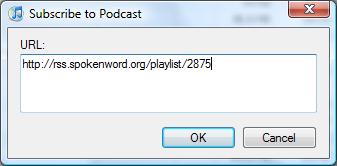
Making this work in iTunes – or your favorite Podcatcher – ought to be straight-forward. In iTunes, simply add the podcast using the Agile Development Practices RSS feed (http://feeds.feedburner.com/AgileDevPractices). In iTunes, this is accessed under the “Advanced” menu, via the “Subscribe to Podcast…” option and will look something like this:

Under "Options" menu, choose "Subscribe to Podcast..." option to get this dialog

Under "Options" menu, choose "Subscribe to Podcast..." then provide an RSS feeed URL in this dialog

iTunes Only Includes First Episode

When you first add a Podcast feed to iTunes (or other Podcatchers), if there is more than one episode, only the latest episode will be included. This may or may not be what you want generally, but in the case of a Podcast Mashup, you probably will want to manually add more episodes to your download list.

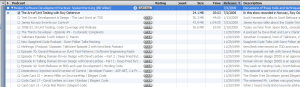
A feed with many existing episodes treated passively by iTunes

A feed with many existing episodes is treated passively by iTunes; you need to click "Get All" or click specific "Get" buttons to include others (Click on the image to zoom in)

If you want to include all of the episodes in the Podcast the first time you load it up, you can click on the “GET ALL” button.

Alternatively, you can expand the Podcast feed in iTunes (by clicking the triangle to the left of the Podcast title) and then clicking individual “GET” buttons.

What other Podcast Mashups ought to exist?

Do you find this idea useful? Is this the right granularity? Or would, say, separate Podcast Mashups for TDD, BDD, DI, and Unit Testing make sense? Or some other cut at it…

What other Podcast Mashup topics would you find useful? Which ones might you offer?

Your feedback is welcome.

Jared Spool on what makes a UI Intuitive

Jared Spool spoke at a Refresh Boston user group meeting on Thu May 28 in Cambridge, MA. During his talk, which was titled What Makes a Design Seem Intuitive?, Spool delved into some common ways User Experience (UX) goes wrong and some ways to make sure this doesn’t happen to you. My personal notes/interpretations follow; if you think I got it wrong or want to offer alternative interpretations, feel free to comment.

Executive Summary

  • Understand your users and their levels of skill/knowledge 
  • Understand the skill level needed by users of your software
  • Identify any gaps between the actual and needed skills (see two points above)
  • Design the software to bridge these skill gaps (which may vary from one user to the next)
  • Test your assumptions with real users to make sure you did everything right (Yogi Berra was right when he said You Can Observe A Lot By Watching!)

How to Create Non-Intuitive User Interfaces

First, some counter-examples – easy paths to UX Failure – how to be Non-Intuitive:

  • Do the unexpected: Spool showed an example of a site that used * (asterisk) to indicated those field “not required” which is opposite of popular convention. UX Fail.
  • Implement non-standard & sub-substandard behaviour: Spool showed a beautifully designed (visually appealing) site  with custom scrollbar that didn’t work right (pretty but not functional). They had implemented their own scrollbar functionality to get the look they wanted – but a fully-functional scrollbar is really hard to do well – theirs was jerky and unpredictable. UX Fail. (Plus a bonus Form Follows Function Fail.)
  • Be non-intuitive: Spool showed “Hay Net” – a very simple site to help sellers and buyers of hay find each other. This site had two main choices on the front page – “have hay”, “want hay” – but user testing showed that about half the time “have hay” was chosen to find someone who has hay, and the rest of the time chosen when I am the one who has the hay. (This might qualify as what my old friend Julianne would call “Escher words” – where the meaning flips back and forth in your mind between alternative viable interpretations much like certain of M. C. Escher‘s artwork). Wording was not intuitive, even though it was very simple. UX Fail.
  • Add non-core features until your application is large and complex: The larger and more complex an app, the harder it is to keep it intuitive. This was a general comment from the Q&A, supported by examples in his talk [Wang dedicated word processors were very complex (requiring 1-2 weeks of training to use), supplanted by WordStar, supplanted in turn by simpler Word Perfect, later supplanted itself by simpler Word (after Word Perfect had grown more complex), and now Word is really complex – tens of toolbars, including one for editing 3D graphics]. But simple does not imply intuitive (see “Hay Net” example above). UX Fail, again and again.

Different Kinds of People

  • Key point: Intuitive is personal – maybe it works for me, not for you — it is unlikely that all possible users have identical knowledge
  • Prior experience of the user matters – where are the on the Knowledge Continuum?

What is this Knowledge Continuum you speak of? Imagine a continuum where the left-most end is “No knowledge” and the right-most end is “Full knowledge” and your UI is designed for users somewhere on that continuum. If the user’s current level of knowledge is less than the level to which you target your design, your software has a problem – there is a gap that needs to be overcome.

A design is intuitive if the Current Level of Knowledge = Target Level of Knowledge, or if the gap is small enough such that it can be bridged with good UI design. If the gap is too large, you may need training (whether online on in-person).

Two types of Knowledge

  • Tool Knowledge (for a specific tool – Word, Visual Studio, TurboTax)
  • Domain Knowledge (independent of this (or any specific) tool – writing, developing in C#, creating personal tax return with weak tax-code depth)

Techniques for Creating Intuitive Designs

  • Field Studies (watch your users in action)
  • Usability Studies
  • Personas
  • Patterns (reuse known good patterns)

Specific Examples for Creating Intuitive Designs

  • Bring Target closer to Current w/o resorting to training or help. This means your software needs to target the right knowledge level – find that target using the techniques listed above – remember: Developer/Designer does not have same knowledge level as User (at least mostly true).
  • Wizards can reduce target knowledge requirements (bridging that knowledge gap).
  • If your user base consists of very different Current Knowledge levels (e.g., home tax preparation vs. professional tax preparers) you can create two (or more?) specialized/targeted applications.
  • Every six weeks, every member of design team needs to watch users using the design for two hours.
  • Don’t hire an agency to design your experience. (Spool thought it was fine to have an agency implement your application, but you need to design it first if you want to be successful.)

Further Information

Here is an older article by Jared Spool on the same topic as this talk: http://www.uie.com/articles/design_intuitive/ (thanks Joan).

UIE Resources

Is “UTF-8” case-sensitive in XML declaration?

At the beginning of an XML document, the XML declaration can optionally declare the document’s encoding format. This typically looks something like this:

<?xml version="1.0" encoding="UTF-8"?>

Sometimes you’ll see the encoding as “UTF-8” or “UTF-16” (all caps), sometimes as “utf-8” or “utf-16” (lowercase). Which is correct? Or are both correct? The short answer is that the uppercase variant is preferred, but both are allowed, though that does not ensure that both variants are widely supported. This suggests the following recommended approach:

Be forgiving when reading, strict when writing. When consuming XML, you are fully standards-compliant by supporting case-insensitive parsing of the encoding format. When producing XML, you are still standards-compliant by generating an uppercase encoding format, while also more likely to be readable by potential consumers.

Often the journey is more interesting than the destination when it comes to deciphering Internet standards; read on for the gory details.

Hmmm... is "UTF-8" in upper case, or lower case?

Hmmm… should “UTF-8” be in uppercase, or is it lowercase?

At first blush, the lowercase usage appears consistent with XHTML (which requires elements and attributes to be lowercase) – but does this convention apply to an XML Processing Instruction (which is metadata, not content)?

According to the W3C Recommendation for Extensible Markup Language (XML) 1.0 (Fourth Edition) section 4.3.3 Character Encoding in Entities:

“XML processors SHOULD match character encoding names in a case-insensitive way and SHOULD either interpret an IANA-registered name as the encoding registered at IANA for that name or treat it as unknown.”

Looking up the values in the Internet Assigned Numbers Authority (IANA) registry for the official spellings of the encoding values, you will find “UTF-8” and “UTF-16” – listed in uppercase. IANA also cross-references RFC-3629 which also goes with all caps. And all of the examples around the XML Recommendation seem to use uppercase exclusively.

So the uppercase versions appear to be the “right” ones.

But are the lowercase versions actually wrong? They might be. The meaning of the word “SHOULD” in the above quoted text is governed by RFC 2119 where it is defined to mean:

“… that there may exist valid reasons in particular circumstances to ignore a particular item, but the full implications must be understood and carefully weighed before choosing a different course.”

If the writers of the XML specification wanted to insist that processors always treat this in a case-insensitive manner, the word “MUST” would have been used from RFC 2119.

So a processor can choose to ignore the part of the XML Recommendation where case-insensitive processing is suggested, and still be within the standard. A processor must always support uppercase; further, a processor only supporting uppercase is perfectly legal. Even if an uppercase only processor seems unlikely, I’m going to standardize on all caps when I create XML files.

What about other character encodings, or what if one is not specified?

A character encoding need not be explicitly specified; if it is not specified,  UTF-8 is default.

UTF-8 and UTF-16 are “universally” supported by XML parsers (by standard requirement); ISO-8859-1 is also often supported, but that char set is less complete (e.g., euro symbol missing).

Wikipedia says:

“The root element can be preceded by an optional XML declaration. This element states what version of XML is in use (normally 1.0); it may also contain information about character encoding and external dependencies.

The specification requires that processors of XML support the pan-Unicode character encodings UTF-8 and UTF-16 (UTF-32 is not mandatory). The use of more limited encodings, such as those based on ISO/IEC 8859, is acknowledged and is widely used and supported.”

These details and conventions are important to anyone generating XML files, such as for bloggers and podcasters publishing in the RSS and ATOM formats.

In summary, if you are producing XML files, it is best to output uppercase “UTF-8” and “UTF-16” since that is always known to be supported. If you are consuming XML files, it is advisable to accept both uppercase and lowercase variants since both are permissible within a strict interpretation of the, uh, “letter” of the standards. And if you are consuming XML files, be sure to handle the case where the optional encoding is not specified at all; the default value is “UTF-8” if nothing else is specified.

Also of interest:

Note added 29-March-2011:

Above it states “Be forgiving when reading, strict when writing.” This is similar to Postel’s Law (aka Robustness Principle), which states:

Be conservative in what you send; be liberal in what you accept.

Since mine is consistent with this, while also more specific, I will consider it simply an appropriate specialization of Postel’s Law and leave it as is.

Blogged with Flock

Tags: ,

Prism Talk – Slides and Code

I have spoken a few times recently (NH Code Camp 1 on 28-Feb-2009, Beantown .NET User Group on 05-Mar-2009, and Boston Code Camp 11 on 28-Mar-2009) on building composite applications for Silverlight and WPF using Prism (which is officially known as Composite Application Guidance for WPF and Silverlight). The slide deck and sample code are essentially the same in all cases, so I am only posting them once.

Recall from the talk that the Save As Podcast code was a (partial) demonstration of moving from “old school” code-behind WinForm pattern into Silverlight and WPF using a newer, cleaner pattern called Model-View-ViewModel and going on to leverage functionality specific to Prism. This code is a partial transformation of that code. To compile, you should first install Prism (aka Composite Application Guidance for WPF and Silverlight) and then essentially replace the “Hello World” QuickStart with this code – that will make your life easier since the projects will retain the relative links to other libraries.