A Podcast Mashup for Agile Development Practices (hosted on SpokenWord.org)

Agile Development Practices Podcast

Delivered as a Podcast Mashup

Executive Summary

I’ve created a Podcast Mashup on SpokenWord.org. This is a hand-picked collection of episodes selected from assorted Podcasts (from other, currently-available sources, nothing originated by me!) which provided particularly insightful coverage of topics important in Agile Development Practices.

The RSS feed is here: http://feeds.feedburner.com/AgileDevPractices (wrapped by Feedburner so I have some idea of how many folks are using it).

Be aware that subscribing to a feed containing more than one episode will often only download for you the latest episode, unless you specifically ask for others.

A longer, more detailed discussion follows.

Motivation for Providing a Curated Feed

Okay, I admit it: I have been a heavy user of Podcasts for a very long time. I’ve been using audio downloaded from the web since before iPods existed and RSS feeds were pervasive – and surely long before the term Podcast became part of our vocabulary.
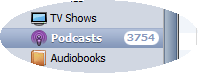
3,753 podcast episodes.. that'll keep me busy

This screen clipping from iTunes is showing there are a whopping 3,754 podcast episodes sitting on my hard disk; good thing I have a spacious 160GB iPod Video Classic!

Yes, I have several thousand episodes from a wide-range of Podcasts – from 120 Podcast feeds – all sitting in iTunes on my hard disk, and being sync’d to my trusty iPod Video Classic, consuming around 75% of its 160 gigabytes. I suppose this makes me clinically addicted. But I’m okay with that.

Many (okay, most) of my podcasts are technical in nature – I take my profession (software development) very seriously and remain permanently paranoid about ever falling behind or getting stale. I listen to a lot of excellent material (while commuting, at gym, out walking, though not while sleeping).

It is rather easy for me to recognize a worthwhile episode on a topic of interest and mark it on my iPod for future reference. (I do this by setting the episode’s “rating” – 0-5 stars – taking advantage of one of the few updates one can make on an iPod that gets sync’d back to iTunes.)

Now I want to offer something back by spreading the word. So I figure, if I am identifying these for my own benefit anyway, why not share these back with the community. I don’t know of anyone else doing this sort of curation.

By the way, I think this matters because of the astounding number of podcasts available out in the wild. I could not find a definitive number, but Steve Jobs announced back in 2007 – nearly exactly two years before this writing – that 125,000 podcasts were being published through iTunes. I believe there is value in helping each other navigate the resources available on a variety of topics – from software development to knitting. We all have limited time and we want to spend it well.

The SpokenWord.org Platform for Podcast Mashups

The cool guys like Doug Kaye who bring us the Conversations Network – with channels for IT Conversations, Social Innovation, and the recently added Computer Human Interaction (CHI) channel CHI Conversations – have gone Web 2.0 on us and are working hard on a platform – SpokenWord.org – which essentially lets individuals curate our own mini-channels, which SpokenWord calls Collections. We can share out our Collections via RSS feeds (plus other consumption options for those who create an account), which of course is the interesting part.

SpokenWord is not actually hosting any audio – SpokenWord only references existing audio (individual files or whole feeds) visible already on the web. So… This makes a SpokenWord Collection close to the moral equivalent of a bunch of Twitter Retweets – other people’s content re-disseminated. Or you could think about this as cross-cutting concern where the system is the podosphere and this related set of podcast episodes from across many podcasts is included in one convenient place (like an XML config file in an application, though this config file is an RSS feed). Or it is just like a list of recommended books; a useful list of recommended books is not just all the books from certain publishers; it is always more nuanced and far more focused than that or it just ain’t useful!

I like to think about this approach to curating & republishing as a Podcast Mashup, which I am defining as follows..

A Podcast Mashup is a curated Podcast with a theme. A Podcast Mashup is built by selectively including episodes from various sources – usually podcasts, but could even include an MP3 hanging out on the web – and combines these into a thematic whole.

This is in contrast to a feed that just aggregates other feeds; a Podcast Mashup is curated – it is selective – you want to tune in because it is “the best of” – not just “all of” – the topic. If there are two excellent episodes on the same topic, the curator may choose to just include one since there was not enough difference between the two.

Using SpokenWord’s Collection feature, I created my first Podcast Mashup this weekend on a topic of great interest to me and presumably many others: my theme is Agile Development Practices.

The process was fairly straightforward.

  1. Identify the podcast episodes of interest – the best ones that match your theme. I did this by marking them on my iPod using the zero-to-five star rating system supported on my iPod. I collected these ratings over many months of listening.
  2. The ratings are sync’d back to iTunes – so I created a Smart Playlist (filterted to only show 5-star-rated podcast episodes) to show them all at once.
  3. Make sure the episodes are known to the SpokenWord system (only 4 of the initial 16 episodes in my collection were already in SpokenWord; I needed to add 12, which surprised me); see the SpokenWord Collections FAQ for instructions for doing this. Note that I added individual episodes – which SpokenWord refers to as a program.  I did not add the entire feeds so that I could curate at the episode (program) level; this is important!
  4. Create a Collection to hold your Podcast Mashup episodes (I called mine “Agile Development Practices”)
  5. Add each episode of interest to my “Agile Development Practices” Collection
  6. Write a blog post about it 🙂 and share the feed: http://feeds.feedburner.com/AgileDevPractices

[I encourage you to check out SpokenWord.org more generally to see what else is there – I am using it more and more – and may even play with the SpokenWord API.]

What are “Agile Development Practices” anyway?

I’m glad you asked. This is the theme of my first Podcast Mashup.
Agile Developer Practices - a Podcast Mashup

Agile Developer Practices - a Podcast Mashup

Basically I am thinking about modern tactics used on the ground by today’s agile developers and development teams that just make them better. Unit Testing. Test-Driven-Development (TDD). Behavior-Driven-Development (BDD). Inversion of Control (IoC) containers. Continuous Integration. Philosophies around how to structure code (e.g., SOLID principles, Law of Demeter). Agile. Lean. Metrics (e.g., Cyclomatic Complexity – did you know it can help you know whether you have sufficient unit test coverage?). The unifying theme is those practices that some of the most successful developers are adopting. Stuff you may want to be processing so you can start to use, increase your use, improve your use, or help decide whether to use.

The content of each episode deals with one or more aspect. Usually the episodes are technology-agnostic, applicable to a Java, C#, Ruby, or Python developer, for example. (Some patterns may be deemed less applicable to some languages, especially Ruby and Python, but I won’t get into that here.)

Getting this to work in iTunes

Making this work in iTunes – or your favorite Podcatcher – ought to be straight-forward. In iTunes, simply add the podcast using the Agile Development Practices RSS feed (http://feeds.feedburner.com/AgileDevPractices). In iTunes, this is accessed under the “Advanced” menu, via the “Subscribe to Podcast…” option and will look something like this:
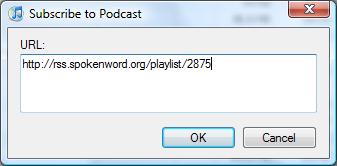
Under "Options" menu, choose "Subscribe to Podcast..." option to get this dialog

Under "Options" menu, choose "Subscribe to Podcast..." then provide an RSS feeed URL in this dialog

iTunes Only Includes First Episode

When you first add a Podcast feed to iTunes (or other Podcatchers), if there is more than one episode, only the latest episode will be included. This may or may not be what you want generally, but in the case of a Podcast Mashup, you probably will want to manually add more episodes to your download list.
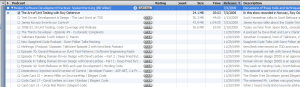
A feed with many existing episodes treated passively by iTunes

A feed with many existing episodes is treated passively by iTunes; you need to click "Get All" or click specific "Get" buttons to include others (Click on the image to zoom in)

If you want to include all of the episodes in the Podcast the first time you load it up, you can click on the “GET ALL” button.

Alternatively, you can expand the Podcast feed in iTunes (by clicking the triangle to the left of the Podcast title) and then clicking individual “GET” buttons.

What other Podcast Mashups ought to exist?

Do you find this idea useful? Is this the right granularity? Or would, say, separate Podcast Mashups for TDD, BDD, DI, and Unit Testing make sense? Or some other cut at it…

What other Podcast Mashup topics would you find useful? Which ones might you offer?

Your feedback is welcome.

Jared Spool on what makes a UI Intuitive

Jared Spool spoke at a Refresh Boston user group meeting on Thu May 28 in Cambridge, MA. During his talk, which was titled What Makes a Design Seem Intuitive?, Spool delved into some common ways User Experience (UX) goes wrong and some ways to make sure this doesn’t happen to you. My personal notes/interpretations follow; if you think I got it wrong or want to offer alternative interpretations, feel free to comment.

Executive Summary

  • Understand your users and their levels of skill/knowledge 
  • Understand the skill level needed by users of your software
  • Identify any gaps between the actual and needed skills (see two points above)
  • Design the software to bridge these skill gaps (which may vary from one user to the next)
  • Test your assumptions with real users to make sure you did everything right (Yogi Berra was right when he said You Can Observe A Lot By Watching!)

How to Create Non-Intuitive User Interfaces

First, some counter-examples – easy paths to UX Failure – how to be Non-Intuitive:

  • Do the unexpected: Spool showed an example of a site that used * (asterisk) to indicated those field “not required” which is opposite of popular convention. UX Fail.
  • Implement non-standard & sub-substandard behaviour: Spool showed a beautifully designed (visually appealing) site  with custom scrollbar that didn’t work right (pretty but not functional). They had implemented their own scrollbar functionality to get the look they wanted – but a fully-functional scrollbar is really hard to do well – theirs was jerky and unpredictable. UX Fail. (Plus a bonus Form Follows Function Fail.)
  • Be non-intuitive: Spool showed “Hay Net” – a very simple site to help sellers and buyers of hay find each other. This site had two main choices on the front page – “have hay”, “want hay” – but user testing showed that about half the time “have hay” was chosen to find someone who has hay, and the rest of the time chosen when I am the one who has the hay. (This might qualify as what my old friend Julianne would call “Escher words” – where the meaning flips back and forth in your mind between alternative viable interpretations much like certain of M. C. Escher‘s artwork). Wording was not intuitive, even though it was very simple. UX Fail.
  • Add non-core features until your application is large and complex: The larger and more complex an app, the harder it is to keep it intuitive. This was a general comment from the Q&A, supported by examples in his talk [Wang dedicated word processors were very complex (requiring 1-2 weeks of training to use), supplanted by WordStar, supplanted in turn by simpler Word Perfect, later supplanted itself by simpler Word (after Word Perfect had grown more complex), and now Word is really complex – tens of toolbars, including one for editing 3D graphics]. But simple does not imply intuitive (see “Hay Net” example above). UX Fail, again and again.

Different Kinds of People

  • Key point: Intuitive is personal – maybe it works for me, not for you — it is unlikely that all possible users have identical knowledge
  • Prior experience of the user matters – where are the on the Knowledge Continuum?

What is this Knowledge Continuum you speak of? Imagine a continuum where the left-most end is “No knowledge” and the right-most end is “Full knowledge” and your UI is designed for users somewhere on that continuum. If the user’s current level of knowledge is less than the level to which you target your design, your software has a problem – there is a gap that needs to be overcome.

A design is intuitive if the Current Level of Knowledge = Target Level of Knowledge, or if the gap is small enough such that it can be bridged with good UI design. If the gap is too large, you may need training (whether online on in-person).

Two types of Knowledge

  • Tool Knowledge (for a specific tool – Word, Visual Studio, TurboTax)
  • Domain Knowledge (independent of this (or any specific) tool – writing, developing in C#, creating personal tax return with weak tax-code depth)

Techniques for Creating Intuitive Designs

  • Field Studies (watch your users in action)
  • Usability Studies
  • Personas
  • Patterns (reuse known good patterns)

Specific Examples for Creating Intuitive Designs

  • Bring Target closer to Current w/o resorting to training or help. This means your software needs to target the right knowledge level – find that target using the techniques listed above – remember: Developer/Designer does not have same knowledge level as User (at least mostly true).
  • Wizards can reduce target knowledge requirements (bridging that knowledge gap).
  • If your user base consists of very different Current Knowledge levels (e.g., home tax preparation vs. professional tax preparers) you can create two (or more?) specialized/targeted applications.
  • Every six weeks, every member of design team needs to watch users using the design for two hours.
  • Don’t hire an agency to design your experience. (Spool thought it was fine to have an agency implement your application, but you need to design it first if you want to be successful.)

Further Information

Here is an older article by Jared Spool on the same topic as this talk: http://www.uie.com/articles/design_intuitive/ (thanks Joan).

UIE Resources

Is “UTF-8” case-sensitive in XML declaration?

At the beginning of an XML document, the XML declaration can optionally declare the document’s encoding format. This typically looks something like this:

<?xml version="1.0" encoding="UTF-8"?>

Sometimes you’ll see the encoding as “UTF-8” or “UTF-16” (all caps), sometimes as “utf-8” or “utf-16” (lowercase). Which is correct? Or are both correct? The short answer is that the uppercase variant is preferred, but both are allowed, though that does not ensure that both variants are widely supported. This suggests the following recommended approach:

Be forgiving when reading, strict when writing. When consuming XML, you are fully standards-compliant by supporting case-insensitive parsing of the encoding format. When producing XML, you are still standards-compliant by generating an uppercase encoding format, while also more likely to be readable by potential consumers.

Often the journey is more interesting than the destination when it comes to deciphering Internet standards; read on for the gory details.

Hmmm... is "UTF-8" in upper case, or lower case?

Hmmm… should “UTF-8” be in uppercase, or is it lowercase?

At first blush, the lowercase usage appears consistent with XHTML (which requires elements and attributes to be lowercase) – but does this convention apply to an XML Processing Instruction (which is metadata, not content)?

According to the W3C Recommendation for Extensible Markup Language (XML) 1.0 (Fourth Edition) section 4.3.3 Character Encoding in Entities:

“XML processors SHOULD match character encoding names in a case-insensitive way and SHOULD either interpret an IANA-registered name as the encoding registered at IANA for that name or treat it as unknown.”

Looking up the values in the Internet Assigned Numbers Authority (IANA) registry for the official spellings of the encoding values, you will find “UTF-8” and “UTF-16” – listed in uppercase. IANA also cross-references RFC-3629 which also goes with all caps. And all of the examples around the XML Recommendation seem to use uppercase exclusively.

So the uppercase versions appear to be the “right” ones.

But are the lowercase versions actually wrong? They might be. The meaning of the word “SHOULD” in the above quoted text is governed by RFC 2119 where it is defined to mean:

“… that there may exist valid reasons in particular circumstances to ignore a particular item, but the full implications must be understood and carefully weighed before choosing a different course.”

If the writers of the XML specification wanted to insist that processors always treat this in a case-insensitive manner, the word “MUST” would have been used from RFC 2119.

So a processor can choose to ignore the part of the XML Recommendation where case-insensitive processing is suggested, and still be within the standard. A processor must always support uppercase; further, a processor only supporting uppercase is perfectly legal. Even if an uppercase only processor seems unlikely, I’m going to standardize on all caps when I create XML files.

What about other character encodings, or what if one is not specified?

A character encoding need not be explicitly specified; if it is not specified,  UTF-8 is default.

UTF-8 and UTF-16 are “universally” supported by XML parsers (by standard requirement); ISO-8859-1 is also often supported, but that char set is less complete (e.g., euro symbol missing).

Wikipedia says:

“The root element can be preceded by an optional XML declaration. This element states what version of XML is in use (normally 1.0); it may also contain information about character encoding and external dependencies.

The specification requires that processors of XML support the pan-Unicode character encodings UTF-8 and UTF-16 (UTF-32 is not mandatory). The use of more limited encodings, such as those based on ISO/IEC 8859, is acknowledged and is widely used and supported.”

These details and conventions are important to anyone generating XML files, such as for bloggers and podcasters publishing in the RSS and ATOM formats.

In summary, if you are producing XML files, it is best to output uppercase “UTF-8” and “UTF-16” since that is always known to be supported. If you are consuming XML files, it is advisable to accept both uppercase and lowercase variants since both are permissible within a strict interpretation of the, uh, “letter” of the standards. And if you are consuming XML files, be sure to handle the case where the optional encoding is not specified at all; the default value is “UTF-8” if nothing else is specified.

Also of interest:

Note added 29-March-2011:

Above it states “Be forgiving when reading, strict when writing.” This is similar to Postel’s Law (aka Robustness Principle), which states:

Be conservative in what you send; be liberal in what you accept.

Since mine is consistent with this, while also more specific, I will consider it simply an appropriate specialization of Postel’s Law and leave it as is.

Blogged with Flock

Tags: ,

Prism Talk – Slides and Code

I have spoken a few times recently (NH Code Camp 1 on 28-Feb-2009, Beantown .NET User Group on 05-Mar-2009, and Boston Code Camp 11 on 28-Mar-2009) on building composite applications for Silverlight and WPF using Prism (which is officially known as Composite Application Guidance for WPF and Silverlight). The slide deck and sample code are essentially the same in all cases, so I am only posting them once.

Recall from the talk that the Save As Podcast code was a (partial) demonstration of moving from “old school” code-behind WinForm pattern into Silverlight and WPF using a newer, cleaner pattern called Model-View-ViewModel and going on to leverage functionality specific to Prism. This code is a partial transformation of that code. To compile, you should first install Prism (aka Composite Application Guidance for WPF and Silverlight) and then essentially replace the “Hello World” QuickStart with this code – that will make your life easier since the projects will retain the relative links to other libraries.

A generic error occurred in GDI+ when reading from MemoryStream

I am playing with TagLib#, an Open Source library that supports reading and updating ID3 metadata from MP3 files. I ran across the following error — “a generic error occurred in gdi+” — displaying a bitmap image I pulled from the MP3 file.

   TagLib.File file = TagLib.File.Create(@"foo.mp3");
   int pictureCount = file.Tag.Pictures.Length;
   System.Drawing.Bitmap bmp = null;
   if (pictureCount > 0)
   {
      System.IO.MemoryStream pictureBitstream = new System.IO.MemoryStream(
                                                    file.Tag.Pictures[0].Data.Data);
      bmp = new System.Drawing.Bitmap(pictureBitstream);
      pictureBitstream.Close();

      string fn = "foo.jpg";

      // create thumbnail
      using (System.Drawing.Image thumb =
                      bmp.GetThumbnailImage(10, 10,
                               new System.Drawing.Image.GetThumbnailImageAbort(
                                        delegate { return false; }),
                               IntPtr.Zero))
      {
         thumb.Save(Response.OutputStream, System.Drawing.Imaging.ImageFormat.Jpeg);
      }
   }

The “a generic error occurred in gdi+” message is not very helpful. I did some googling and came up with a few helpful posts on the matter, including several that appeared to be different problems. Looks like 4 Guys from Rolla have functional code.

My problem was in closing the stream too soon, which was not obvious to me at first, though makes some sense. The fix is to defer

      pictureBitstream.Close();

until after the Bitmap object is done with its work. I was initially under the illusion that once I’d created the stream for the image it read the whole image; of course that’s not true – it is not read in until it is read in.

I would submit this is a confusing UI design. Developers deserve better affordances. Good thing an exception was thrown; otherwise, this may have blown up later in a less obvious manner or at a less convenient time.

Coding Out Loud begins

“If one advances confidently in the direction of his dreams,
and endeavors to live the life which he has imagined,
he will meet with a success unexpected in common hours.”
Henry David Thoreau
from Walden

I am embarking on a coding adventure – and I plan to blog as I go. In effect, Coding Out Loud – thus the name of this blog. I do not know whether anyone will read this blog or follow my adventures, but I will give it a try anyway. I expect many of my posts will be the kind I would personally like to find – the kind I may even refer back to from time to time for reference – because it will in part be a repository of useful information, hard-won insights, interesting approaches, and documentation of thought processes for making trade-offs. My technology orientation right now is ASP.NET 2.0.

I have been a blog reader for a long time and a big fan of podcasting since its early years. For podcast listening, since September 2007 I have owned a sixth-generation iPod Video with 160 GB of space (bigger than hard drives on most of my computers – including my work computer – and I am a professional developer!); I do watch some video on this (e.g., TED), but I do like me some big hard drive (my older iPod nano constantly ran out of space from too many podcasts).

Since I am now embarking on blogging for myself the first time, I will try to make sense of features of WordPress (categories or tags?), technorati, feedburner, and others of the many technologies & services out there. Which should I care about – and why. This process may spawn blog posts.

I also do have a day job but I will not blog on it. So my adventures will be “off hours” – mornings, nights, weekends mostly – on my solo projects.

So, in summary, this blog will encompass my adventures coding + my adventures blogging (or podcasting someday..).

So the journey begins…