Category Archives: Programming

Related to some aspect of programming, software development, related tools, or supporting technologies, related standards, etc.

May 2011 Azure Cloud Events in Boston Area

Are you interested in Cloud Computing generally, or specifically Cloud Computing using the Windows Azure Platform? Listed below are the upcoming Azure-related events in the Greater Boston area which you can attend in person and for FREE (or at least inexpensively).

They are listed in the order in which they will occur.

Know of any more cloud events of interest to the Windows Azure community? Have any more information or corrections on the events listed? Please let us know in the comments.

1. New England Code Camp

  • when: Sat 07-May-2011, 8:30 AM – 6:00 PM
  • where: Microsoft Waltham (Jones Road)
  • wifi: (unknown, but probably just for speakers)
  • food: Provided (usually pizza & salad)
  • cost: Free
  • what: Developer-focused mini-conference on a wide range of topics
  • More info & Register: http://thedevcommunity.org

2. Jeffrey Richter from Wintellect will be presenting a free, in-person Windows Azure Deep Dive

  • when: Mon 16-May-2011, all day
  • where: Waltham
  • wifi: (unknown)
  • food: (unknown)
  • cost: FREE (registration required)
  • what: Deep Dive on Windows Azure
  • More info: See Jim O’Neil’s blog post for details
  • Register: Note there are two ways to register from this page – in person, or webinar – the webinar is a link, but the in person event form is on this page directly: https://www.wintellect.com/Training/Webinar/Registration

3. NHDN – New Hampshire .NET – Concord

  • when: Wed 25-May-2011, 6:00 – 8:00 PM
  • where: New Hampshire Technical Institute 31 College Drive Concord, NH 03301, Grappone Hall, Room 106
  • wifi: not sure
  • food: I think they do dinner afterwards
  • cost: FREE
  • what: Demystifying the Cloud and an overview of Microsoft’s public cloud platform, Windows Azure
  • More info: here
  • Register: here

4. Boston Azure User Group meeting on PowerShell and how to use it with Windows Azure

  • when: Thu 26-May-2011, 6:00 – 8:30 PM
  • where: Hosted at NERD Center
  • wifi: Wireless Internet access will be available
  • food: Pizza and drinks will be provided
  • cost: FREE (registration appreciated)
  • what: What is PowerShell, why do you care, and how can you use its awesome power to help with Windows Azure. PowerShell MVP Joel Bennett is the featured speaker.
  • More info: See Boston Azure cloud user group site for details
  • Register: here

Coming in June:

  • 24 Hours in the Cloud
  • Cloud Camp Boston
  • The Architect Factory
  • Boston Azure
  • Beantown .NET (Architecture Patterns in the cloud)
  • Hartford Code Camp
  • New Hampshire Code Camp
  • And more? Please let me know in the comments if you know about an event relevant to those who care about the Windows Azure Platform

My SQL Saturday Talk: “Storing Data in the Cloud: Beyond SQL Azure”

I spoke today at SQL Saturday #71 where I gave a talk on “Storing Data in the Cloud: Beyond SQL Azure” where I talk about the following:

  • What is the Cloud
  • How does SQL Azure compare with SQL Server
  • What are the other storage options available on the Windows Azure Platform

There were many interesting questions from the audience of 20 or so people – One asked (paraphrasing here..) “Are the Microsoft Data Centers resilient to the radiation expected from a nuke” to which I did not have a good answer. To another question, Jeff Mlakar (@JeffMlakar) offered helpfully that the SQL Azure Data Sync service is an option for SQL Azure backups to on-prem and with geo-replicating SQL Azure across data centers.

We didn’t get to the end of the material due to lots of discussion… but we did get through the most critical concepts.

April 2011 Azure Cloud Events in Boston Area

Are you interested in Cloud Computing generally, or specifically Cloud Computing using the Windows Azure Platform? Listed below are the upcoming Azure-related events in the Boston/Cambridge area which you can attend in person and for FREE (or at least inexpensive).

They are listed in the order in which they will occur.

Know of any more cloud events of interest to the Windows Azure community? Have any more information or corrections on the events listed? Please let us know in the comments.

1. SQL Saturday #71

  • when: Sat 02-Apr-2011, 8:30 AM – 6:00 PM
  • where: Babson College
  • wifi: (unknown)
  • food: Provided
  • cost: Cheap (registration required)
  • what: All about SQL and related topics
  • More info & Register: http://www.sqlsaturday.com/71/eventhome.aspx

2. Cloud Platform Bake-Off led by Kyle C. Quest

  • when: Fri 15-Apr-2011, 10:00 AM – ??? PM
  • where: Hosted at Cafe On the Common, 677 Main Street Waltham, MA (but please DOUBLE CHECK the location at Meetup.com listing)
  • wifi: (unknown)
  • food: (unknown)
  • cost: FREE, but pre-registration appears to be required
  • what: “Putting different cloud platforms head to head is one of the original ideas for Cloud Hackathon. I’m sure lots of people are curious how each platform can measure up to its competition.” This is a coding/hacking event on Windows Azure plus Amazon EC3, Google App Engine, and maybe others.
  • More info: See Meetup.com for details
  • Register: See Meetup.com

3. Boston Azure User Group meeting with David Makogon as featured speaker

  • when: Thu 28-Apr-2011, 6:00 – 8:30 PM
  • where: Hosted at NERD Center
  • wifi: Wireless Internet access will be available
  • food: Pizza and drinks will be provided
  • cost: FREE
  • what: Exact topics to-be-announced, but they will be awesome 🙂 David Makogon from Microsoft will be featured speaker
  • More info: See Boston Azure cloud user group site for details (soon)
  • Register: (soon)

Beyond Virtualization – Welcome to the Cloud

Virtualization – of the server, desktop, application, storage, network, and more – was a seriously disruptive force in the previous decade. Virtualization – in concert with cheap & capable commodity hardware, automation galore, ubiquitous connectivity, and some new business models – will give way to Cloud Computing during the coming decade.

Today at the Virtualization Boston Deep Dive Day 2011 event (put on by the Virtualization Group-Boston), I joined forces with the ITProGuru (aka Mr. Dan Stolts) to share some thoughts in a presentation on this megatrend – what’s going on, what it means for data centers, and what today’s IT Pro might expect from a Cloud-dominated future.

The slides are available here:

Cloud Computing Essentials for the IT Pro – Bill Wilder and Dan Stolts – 11-Mar-2011

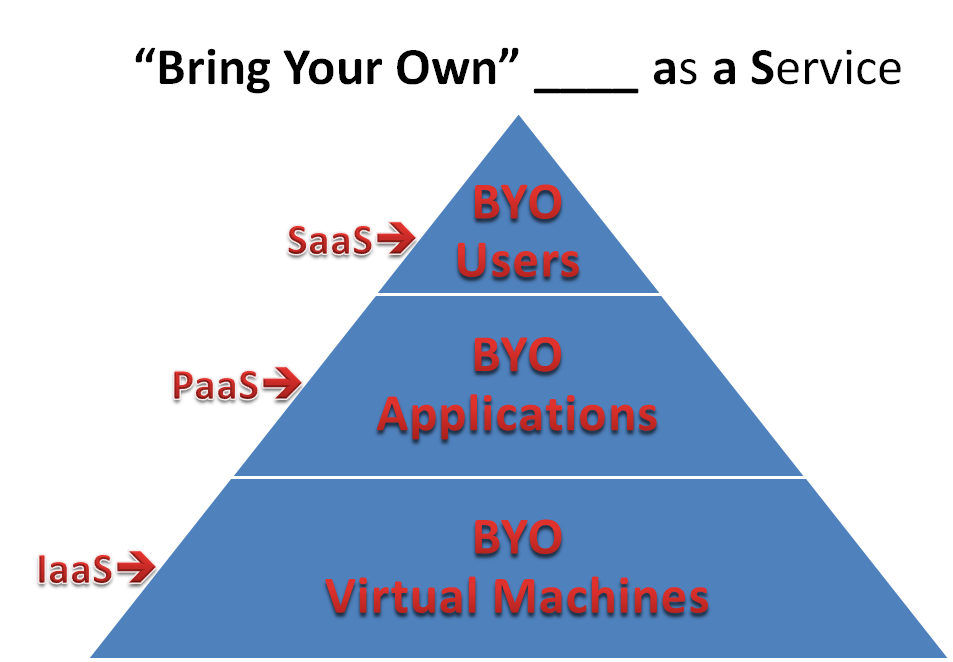
The following was not a slide all by itself, but could have been – and I think I’ll use it next time for the simplest definition I can think of for understanding SaaS, PaaS, IaaS:

I also posted a twitter-sized definition of SaaS, PaaS, and IaaS.

Boston Azure Hackathon

Do you know about the Boston Azure Hackathon to be held at NERD on Wed Feb 16, 2011?

A Hackathon You Say?

Yes, a Hackathon. This is in-person event where folks show up and hack (write code). In our case, we will meet at Microsoft NERD Center in Cambridge, MA, and our hacking will be on Windows Azure-related code.

  1. Rule #1: A Hackathon is fun! (Coding is fun when there is a lot of energy in the room… Plus, we’ll have give-aways – which always makes it even more fun, right?)
  2. Rule #2: We learn something! (We all learn better by doing. Plus, we’ll have many book give-aways – another great way to learn!)
  3. Rule #3: Aim to ship! (So don’t be overly ambitious with your idea – try to choose something that you can complete in the allotted time – then enhance it if you have extra time.)
  4. Rule #4: Goto Rule #1! (Yes, recursion abuse. Extra credit at the Hackathon if you employ recursion appropriately.)

(Did you say Windows Azure? Yes, Windows Azure is Microsoft’s platform for writing applications that will run in the cloud.)

A code base that we expect will get a lot of attention is www.bostonazure.org, which is the community’s web site, but is also a real honest-to-goodness-in-production Azure application using features like Web Role, Blob Storage, Table Storage, SQL Azure (with OData), and Azure Diagnostics. (And also an open source project on CodePlex.)

We will break up into small teams based on which subprojects people want to work on and… get coding.

Here’s the approx schedule:

  • 4:00-4:30 PM – Gather, get organized into teams, begin hacking! (We want this to be as efficient as possible so we maximize our time hacking. So please read the rest of this post to see how you can be prepared, such as by joining in the conversation on CodePlex in advance.)
  • 4:30-8:15 PM – Hack! We will break for pizza, but otherwise will crank away.
  • 8:15-9:00 PM – Show and Tell. What did you do? We will have fun seeing what everyone did, and some cool PRIZES and GIVEAWAYS. + +


Where and when?

Location: Microsoft NERD Center in Cambridge, MA. Parking available in the building (costs money), or take the T, or find on-street parking.

When: Wednesday February 16, 2011 from 4:00-9:00 PM. If you are late, that’s life, but something we can live with.

Food: Pizza will be provided.

What happens if I come late? Join a team when you get here. You will be “just in time” for something.

What do I need to do?

A few things:

  1. Sign up so we know you are coming
  2. Prepare your development laptop (www.bostonazure.org is running SDK 1.3)
  3. Join the conversation in this thread on the CodePlex space for the Boston Azure Project (where we can discuss ideas in advance of the event so we can “hit the ground running”)
  4. If you want to have access to a live, honest-to-goodness Azure-in-the-cloud instance of your own, please be sure to sign up A FEW DAYS IN ADVANCE for a Windows Azure Pass (use code: DPEA01). For very clear instructions, please check out Jim O’Neil’s screencast on signing up for Windows Azure Pass. Jim will be at the Hackathon helping out, and in case you don’t know him, Jim is definitely a friend of ours. [Note that an Azure development environment should be fine as well for most of us.]

IF YOU DO NOT HAVE YOUR OWN AZURE-CAPABLE DEV LAPTOP, then plan to pair up with someone who does…

What will we work on?

Here’s the rule: You can hack on anything you want that is either related to Windows Azure or related to the Boston Azure Community. The discussion thread mentioned above has some ideas. Add your ideas too.

This will break into three broad areas:

  1. Ehancing or adding Azure capabilities to www.bostonazure.org (generally speaking, this is what the group calls the Boston Azure Project). This does not need to be limited to .NET or ASP.NET MVC. Post your ideas to CodePlex.
  2. Writing Azure code unrelated to www.bostonazure.org (maybe a file upload utility, for example)
  3. Enhancing the Boston Azure community in ways unrelated to using Azure itself. For example, if you want to build a WP7 app for the Boston Azure community, go for it (though that could have an Azure-enabled back end). If you want to add features to www.bostonazure.org in jQuery or make it HTML5-capable, go for it. If you want to create a favicon or a privacy policy for the site, go for it.

Use your imagination.

Wait – I am not an Azure expert – is that okay?

Yes, that’s okay. We will have some folks in the room who do understand Azure, so we will help you. However, of course, it is better if you get warmed up in advance. Install the Azure dev environment. Learn a bit about Azure in advance. Download the code from bostonazure.codeplex.com to see the code for the site.

Do you have a hashtag for Twitter?

Yes: #bostonazurehack.

The Boston Azure User Group has a twitter handle: @bostonazure. My personal twitter handle is @codingoutloud.

Who do we have to thank for all this awesomeness?

Microsoft NERD Center provides the space and the food (thanks Leah!).

Microsoft people help make it happen (thanks Jim O’Neil and Mark Eisenberg – each is a friend of ours!).

And the following sponsors are providing software and books for prizes:

+ +

The event is organized by folks from the Boston Azure User Group.

Recognized as Windows Azure MVP

On a personal note, I got an email on January 1st from Microsoft informing me that I have been recognized as a Microsoft MVP for Windows Azure. This is for my community work around Windows Azure: founding the Boston Azure User Group, bloggingspeaking, and some customer advisor work with Patterns & Practices.

Thanks Microsoft!

Boston Azure User Group – Notes from November 2010 Meeting

Around 25-30 of us gathered together on November 18 to talk about Azure. What else would you expect us to do at a Boston Azure User Group meeting?

1. The featured talk led by Chander Khanna and Nazik Huq asked the provocative question Why choose the Azure cloud?  and (not surprisingly!) spirited discussion ensued. The slides are available (see link at the bottom of the page), and there is a blog post titled “Microsoft in the Clouds with Windows Azure Platform?” from Chander which considers some of the same material.

2. An Azure 101 talk was led by Mark Eisenberg. This is a challenging topic to cover, since the cloud has so many interesting concepts, and the audience at any given Boston Azure meeting always includes new faces. More Azure 101 to come at next meeting, Dec 13, 2010.

3. Several members discussed the Boston Azure Project. The most recent build includes some instrumentation changes made by Arra Derderian (part of which reused some code from Jason Haley).

4. After the meeting around 10 of us went down to the Muddy Charles Pub for a beer!

Follow me on twitter (@codingoutloud), follow the Boston Azure User Group on twitter (@bostonazure), join the low volume Boston Azure User Group email list, and come join us at an upcoming Boston Azure meeting such as our SPECIAL NIGHT FOR DECEMBER as we meet on Monday December 13, 2010 for a night of Azure-packed goodness!

As always, to see what’s COMING UP in Boston Azure meetings, check out our Azure-hosted web site at www.bostonazure.org – meetings beyond what is on the home page (if known) are listed on the Upcoming Events page.

An HTTP header that’s mandatory for this request is not specified: One Cause for Azure Error Message

I recently posted sample code that shows copying a file up to Azure Blob Storage in One Page Of Code. In repurposing the code that deals with Azure Queues, I encountered a perplexing error message in using the Azure CloudQueue class from the SDK. I was able to figure it out, and the actual solution may actually be less interesting than how the solution was discovered, so here it is…

The story of “an HTTP header that’s mandatory for this request is not specified”

First of all, my call to get a queue reference had completed without incident:

queue = queueStorage.GetQueueReference(“myqueue”);

Next I executed this line of seemingly innocuous code:

queue.CreateIfNotExist();

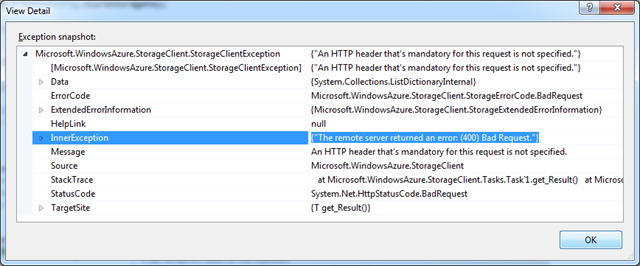
An Exception was raised – a “Microsoft.WindowsAzure.StorageClient.StorageClientException” to be exact – with the following message:

Exception Message: “An HTTP header that’s mandatory for this request is not specified” 

“An HTTP header that’s mandatory for this request is not specified.”

"An HTTP header that's mandatory for this request is not specified."

That didn’t help, so I then checked the Inner Exception:

Inner Exception Message: “The remote server returned an error: (400) Bad Request.”

"The remote server returned an error: (400) Bad Request."

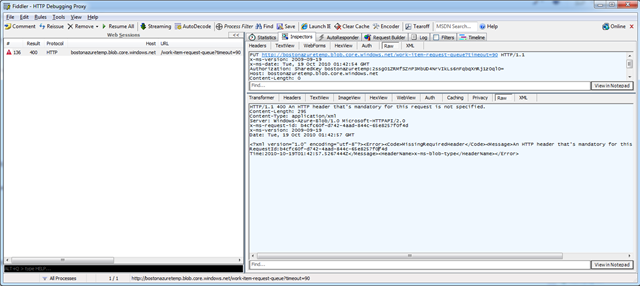
That didn’t help either. So I fired up Fiddler and looked at the http Request and Response (Raw views shown here):

Screen shot mentioning “Server: Windows-Azure-Blob/1.0 Microsoft-HTTPAPI/2.0” and “<HeaderName>x-ms-blob-type</HeaderName>”

If you look carefully in the Response, you will see there are two references to Blobs:

Circled “Server: Windows-Azure-Blob/1.0 Microsoft-HTTPAPI/2.0” and “<HeaderName>x-ms-blob-type</HeaderName>”

Blobs? Yes, blobs.

Blobs… That was my problem. This was supposed to be code to create a queue. A quick check back to my code immediately revealed a cut and paste error on my part. Two actually, as I tried this both against Development Storage and against live Cloud Storage with the same error.

This was the problem – the culpret – the issue – the bug:

    var clientStorageAccount = CloudStorageAccount.DevelopmentStorageAccount;
    CloudQueueClient queueStorage = new CloudQueueClient(clientStorageAccount.BlobEndpoint.AbsoluteUri,clientStorageAccount.Credentials);

As was this:

    CloudQueueClient queueStorage = new CloudQueueClient(String.Format(“http://{0}.blob.core.windows.net”, accountName), creds);

Replacing “Blob” with “Queue” did the trick for both snippets.

Pay the Fiddler

The error message was tricky, requiring that I fire up Fiddler to see the error of my ways. So..  Be careful out there when you Cut & Paste. Or don’t hack at 9:30 in the night. Or check out a Fiddler http trace, which may have additional information. Or all three..

Checking the Fiddler trace is really the interesting lesson from this post. If you are perplexed over some error condition, look at the raw http traffic for additional details – there may be a new clue in there.

Did This Post Help You?

Please leave me a comment if this blog post helped you or if you encountered the same exact error.

Why Don’t Windows Azure Libraries Show Up In Add Reference Dialog when Using .NET Framework Client Profile?

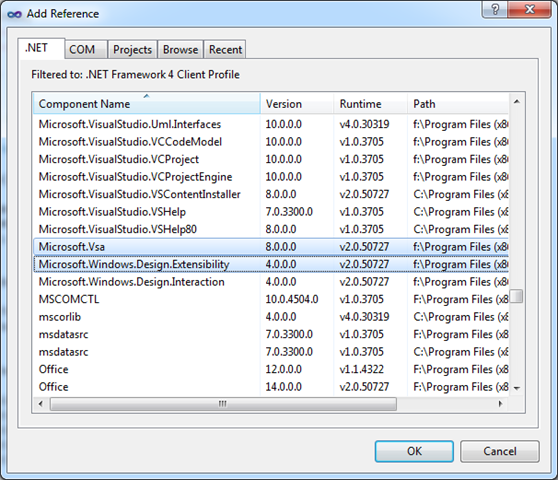
You are writing an application for Windows – perhaps a Console App or a WPF Application – or maybe an old-school Windows Forms app.  Every is humming along. Then you want to interact with Windows Azure storage. Easy, right? So you Right-Click on the References list in Visual Studio, pop up the trusty old Add Reference dialog box, and search for Microsoft.WindowsAzure.StorageClient in the list of assemblies.

But it isn’t there!

You already know you can’t use the .NET Managed Libraries for Windows Azure in a Silverlight app, but you just know it is okay in a desktop application.

You double-check that you have installed Windows Azure Tools for Microsoft Visual Studio 1.2 (June 2010) (or at least Windows Azure SDK 1.2 (last refreshed from June in Sept 2010 with a couple of bug-fixes)).

You sort the list by Component Name, then leveraging your absolute mastery of the alphabet, you find the spot in the list where the assemblies ought to be, but they are not there. You see the one before in the alphabet, the one after it in the alphabet, but no Microsoft.WindowsAzure.StorageClient assembly in sight. What gives?

Look familiar? Where is the Microsoft.WindowsAzure.StorageClient assembly?

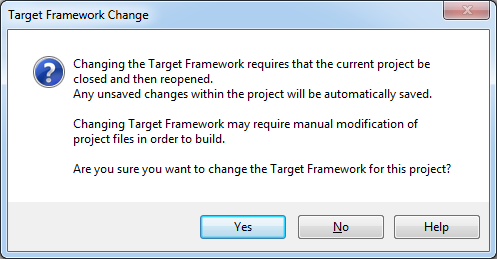
Confirmation Dialog after changing from Client Profile to full .NET

Azure Managed Libraries Not Included in .NET Framework 4 Client Profile

If your eyes move a little higher in the Add Reference dialog box, you will see the problem. You are using the .NET Framework 4 Client Profile. Nothing wrong with the Client Profile – it can be a friend if you want a lighter-weight version of the .NET framework for deployment to desktops where you can’t be sure your .NET platform bits are already there – but Windows Azure Managed Libraries are not included with the Client Profile.

image

Bottom line: Windows Azure Managed Libraries are simply not support in the .NET Framework 4 Client Profile

How Did This Happen?

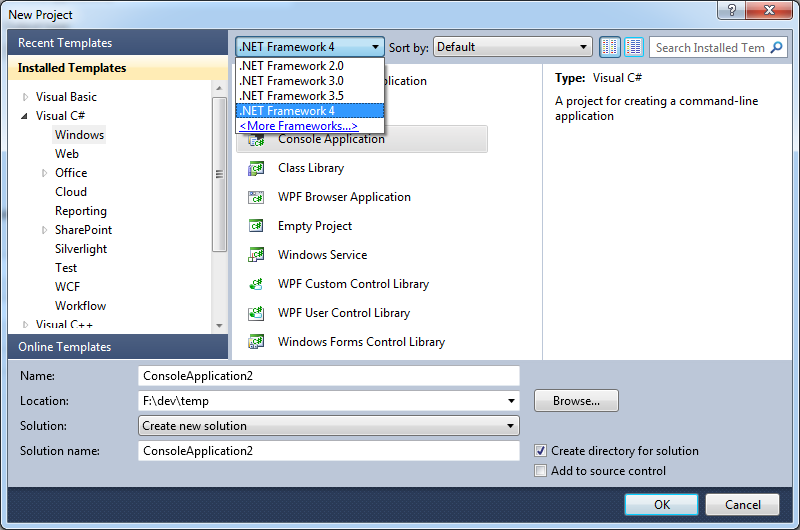
It turns out that in Visual Studio 2010, the default behavior for many common project types is to use the .NET Framework 4 Client Profile. There are some good reasons behind this, but it is something you need to know about. It is very easy to create a project that uses the Client Profile because it is neither visible – and with not apparent option for adjustment – on the Add Project dialog box – all you see is .NET Framework 4.0:

The “Work-around” is Simple: Do Not Use .NET Framework 4 Client Profile

While you are not completely out of luck, you just can’t use the Client Profile in this case. And, as the .NET Framework 4 Client Profile documentation states:

If you are targeting the .NET Framework 4 Client Profile, you cannot reference an assembly that is not in the .NET Framework 4 Client Profile. Instead you must target the .NET Framework 4.

So let’s use the (full) .NET Framework 4.

Changing from .NET Client Profile to Full .NET Framework

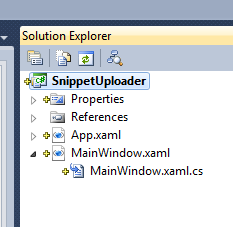
To move your project from Client Profile to Full Framework, right-click on your project in Solution Explorer (my project here is called “SnippetUploader”):

image

From the bottom of the pop-up list, choose Properties.

image

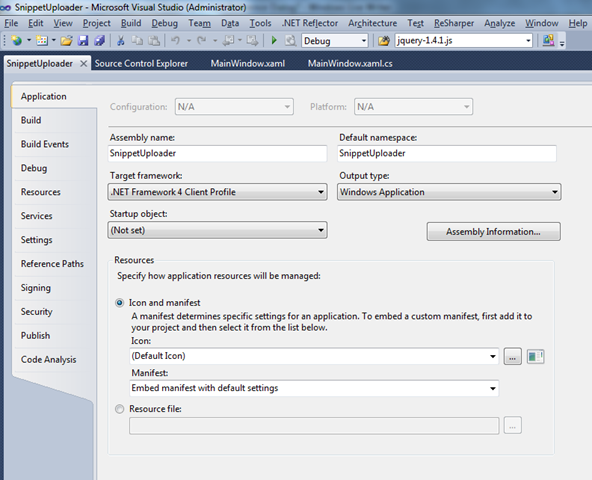
This will bring up the Properties window for your application. It will look something like this:

image

Of course, by now you probably see the culprit in the screen shot: change the “Target framework:” from “.NET Framework 4 Client Profile” to “.NET Framework 4” (or an earlier version) and you have one final step:

image

Now you should be good to go, provided you have Windows Azure Tools for Microsoft Visual Studio 1.2 (June 2010) installed. Note, incidentally, that the Windows Azure tools for VS mention support for

…targeting either the .NET 3.5 or .NET 4 framework.

with no mention of support the .NET Client Profile. So stop expecting it to be there!


You can’t add a reference to Microsoft.WindowsAzure.StorageClient.dll as it was not build against the Silverlight runtime

Are you developing Silverlight apps that would like to talk directly to Windows Azure APIs? That is perfectly legal, using the REST API. But if you want to use the handy-dandy Windows Azure Managed Libraries – such as Microsoft.WindowsAzure.StorageClient.dll to talk to Windows Azure Storage – then that’s not available in Silverlight.

As you may know, Silverlight assembly format is a bit different than straight-up .NET, and attempting to use Add Reference from a Silverlight project to a plain-old-.NET assembly just won’t work. Instead, you’ll see something like this:

Visual Studio error message from use of Add Reference in a Silverlight project: "You can’t add a reference to Microsoft.WindowsAzure.StorageClient.dll as it was not build against the Silverlight runtime. Silverlight projects will only work with Silverlight assemblies."

If you pick a class from the StorageClient assembly – let’s say, CloudBlobClient – and check the documentation, it will tell you where this class is supported:

Screen clipping from the StorageClient documentation with empty list of Target Platforms

Okay – so maybe it doesn’t exactly – the Target Platforms list is empty – presumably an error of omission. But going by the Development Platforms list, you wouldn’t expect it to work in Silverlight.

There’s Always REST

As mentioned, you are always free to directly do battle with the Azure REST APIs for Storage or Management. This is a workable approach. Or, even better, expose the operations of interest as Azure services – abstracting them as higher level activities. You have heard of SOA, haven’t you? 🙂