Today I attended and contributed a talk to the Boston Code Camp 38 (yes, impressively, the 38th edition of this event). I made the trip with Maura (she gave a talk combining Cryptocurrency And Agentic AI) and Kevin (he gave a talk on Top 10 AI Security Risks). and we got to hang out with and chat with so many cool people from the Boston technology community.
The description of my Let’s Build a Goal-Oriented AI Agent Using Semantic Kerneltalk follows, followed by a couple of relevant links, then the slide deck.
Imagine an AI not limited to answering individual questions or chatting, but actively working towards a goal you’ve assigned to it.
In this session, we’ll explore the building of an AI Agent – an autonomous actor that can execute tasks and achieve objectives on your behalf.
Along the way we will demystify:
1. 🧠 LLMs – What is a Large Language Model (LLM) 2. 📚 Tokens – What is a token and what are its roles 3. 💡 Embeddings – What are embedding models and vectors and what can they do for us 4. 🎯 Prompts – Beyond the basics 5. ⚙️ Tools – How can these be created and accessed using Semantic Kernel 6. 🤖 Agents – Let’s put all these concepts to work!
The end result will be the core (or perhaps ‘kernel’ 😉) of an AI Agent – your virtual coworker willing to handle tasks on your behalf without. It will be built in C# using the open source, cross-platform Semantic Kernel library.
This talk assumes user-level familiarity with LLMs like ChatGPT or Microsoft Copilot and basic prompting. Anything else will be explained.
I was in the audience at the Microsoft PDC on Nov 3, 2008 where Windows Azure was unveiled on stage by Ray Ozzie in the conference’s opening keynote. At the 16:45 mark he graciously tipped his hat to Jeff Bezos and the AWS team, then announced Windows Azure – a platform with two services: Azure Storage (Blobs, Tables, Queues) and Cloud Services (Web Roles, Worker Roles) – all with the illusion of infinite scale. Later that same day I got hands-on Windows Azure coding experience in a special booth staffed by Microsoft engineers (and it turns out that the impressive engineer helping me was Sriram Krishnan (@sriramk)). I got to test drive those new super-cool Azure services. From my perspective this was the beginning of the conversation about Platform as a Service (PaaS) in the cloud – and the start of horizontal scale as a mainstream architecture pattern. What an event! Around 15 months from this initial announcement, on Feb 1, 2010, Windows Azure reached “GA” (general availability).
In between the initial announcement in 2008 and the GA date in 2010, Boston Azure was born. On Oct 22, 2009, Boston Azure debuted as the first community group of its kind – the first one dedicated to learning about the Azure platform. As of this writing, it has around 3.500 members according to Meetup.com.
(For a long time after we started hosting events we had people attending other events see our signage and curiously pop their head in to ask “What’s Azure?” When I’d answer “that’s Microsoft’s public cloud platform” they would very often react with a puzzled look and a follow-up question: “Cloud? What’s a cloud?” So yes, those were early days.)
That first event was held at the Microsoft NERD building in Cambridge MA. Mike Werner said a few words, I gave a short talk about cloud benefits and the coming opportunity (and somehow managed to reference “the Internet is … a series of tubes” comment by Alaska Senator Ted Stevens) and Brian Lambert (@softwarenerd) was the featured speaker who talked about queuing patterns in Azure Storage which was part of my journey of getting interested in cloud-relevant patterns (which culminated in me writing a book – Cloud Architecture Patterns – a few years later). Michael Stiefel was Boston Azure’s second-ever speaker.
A few things have changed since then. The PDC conference is no longer – though content has been subsumed into the Build conference. Windows Azure is now just Azure. There are hundreds of Azure services, not two. And Ray Ozzie is no longer at Microsoft (but has the Blues in the best sense of the word).
And Boston Azure is still at it. We’ve delivered more than 150 free events and still going strong. Now also delivering events virtually since the you-know-what made in-person events so difficult. Back in the early days George Babey and Nazik Huq signed on to help me run things. These days – and for some time now – our leadership team is Jason Haley (@haleyjason), Veronika Kolesnikova (@veronika_dev1), and me.
But technology continues to evolve, and we need to evolve too. Today Artificial Intelligence is playing a role similar to the role played by public cloud platforms back 15 years ago: everything is different so what does that mean? what will come out next? what does this make possible? how can I make use of this? how do I learn this stuff? This is exciting, right??
We’ve been emphasizing AI topics for a while already. Veronika is a long-time Microsoft MVP for AI, Jason is a long-time Microsoft MVP for Azure who last year was reclassified to the AI category, and myself as a long-time Azure MVP was re-classified last year as Dev Tools (presumably due to giving so many talks on GitHub Copilot, the AI coding assistant, in the prior year), so this emphasis also aligns with where the group’s leadership is spending time. At any rate, this rename should at least help us more clearly communicate to the community what we intend to offer.
Where to Find Boston Azure AI
With the rename, we are retooling some of our properties. Some are new, some are renamed from bostonazure version. You can find us at the following destinations:
GitHub: 🛠️ https://github.com/bostonazureai – created a new GitHub Organization for this and will be migrating over the old content, including the C# + Semantic Kernel + Azure OpenAI hands-on workshop materials shortly (see bottom of this post for more – we are running an event on Jan 31)
Email: ✉️ hello@bostonazureai.org – we used a gmail address for the first 15 years, but now we are getting fancy with the bostonazureai.org domain. Hit us up if you want to offer a talk (in person or virtual) or have a suggested topic for us!
Hands-on AI Coding Workshop: C#, .NET 9, and Semantic Kernel on Azure OpenAI
In another evolution, Jason Haley and I are experimenting with offering Boston Azure AI in-person hands-on AI coding workshops during the workday. The community events we’ve historically offered have been only nights and weekends – non-working hours. We’ll see how this works out. We have our second such in-person during-the-workday hands-on coding workshop focused on using C#, .NET 9, and Semantic Kernel on Azure OpenAI coming up on Fri Jan 31, 2025 held in Cambridge MA. You can sign up here. Free.
And we have a weekend event on the schedule to participate in Boston Azure editionBoston Azure AI edition of the Global AI Bootcamp in March. You can sign up here. Free.
Buckle in. Looking forward to an exciting next few years!
Last night I was guest speaker at the Boston .NET Architecture community group. I learned they are now 21-year-olds. That’s a long track record! The audience had some insightful questions, which I always appreciate.
My talk focused on the perspective of the application architect – and not the data scientist, for example – in how the process works and what are some areas I would need to dig into.
Here’s the alternative talk description I offered a few days ago:
Interested in understanding how LLMs are created and how they work internally, including all the in-depth data science and machine learning techniques? If so, then this is not that talk. Rather, this talk steps back to treat the LLM as a black box. And then steps further back to treat the LLM as a part of a cohesive system offered over the internet through an API. It is from that perspective that we begin our exploration.
How exactly does an application make use of LLM services? Is this thing secure? Is it private? Am I operating according to Responsible AI principles? (Oh, and what are Responsible AI principles?) Is it accurate? Is it portable? And of course, when does it stop being a Chatbot and start being an Agent?
These are some of the key types of application architecture considerations we will discuss as we start with “the humble chatbot demo” then turn it into an Agent and then see what it would take to put that into production.
Today I attended and spoke at the 37th Boston Code Camp. The rainy weather was just enough to maximize attendance.
There was an incredibly energetic group of inquisitive people at my talk which was on how you can give your AI LLM a goal and some tools and let it figure out how to move ahead! Lots of questions came from this highly engaged group.
The details of my talk follow.
Building an AI Agent with Semantic Kernel
The classic approach to managing complexity is through abstraction. While also useful in the physical world (you can know how to use a “car” without needing to know about all the parts under the hood), it is an essential tool in software.
To program against the current generative AI models you can use the model’s native abstraction (their SDK). But there are other options too, one of which is to use Semantic Kernel, an open-source library from Microsoft.
In this talk we will understand the first-class abstractions representable using Semantic Kernel, from the granular Function and building up to an Agent, and a couple of steps in between.
This talk will be a mix of explaining AI-relevant and Semantic Kernel-relevant topics + some explanatory sample code. We may also sneak in a little Prompty.
By the end of this talk you will appreciate why you might (or might not) want to build your AI solution with Semantic Kernel (SK) and how you would approach it.
This talk will assume you have used LLMs (like ChatGPT or others) and know the very basics of iterating on prompts and experiencing that GenAI systems have an ability to make decisions from human language. Anything beyond this will be explained in the talk.
The sample application used in the talk can be found here:
At Virtual Boston Azure tonight Jason Haley and I teamed up to talk about ways Gen AI can be integrated with your existing systems. In the case of existing enterprise software systems, many are written in C# and Java, both languages supported by Semantic Kernel. Semantic Kernel also supports Python, which is a great language, but all things being equal using a language and technology stack already familiar to your team is also attractive. So considering a library like Semantic Kernel is a productive angle when looking across the spectrum of AI tools.
Much of my talk was focused on how to use Semantic Kernel (in C# and .NET 8) to give your AI a goal and have it solve it. The deck I presented and a recording of the talk follow. <I will likely update this post to link to code used in demo and as other artifacts become available>
Last night at Boston Azure I teamed up with Jason Haley to cover the current Azure AI topics from the Microsoft-created Season of Azure program. An engaged group showed up at NERD in Cambridge to hear all about it.
Also complements of the Season of AI team, check out these resources.
Join the Azure AI Community on Discord
Connect with fellow enthusiasts, engage with Microsoft experts and MVPs, discuss your favorite sessions, and delve into AI discussions. Your space to ask, share, and explore!
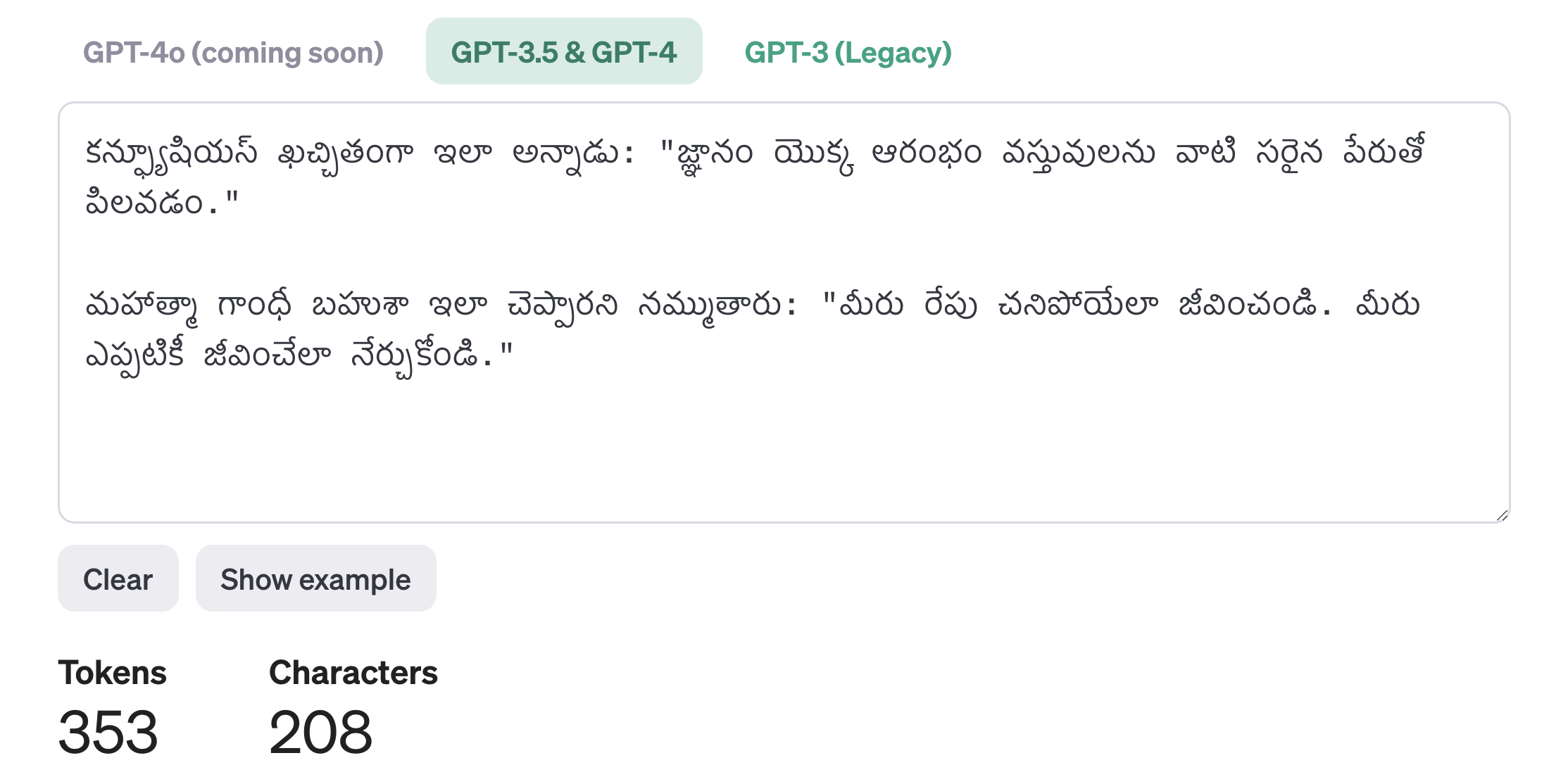
Recall the third one shown – Telugu – was wildly more expensive (in terms of token count) than English (50 tokens) and Chinese (75 tokens) – where Telugu weighed in at 353 tokens.
Last night at Virtual Boston Azure I teamed up with Jason and Veronika and the three of us covered some of the topics from Microsoft Build 2024 that we found most impactful and interesting.
This weekend I create a web front-end for it and deployed as an Azure Static Web App with an Azure Function supporting the refactored C# logic to execute the Azure OpenAI service calls.
Note that while the additional grounding fails to stop all of the hallucinations, it does help with the most obvious one (so we are making progress) but there’s more to be done.
The March 28 Virtual Boston Azure was headlined by Pamela Fox from Microsoft. She explained all about the RAG pattern which is commonly used for building effective applications based on Large Language Models (“LLMs”) and Generative AI (“GenAI”). Pamela shared many superb insights, including lots of depth, while answering a ton of interesting follow-up questions. Was a fantastic talk. Boston Azure has a YouTube channel at youtube.com/bostonazure where you can find recordings of many past events. Pamela Fox’s talk is available there as the 48th video to be posted to the channel.
After Pamela’s talk around 15 people stuck around to participate in our first ever “AI mini-workshop” hands-on experience. The remainder of this post is about that mini-workshop.
The AI mini-workshop was a facilitated hands-on coding experience with the following goals:
1. Demystify Azure OpenAI
As background, OpenAI’s ChatGPT burst onto the scene in November 2022. That led to an explosion of people learning about AI and associated technologies such as “LLMs” which is the common shorthand for Large Language Models.
The vast majority of people interact with LLMs via chat interfaces such as available from OpenAI’s public version of ChatGPT or via Copilot on Microsoft Bing search. There’s also a more integrated programming experience surfaced through GitHub Copilot for use with VS Code and several other popular IDEs.
But what about programming your own solution that uses an LLM? Microsoft has done a great job of providing an enterprise-grade version of the OpenAI LLM as a set of services known as Azure OpenAI.
The first goal of this AI mini-workshop was to demystify this programming experience.
This was accomplished by giving the mini-workshop participants a working C# or Python program that fit on a page. And there are only around 10 lines of meaningful code needed to interact with the AI service. This is NOT that complex.
Creating a production-grade application has additional requirements, but at its core, it is straight-forward to interact with Azure OpenAI service programmatically.
The hoped for “Aha!” moment was this:
Aha #1! I can do this! I can programmatically interact with the Azure OpenAI LLM. It isn’t that mysterious after all.
Aha #2! This is possible without much code! In the Python and C# solutions shared there were only around 10 lines of core code.
2. Understand Some AI Concepts
Part of the mini-workshop exercise was to recognize a hallucination and fix it through some additional grounding using a very simple form of RAG.
The hope here is for some “Aha!” moments:
Aha #3! Here’s a concrete, understandable example of a hallucination!
Aha #4! And here’s a concrete, simple example use of RAG pattern to better ground the AI so that it no longer hallucinates about today’s date! But do note that other hallucinations remain…
3. Wield Great Power
The ability to program a LLM to generate unique content is something that essentially NO DEVELOPER COULD DO, EVER, before the super-powerful LLMs that were developed at costs of hundreds of millions of dollars and democratized by the Microsoft Azure OpenAI services (as well as by OpenAI themselves).
The hands-on AI mini-workshop required either (a) a functional Python 3 environment, or (b) a functional C#/.NET environment – everything else was provided, including sufficient access to the Azure OpenAI LLM service to complete the mini-workshop.
But in the end with very little coding you can get to the 5th Aha! moment which is:
Aha #5! I have at my command capabilities that have not been possible in all of the history of computers. The magic of LLMs available via Azure OpenAI gives me superpowers that we are only in the very beginning of understanding the ways this can be put to use.
My original thinking was to distribute the keys separately (like this). If this was an in-person workshop I would have kept the configuration values separated from the source, but given the added challenge of doing this with an online distributed audience I decided to simplify the mini workshop by included the configuration values directly in the source code. Looking back, I believe it was a good concession for minimizing obstacles to learning. So I’d do it again next time.
Always great to hang out with the greater Boston tech community. Today I attended and contributed a talk to Boston Code Camp 36 (the 36th edition of this event).
I made the trip with Maura (she gave a talk on blockchain). and we met a lot of cool people and had a great time.
I spoke on GitHub Copilot. Much of my talk was demo and discussion – you have to see this in action (or use it) to appreciate what’s happening. I consider this a glimpse into the future – it will surely become then norm to have an AI assistant when programming.
It is fun have one AI 🤖 (GitHub Copilot) help us program another AI 🤖 (Azure OpenAI). 🤖 🤖 🤖 😀 After Copilot Chat was able to explain that Azure OpenAI did not have any notion of “today” we used Copilot to implement a trivial version of RAG to anchor the prompt to the current day.
We saw how the agents like @workspace can explain a body of code and even help us figure out where to implement a new feature (such as the --joke command line param).
Another demo was to get Copilot to write unit tests for me. The demo gods were not helpful 😱 😱 😱 and I ran into an error. I moved on without fixing it since time was short. I diagnosed it later and it turns out I had double-pasted (classic demo failure!) which caused the problem. We did use /tests to create unit tests, which were initially NUnit test, but then we asked Copilot to recast them as xUnit tests, then to more efficiently create test cases using the InlineData attribute to consolidate similar test cases.We didn’t get to run the tests at the end, but hopefully the power of GitHub Copilot in helping to create unit tests came through.
I also had the opportunity to hang out with some smart soon-to-be graduates from my alma mater – University of Massachusetts at Boston (some of them were Rohini Deshmukh, Master’s in Information Technology, Kunal Sahjwani, Master’s in Information Technology, and Shounak Kulkarni, Master’s in Business Analytics). Great to see our profession is in such capable hands from chatting with these very smart and capable technologists, analysts, and future leaders.
Here is the published talk abstract for the talk I delivered – and though much of the session was demos, the PowerPoint deck is attached after the abstract.
Meet GitHub Copilot, Your AI Coding Assistant
Imagine an assistant who anticipates your needs as you code, handling mundane and time-consuming steps, allowing you to focus on more complex challenges (the fun stuff). Allow me to introduce you to GitHub Copilot.
GitHub Copilot is an AI-powered coding assistant that integrates with your developer IDE adding many powerful productivity features. Backed by the same OpenAI Large Language Model (LLM) behind ChatGPT, it has an uncanny ability to suggest code snippets that you were about to type in. But suggesting code snippets is just the beginning.
In this demo-heavy talk, we’ll show usage basics, distinguish scenarios where it excels vs. some it finds challenging, and point out a few common anti-patterns so you can avoid them.
Since it is still early days, big features are still showing up at a fast clip, so we’ll highlight some recent features and some others just emerging. At the end we’ll squeeze in just a bit of prognosticating about what it might mean for the future of software development.
As you’ll learn in more depth during this session, the promise of GitHub Copilot is to help you be more productive – go faster, stay in flow, build even more robust software. We are not fully there but we are on the way. This imperfect tool is still a game changer.
I believe the rise of AI coding assistants is unstoppable at this point – and that’s a good thing. By the end of this session, you might agree. And maybe you’ll join the revolution early.




 Coding Out Loud
