Azure FAQ: IP Addresses and DNS

The Azure FAQWhen deploying an application or service to Windows Azure, a public IP address is assigned, making it easy to host a web server, API, or other services. Here are some of the more frequently asked questions asked about these IP addresses.

Q. Will my IP Address be Stable?

Short answer: Yes. Longer answer: For Cloud Services and Virtual Machines (but not Azure Web Sites) the IP address – once assigned – is stable, provided you do not remove the deployment. If you delete the deployment, your IP address goes back into the pool. For most production cloud applications it would very unusual to ever delete the deployment, so this is reasonable. Windows Azure supports in-place updates as well as the VIP Swap approach for Cloud Services, both of which always preserve the IP Address. Windows Azure Web Sites also has an IP Address-preserving swap feature.

Q. Can I map a “Naked” Domain to my Azure App or Service?

Short answer: Yes. The formal name for a so-called “naked” domain is a zone apex. But regardless of what we call it, it is simply a domain without any subdomain prefix. The address “devpartners.com” is a “naked” or “apex” domain, whereas  “www.devpartners.com” is not. And it is not just about counting periods in the domain: “amazon.co.jp” is also an apex domain. A DNS Address Record – or “A Record” for short – is used to configure an apex domain, and an A Record must be mapped to an IP Address. As noted in the question immediately above, you can have a stable IP address in Windows Azure, so therefore a stable A Record is possible, so therefore you can definitely map an apex record to your Windows Azure application or service. You can also use a DNS Canonical Name Record – or “CNAME” for short – to refer to a subdomain in your service. This is easy since, in addition to the stable IP address support mentioned above, Windows Azure provides a DNS name you can assign CNAMEs against. In Cloud Services (which includes Virtual Machines) this is of the form mycloudservice.cloudapp.net. [As opposed to Azure Web Sites which are of the form mywebsite.azurewebsites.net.]

Q. Is the IP Address Range Known?

Short answer: Yes. Longer answer: Microsoft publishes the IP Address Ranges used, organized by data center. So this published list of ranges can be consulted to review the possible IP address ranges. Specifically, the IP Address Ranges are documented here (http://msdn.microsoft.com/en-us/library/windowsazure/dn175718.aspx) and are expressed in Classless Inter-Domain Routing (CIDR) format. Be aware that as capacity increases and new data centers come on line, these ranges will evolve (I assume mostly the number of addresses will grow).

Talk: Telemetry: Beyond Logging to Insight

Today I spoke at the NYC Code Camp. My talk was Telemetry: Beyond Logging to Insight and focused on Event Tracing for Windows (ETW), ETW support in .NET 4.5, some .NET 4.5.1 additions, Semantic Logging Application Block (SLAB), Semantic Logging, and a number of other tools and ideas for using logging and other means to generate insight and answer questions. In order to allow this, “logging” needs to be structured, which ETW facilitates. In order for the structured data to make sense, developers need to be disciplined, which the Semantic Logging mindset supports.

The talk abstract and the slide deck used are both included below.

ABSTRACT

What is my application doing? This question can be difficult to answer in distributed environments such as the cloud. Parsing logs doesn’t cut it anymore. We need insight. In this talk we look at current logging approaches, contrast it with Telemetry, mix in the Semantic Logging mindset, and then use some new-fangled tools and techniques (enabled by .NET 4.5) alongside some old-school tools and techniques to see how to apply this goodness in our code. Event Tracing for Windows (ETW), the Semantic Logging Application Block, and several other tools and technologies will play a role.

DECK

Telemetry with Event Tracing for Windows (ETW), EventSource, and Semantic Logging Application Block (SLAB) — NYC CC — 14-September-2013 — Bill Wilder (blog.codingoutloud.com)

Are you missing an assembly reference? Why, yes I am. So kind of you to ask.

Ever pull down the source code for a project, only to find many errors of the “The type or namespace name ‘Optimization’ does not exist in the namespace ‘System.Web’ (are you missing an assembly reference?)” variety?

This just happened to me because I pulled down the Page of Photos source code from github for the first time to a certain dev machine. Not all of the binary library dependencies are checked into github (trying to just check in source code), so how does this happen and how should it be fixed?

image

In my experience, this usually relates to NuGet packages. There are at least two reasonable solutions.

Solution #1: Capture All Binaries (not recommended)

Check into source control the binaries for those packages your project depend on so they’ll always be there. Personally, that seems so last year, and I don’t take this approach for libraries available through NuGet.

(Having private libraries is no longer a reason to do this either. Check out MyGet,org for a hosted private solution that works fine with NuGet machinery.)

Solution #2: Empower NuGet to Self-Heal

Right-click on the Solution from the Visual Studio Solution Explorer and notice the two NuGet-related options in the pop-up menu. To fix the problem imageat hand in the most convenient manner, simply select “Enable NuGet Package Restore” which is the second of the NuGet-related options.

You will then get an explanation of what’s about to happen:

image

If you choose “Yes” then NuGet will think for a few seconds before declaring victory:

image

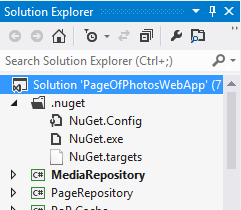
You might notice there are some new NuGet-related artifacts in your solution.

image

Now if you again right-click on the Solution from Visual Studio’s Solution Explorer menu, you will notice that the “Enable NuGet Package Restore” menu is gone, leaving only the “Manage NuGet Packages for Solution” option. Select the “Enable NuGet Package Restore” menu to bring up the NuGet management dialog.

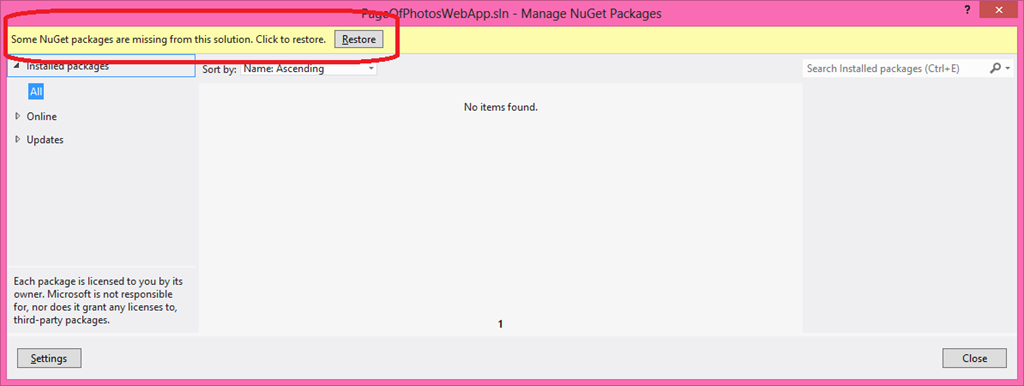
image

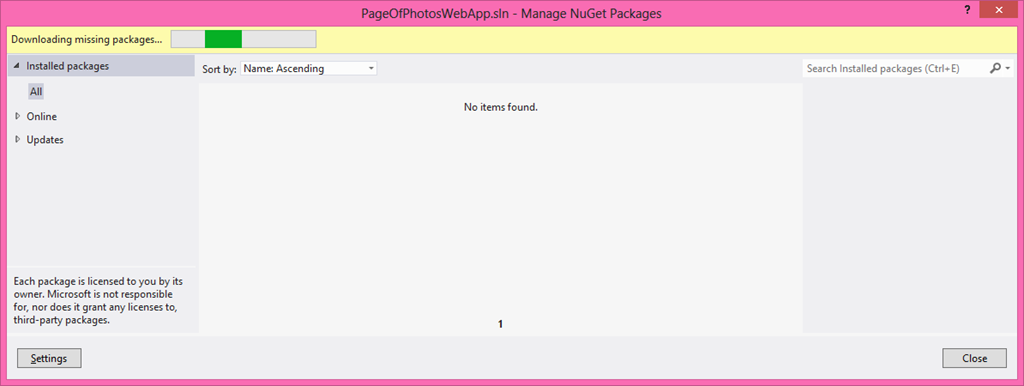
Click on “Restore” and your solution should begin to heal itself by downloading the many missing NuGet packages. You can feel the excitement as NuGet thinks it through..

image

.. and thinks some more ..

image

.. then – Ta Da! – you suddenly have a bunch of downloaded libraries.

image

Now your solution will happily compile once more.

Note that this is a one-time & long-term solution since now NuGet is empowered to pull down missing packages whenever needed. (Not “any old packages” of course – just those you’ve added to the projects within the solution.) When you freshly pull down a build (just the source) from source control it helps, of course, but build machines will also enjoy this.

Start Windows Azure Storage Emulator from a Shortcut

When building applications to run on Windows Azure you can get a lot of development and testing done without ever leaving your developer desktop. Much of this is due to the convenient fact that much code “just works” on Windows Azure. How can that be, you might wonder? Running on Windows Azure in many cases amounts to nothing different than running on Windows Server 2012 (or Linux, should you chose). In other words, most generic PHP, C#, C++, Java, Python, and <your favorite language here> code just works.

Once your code starts accessing specific cloud features, you face a choice: access those services in the cloud, or use the local development emulator. You can access most cloud services directly from code running on your developer desktop – it usually just amounts to a REST call under the hood (with some added latency from desktop to cloud and back) – it is an efficient and effective way to debug. But the development emulator gives you another option for certain Windows Azure cloud services.

A common use case for the local development emulator is to have web applications such as with ASP.NET, ASP.NET MVC, and Web API that run either in Cloud Services or just in a Web Site. This is an important difference because when debugging, Visual Studio will start the Storage Emulator automatically, but this will not happen if you debugging web code that does not run from a Cloud Service. So if your web code is accessing Blob Storage, for example, when you run it locally you will get a timeout when it attempts to access Storage. That is, unless you ensure that the Storage Emulator has been started. Here’s an easy way to do this. (Normally, you only need to do this once per login (since it keeps running until you stop it).)

In my case, it was very convenient to have a shortcut that I could click to start the Storage Emulator on occasion. Here’s how to set it up. I’ll explain it as a shortcut (such as on a Windows 8 desktop), but the key step is very simple and easily used elsewhere.

Creating the Desktop Shortcut

  1. Right-click on a desktop
  2. From pop-up menu, choose New –> Shortcut      image
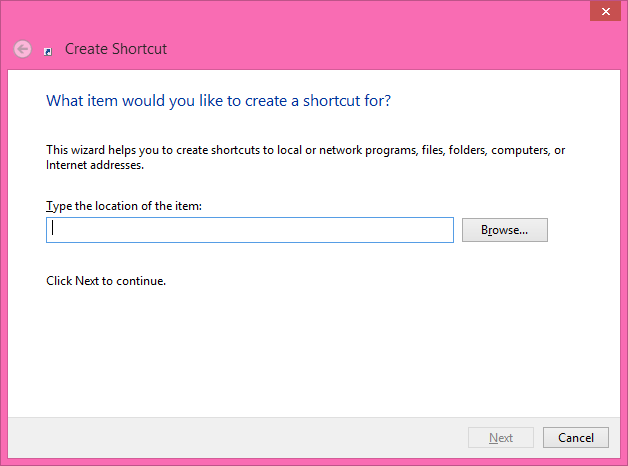
  3. You get a dialog box asking about what you’d like to create a shortcut for:image
  4. HERE’S IMPORTANT PART 1/2: click hit the Browse button and navigate to wherever your Windows Azure SDK is installed and drill into the image
  5. In my case this places the path "C:\Program Files\Microsoft SDKs\Windows Azure\Emulator\csrun.exe" into the text field.
  6. HERE’S IMPORTANT PART 2/2: Now after the end of the path (after the second double quote) add the parameter /devstore:start which indicates to start up the Storage Emulator.
  7. Click Next to reach the last step – naming the shortcut: image
  8. Perhaps change the name of the shortcut from the default (csrun.exe) to something like Start Storage Emulator: image
  9. Done! Now you can double-click this shortcut to fire up the Windows Azure Storage Emulator: image 

On my dev computer, the path to start the Windows Azure Storage Emulator was: "C:\Program Files\Microsoft SDKs\Windows Azure\Emulator\csrun.exe" /devstore:start

Now starting the Storage Emulator without having to use a Cloud Service from Visual Studio is only a double-click away.

RELATED

It’s Official: New MASS Tax Targets Use of Open Source in Software Consulting Services

Changes to Massachusetts tax policy became law became last week on July 24, 2013. One change included a new tax on “Software Services” involving “prewritten” software. This new tax became effective one week later – July 31, 2013.

I wrote an analysis of that law which generate some really great dialog (see the comments). In my analysis, I was alarmed because I though the intent of the new tax law did not match the wording. I sent my feedback to the Department of Revenue (DOR) asking for clarification. The DOR has responded.

The DOR response has a short overview page that includes a link to an FAQ on the new software services tax that contains the key clarifications. This FAQ is well done and provides a good deal of new, clarifying information in the form of 29 Questions with Answers. (I don’t necessarily like the answers it provides, as I wish the policies were different, but there’s no questioning that they do clear up certain areas of confusion substantially.)

Here is my take on a couple of the FAQ responses that, while very clear, are not the answers I was hoping to hear. The FAQ items cited are included verbatim in blue text.

FAQ Item 5 – Blindsided

FAQ 5. Why were businesses given such short notice of the new tax?

A. The effective date was set by legislation, not by the Department of Revenue. The Department’s TIR 13-10, “Sales and use Tax on Computer and Software Services” was issued one day after the legislation became law.

ANALYSIS

First, it is important to realize that the DOR was not responsible for writing the law, but they are trying to stay on top of it and issue timely guidance. One day after for the original TIR 13-10 and one week after that for this updated FAQ does not seem unreasonable since drafting answers these questions (many unanticipated by lawmakers) is not a casual endeavor. The authors of the FAQ appear to have taken into consideration lots of input, judging from the breadth of the questions it answers (including a couple of fairly esoteric ones).

This item is not speaking for lawmakers who should still explain how they thought they were acting responsibly by adding “sales tax” to software services where there never was such a thing before and have it become effective within a mere 7 days of becoming law. I did not say “why did they only give 7 days notice” because I don’t see this as giving the community “notice” – most effected consultants and services companies probably don’t even know about it yet – and it really did come out of the blue.

Lawmakers also still need to explain why they did not ask for feedback from the software services community in advance. Then the DOR FAQ could have been ready in advance. And maybe the law could have even been written more clearly. Did they ask for feedback in advance? If the publication of Working Draft Directive 13-XX: Criteria for Determining Whether a Transaction is a Taxable Sale of Pre-written Software or a Non-taxable Service is used as evidence that sufficient notice was given to the software services community, I strongly disagree. That draft was not a sufficient indicator of what was to come.

How the Software Services Community was Blindsided

  1. The publication of Working Draft Directive 13-XX: Criteria for Determining Whether a Transaction is a Taxable Sale of Pre-written Software or a Non-taxable Service is VERY DIFFERENT from the final law.
  2. The draft targeted software services tied to a larger software sale. Consider this key bullet from Directive 1 in the draft: “Pre-written software is bundled with a non-taxable service and sold for a single price, but only where the software constitutes the predominant value of the sale.” I can see this as taxing the services sold to make the software sale possible (think Enterprise Software which often require major integration) and to make it harder for vendors to shift licensing costs to services costs to avoid taxes.
  3. The draft exempted custom software and projects where the services were dominant part of the transaction. Consider these two key bullets from Directive 2 in the draft:  “The seller is providing custom software.” and “Substantial personal or professional services are performed by seller’s employees and are bundled with the use of software and sold for a single price, and such services constitute the predominant value of the sale.”
  4. These seemed to be reasonable & logical criteria for taxation (Directive 1) and non-taxation (Directive 2).  So why worry?
  5. The actual legislation took a major turn and is SO DIFFERENT in its scope and intent that it is not a logical successor to the draft. There is NO WAY our lawmakers can expect a reasonable reading of the draft suggests we might arrive at this final legislation.
  6. And, as mentioned, most impacted software services professionals don’t even know about the draft, the law, or the tax. HOW WERE WE SUPPOSED TO KNOW THIS WAS HAPPENING? How many lawmakers made an effort to socialize this with those of us in the profession? Anyone have any evidence that any outreach happened? Anyone reach out to your professional organization, company, or community group?

FAQ Items 9 and 10 – Taxing Open Source

FAQ 9. How does the new tax apply to use of Open Source software?

FAQ 10. Is Website Design a taxable service?

A9. Open Source software is available free on the Internet. Thus, no tax applies to the transfer of Open Source software where there is no consideration for the transfer. If a seller customizes Open Source software and sells it to one or more customers to be used on any electronic device, that customized software is subject to tax.

A10. The Department understands that website design may be accomplished in various ways. If the website designer is configuring or modifying Open Source (free) code or other prewritten software for the needs of a customer, the designer’s charges to that customer are subject to tax. If the website designer is creating custom software for its customer (that is, not based on other prewritten software), then the charges are not taxable.

ANALYSIS

I will tackle FAQ items 9 and 10 together here since my reaction spans both, and is one of astonishment. I had expected that the clarification on the tax law would be “oh my goodness, we never intended that, please let me amend that immediately!!” – but that’s plainly not the case.

This new tax law explicitly taxes software services and software consulting whenever “customizing” or “configuring” open source software is involved. This is pretty much every software application that uses open source – which is most software applications.

The tax law does exempt building completely from scratch, but I don’t know of too many projects outside academia or hobbies that would apply to since it is usually a terrible waste of time. The law also exempts just handing over open source software “as is” (if your customer doesn’t want to download it themselves?) – but if you install it for the customer, that service will be taxed (see FAQ item 21 which clarifies that software installation services are taxable).

More generally, the tax on software services is triggered by customizing or configuring any prewritten software – including software that is freely available like open source.

Response – Activism

While my first essay attempted to show how the new tax law was written to be so sweeping, my hope was this would open eyes since I thought the vagueness of the law was unintended. Appears I was wrong.

I encourage everyone to read up on this and stay fact-based. I recommend starting with the most recent DOR short overview page and especially the linked FAQ.

The time has come to get organized and respond. My plans will include:

  • Continue to increase awareness
  • Continue to work with colleagues to plan a course of action
  • Broaden the number of people I am aligning with (I’ll be making some phone calls)
  • I will be contacting (again) my state rep and senator letting them know I believe this is just wrong

What else should I do? What do you plan to do?

Open Letter on New Massachusetts Tax on Software Services

I am a long-time resident of Massachusetts and the co-owner of Development Partners Software Corporation, a small software consulting company specializing in helping businesses build custom software that effectively leverages cloud computing for competitive advantage.Tweet this story

A few days ago some changes to Massachusetts law were enacted that alter the tax policy around software consulting. I learned of this through Technical Information Release TIR 13-10 which was published to www.mass.gov and is dated July 25, 2013.

Quoting from TIR 13-10, “Chapters 64H and 64I of the General Laws have been amended to apply the sales and use tax to certain services relating to computer system design and to modification, integration, enhancement, installation, or configuration of standardized or prewritten software.” (I’ve added emphasis on the term prewritten since that is a pivotal term.)

It is worth pointing out that I was not successful in finding the actual final legislation (all I have to go on is the TIR paraphrase) since the wording does not yet appear to be updated on the web. For example, Chapter 64H, Section 1 (which I found through this tool for searching our laws) does not contain the changes indicated in the TIR. I also could not find the phrase “information management services” – listed in the TIR as part of the updated verbiage – using the search tool.

Fear, uncertainty, and doubtFUD, for short – is well known to the software community where vendors can be highly competitive and might sometimes plant seeds of doubt about another vendor in hopes that help them get the sale. But sometimes FUD just happens by mistake when communication is unclear – and I hope this new tax legislation is that type of FUD, and we’ll soon get a “sorry, didn’t mean to scare you” clarification. But in the mean time…

I have two primary concerns about this legislation:

  1. Insanely Short Notice – Are there seriously only 7 days to prepare for this confusing, far-reaching, and disruptive change in tax policy to take effect?
  2. Sweeping Inclusiveness – The language around which types of software consulting are to be impacted includes an extremely broad range of services.

I have other concerns too, but I’m assuming there are good answers to them. For example, if I have subcontractors on a taxable project, and they are performing taxable integration work, is their time also taxable? I assume not. But would be nice to see that in writing. On to my two primary concerns…

Insanely Short Notice

The legislation was enacted on July 24, 2013  TIR 13-10 was published on July 25, 2013, and the new taxes are effective beginning on July 31, 2013.

Yes, this new tax takes effect a mere week after being made law, a mere six days after TIR 13-10 was published, and this is all for a bill that most software consultants doing business in Massachusetts are likely not even aware of it. (I heard of it through my friend Jason Haley who forwarded me the link. Like 100% of the other software consultants, I am not expecting a blind-side like this, so am not spending time watching for it, but am focused on my business.) I know I certainly would not know about it if I hadn’t been tipped off by Jason. It seems obvious to me that a significant percentage of impacted businesses will not even be aware of the new requirements until after the taxation has begun.

IANAL, but my reading suggests I have the following new obligations:

  • Determine which of my consulting services are taxable (more on this in the “Broad Inclusiveness” section below) – which may require me to retain both a lawyer and an accountant for guidance
  • Collect taxes from customers
  • Set up an online tax account with the state (?)
  • Pay periodic taxes to the state of Massachusetts

Now consider the awkwardness of the very short notice. It is naïve to think that the tax “just gets paid” – it can impact my ability to sell services (since the price tag has gone up) and makes all existing deals awkward since the cost of doing business has gone up so unexpectedly.

Consider a deal that’s in place for my company to provide $10,000 worth of (now taxable) services to a client. The $10,000 is already negotiated. Now throw in the 6.25% sales tax. Where’s the $625 for taxes supposed to come from?  If my client absorbs this, they will pay more than they budgeted. Or maybe they want to back out of the deal or want my company to take on this unexpected cost. If my company absorbs it, I will receive less revenue than budgeted. If my company receives less, what about subcontractors that’ I’ve already lined up? Or my own company’s bottom line? Change happens – I realize that, and am okay with that – but sweeping changes can be painful – and enacting such sweeping changes so suddenly seems reckless and patently unfair.

This sudden tax complicates my company’s existing and ongoing business arrangements, causes me to waste time working through these new factors with clients, and doesn’t have an iota of business value for me or my clients. An unwelcome distraction. How does this help the business climate?

A little notice would go a long way. How about at least six months or a year’s notice? I find it absurd that our lawmakers expect businesses to react so rapidly to something that is so fundamentally disruptive. I didn’t look, but it makes me wonder whether there are guidelines in the Massachusetts State Constitution around whether taxes can be implemented with such short notice.

And, as mentioned above, I looked for – but was unsuccessful in finding – the actual new law with the updated text. Shouldn’t laws be fully published before we are expected to follow them? Are they out there somewhere else but I failed to find them?

Sweeping Inclusiveness

Cribbing from TIR 13-10, “The Act also amended the definition, in section 1 of Chapter 64H, of ‘services’ that are taxable under Massachusetts sales and use taxes.” It goes on to define services as “limited to the following items: telecommunications services, computer system design services and the modification, integration, enhancement, installation or configuration of standardized software.” I added the emphasis on the term standardized since it is such an important qualifier; I am not sure why our law makers did use the term prewritten here, as was used above, or whether they consider them synonyms. Any linguists wish to offer an opinion?

I encountered an earlier draft of this law a couple of months ago and was not nearly so concerned since the focus then was Software as a Service which is so common these days that we simply call it SaaS. Exactly what constitutes SaaS is not perfectly defined, but is surely less encompassing than this new law which dropped the term Software as a Service in favor of the far broader Software Services.

Of further relevance is the first footnote in TIR 13-10 which states “The taxability of data access, data processing or information services is unchanged by the Act; these services are not subject to sales/use tax.” This seemingly gives hope – the listed activities “are not subject to sales/use tax” – until you realize that this uses different terminology than the main text which formally defines “services” as the taxable activity; the term “services” is not used in the same way in this footnote.

What is “Prewritten” Software

Let’s consider a few scenarios around the sale of prewritten software.

Consider a large software vendor selling prewritten database software and related tools. The software has been around for decades and there’s little question that it is “prewritten” and is sold many times over. Selling copies of such prewritten software logically should trigger sales tax collection. This is not changed by this law (though keep in mind IANAL).

Now suppose this large software vendor makes a million dollar deal to sell some of this software and also provide the expert services to handle the installation, configuration, and integration for the customer’s environment. Should they apportion $500k to software and $500k to consulting? Or might they be incented – for tax reasons – to negotiate $200k for the software and $800k for consulting? Shifting the cost from software licenses to services means lower taxes on the software, 6.25% of $300k in this hypothetical scenario. In this situation, the software sale can not happen without the consulting, and no consulting would be needed without the software sale. It seems that the change to the tax law would target this sort of deal – just tax the whole deal so the software vendor can’t play games just to avoid taxes.

Okay – there is obviously more that’s being taxed – but there’s a “fairness” angle there because it reduces “cheating” – so while I’m not a fan, I can at least see the logic. At first I thought the law was targeting these kinds of deals, but after reflection realized its language made it more sweeping.

What other scenarios seem included in this law? A few examples follow. But unlike the scenario described above, I see no logical tie-in with existing tax revenue streams, so I believe (hope?) these additional scenarios included by the wording in the law are unintended.

Unexpected Consequences? – Open Source Software

EDIT 01-Aug-2013: This, sadly, is officially not an unintended consequence since adding open source use to an otherwise untaxed software services project  can trigger the tax: https://blog.codingoutloud.com/2013/08/01/its-official-new-mass-tax-targets-use-of-open-source-in-software-consulting-services/

There is a great deal of software in use use in the world that is available for anyone to use, for any purpose, with full access to the underlying source code needed to modify or understand the software. This is commonly known as Open Source Software.

By definition, all open source software is “prewritten” software.

Examples of open source software includes the Firefox and Chrome web browsers, the Android operating system the powers mobile phones from Google, the software behind TiVo (the original DVR), and the WordPress blogging platform. This is only a very small sampling of thousands of software packages available as open source.

Let’s consider the use of WordPress. What happens when I hire someone to create me a blog? It is very common that such software projects are not built from scratch, but are based on prewritten software, such as WordPress. WordPress is then customized to suit the needs of the client, perhaps including integration with their existing database. Is building a blog with prewritten WordPress now taxable?

Not all open source software packages are known to the public, but the Linux operating system is perhaps one that is somewhat famous, even outside the software development community. Are all systems integration projects based on the prewritten Linux operation system now taxable?

If you answer that question by following-up with – It depends on whether you paid for the open source software? – then that’s even more complex. It turns out that sometimes you pay for open source software – even though you don’t have to – for a number of potential reasons, one of which is simply so someone will pick up the phone if you need technical support. Does paying for the open source software (now or months later) trigger taxation (perhaps retroactively, if I buy the software later) on the associated consulting services?

Unexpected Consequences? – Third-Party Components

Software developers frequently use third-party components in building solutions for clients since it can greatly enhance the polish, while dramatically speeding time to market and reducing project risk and complexity. While there is a lot of similarity to the use of open source software (which can also take the form of software components), let’s focus on only those third-party components which are commercially licensed. There is a significant industry around this, with a popular example being able to buy a third-party component to add “spreadsheet” functionality to a business application.

Or let’s go one step further and consider Excel itself – the ubiquitous business tool that many third-party components emulate. Excel is a software development platform in itself and can be integrated with your company’s technical environment.

Use of a third-party commercial component or building an application on top of an application like Excel definitely includes taxable software sales, but does it trigger the taxation law for the associated development services?

Unexpected Consequences? – Cloud Computing

The final example I’ll offer is where all of the above considerations converge – and then some. I personally make my living helping companies – mostly small businesses looking for a competitive edge – build their own software solutions that leverage cloud computing.

Cloud computing is all about using prewritten software. The customer builds some software for themselves – the parts that are very specific to their business – then rents all the other capabilities they need but don’t differentiate them. For example, they may build their own SaaS web or mobile applications for their customers that contains specialized logic specific to their business. Then they rent the rest of what they need – they rent the operating system, the hardware it runs on, databases, storage services, and so forth. This allows them to focus on the part that matters – and as quickly as possible get great software out there to help them build their own business.

Consider this as similar to the utility access to water or electricity. Every building needs water and electricity, but that’s rarely a business differentiator. You need it, but it’s already been figured out, and “just works” if you use the standard existing solutions. Cloud services are like this. For most business applications, a database is needed, storage services are needed, an operating system is needed, and so forth, but only a relatively small amount of logic really differentiates the application. Your application-specific logic is almost always much, much less sophisticated than services you rent, such as the Windows Server or Linux operating system or the SQL Server, SQL Azure, or MySQL database.

Databases are water and operating systems are electricity. You need these prewritten services, and you build around them. If they work well, they go unnoticed. But, in the cloud computing world, will they result in related software services being taxed?

In Closing

Reusing existing software is at the heart of what helps the software industry advance to higher levels of productivity.

Bottom line: NOT using prewritten software constitutes malpractice for most software projects!

<sarcasm>

Should we start taxing lawyers for using prewritten boilerplate contracts? Isn’t that the same as selling a service that leverages prewritten assets. I know much contract language has gone through many, many years of hardening, refining, and tuning and is effectively resold in order to make downstream deals more productive and less risky. This is very much selling a preexisting asset, with some customization (systems integration) work. Seems to me pretty analogous to what is happening with software.

I’m also wondering whether the state’s lawmakers believe the productivity and profits lost by software consultants and their clients will be made up by taxes on the additional revenue that will now flow to lawyers and accountants as the software industry scrambles to handle the understanding and execution of these new policies?

</sarcasm>

TIR 13-10 also offers that “Comments or suggestions may be sent to rulesandregs@dor.state.ma.us” so I have forwarded a link to this post to that email address. I will post here any relevant response.
01-Aug-2013 UPDATE: This morning I received the following email response:

Thank you for sending comments to the Department of Revenue regarding TIR 13-10 and the sales tax on computer/software services.  In response to the large volume of questions, the Department has posted answers to Frequently Asked Questions on the DOR Website at: http://www.mass.gov/dor/docs/dor/law-changes/faqss-computer-software-2013.pdf

The FAQs will be updated as additional questions are received and reviewed.

My business and my home are in Needham, MA. Needham is most ably represented by Massachusetts Representative Denise Garlick (who I’ve known for many years, starting when our sons were in the same Boy Scout troop). On Monday I emailed Representative Garlick’s office a reference to this letter. On Tuesday I emailed her and Massachusetts Senator Michael F. Rush. Hoping to hear back from both.

01-Aug-2013 UPDATE: I heard back from Representative Garlick. She’s concerned and seems her understanding of the law as written may differ from DOR interpretation. Here’s an excerpt from her email:

My understanding as I voted (Massachusetts House of Representatives) is that this proposal does not tax:

·        custom built computer software

·        data recovery services

·        website design, “the cloud”

·        access to software hosted on a third party server

Further, the computer services tax included in this plan does not tax :

·        downloaded music

·        books or games

Additionally, this tax does not extend to many consumer computer services including technical support, removing software from a computer (for example, removing malware or a virus), or running diagnostics.

I think “custom built computer software” and “website design” appear (in my interpretation) to be covered as taxable in the DOR FAQ, but this contrary to Representative Garlick’s expectations when she voted for it. Rep. Garlick is also “trying to  schedule a focus group discussion in Needham with DOR to so that you may share more about business practices and any areas of uncertainty that you may regarding the legislation. I will keep you posted on a date, time, and location of the meeting. ” I told her this was an excellent idea.

I also tweeted a reference to this letter. If you are concerned and wish to share, please feel free to retweet.    Tweet this story

Your comments to this letter also welcome.
C# Exception Handling: Accessing the Base Exception

Sometimes the mundane act of giving a concept or feature a good name goes a long way in simplifying it and making it easier to grapple with. Even if it is just a small time-saver. The Base Exception concept in .NET exception handling is a good example – one that we’ll return to shortly.

When handling exceptions in C#, sometimes you will find that the exception you see in your catch block holds a great deal more data than you might realize at first glance.

The most obvious is the Message property which might explain what happened (in prose), or perhaps the HResult property which might explain what happened (after reviewing documented return codes, or perhaps after a Google search on the returned value).

Further, different Exception types may also have additional specialized properties, such as the ParamName property on the ArgumentNullException class.

And then sometimes there is the motherlode of additional exception data: an inner exception. When the InnerException property is not null, it contains a copy of an entire additional exception, usually one more specific than the one you caught directly. And an InnerException property can contain its own InnerException property, creating an arbitrarily deeply nested chain of exceptions.

This can be invaluable information, but how do you dig out the most deeply nested one – since that’s most likely the exception that started causing trouble in the first place.

You basically have two choices.

Choice #1 – dig it out “by hand” using a loop:

catch (Exception ex)
{
   var baseEx = ex;
   while (baseEx.InnerException != null)
   {
      baseEx = baseEx.InnerException;
   …
   }
}

Or Choice #2 – and the better choice – is to realize that there is a name for this exception – in the .NET Framework it is known as the Base Exception – and simply ask for it by name. All Exception and Exception-derived classes have a GetBaseException method.

catch (Exception ex)
{
   var baseEx = ex.GetBaseException();
   …
}

I’ve found that in debugging Windows Azure Cloud applications, jumping directly to the Base Exception is often a productive first step in zooming in on the root cause of the issue at hand.

Hopefully this post gives you some insight into more efficient understanding of exceptions in your own applications – and a small helper in digging out the Base Exception.

Examine User Identity and Claims from Visual Studio Debugger

When debugging a claims-aware application (you ARE using claims, aren’t you?), sometimes it is useful to answer the question “which user is logged in (if any) and (if so) which claims are associated with said user.”

Assuming you are using Visual Studio and .NET 4.5, the simple solution is to add the following to one of your Visual Studio Watch windows:

System.Threading.Thread.CurrentPrincipal

[If you happen to be debugging ASP.NET code, you could save a little typing and instead add User to your Watch window. User should have the same value as the CurrentPrincipal in the context of ASP.NET. For ASP.NET WebForms User is a property of the Page class (Page.User), while for ASP.NET MVC User is a property of both the Controller class (Controller.User) and the HttpContext class (HttpContext.User).]

Drill in, and you will see something like the following:

image

If you then right-click on the Results View entry under Claims (the one that says “Expanding the Results View will enumerate the IEnumerable”) and, uhh, click on that entry to expand the results view, you will see all the claims.

In my case, some claims were flowing through Windows Azure Access Control Service (ACS), and these list the ACS namespace as the Issuer. Other claims were added at runtime by my code using a ClaimsAuthenticationManager module, and these list LOCAL AUTHORITY as the Issuer.

image

Alternatively, you can add the more complex direct expression to your Watch window – using the cast to coerce the right values:

((System.Security.Claims.ClaimsPrincipal)(System.Threading.Thread.CurrentPrincipal))

This will also do the job – with a little less drilling.

Visual Studio Ultimate 2012’s “Generate Dependency Graph” helps quickly visualize system dependencies

Recently I was exercising some of the OData APIs for manipulating a Windows Azure Access Control Service (ACS) namespace. I found some nice sample code, but the sample code was super-extensive (even including a Windows Phone sample), but my needs were humble (I wanted to manipulate ACS Reply-To addresses). After cutting out a few of the obvious projects so I could find “the code that mattered” I was still left with a heap of projects and libraries to weed out to get to the essential code – and it was tedious and error-prone to manually do this (if I was too aggressive, I broke the solution so it would no longer build). Frustration! How could I efficiently zoom in on the code I cared about so I could ensure I understood its requirements and dependencies?

This was two easy steps:

1. Create a simple program to exercise the code I cared about. This was a Console app I called TestRealmLib.exe.

2. Figure out everything that TestRealmLib.exe really depended upon.

Step one was easy since I knew the functionality I wanted to exercise.

Step two was easy once it dawned on me to use the right tool for the job: Visual Studio Ultimate 2012’s Generate Dependency Graph tool found under the ARCHITECTURE menu option.

NOTE: My understanding is that this feature is only fully available with Visual Studio Ultimate 2012, partially available in Premium (view but not create), and not available in lower editions – compare what’s included in which Visual Studio editions here: http://www.microsoft.com/visualstudio/eng/products/compare. I only have personally used it with Visual Studio Ultimate 2012 on solutions with C# projects (though I understand C++ is also supported, and assume any .NET language would work as well).

Running this for the whole solution, and rearranging the nodes with my mouse, quickly let me see where all the dependencies were.

image

I was quickly able to see that the modules I dragged to the right-hand side of the graph were not necessary, and those few on the left were the key. That was the answer I needed, but there are other interesting features. For example…

The thicker dependency lines represent more dependencies than the thinner lines. To drill in, right-click on a dependency line. Here’s what you get when you choose Advanced > Show Contributing Links on New Code Map:

image

Also note the “red dot” in the Code Map – this is indicating that I currently have a breakpoint set in there – yes, this is debugger-aware.

There are a bunch of other nifty features with this that you can check out here. These include dependency analysis, “Show Contributing Links” (on the dependency VisualStudioDependecyGraphWithLegendlink to show which parts of module you are calling), and more. The UI gestures you’d expect all do something reasonable – like double-click, right-click, whether on nodes or lines. You can double-click a class or method name to jump to your C# code. And don’t forget to turn on the Legend (from toolbar at top of graph, not shown in my screen grabs) and explore the other features.

There is also a nice video demonstration in Channel 9: http://channel9.msdn.com/Series/Visual-Studio-2012-Premium-and-Ultimate-Overview/Visual-Studio-Ultimate-2012-Understand-your-code-dependencies-through-visualization

Talk: What’s New in Windows Azure – New England Microsoft Dev Group

A couple of nights ago, I had the privilege of speaking at the New England Microsoft Dev Group in Waltham, MA. The topic covered a general and high-level overview of the broad capabilities of the Windows Azure Cloud Platform, with some specific topics added by attendees as well. It turned out to be an interactive session with good questions from the group.

We agreed I would come back after the summer for an architecture-focused session; the session presented was more feature & technology-oriented.

A few followups:

The deck I used is pretty short, but here in case you are interested:

My book, if you are interested, is described here (note: my next talk to the group will cover material more closely associated with the book, which is more focused on patterns and architecture in the context of designing effective cloud applications).