Category Archives: Programming

Related to some aspect of programming, software development, related tools, or supporting technologies, related standards, etc.

BostonAzure.org “Subscribe to Email List” Form gets UX make-over

There is a “subscribe” form on the Boston Azure web site from which people can ask to be added to  the group’s email list.

I just made some updates to improve the user experience (UX). Here are the changes I made, and I list the handy web resources I used to help me decide (where applicable).

For field labels, I place the label directly above the field it describes. I use <fieldset> and <label> to describe my markup, presumably making it friendly to screen readers. (Credit to templates provided with ASP.NET MVC for making this part easy.) This is the layout that Luke Wroblewski (author of Web Form Design: Filling in the Blanks) recommends in his Best Practices for Web Form Design for scenarios where you want to maximize speed, and the user is likely familiar with the data being requested.

Luke’s work is packed with clear, actionable, useful guidance that is easily applied and backed by user research. A gold mine…

Other recommendations I adopted from LukeW include:

  • Since I have two required fields and three optional ones, I removed the (Required) labels, and stuck with the (optional) ones only.
  • Added field length for optional Notes field.
  • Made the Primary Action of the form (the Subscribe button) green, just like Apple Store (got the idea from UIE mailing).

Also from LukeW, but from a different source (The Apple Store’s Checkout Form Redesign, which I learned of from a UIE mailing):

  • After the form is submitted, the user does not get an immediate email. I made that clear in the resulting text.

More improvements I can make in the future, also based on LukeW, include:

  • Validate the data entered. In my case, this is currently only that a well-formed email address is provided.
  • Provide more context on why data is being requested.
  • Disable the Submit (Subscribe) button after it is clicked to avoid double clicks.

Other changes, outside of LukeW’s guidance:

  • Mentioned “low volume” and “will not spam you” – though also need a privacy policy. Will get to that eventually..
  • Programmatically set focus to the first field in the form when the page is loaded. I used the jQuery technique described here.
  • Dropped “:” (colons) at end of labels while also changing labels text from leading caps style to mixed case (“Job title” instead of “Job Title:”). While not decisive for me, I found an interesting discussion around whether to use a colon in form labels.
  • Made sure users could press Enter at any time to submit – but this will only work if they are not in the single multi-line field on my form. Need to consider removing that field … Need to consult with Joan on that one. 🙂

Used semantic mark-up to implement the green Submit (Subscribe) button mentioned above:

Green button that is visually distinctive

Submit (Subscribe) Button

HTML:

<input type="submit" id="primaryaction" value="Subscribe" />

CSS:

#primaryaction
{
 padding: 5px;
 color: #FFFFFF;
 background-color: #267C18;
 font-weight: bolder;
}

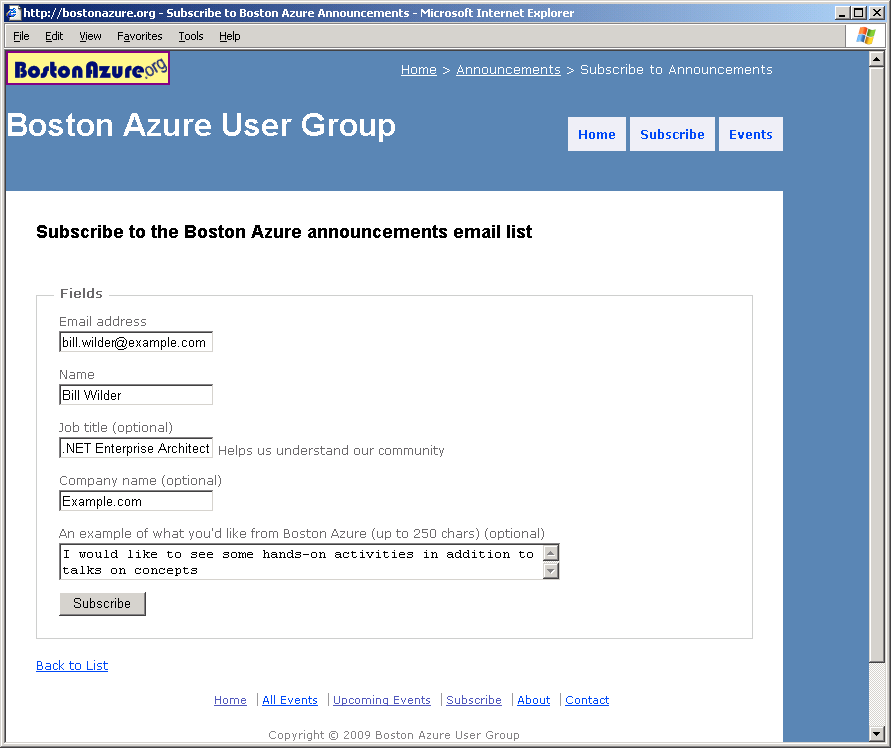
Old form:

sign-up form BEFORE the make-over

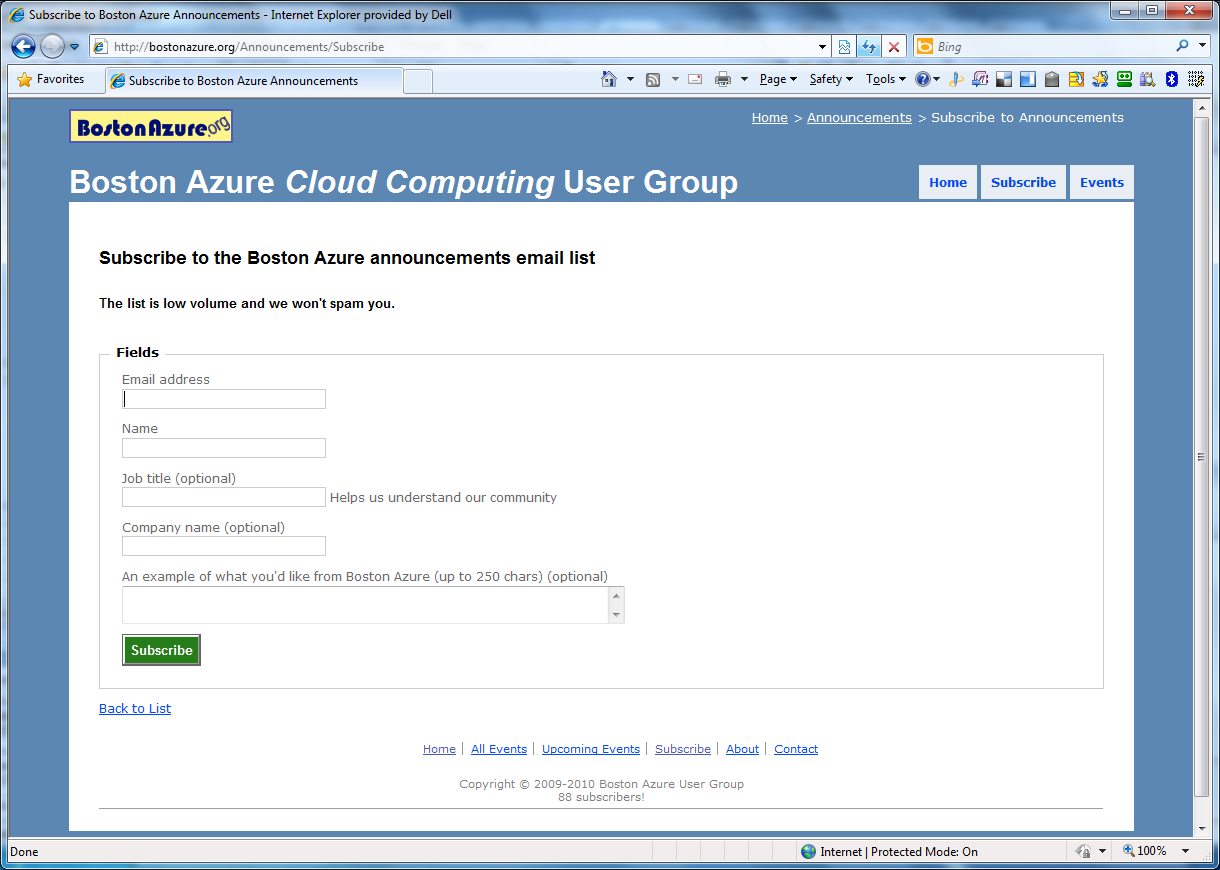
New form:

The subscribe form AFTER IMPROVEMENT

The AFTER screen shot

The Project Location is not Trusted – Dealing with the Dreaded Unblock

The Project Location is not Trusted

Dealing with the dreaded blocked files problem

Quickly Unblocking files marked as Unsafe

Ever download a Zip (or other files) and have to manually “Unblock” one or more files through Windows Explorer’s Properties dialog, like this?
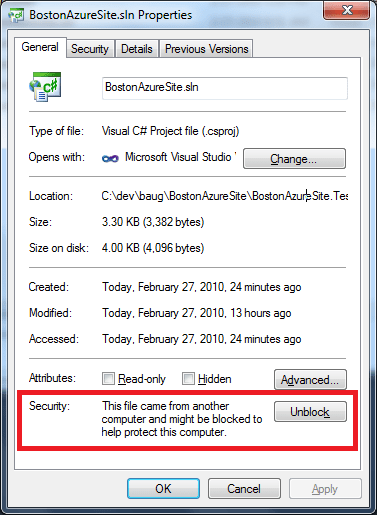
Perhaps you been mystified by a message like this one from Visual Studio?
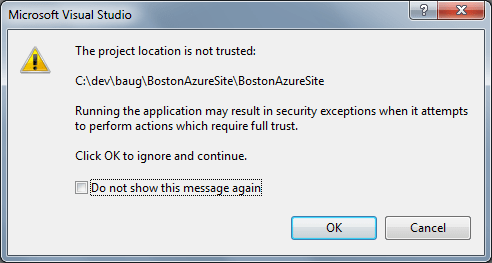
Mysterious Visual Studio error message

Read on to understand what’s happening and to learn how to more easily deal with Unblocking such downloaded files on Windows 7, Vista, and XP.

Why does this happen? Why do files become “Blocked”?

It appears that Internet Explorer (versions 7 and  8, maybe late patches in IE 6) applies the “block” in a stream (see below for more on streams). Some programs handle these “blocked” files more gracefully than others (looks like the latest Adobe PDF reader can read files like this w/o error).

I’ve seen blocking happen when downloading Visual Studio solutions from the web or from an email. I’ve also seen it when downloading documents to disk for use later. You can view the file’s properties in Windows Explorer to see if the block is there (look for the “Unblock” option, as seen above).

Another option is to use Notepad as illustrated in Colin Mackay’s Tip of the Day from nearly a year ago:

notepad MyDownloadedFile.zip:zone.identifier

Of course, substitute your filename in instead of BostonAzureSite.zip, but keep everything else identical. You will see the external zone stream:

[ZoneTransfer]
ZoneId=3

Windows is protecting us from ourselves. I guess if you don’t know what you are doing, you could hurt yourself; you’ve downloaded something “untrusted” from the interweb. This “protection” is in Windows 7 and Windows Vista, and apparently can even appear in Windows XP if certain Microsoft software updates are installed. I assume this has some benefits to someone!

But if you are a programmer / hacker / techie, and are comfortable hacking and generally know what you are doing, read on…

Easily Unblock downloaded files marked by IE as Unsafe

Normally, to Unblock files, you need to visit them one at a time with Windows Explorer, pop up the properties, and click on the Unblock button. This is tedious. If you want to be able to Unblock files more quickly, including whole directory trees at once, then consider doing the following.

Go get streams.exe from the big brains at Systinternals (which is part of Microsoft) and copy the executable to c:\bin\streams.exe. (If you put it somewhere else, make a compensating adjustment in the next step.)

Use Notepad to save the following into a text file named unblock-menu.reg and save it to disk:

Windows Registry Editor Version 5.00

[HKEY_CLASSES_ROOT\Directory\shell\UnBlock]

[HKEY_CLASSES_ROOT\Directory\shell\UnBlock\command]
@="c:\\bin\\streams.exe -d -s \"%1\""

[HKEY_CLASSES_ROOT\*\shell\UnBlock]

[HKEY_CLASSES_ROOT\*\shell\UnBlock\command]
@="c:\\bin\\streams.exe -d \"%1\""

What do these Registry Settings do?

This file lists some registry settings that will allow you to invoke streams.exe from the right-click context menu in Windows Explorer. Depending on whether you right-click on a folder or a file, the context menu will vary, as will the action. For a folder (directory), the registry setting says “call the program streams.exe with the parameters ‘-d -s’ and name-of-whatever-folder-i-clicked-on” which will cause streams.exe to visit each file in that directory tree and remove its streams information. If you right-click on just one file, the command is similar, except does not use the “-s” flag (which says to recurse into subdirectories).

Now install these registry settings by executing this file, probably by double-clicking on unblock-menu.reg from Windows Explorer. You will probably get a warning from Windows saying you must be nuts to attempt to modify the registry. However, if you are a programmer you are probably cool with it (and may also be nuts).

Now you are ready for the next time Windows protects you from yourself by blocking content you didn’t want marked as unsafe in the first place. You can right-click on any file or directory on your computer and select “Unblock” and that will apply the Unblock process. If you apply it to a file, it will only impact that file. If you apply it to a directory (aka folder) then it will recursively apply to all files and directories below that folder.

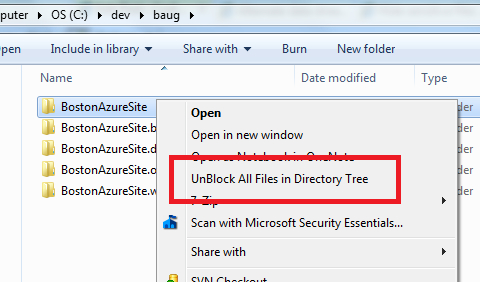
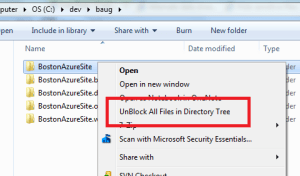
Here’s what you will see when you right-click on a directory / folder from Windows Explorer – note the new option:
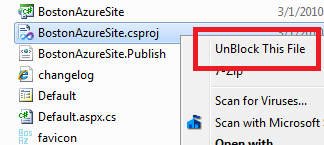
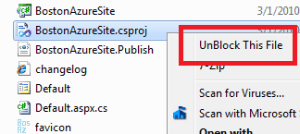
And here’s what you will see when you right-click on a file:
Other Options

I learned about the streams.exe utility from a handy post about unblocking files for Vista. In that same post, they describe how to turn the feature off altogether using the Policy Editor.

Caveat Emptor

With great power comes great responsiblility.

I do not advise applying streams.exe to C:\ as I have no idea whether it is ever a good idea to remove all streams from all files. This may in fact be a very bad thing to do. I just don’t know.  I am personally comfortable doing it with Visual Studio projects and various documents I’ve downloaded, and have not run into any trouble, but be careful out there…

Note that the streams utility will nuke *all* the streams. So if your files contain useful additionals streams, this is probably not going to be a helpful strategy. I expect this is not likely to be a problem for the vast majority of people.

Interesting write-up on Alternate Data Streams, which are a feature of NTFS file system. Even some interesting streams hacks out there.
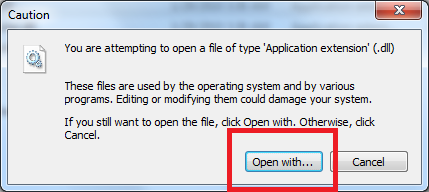
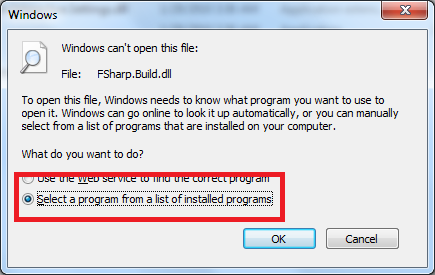
ASP.NET MVC 1.0 Visual Studio 2008 project will not open in Visual Studio 2010 RC or Beta

Errors Opening ASP.NET MVC 1.0 Sites in Visual Studio 2010 RC, Beta

If you try to use Visual Studio 2010 RC to open an existing ASP.NET MVC web site that was built on ASP.NET MVC 1.0 under Visual Studio 2008, you might expect it to be converted and to open successfully. That’s what I expected, but that did not happen. Visual Studio 2010 gave me conversion errors.

But.. there is a straight-forward way to migrate your ASP.NET MVC project from Visual Studio 2008 to Visual Studio 2010 RC.

Here’s what you need to do:

1. Uninstall the MVC 2.0 RC (or RC 1) bits that ship with the RC if you’ve already installed Visual Studio 2010 (and you probably have if you are reading this blob post – but refer to Phil Haack’s post for full details)

2. Download the latest MVC 2.0 RC 2 bits and install them into Visual Studio 2010

3. Download the work-in-progress MVC converter tool and run it on your project

4. Open your project in Visual Studio 2010 and it will now be able to complete the conversion

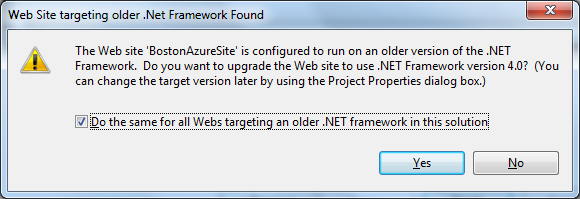
One step in the conversion to Visual Studio 2010 will also ask you if you wish to convert to .NET 4.0:

Since I wish to deploy this site back to a host with .NET 3.5 SP1, I chose No. I am willing to live with deploying the ASP.NET MVC RC 2 bits, but not so with .NET 4.0 as I don’t have control over that (I deploy onto a shared server).

Presumably this will all be integrated and seamless in the final release of Visual Studio. But it worked for me…

Notes from Curt Devlin on Identity, Claims, and Azure Geneva from 4th Boston Azure Meeting Feb 2010

Curt Devlin keynotes 4th Boston Azure User Group meeting

Identity, Claims, Geneva, and Trust in the Cloud

This was Boston Azure meeting #4, Feb 25, 2010

(Curt’s slide deck will be made is now available (PPT 2003 format))

Some notes from Curt’s talk:

  • Azure devs need to care about claims-based-identity and federated identity
  • Geneva is Microsoft’s solution in this space
  • Perfect storm of paradigm shifts
  • Caution: Geneva is not a panacea for “Identity in the Cloud”

“The most important thing Microsoft has done in identity since they came out with ActiveDirectory” – and think about how much we rely on AD for enterprise-class apps – “it’s like air”

First two lines of every program (with nod to Kim Cameron):

  1. Who are you?
  2. What are you allowed to do?
  • The answer to the second generally depends on the answer to the first. “Identity” is an input.

Big architectural problem: the ‘net was built w/o any way of knowing who you are connecting to (http has no identity)

  • RBAC (role-based access control) is not as flexible or powerful as claims
  • Any statement that can be validated can be a claim

Microsoft’s Federated Identity Group very focused on standards. To be serious also about Azure, you need to pay deep attention to the key standards.

Azure is only cloud solution REALLY solving the SSO problem in the cloud – and into your data center. Identity must flow…

Geneva Technology stack:

  • Microsoft Federation Gateway (“ADS 2.0 in the sky”)
  • Windows Identity Foundation (some .NET namespaces)
  • Active Directory Federation Services 2.0
  • Windows CardSpace 2.0

Curt will focus for a while in his talk on Windows Identity Foundation…

Consider three parties – Security Token Service, Your App, End User

  1. Secure Token Service <=> Your App – Initial handshake uses WS-Federation (metadata, X-509 cert)
  2. End User <=> Your App – claims via WS-Policy (which Security Token Service(s) I trust)
  3. End User <=> Security Token Service – verify policy
  4. End User <=> Security Token Service – WS-Trust
  5. End User <=> Your App – lots of interactions – signed tokens, claims

ADF 2.0 – same programming model across web and desktop

RP = relying party – someone that consumes tokens

PingIdentity.com

OpenID cannot help with Man-in-the-middle attacks

“Shred the token” is lingo meaning to decrypt a token.

Coded example showing implementation of Passive Federation.

  • Showed the 8 (!) prerequisites
  • Create full-trust app (Since runtime not fully baked in Azure yet – and certainly not yet in GAC)
  • Add a reference to Microsoft.IdentityModel (which is a stronger programming model than older System.IdentityModel)
  • using Microsoft.IdentityModel.Claims;
  • using System.Threading;
  • Then write like 5 lines of code…
  • Subclasses from IIdentity, IClaimsIdentity, IClaimsPrincipal (same ones used in other .NET apps)
  • WIF ASP.NET Processing Pipeline does a lot of behind-the-scenes work for us
  • IsInRole method is key
  • Then in the ASP.NET app, there is some 10 lines of key code for X-509 cert – which contains the URL (or domain, really) of the web site that the cert applies to – a problem with “localhost” and “stage.foo.com” etc. due to mismatch – this goes in Global.asax – plus several other blocks of code…

Now for the STS (which you don’t need if you have ADFS 2.0)

  • There is a Token Service for ASP.NET visual studio template with Geneva install
  • Many coding steps here (see slides)
  • Use FedUtil (which comes with Geneva and VS 2008, VS 2010) to create a trust between your application and your STS
  • There is a lab to create your own STS

Claims-based systems externalized the work of AuthZ, AuthN to your STS – not stuck in your code.

Geneva supports delegation – embedding one token within another…

(21 people at the meeting)

December 2010 Boston Azure User Group Meeting Notes

Second meeting of Boston Azure User Group

Guest speakers were Michael Stiefel and Mark Eisenberg

Meeting was held December 3, 2009 at the Microsoft NERD

We opened with Boston Azure Theater, kicking off a few minutes after 6:00.  For around 45 minutes we watched a video of Microsoft Director Manuvir Das’ PDC talk A Lap Around the Windows Azure Platform.

From there, Microsoft’s Mark Eisenberg walked us through a summary of key Windows Azure announcements made at (or right before) the Microsoft PDC in November. The deck Mark used is available BAUG_PDCHighlights. There was a lot of interest in the announcement details and in the pricing model.

Our keynote speaker, Michael Stiefel, followed with a detailed look into the project “Dallas” announcement, showcasing the Dallas “Data as a Service” platform, working through sample apps, a custom mashup – with code, demonstrating the straight-forward programming model (ATOM feeds), and showing use of the data directly within Excel. Michael wrapped up by reviewing the business model – and discussing the interesting possibilities (publishers can publish – and others can consume – data so much more easily than today since Microsoft will have eliminated the “contract friction” we’d have if every consumer had to strike a deal with every publisher).

Silverlight exceeds 50% penetration

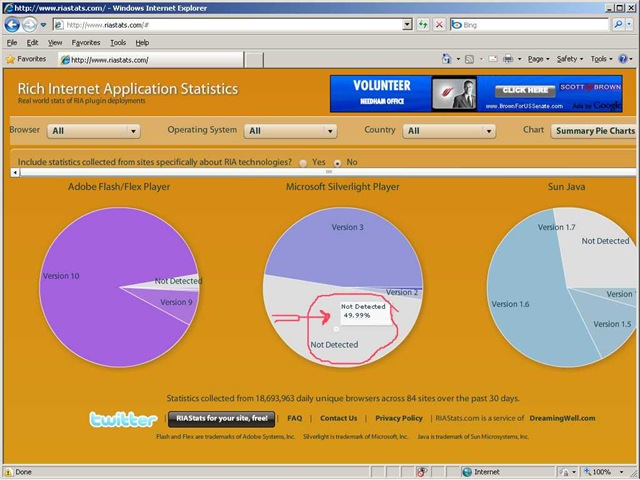
According to RIAStats, a version of Silverlight is now detected on more than half of the browsers sampled! This is a telling milestone as installations of Silverlight continue to grow – drawing inexorably closer to that of Adobe Flash which currently enjoys installations on around 97% of browsers.

If you look at the graphic, and you consider the “not detected” section, it reads 49.99%, which means that the sum of those detected is better than half.

silverlight-exceeds-50-percent

At PDC 2009 in November, Scott Guthrie announced that Silverlight penetration was up to around 45%, up from around 30% in the summer. These RIAStats numbers feel in line with that.

Of course, I know this doesn’t “prove” Silverlight is really on more than 50% of browsers, as RIAStats are not a perfect reflection of the web as a whole, but it seems an interesting milestone nonetheless.

Silverlight has been in the wild for 863 days: Silverlight was released for real (RTW, or “released to web”) on 05-Sep-2007, followed thirteen months later by Silverlight 2 RTW 14-Oct-2008, then less than nine months later we saw Silverlight 3 on 09-July-2009. Silverlight 4 is in beta – maybe Microsoft will announce its release at MIX10 in mid-March? If they do, that would be on a similar release rhythm as from Silverlight 2 to Silverlight 3.

Silverlight’s installed base will also get another boost from the 2010 Winter Olympics next month as well. (And Silverlight 2 shipped shortly after the 2008 Summer Olympics.)

It is interesting to note that another tracking site – StatOwl.com – not only shows the penetration lower – and doesn’t agree on any of the numbers – but also doesn’t even agree on relative installed base across versions [EDIT: after Comment from Travis Collins, added in Silverlight 4 = 0.04 for RIAStats]:

RIAStats StatOwl
Silverlight 1 0.62 1.39
Silverlight 2 1.91 9.73
Silverlight 3 47.44 23.85
Silverlight 4 (beta) 0.04 (<1 pixel) not shown, or 0%
Undetected (reported) 49.99 65.03%

I’m not sure why they don’t agree – perhaps differences in sample sizes, sampling methodology, or due to different audiences being sampled.

Also, if you check the math yourself, you’ll see the values shown don’t tie down perfectly for RIAStats (though they do for StatOwl); if you add up the individual Silverlight versions along with the Undetected, you won’t get exactly 100%. Some sort of rounding errors I assume. [EDIT: See explanation in Comment from Travis Collins, RIAStats creator.] But I also assume that the Undetected = 49.99% is most likely right (at least not wrong due to a rounding error, since it is harder to round wrong there).

EDIT 01-Feb-2010: Found an interesting, relevant post on Cool facts about Silverlight penetration / mindshare from UXPassion.com.

NEJUG ~ JSR-299 – 08-Oct-2009

Very rough notes on JSR-299 by Gavin King from NEJUG Meeting of 08-Oct-2009

Profiles

  1. Will enable deployment with subset of JEE feature set – so can leave out parts you don’t use – thinner footprint, less complexity?

Theme = Loose Coupling

  1. decouple server and client via well-defined types and “qualifiers” (beyond Interfaces)
  2. decouple lifecycle of collaborating components via
    1. server-side lifecycle management by Container
    2. allow stateful components to interact like services via message-passing
  3. decouple orthogonal concerns via Interceptors
  4. decouple msg producer from consumer via Events

Theme = Strong Typing

  1. eliminate lookup using string-based names
    1. enables smarter auto-complete, more power in compiler type checking

What’s unique?

  1. implementations of a type may vary at deployment time – without need for central list of available implementations
    1. no need to explicityl list beans (e.g., Spring) or use Java-based DSL (Guice)

What kinds of things can be injected and how?

  1. Most java classes
  2. EJB session beans
  3. Objects returned by producer methods
  4. Java EE resources (e.g., JMS topics/queues)
  5. Persistence contexts (JPE EntityManager)
  6. Web service references
  7. Remote EJB references
  8. anything else can be supported through SPI (flexible extensibility via metamodel)
  9. Can define business-sensible attributes to specify injection types (e.g., InformalGreeting extends Greeting class, then have an @Informal attribute)
  10. Can use injected object in a JSF or JSP page – e.g., container will instantiate the right objects (construct as needed, etc.) and pass it is such as in: <h:commandButton value=”Say Hello” action=”#{printer.greet}”/>
  11. Beans may need to be stateful – this is supported too – handled as lifecycle attributes such as @RequestScoped for per-request or

Scopes and Contexts

  1. Extensible context model
  2. Dependent scope, @Dependent
  3. Built-in scopes
    1. @ApplicationScoped, @RequestScoped, for servlet we have @SessionScoped [e.g., Login state object may store username in a member variable], for JSF requests @ConversationScoped
  4. Custom scopes – third party frameworks can support via SPI
  5. KEY POINT: Client does NOT know anything about the lifecycle of the session-scoped object
  6. Conversation context is scoped INSIDE OF (DOES IT NEED TO BE WITHIN, or is it just defined as more granular a SCOPE than) a session – can have more than one Concersation that don’t know about each other – supports multiple tabs, wizards, AJAX and other multi-step sub-tasks
  7. Better abstracts some concepts – a set of mappings can be defined such that a class can loosely reference (my term), say, a value from another object (like the user’s first name, from the Login object), and the container will take care of all the heavy lifting and just insert that value – nicely separates lookup logic so your business logic code can stay cleaner and refer to (as in example above) their “first name”, not the Login object directly

Interceptors

  1. ANOTHER APPROACH FOR WHAT ASPECTS ARE USED FOR TODAY
    1. Perceived to be more flexible, more generally useful (there are very few uses for Aspects now – nothing new in 5-10 years!)
  2. Should be decoupled from implementation via semantic annotations
  3. Should be deployment-specific – e.g., can turn off my transaction support during testing
  4. Ordering of interceptors matters – so do this centrally so you can manage/understand it – don’t bing interceptors directly to components

Stereotypes

  1. Reuse patters – not just Interceptor bindings!
  2. Capture roles of components using stereotypes
  3. A Stereotype packages up:
    1. a default scope
    2. a set of interceptor bindings
    3. the ability to specify that beans have names by defaults
    4. (more)
  4. Uses @Stereotype annotation

Events

  1. Can be injected – as in void Login(@Observes LoggedIn loggedin)…

Proposed final draft of JSR-299: http://www.jcp.org/en/jsr/detail?id=299

Seam Framework reference implementation: http://seamframework.org/WebBeans

JBoss doc: http://docs.jboss.org/webbeans/reference/current/en-US/html/

Blog: http://in.relation.to/Bloggers/Everyone/Tag/Web+Beans

—-

Value of more Type Safety in a world where Dynamic Languages are gaining traction

Debugging might be more challenging

Performance issues?

Complexity / tooling issues?

How is this different / better / worse than Spring?

Gary Chin Presents SketchFlow at Code Camp 12 in Boston

Gary Chin on SketchFlow for Silverlight

Gary Chin spoke at Boston Code Camp 12 (on Oct 17, 2009) – his talk was all about using SketchFlow for Silverlight.

I heard from various folks that the talk went really well. Unfortunately, I wasn’t able to make it since I was presenting at the same time (actually presenting on presenting.)

Gary was kind enough to send me his slides which I have attached to this post: SketchFlow-GaryChin-Oct2009

See you at the next Code Camp! (Though will probably also see many of you before then – this Thursday night at the first meeting of the Boston Azure User Group!)

First Boston Azure User Group meeting next week

We are getting close to the kick-off meeting of the Boston Azure User Group – next week, on Thursday October 22, 2009 starting with pizza at 6:30 at the NERD in Kendall Square. Microsoft’s Brian Lambert is the featured speaker.

We have a couple of behind-the-scenes planning meetings this week then will finalize the information on the bostonazure.org web site.

Have you joined the Boston Azure User Group mailing list?

Demystifying Prism – talk at New Hampshire .NET User Group 17-Jun-2009

Spoke at New Hampshire .NET User Group back on June 17, 2009. Talked about Prism (focusing mostly on Silverlight, a little homage to WPF), showed some code, shared a slide deck.

I will be giving an updated version of this talk at the upcoming Code Camp 12 in Waltham (Boston area) on Sat Oct 17, 2009.