Category Archives: Events

At New England Code Camp #13, Gave Talks on Azure and Prism

At today’s New England Code Camp #13, I gave talks on Azure and Prism.

1. Azure Talk

2. Prism Talk

Steve Krug on Rocket Surgery Made Easy from Dec 2010 BostonCHI Meeting

Rocket Surgery Made Easy

Steve Krug speaks at BostonCHI

Notes from 08-Dec-2009 meeting

  • Steve’s new book – Rocket Surgery Made Easy – due in bookstores in a couple of weeks – material from this talk will be in his book…
  • Passed a copy of his book around through the audience for quick peek
  • 150 or so people in attendance

Writing process

  1. writing process: collect years of notes
  2. need deadlines to force you to write (and finish)
  3. collect relevant articles for each chapter and post them all on a wall
  4. once you’ve begun to panic, start throwing things overboard
  5. Outline, write, iterate
  6. get help
  7. throw things overboard (save for next book?)
  8. FAQ at the end of every chapter – good idea
  9. Doing usability (vs How to Think About Usability)

Doing Usability

  1. A morning a month – that’s all we ask
  2. Run tests – with whole team – at our site – scheduled monthly and well ahead of time – and debrief immediately after over lunch
    1. maybe do right before iteration planning
    2. company-sponsored lunch
  3. Start earlier than you think makes sense
  4. The sooner you get information, the better use you can make of that information
  5. Don’t wait until the site is “finished” – test it as soon as it is testable
  6. Don’t worry that “you already know about the problems”
  7. If you have nothing built, test other people’s sites
  8. Are you working on the site? –> Yes ==> test now!
  9. Recruit loosely and grade on a curve
  10. Beware implied domain knowledge
  11. Some testing can be done w/o your target audience
  12. Usability testers say many things that are similar to what therapists say – “what did you expect to happen when you did that?”
  13. Keep yourself out of it! It is about the user and what the user being tested is thinking.
  14. Make it a spectator sport
  15. Get everyone to come and watch the test – frequently the observers suddenly just “get it” that they are not their users
  16. Have high quality snacks. Keep the sessions short and compact. Do them on site. Make it easy for everyone to join in, hard to have a good reason to skip it.
  17. Record sessions with Camtasia ($300). Get a good USB desktop microphone ($25). Don’t record user’s face (“useless and distracting”). Use a screen sharing service (like GotoMeeting, $40/month?) to control the UI. High quality audio is important, and should be channeled to the observation room via GotoMeeting or Skype.
  18. Focus ruthlessly on a small number of the most important problems
  19. Serious because everyone will come across them, or serious because for those who do encounter them will be seriously impeded.
  20. Don’t feel you need to come up with the “perfect” fix
  21. Ask everyone in the observation room to write down the three most important issues they observed. These are raised at the debriefing session over lunch.
  22. When fixing problems, always do the least you can do ™
  23. Prioritize the list, then work your way down the list until you run out of time/resources
  24. Sometimes a tweak is better than a redesign – don’t get suckered into a redesign – the perfect is the enemy of the good!
  25. Focus on the smallest change we think we can make to address the problem we observed
  26. Q&A
  27. Remote Testing?
  28. Remote testing is handy – saves travel time, recruiting pool grows, … do over skype or GotoMeeting.
  29. How to get it off the ground? Try a group usability test of competitor’s site – everyone can get behind that. Do one and hope people get enthused about it. Make the cost of swinging by to watch the testing really small.
  30. Be very cautious about asking users how to fix the problems they’ve encountered. “Users are not designers.” “Hopefully you know a lot more than they do about design.” Listen to them, but be careful that they’re ideas are not well thought out. The purpose of testing is to “inform your design intelligence”.

Since Software is a Business, Architects need to be More than Technologists

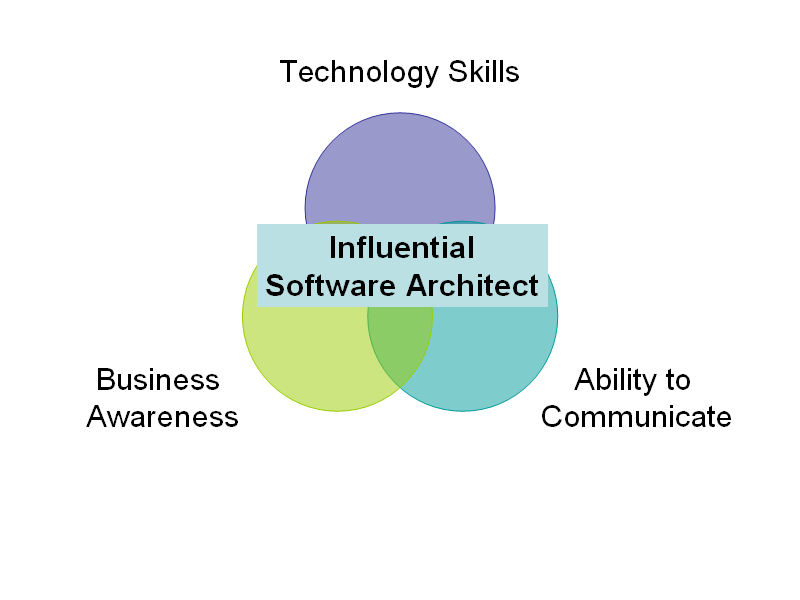
Gave talk at Architect Factory, Part Deux today titled Since Software is a Business, Architects need to be More than Technologists. The slide deck can be downloaded here. The most prominent concept/slide follows:

Technology Skills

Technology + Communications + Business-Awareness = Influential Architect

The overall event was excellent. It was organized primarily by Bryan Tuttle of CodeRight, a Consulting/Training company. Many thanks to Bryan for a job well done!

NEJUG ~ JSR-299 – 08-Oct-2009

Very rough notes on JSR-299 by Gavin King from NEJUG Meeting of 08-Oct-2009

Profiles

  1. Will enable deployment with subset of JEE feature set – so can leave out parts you don’t use – thinner footprint, less complexity?

Theme = Loose Coupling

  1. decouple server and client via well-defined types and “qualifiers” (beyond Interfaces)
  2. decouple lifecycle of collaborating components via
    1. server-side lifecycle management by Container
    2. allow stateful components to interact like services via message-passing
  3. decouple orthogonal concerns via Interceptors
  4. decouple msg producer from consumer via Events

Theme = Strong Typing

  1. eliminate lookup using string-based names
    1. enables smarter auto-complete, more power in compiler type checking

What’s unique?

  1. implementations of a type may vary at deployment time – without need for central list of available implementations
    1. no need to explicityl list beans (e.g., Spring) or use Java-based DSL (Guice)

What kinds of things can be injected and how?

  1. Most java classes
  2. EJB session beans
  3. Objects returned by producer methods
  4. Java EE resources (e.g., JMS topics/queues)
  5. Persistence contexts (JPE EntityManager)
  6. Web service references
  7. Remote EJB references
  8. anything else can be supported through SPI (flexible extensibility via metamodel)
  9. Can define business-sensible attributes to specify injection types (e.g., InformalGreeting extends Greeting class, then have an @Informal attribute)
  10. Can use injected object in a JSF or JSP page – e.g., container will instantiate the right objects (construct as needed, etc.) and pass it is such as in: <h:commandButton value=”Say Hello” action=”#{printer.greet}”/>
  11. Beans may need to be stateful – this is supported too – handled as lifecycle attributes such as @RequestScoped for per-request or

Scopes and Contexts

  1. Extensible context model
  2. Dependent scope, @Dependent
  3. Built-in scopes
    1. @ApplicationScoped, @RequestScoped, for servlet we have @SessionScoped [e.g., Login state object may store username in a member variable], for JSF requests @ConversationScoped
  4. Custom scopes – third party frameworks can support via SPI
  5. KEY POINT: Client does NOT know anything about the lifecycle of the session-scoped object
  6. Conversation context is scoped INSIDE OF (DOES IT NEED TO BE WITHIN, or is it just defined as more granular a SCOPE than) a session – can have more than one Concersation that don’t know about each other – supports multiple tabs, wizards, AJAX and other multi-step sub-tasks
  7. Better abstracts some concepts – a set of mappings can be defined such that a class can loosely reference (my term), say, a value from another object (like the user’s first name, from the Login object), and the container will take care of all the heavy lifting and just insert that value – nicely separates lookup logic so your business logic code can stay cleaner and refer to (as in example above) their “first name”, not the Login object directly

Interceptors

  1. ANOTHER APPROACH FOR WHAT ASPECTS ARE USED FOR TODAY
    1. Perceived to be more flexible, more generally useful (there are very few uses for Aspects now – nothing new in 5-10 years!)
  2. Should be decoupled from implementation via semantic annotations
  3. Should be deployment-specific – e.g., can turn off my transaction support during testing
  4. Ordering of interceptors matters – so do this centrally so you can manage/understand it – don’t bing interceptors directly to components

Stereotypes

  1. Reuse patters – not just Interceptor bindings!
  2. Capture roles of components using stereotypes
  3. A Stereotype packages up:
    1. a default scope
    2. a set of interceptor bindings
    3. the ability to specify that beans have names by defaults
    4. (more)
  4. Uses @Stereotype annotation

Events

  1. Can be injected – as in void Login(@Observes LoggedIn loggedin)…

Proposed final draft of JSR-299: http://www.jcp.org/en/jsr/detail?id=299

Seam Framework reference implementation: http://seamframework.org/WebBeans

JBoss doc: http://docs.jboss.org/webbeans/reference/current/en-US/html/

Blog: http://in.relation.to/Bloggers/Everyone/Tag/Web+Beans

—-

Value of more Type Safety in a world where Dynamic Languages are gaining traction

Debugging might be more challenging

Performance issues?

Complexity / tooling issues?

How is this different / better / worse than Spring?

Cure for Phantom Mouse Clicks on Acer Netbook Laptop Tablet from Microsoft PDC

If you attended the Microsoft PDC in 2009, you received what appeared to be an Acer Netbook, but in fact is technically an Acer Laptop (that’s what Acer support insists), though apparently is also a considered a Tablet – the Acer Aspire 1420P Convertible Tablet PC. But a Convertible Tablet at that… 

Talk about an identity crisis. Maybe we should just call it, more simply, the PDC Netabletible Convertilizer? 

If yours has trouble with “phantom mouse clicks” – where you are typing away, and it seems that somehow the left mouse button was just clicked, but you know you didn’t click it – that can be fixed with the simple act of installing the Synaptics driver for this machine that, weirdly, will not ever show up in Windows Update.  But since this is a pretty useful update, consider doing it the old fashioned way. 

Or at least it worked for me. Though belated, this blog post may save someone the challenge of finding the cure, which I thought more difficult than it oughta be. 

The PDC Netabletible Convertilizer may not be the only one out there with this problem.

As an aside, my PDC Netabletible Convertilizer also became more usable once I recalibrated the touch screen. (How does one do that? Type into the search field in the Start menu “calibrate touch” for a link to the right part of Control Panel to make this happen…)

Intuit as a Service

My notes from Intuit talk at Boston Cloud Meetup on Nov 3, 2009.

Per Alex Barnett of Intuit – only 12% of 4m Small Businesses not willing to use hosted data with SaaS.

Webware 100 finalists… best software solutions.

How do cloud-based apps Integrate?

  • Finance system know the project in Basecamp is done
  • Calendar know about CRM

Simplify by mapping services to a COMMON DATA MODEL (this is a REALLY big deal, IMHO).

QuickBooks have 4 m customers who have effectively agreed on a database schema… exposed an API to this data store. Nice…

The “Small Business Data Cloud” – available today from Intuit – as the Intuit Partner Platform.

native apps

  • Flex applications hold the logic
  • Server-side Java coming in development

federated apps

  • identity
  • data
  • billing
  • most of the action is over here (rather than native apps)

They expect to ship 1.7 m units of QB 10 over next 6-12 months – this will really launch the platform.

4 m users spending 4 b hours per year of screen time

25 million users within these Small Businesses

FAST TIME TO VALUE through SaaS solutions.

Intuit keeps 20% of the rate, rest goes to developers

Can have trial-periods, entitlements (monthly-charged extra features), more options coming next year.

Developers support the apps – Intuit supports everything else.

http://code.intuit.com – some Open Source in here

  • some code uses SAML
  • support Java, Python, Ruby, PHP, and .NET versions of code, such as SAML gateway

http://developer.intuit.com

Intuit – SMB, 4m customers

Salesforce – Enterprises, 25k customers

Is it a per-user, or per-customer license? Intuit end-users don’t need a license.

Don’t need to license QuickBooks to use the overall platform – but there may be some synergies.

Intuit certifies apps for use in their marketplace. Federated apps go through a third-party security assessment – on Intuit’s dime today, though that may change in the future.

Top 10 Presentation Tips from Presentation Camp Boston

I attended Presentation Camp Boston, a bar-camp style conference, on 24-Oct-2009. There were many good ideas and presentation tips. Among them, these are my favorites.

Top 10 Presentation Tips

The top 10 presentation tips I took away from Presentation Camp Boston

From Kenny Raskin‘s keynote:

1. “Have a Passionate Purpose”

When you are speaking, it is not only about the content. If you mean what you say – you really believe in it – (which I believe Dale Carnegie refers to as conviction) – then you are more likely to be successful at conveying your message and persuading your audience.

Kenny shared a quote which was something like the following:

Who you are being when you are saying what you are saying says more about what you are saying that what you are saying.

Not just sell it – it was believe it + sell it both at once. This tip resonates with me and is consistent with a lesson from studying and performing improv; one of my instructors, Erik Volkert, really got across the difference between acting it out and really committing – and the impact that has on stage.

2. “The presentation starts before you are even in the room”

  • Find out who the audience is and what you want to say to them. What do you want them to FEEL. (“Know your passionate purpose!”)
  • As you are preparing to enter as a speaker, take a breath. Focus. Clear your mind.
  • As you enter, look your audience in the eyes. Before you say a word. Greet the audience. Pause… and let them respond.

3. Genuine eye contact != scanning

Eye contact is important. Don’t scan the audience and think that’s eye contact – you need to pause and connect with individuals one at a time – this may be for the duration of a thought or statement – or just until you feel you’ve connected. Some of your eye contact moments will be during pauses and are your opportunity to re-energize by breathing.

From Diane Darling‘s Talk about Networking:

Not about presenting to large groups, but focused on presenting to very small groups of one or a few other folks in a social / networking situation.

4. Business Cards from A-Z

Some wisdom on business cards:

  • You need business cards. And they don’t need to be plain and boring… Diane’s cards have a list of tips on one side – useful and “sticky“.
  • She advises to keep your business cards in one pocket, and the ones you collect in another pocket – just have a simple system to avoid fumbling.
  • Write on the business cards – you may forget later otherwise that this card is from someone you offered to send a link to an interesting paper, or perhaps they might be a future business partner. Handy, easy hack.
  • If you do give a talk to a group, be sure to have a stack of cards handy to share at the end.

5. “Own the room”

I am a highly functional introvert
~ Diane Darling, author of The Networking Survival Guide: Get the Success You Want By Tapping Into the People You Know

I love that quote! As a fellow introvert, that’s how I want to be. Diane builds a case for being highly functioning with a plethora of straight-forward tips on how to handle lots of business social situations. A couple of examples:

  • Prepare several generic ice breaker questions you can use when you meet someone new. A good format for such questions is “Tell me about ______.” You fill in the blank with “your job” or “how you got into this line of work” or “how you ended up at this conference” etc.
  • Wear your name tag close to your RIGHT shoulder (since that’s where the eye most naturally is directed during a hand-shake.
  • Don’t start with your name! Introduce yourself by saying something about yourself, and end with your name – it is easier to remember there.
  • Saturday Night “Live” != Saturday Night “Unrehearsed” — you will be more successful if you practice some of what you will say — like what is your brief introduction of yourself (your elevator pitch), ending with your name, of course!

6. Connect with the Gatekeepers

If you want to get access to key people who may be hard to get to, consider connecting with those people who control access – such as a personal assistant to the CEO.

From Edwin Guarin‘s talk, The Killer Presentation:

Edwin is an Academic Evangelist for Microsoft. His talk was called The Killer Presentation – Gettting to Point B.

7. Distributing Your PowerPoint Deck

Suppose you’ve given a talk, but now your audience wants a copy. Here’s how to do it, plus a couple of important benefits:

  • File > Save As… and choose either PDF or PowerPoint Show.
  • If you have Hidden slides – perhaps because you want “single source” for a slide deck that you use in multiple circumstances, but don’t want to maintain the bulk of the slides more than once – this will drop all those marked as hidden at the time you Save As.
  • If you have Notes, they are not included either. Sometimes your Notes are just speaking points, but perhaps they are not something you want everyone to see.

8. Spruce Up Your Talk with Images

You are preparing a deck, and you want to be memorable. You want that “just right” image or text effect.

  • Edwin recommends the use of royaty-free photos from http://sxc.hu.  You need to create an account to access them, then are free to use them in your PowerPoint slides.
  • Note that you are not licensed to subsequently redistribute these images if they are embedded in your PowerPoint deck. I registered an account on sxc.hu web site asking for clarification – and there was a tad bit of ambiguity around the licensing (the license text seem to both suggest it was fine and also say it wasn’t) – so I sent in a specific question on this scenario. The response from sxc.hu support was that the PowerPoint cannot be posted for redistribution. I am not a lawyer. And I do not even play a lawyer on TV.
  • [In my talk, I advocate searching through Google Images advanced search and filtering by Usage Rights to only include images labeled for reuse (usually through Creative Commons).]
  • To embed an image that is too bright, overlay it with a rectangle – and set the transparency to accordinly to fade it a bit so that text can be seen on top of it.
  • Use SmartArt to snazz up your text… transform a bullet list into a ring, or horizontal property or other eye-candy fanciness.

From Brainshark demo:

9. Sharing Your Presentation After the Fact

Brainshark has a cool way for you to post your slide-deck to their free http://my.brainshare.com hosted service: you can upload both the deck *and* an audio track.

This is way better than just distributing the PowerPoint deck, which may not be of any use for people who didn’t attend the talk. Of course, you do need to create (or record) an audio track.

I am not sure how the slides and the audio are sync’d – like when in the audio track should slide 7 pop in – but my guess is that you are expected to record your voice while delivering the talk – and some agent on your desktop keeps an eye on when you transition between slides. If so, I wonder if it can also capture screen shots of non-PowerPoint activities – like if I pop up a web browers, or use Visual Studio.

From Bill Wilder’s talk on Better Tech Talks:

Yes, I am recommending a tip from my own talk. 🙂

10. “It is a Talk, not a Read”

Don’t even think of reading your slides to your audience.

  • If you cram all the text for your talk into your deck , you will be guilty of promulgating support for Death By PowerPoint.
  • Your audience can read faster than you can talk anyway – they will be done before you. And they won’t be listening to you while they read; they can’t do both at once.
  • Your audience will resent being read to. As Jack Welch is reputed to have said to a presenter reading him the slides: if everything is on the slides, then we don’t need you.
  • There are better tools for a stand-alone document – like blog posts, or word-processors. PowerPoint is a poor substitute when writing a document that is being prepared for general reading.
  • If you do need to capture more info than belongs in the slides, consider putting it into the Notes section, and then using dual-monitor capabilities to have your laptop display different content than the projector, and configure PowerPoint to know about this via:  Slide Show > Set Up Show > Multiple Monitors.
Better Tech Talks session from Presentation Camp Boston

I attended Presentation Camp Boston on Saturday 24-Oct-2009. I sat in on several excellent talks, plus led a session myself called Better Tech Talks. which was a presentation & discussion on giving technical talks to technical people.

I’ve been thinking a lot about how to give code-centric talks to software engineers, plus the general problem of clear communication through presentations. Those in my session will recognize that my slides (Better Tech Talks – 24-Oct-2009) do not stand alone well! – but should serve as a good reminder for those who participated in the session.

Feel free to follow-up with me to continue the discussion!

So, You Want to Give Your First Code Camp Talk?

Gave a talk 17-Sat-at Boston Code Camp 12 called So, You Want to Give a Code Camp Talk?.

How to Give Your First Code Camp Talk – 17-Oct-2009

If you attended my talk, you learned than I don’t advocate ensuring the slide deck makes sense stand-alone (since it is a framework for a talk, with purpose different than that of an article or blog post). You’ve been warned. 🙂

Demystifying Prism – talk at New Hampshire .NET User Group 17-Jun-2009

Spoke at New Hampshire .NET User Group back on June 17, 2009. Talked about Prism (focusing mostly on Silverlight, a little homage to WPF), showed some code, shared a slide deck.

I will be giving an updated version of this talk at the upcoming Code Camp 12 in Waltham (Boston area) on Sat Oct 17, 2009.