Tag Archives: technology

OTel Traces for the Win

This post was inspired by my Making Agents Work talk at Boston Code Camp #40, inspired by my OTel demo snafu at the live event.

Image stolen from Bala Subra – https://x.com/bsubra/status/2037887079804248504?s=20

Quoting from https://opentelemetry.io/ – “OpenTelemetry is an open source observability framework for cloud native software. It provides a single set of APIs, libraries, agents, and collector services to capture distributed traces and metrics from your application.”

Here we focus on Open Telemetry – or OTel for short – Traces.

The Anemic OTel Trace Antipattern

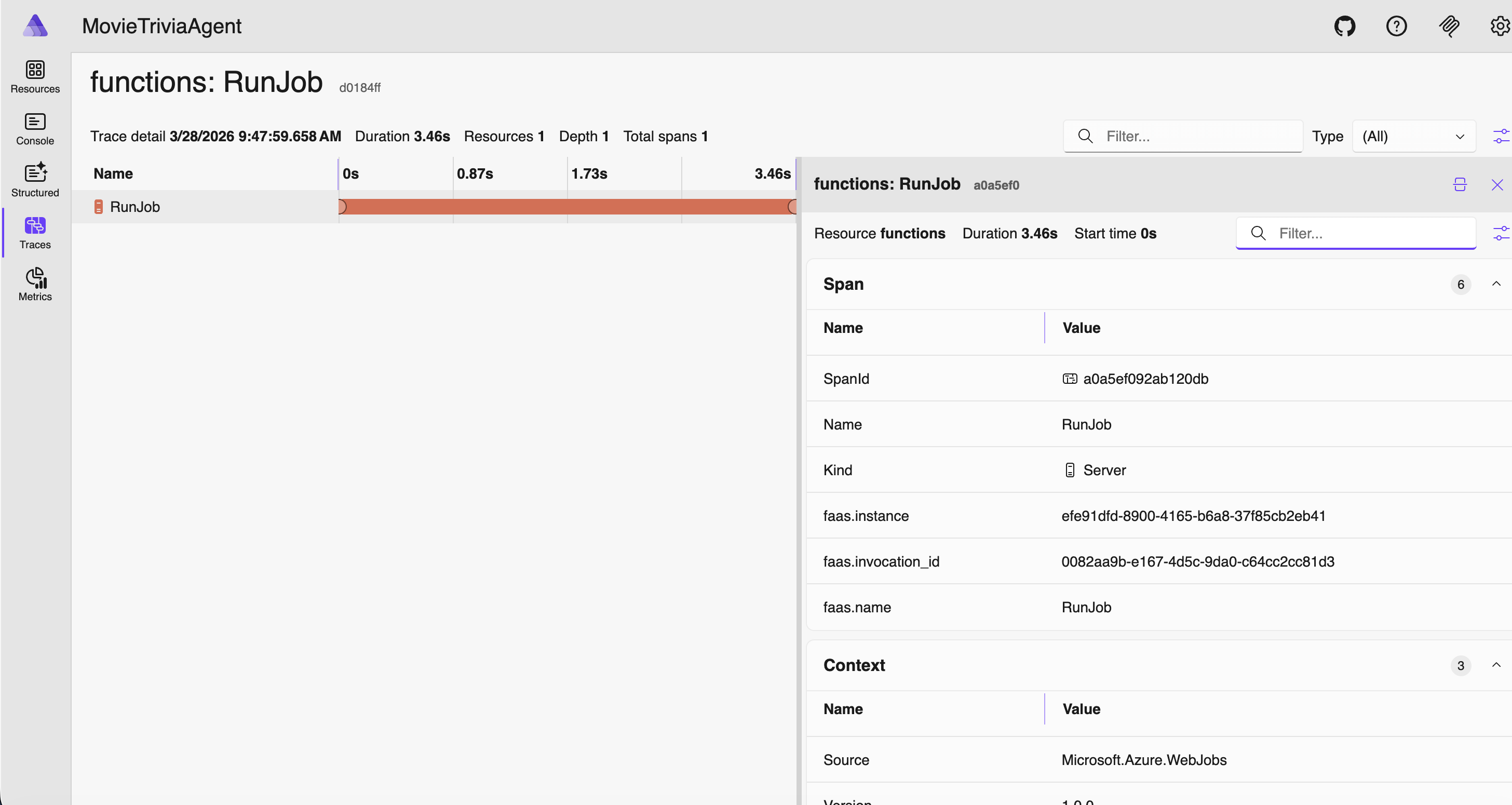
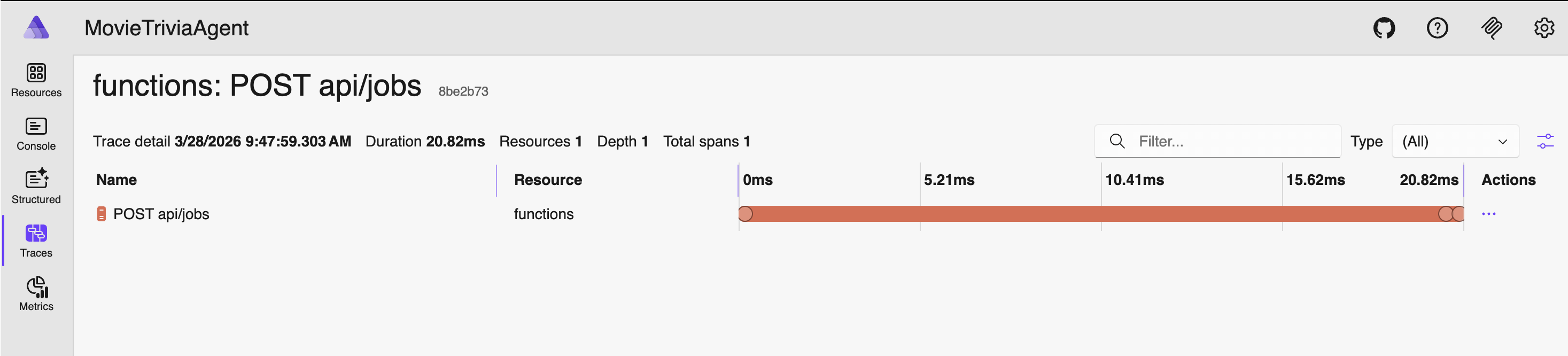
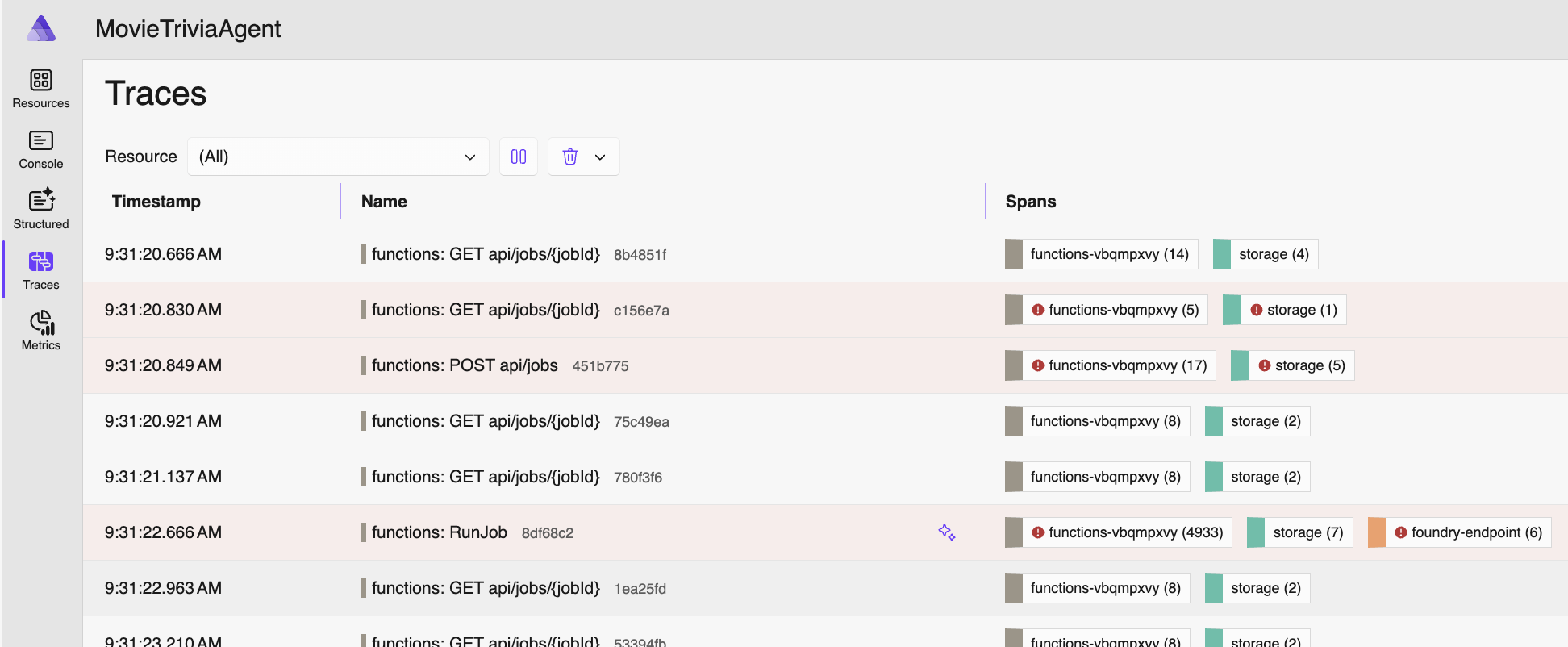
Due to an error in my demo prep, I ended up showing sparse OTel Traces – definitely not producing meaningful telemetry so observability will be subpar (or terrible). I am calling this the Anemic OTel Trace Antipattern. This antipattern comes through in the four screenshots that follow. The first screenshot shows the overall traces view listing one trace-per row. This is actually fine and normal as these are reasonable top-level traces. But drilling into any of these individual traces revealed no nesting and no context.
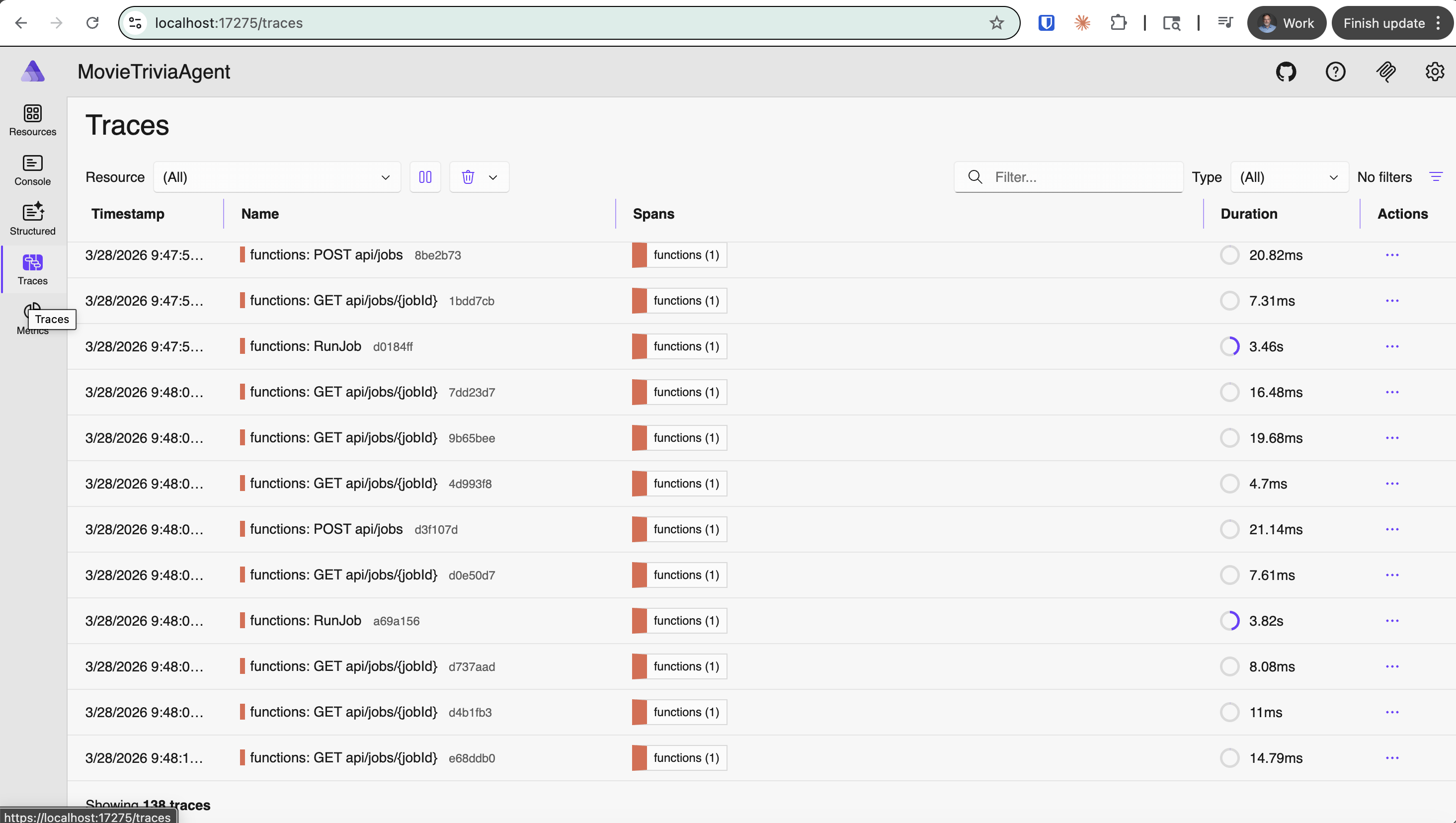
Top-level OTel Traces – shown using Aspire on local machine (note the localhost URL)
Click on “functions: RunJob” trace

Click on “functions: POST api/jobs” trace – this is the detail after clicking on the one trace row
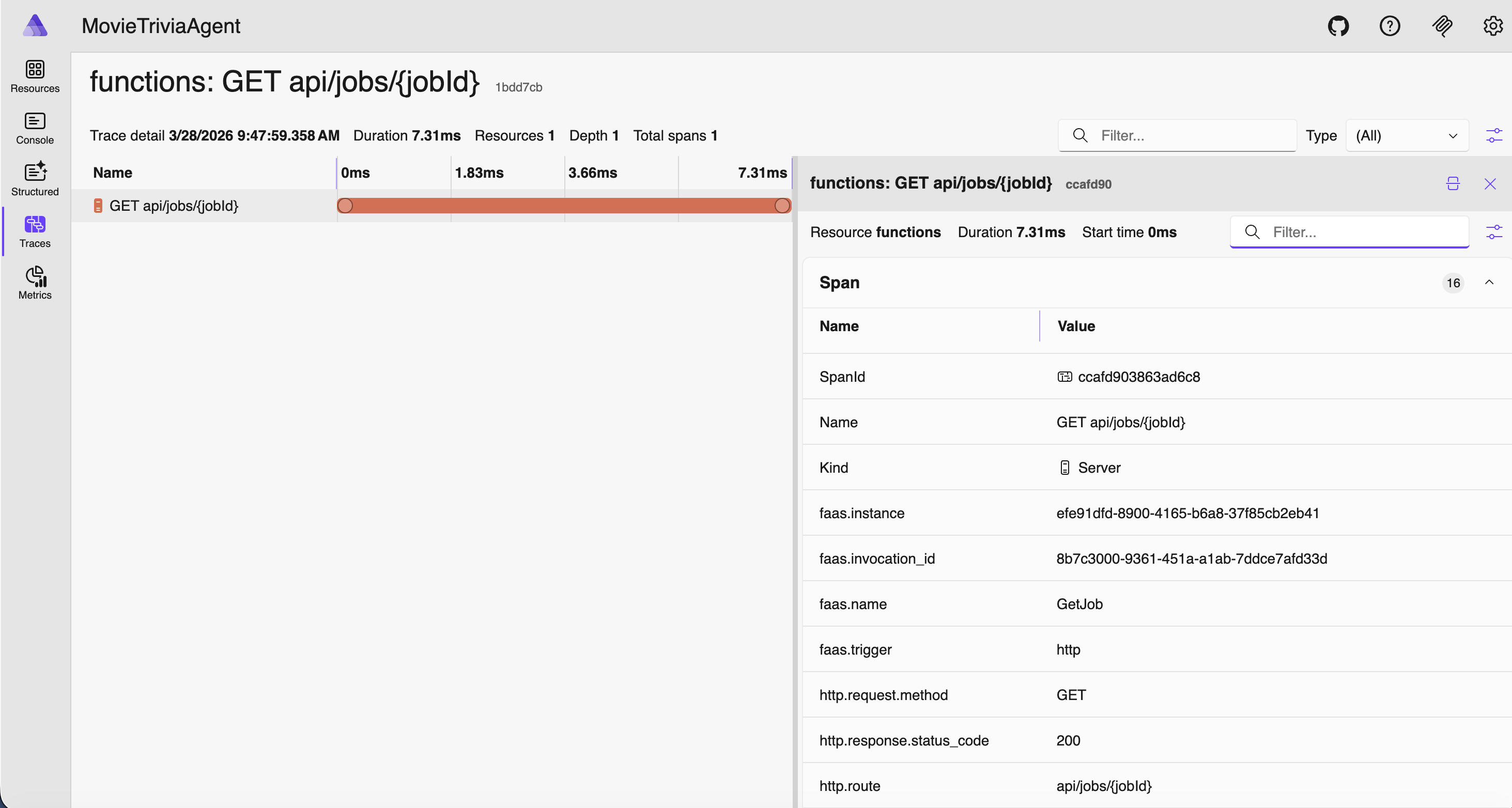
Click on “functions: GET api/jobs” trace – this is the detail after clicking on the one trace row

The Flat Trace OTel Trace Antipattern

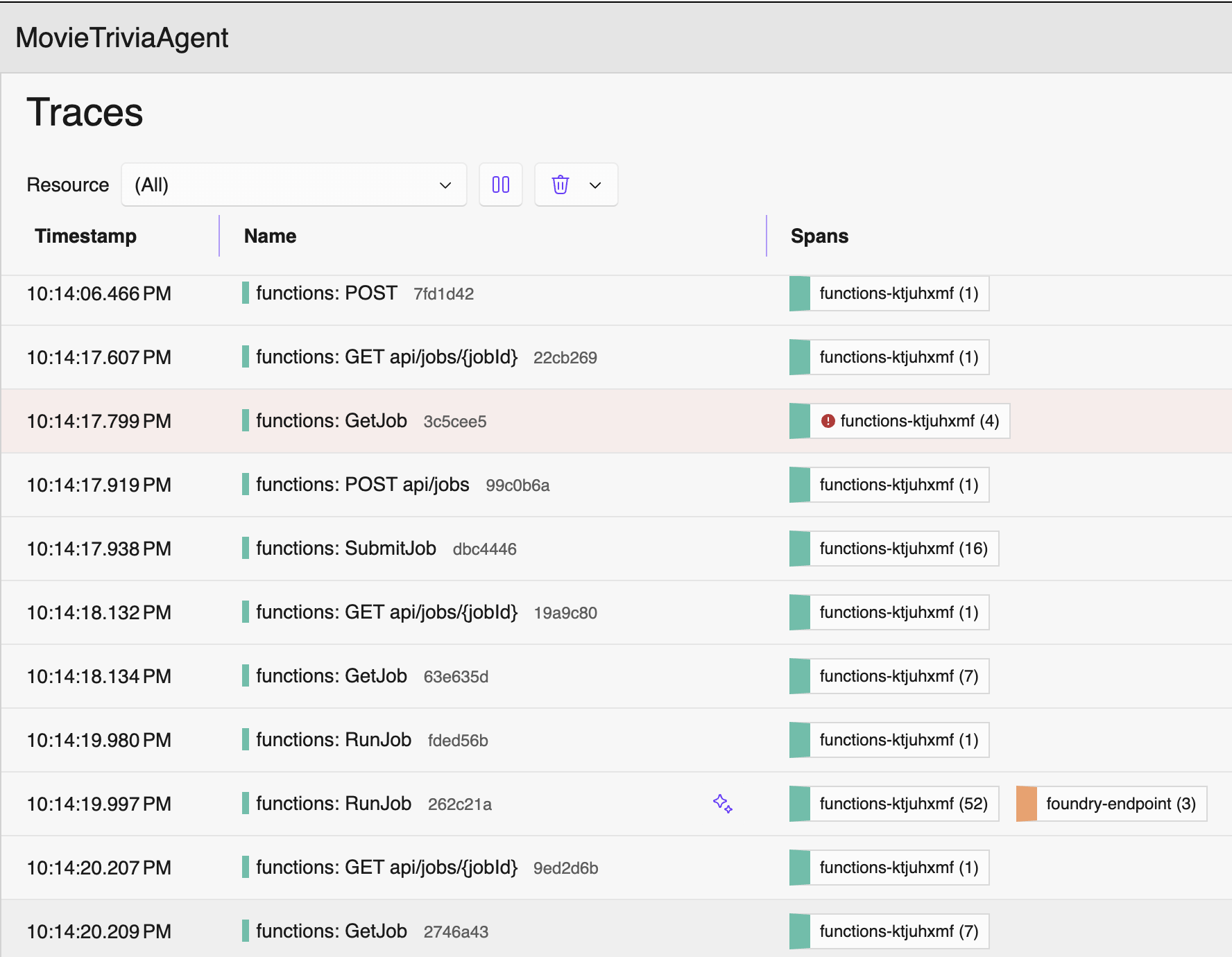
Consider the traces below. If GetJob is triggered by an HTTP GET to the jobs endpoint, then my suggestion is they should be nested – GetJob under the corresponding HTTP GET /jobs/guid. As shown below they are flat, appearing as siblings rather than hierarchical. This is another OTel Trace Antipattern – let’s call it the Flat Trace OTel Trace Antipattern. We have this great “Trace”/”Span” nesting support, but still our signals look like old-school flat log entries. Definitely not optimal!
Properly Nested Traces and Spans

Let’s tighten up terminology. An OTel Trace represents the complete journey of a request through a system, and it is made up of one or more Spans that form a (logically nested) tree where each span is a unit of work. Within a trace it can make sense that some spans are siblings and others nested – it should mimic the actual flow through the system. The tree is reconstructed by following parent_span_id references. A trace can span multiple services (distributed tracing for the win!). Each service creates its own spans, propagating the Trace ID and parent Span ID via context propagation headers (e.g., traceparent in W3C Trace Context). Each Span in a Trace will share the same trace_id but have its own unique span_id.

So, using our vocabulary from above, the remedy for Anemic is to add more spans, and the remedy for Flat is to reuse span parents – passing them down to child processes rather than creating new spans.

With proper span structure, here is the SAME application again, except with OTel Traces and Spans more thoughtfully configured.
Now I can click on any of these and there will be spans nested within. You can tell the number and types of spans from the Spans column. The following span is from when the job was submitted: starts with an HTTP POST, stores some stuff in an Azure Storage Blob, creates a message in an Azure Storage Queue, then returns an HTTP 202 STATUS (“Accepted”) with a JobId.
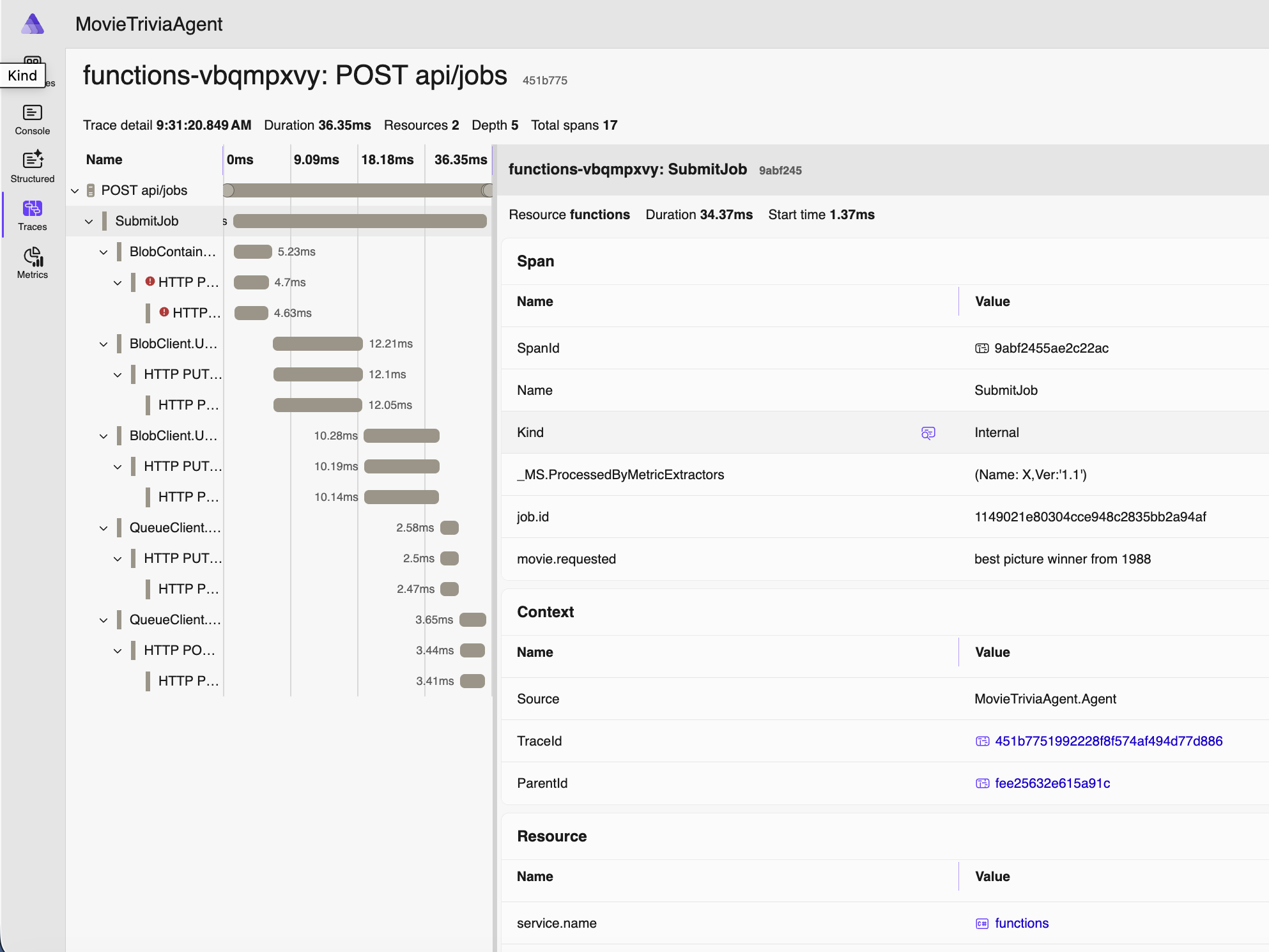
Note above that movie we are requesting to assess is “best picture winner from 1988” – which is not a movie name you’ll find on IMDB. But a human will at least know what you mean. As will an LLM.

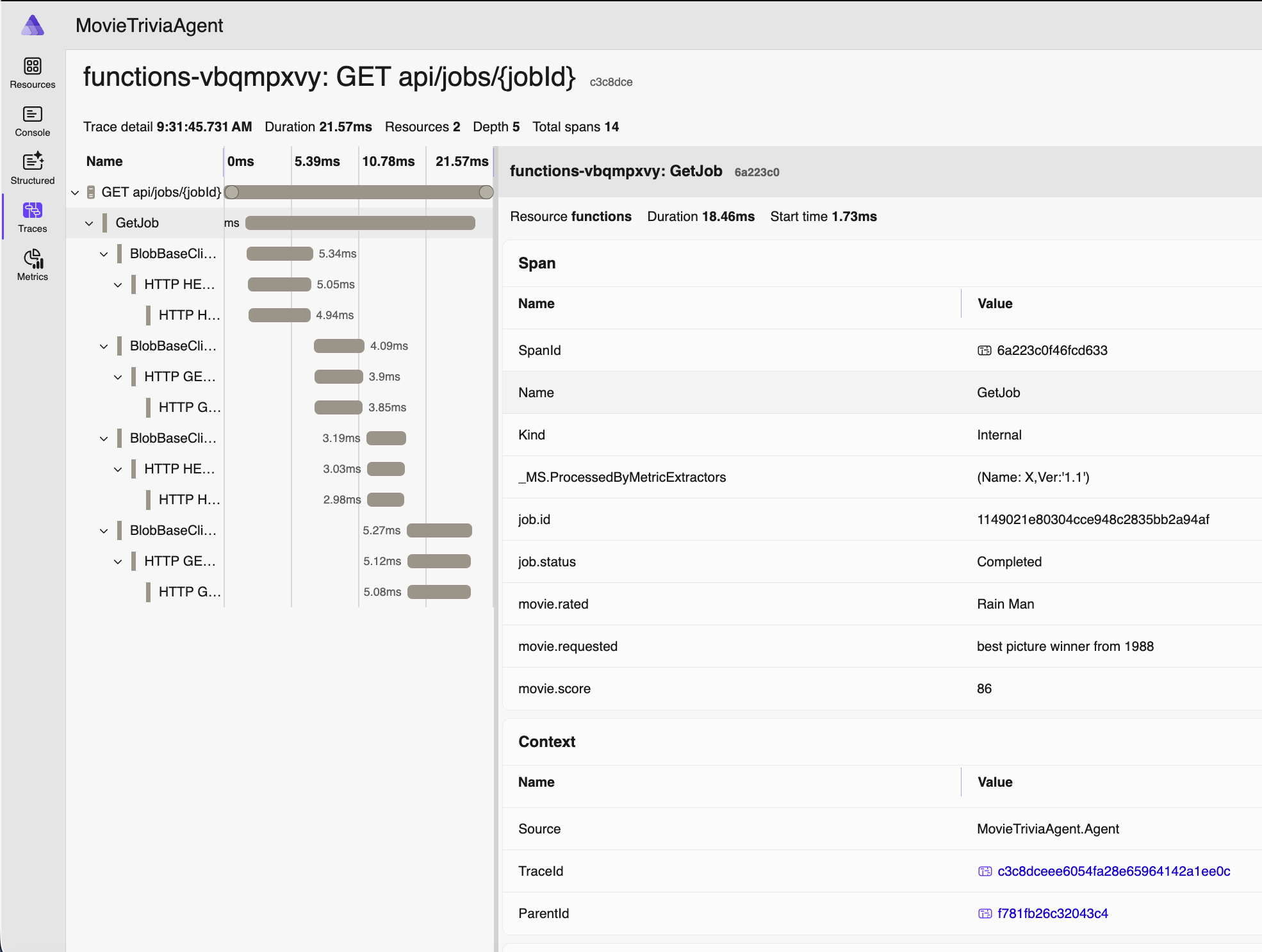
Now let’s double-click on the “RunJob” trace for the same movie – this is also around 20 seconds after the job was created since processing is asynchronous – and starts when our movie makes it to the front of the Azure Storage Queue queue:
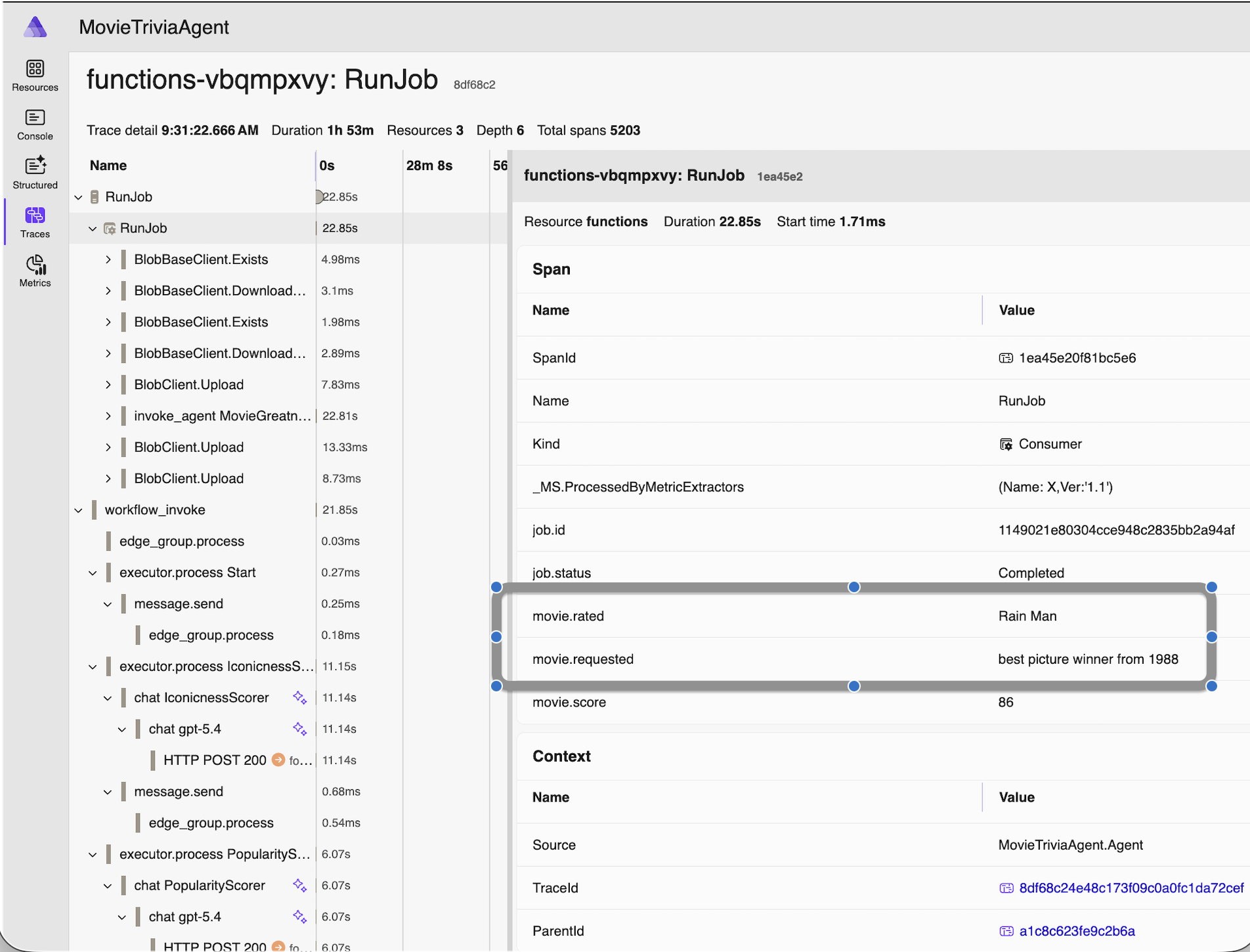
Since we have an AI Agent, the movie request we made earlier (via HTTP POST) was asking to assess “best picture winner from 1988” and the name of the movie actually assessed was “Rain Man” as you can see. AI is working for us. For visibility in our monitoring and debugging, we added those details as properties in the OTel span. The helps us know exactly which business operation we are looking at when we review the telemetry.

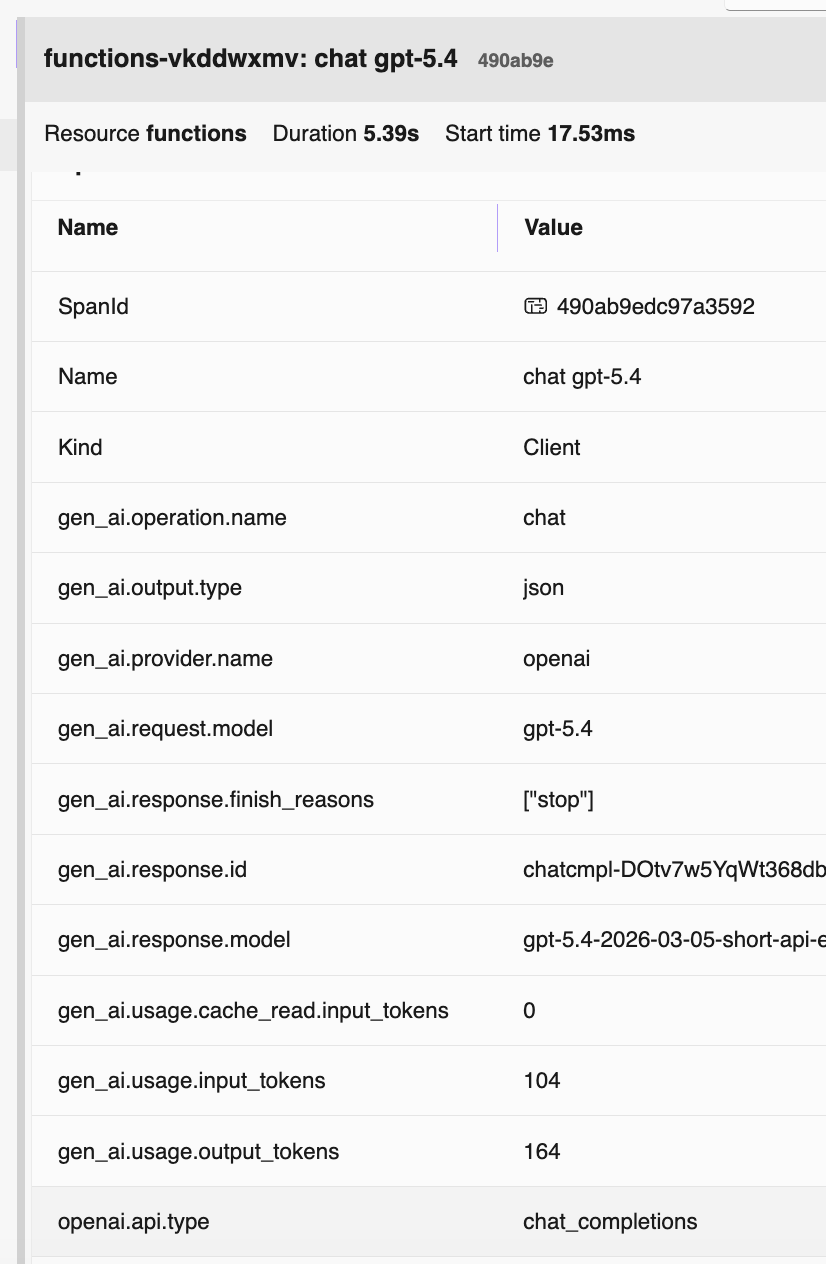
Here’s one more span from the RunJob trace, this one showing some OTel Semantic Conventions for GenAI – the gen_ai.request_model and other span properties – but see also the next section for more on this:
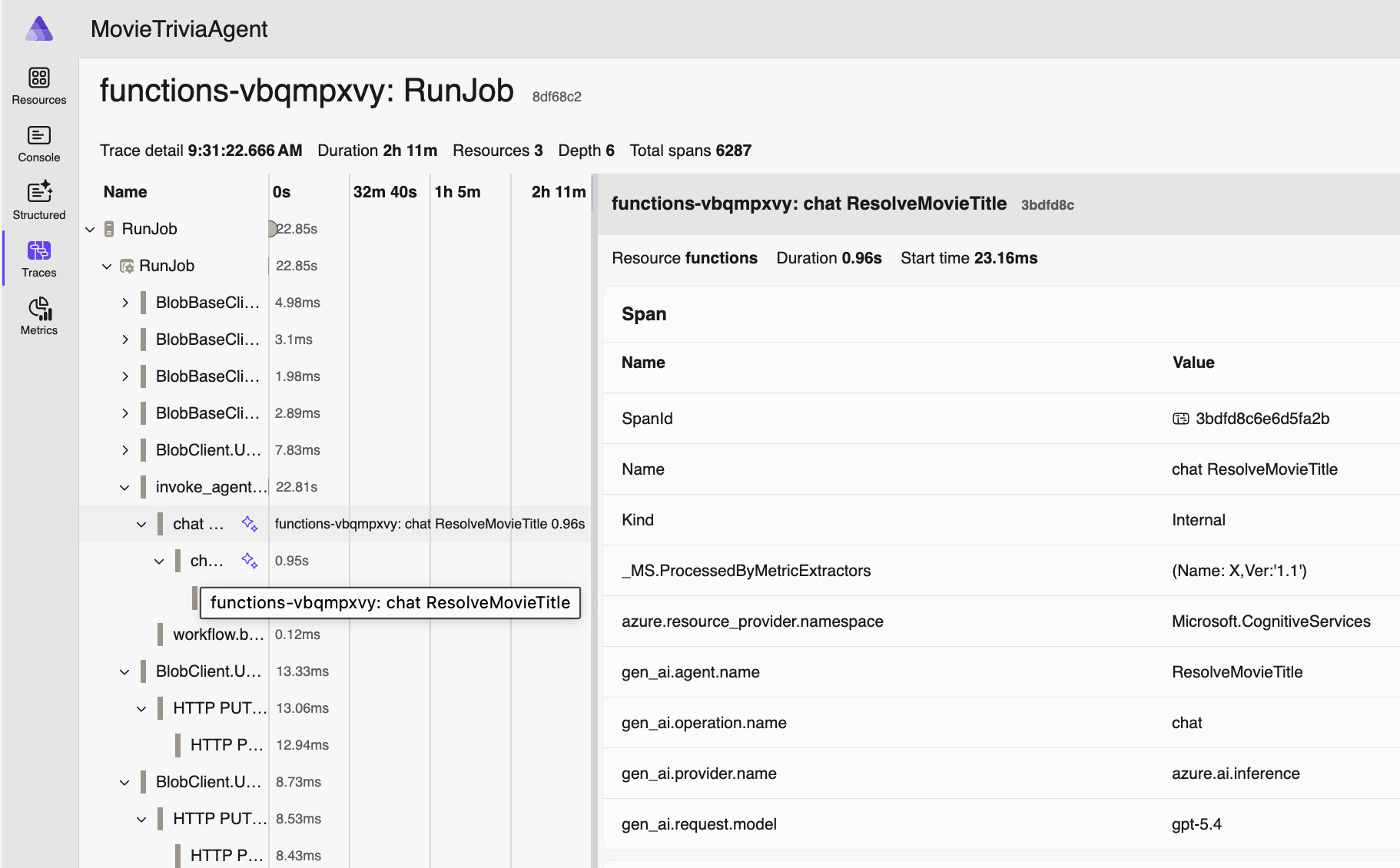
OTel GenAI Semantic Conventions in action ☝

Finally, here’s the trace for that same movie request being retrieved after processing has completed:
OTel GenAI Semantic Conventions

OTel drives consistency across solutions and vendors by specifying semantic conventions. Specifically for GenAI they specify many identifiers (see example above – two screenshots ago). In this screenshot you can see a bunch of them in action. For more information, check out these resources:

Grabbed from Traces view in Aspire (click on a row, this appears in the right-most pane)

Source Code

Presentation

  • PowerPoint Deck is here:

Connect

Connect with Bill

Connect with Boston Azure AI

Connect with Agent Framework Dev Project

Talk: Making Agents Work – Boston Code Camp #40

I had the opportunity (28-Mar-2026) to present at the 40th running of Boston Code Camp. Thank you to the incredible pros running these events, twice yearly, making it happen for a grateful greater-Boston tech community.

Image stolen from Bala Subra – https://x.com/bsubra/status/2037887079804248504?s=20

Thank You to the Speakers, Sponsors, and Organizers

Thank you to all the speakers:

Anirban Tarafder · Bala Subra · Bill Wilder · Bob German · Bryan Hogan · Chris Seferlis · Cole Flenniken · Dave Davis · Dave Finn · Dekel Cohen Sharon · Fnu Tarana · Gleb Bahmutov · Harry Kimpel · Jason Haley · Jeff Blanchard · Jesse Liberty · Jim Wilcox · John Miner · Joseph Parzel · Josh Goldberg · Juan Pablo Garcia Gonzalez · Keith Fitts · Matt Ferguson · Matthew Norberg · Michael Mintz · Pavan Kumar Kasani · Richard Crane · Sunil Kadimdiwan · Taiob Ali · Ty Augustine · Udaiappa Ramachandran · Varsham Papikian · Vijaya Vishwanath · Viswa Mohanty

And thank you sponsors:

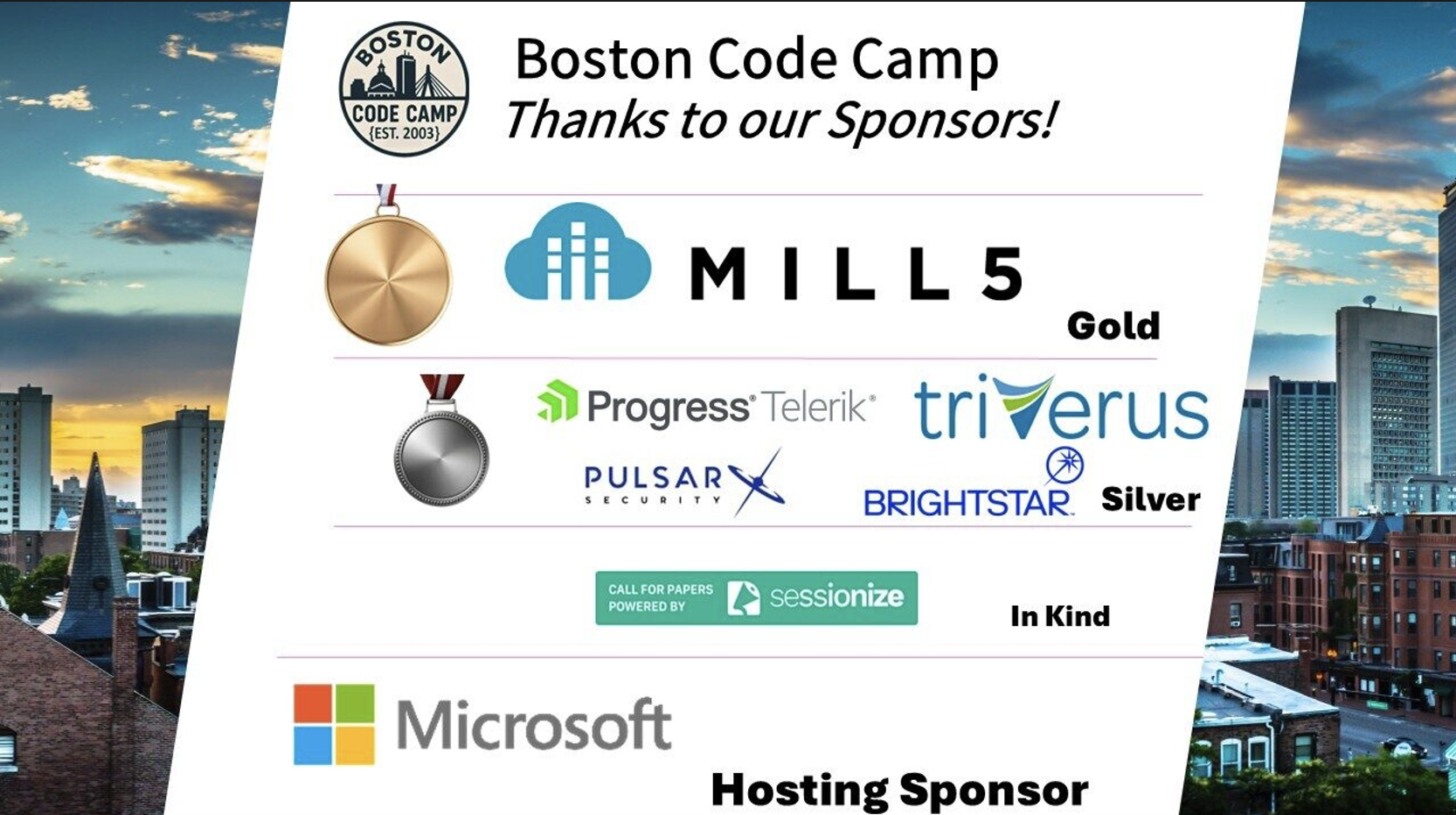
Hosting: Microsoft · Gold: MILL5 · Silver: Pulsar Security · Progress Telerik · Triverus · Brightstar · In-kind: Sessionize

Making Agents Work

My session was Making Agents Work which highlighted some of “the boring side” of building an AI Agent – but these boring details can be super-valuable. The talk was inspired by work I did in my day job as CTO at Open Admissions. I am using an AI Agent to scale a 30 year-old methodology that can be used to help people understand themselves better and use those insights to choose a more aligned college, major, job, or other consequential life decision. Doing this with an AI Agent is a huge responsibility and, as I shared, putting together the initial agent was the easy part – being confident it is consistent, accurate, well behaved, robust if attacked or misused – but still easy to use – that was the hard and boring part!

Image stolen from Bala Subra – https://x.com/bsubra/status/2037887079804248504?s=20

The talk uses a different AI Agent – a simple one that accepts a movie and returns a rating summary – to illuminate some of the points. For example, it uses Agent Framework and has a fan-out/fan-in workflow in the internal agent architecture, uses Microsoft Foundry, a modern tech stack, and Azure Monitor for OTel-aligned Observability.

The full description, link to github repo, and slides follow.

But first, please find some elaboration on OTel Traces, inspired by my OTel demo snafu at the live event. That blog post is here: https://blog.codingoutloud.com/2026/03/30/otel-traces-for-the-win/

OTel Traces for the Win

Speaking of OTel… Due 100% to user error (that would be me!), the demo I had prepared to show the incredible power of OTel had a technical glitch. So I have attempted to remedy that with a blog post I’m calling OTel Traces for the Win. So please hop over there if you are interested.

Making Agents Work – the official talk description

Building more powerful AI Agents seems to be getting easier by the day. They are powered by incredible models, have access to tools, and can work in teams. But how can we have confidence in non-deterministic systems that make consequential decisions?

This talk explores four approaches for building that confidence.

1. Observability platforms – You can’t improve what you can’t see. We’ll explore tools that make the hard-to-see stuff visible.

2. Evals (evaluations) – Moving beyond LGTM (looks good to me), evals wrap agents in formal testing structures to measure accuracy, consistency, and edge case handling – both before and after your Agent goes live.

3. Safety guardrails – Content filtering, PII detection, and hallucination detection from both platform vendors and standalone models. Let’s see how they fit into your agent stack.

4. Selective determinism – Sometimes we make better AI solutions by knowing when NOT to use AI. We will discuss mixing in deterministic logic with our non-deterministic behaviors.

Concepts are platform-agnostic, but demos will use Microsoft Foundry and the Agent Framework (currently in preview). (In case you haven’t been following along, Microsoft Foundry was previously know as known as Azure AI Foundry, and before that was Azure AI Studio. And Agent Framework is the next generation of both Semantic Kernel and AutoGen.)

Target audience: Those new to building production agent systems seeking approaches beyond the “hello world” tutorials – which described me not too long ago.

Source Code

Presentation

  • The slides I presented are here:

Connect

Connect with Bill

Connect with Boston Azure AI

Connect with Agent Framework Dev Project

GitHub Copilot Agent Mode for the Win: I added a new Tool to MCP Server with Single Prompt

Along with fellow panelists Jason Haley, Veronika Kolesnikova (the three of us run Boston Azure AI), and Udaiappa Ramachandran (he runs Nashua Cloud .NET & DevBoston), I was part of a Boston Azure AI event to discuss highlights from Microsoft’s 2025 Build conference. I knew a couple of the things I wanted to show off were GitHub Copilot Agent mode and hosting Model Context Protocol (MCP) tools in Azure Functions.

What I didn’t realize at first was that these would be the same demo.

I started with a solid sample C#/.NET MCP server ready to be deployed as an Azure Function (one of several languages offered). The sample implemented a couple of tools and my goal was to implement an additional tool that would accept an IP address and return the country where that IP address is registered. The IP to country code mapping functionality if available as part of Azure Maps.

I started to hand-implement it, then… I decided to see how far GitHub Copilot Agent mode would get me. I’ve used it many times before and it can be helpful, but this ask was tricky. One challenge being that there was IaC in the mix: Bicep files to support the azd up deployment, AVM modules, and many code files implementing the feature set. And MCP is still new. And the MCP support within Azure Functions was newer still.

Give GitHub Copilot Agent a Goal

The first step was to give the GitHub Copilot Agent a goal that matches my needs. In my case, I gave Agent mode this prompt:

The .NET project implements a couple of Model Context Protocol (MCP) tools – a couple for snippets and one that says hello. Add a new MCP tool that accepts an IPv4 IP address and returns the country where that IP address is registered. For example, passing in 8.8.8.8, which is Google’s well-known DNS server address, would return “us” because it is based in the USA. To look up the country of registration, use the Azure Maps API.

And here’s what happened – as told through some screenshots from what scrolled by in the Agent chat pane – in a sequence that took around 12 minutes:

I can see some coding progress along the way:

A couple of times the Agent paused to see if I wanted to continue:

It noticed an error and didn’t stop – it just got busy overcoming it:

It routinely asked for permissions before certain actions:

Again, error identification – then overcoming errors, sometimes by getting more up-to-date information:

Second check to make sure I was comfortable with it continuing – this one around 10 minutes after starting work on the goal:

In total 9 files were changed and 11 edit locations were identified:

Deploy to Azure

Using azd up, get it deployed into Azure.

Add MCP Reference to VS Code

Once up and running, then I installed it in VS Code as a new Tool – first click on the wrench/screwdriver:

Then from the pop-up, scroll the the bottom, then choose + Add More Tools…

Then follow the prompts (and see also instructions in the GitHub repo):

Exercise in VS Code

Now that you’ve added the MCP server (running from an Azure Function) into the MCP host (which is VS Code), you can invoke the MCT tool that accepts an IP and returns a country code:

domain-availability-checker% dig A en.kremlin.ru +short
95.173.136.70
95.173.136.72
95.173.136.71
domain-availability-checker%

Using the first of the three returned IP addresses, I ask within the Agent chat area “where is 95.173.136.70 located?” – assuming that the LLM used by the chat parser will recognize the IP address – and the need for a location – and figure out the right MCT tool to invoke:

I give it one-time permission and it does its thing:

Victory!

Check Code Changes into GitHub

Of course, using GitHub Copilot to generate a commit message:

Done!

Connect with Bill and Boston Azure AI

Talk: Empowering AI Agents with Tools using MCP

Last night I had the pleasure of speaking to two simultaneous audiences: Nashua Cloud .NET & DevBoston community tech groups. The talk was on Model Context Protocol (MCP) which, in a nutshell, is the rising star for answering the following question: What’s the best way to allow my LLM to call my code in a standard way?

There is a lot in that statement, so let me elaborate.

First, what do you mean by “the best way to allow my LLM to call my code” — why is the LLM calling my code at all? Don’t we invoke the LLM via its API, not the other way around? Good question, but LLMs can actually invoke your code. Because this is how LLMs are empowered to do more as AI Agents. Think about an AI Agent as an LLM + a Goal (prompts) + Tools (code, such as provided by MCP servers). The LLM uses the totality of the prompt (system prompt + user prompt + RAG data + any other context channeled in via prompt) to understand the goal you’ve given it then it figures out which tools to call to get that done.

In the simple Azure AI Agent I presented, its goal is to deliver an HTML snippet that follows HTML Accessibility best practices in linking to a logo it tracks down for us. One of the tools is web search to find the link to the logo. Another tool validates that the proposed link to the logo actually resolves to a legit image. And another tool could have been to create a text description of the image, but I made the design choice to leave that up to the Agent’s LLM since it was multimodel. (My older version had a separate tool for this that used a different LLM than the one driving the agent. This was an LLM with vision capabilities – which is still a reasonable idea here for multiple reasons, but kept it simple here.)

Second, what do you mean by “in a standard way” – aren’t all LLMs different? It is actually the differences between LLMs that drives the benefits of a standard way. It has been possible for a while to allow your LLM to call out to tools, but there were many ways to do this. Now doing so according to a cross-vendor agreed-upon standard, which MCP represents, lowers the bar for creating reusable and independently testable tools. And marketplaces!

Remember many challenges remain ahead. There are a few others in the deck, but here are two:

First screenshot reminds that there are limits to how many MCP tools an LLM (or host) can juggle; here, GitHub Copilot currently is capping at 128 tools, but you can get there quickly!

Second screenshot reminds that these are complex operational systems. This “major outage” (using Anthropic’s terminology) was shortly before this talk so complicated my planned preparation timel. But it recovered before the talk timeslot. Phew.

Connect with Bill and Boston Azure AI

Links from the talk

  1. Assorted Cranking AI resources ➞ https://github.com/crankingai
  2. Code for the Agent ➞ https://github.com/crankingai/logo-agent
  3. Code for the Logo Validator MCP tool ➞ https://github.com/crankingai/logo-validator-mcp
  4. Code for the Brave Web Search MCP tool ➞ https://github.com/crankingai/brave-search-mcp
  5. Images I used in the example ➞ https://github.com/crankingai/bad-images (https://raw.githubusercontent.com/crankingai/bad-images/refs/heads/main/JPEG_example_flower-jpg.png)

Anthropic status page ➞ https://status.anthropic.com/ (see screenshot above).

Model Context Protocol (MCP) Resources

Standards & Cross-vendor Cooperation

SDKs & Samples

MCP Servers & Implementations

Popular MCP Servers

  • GitHub MCP Server – GitHub’s official MCP server that provides seamless integration with GitHub APIs for automating workflows, extracting data, and building AI-powered tools. In case you’d like to create a Personal Access Token to allow your GitHub MCP tools to access github.com on your behalf ➞ https://github.com/settings/personal-access-tokens
  • Playwright MCP Server – Microsoft’s MCP server that provides browser automation capabilities using Playwright, enabling LLMs to interact with web pages through structured accessibility snapshots.
  • MCP Servers Repository – Collection of official reference implementations of MCP servers.
  • Popular MCP Servers Directory – Curated list of popular MCP server implementations.

MCP Inspector Tool ➞ Check this out for sure

Download the deck from the talk ➞

Talk: Boston Code Camp 38 – Let’s Build a Goal-Oriented AI Agent Using Semantic Kernel

29-Mar-2025

Today I attended and contributed a talk to the Boston Code Camp 38 (yes, impressively, the 38th edition of this event). I made the trip with Maura (she gave a talk combining Cryptocurrency And Agentic AI) and Kevin (he gave a talk on Top 10 AI Security Risks). and we got to hang out with and chat with so many cool people from the Boston technology community.

The description of my Let’s Build a Goal-Oriented AI Agent Using Semantic Kernel talk follows, followed by a couple of relevant links, then the slide deck.

Imagine an AI not limited to answering individual questions or chatting, but actively working towards a goal you’ve assigned to it.

In this session, we’ll explore the building of an AI Agent – an autonomous actor that can execute tasks and achieve objectives on your behalf.

Along the way we will demystify:

1. 🧠 LLMs – What is a Large Language Model (LLM)
2. 📚 Tokens – What is a token and what are its roles
3. 💡 Embeddings – What are embedding models and vectors and what can they do for us
4. 🎯 Prompts – Beyond the basics
5. ⚙️ Tools – How can these be created and accessed using Semantic Kernel
6. 🤖 Agents – Let’s put all these concepts to work!

The end result will be the core (or perhaps ‘kernel’ 😉) of an AI Agent – your virtual coworker willing to handle tasks on your behalf without. It will be built in C# using the open source, cross-platform Semantic Kernel library.

This talk assumes user-level familiarity with LLMs like ChatGPT or Microsoft Copilot and basic prompting. Anything else will be explained.

(stole photo from Robert Hurlbut)

A couple of prominent links from the talk are:

You can find the Fun with Vectors tool here: https://funwithvectors.com/

You can find the OpenAI Tokenizer tool here: https://platform.openai.com/tokenizer

Download the slides here:

Boston Azure AI: Boston Azure is changing calls signs

I was in the audience at the Microsoft PDC on Nov 3, 2008 where Windows Azure was unveiled on stage by Ray Ozzie in the conference’s opening keynote. At the 16:45 mark he graciously tipped his hat to Jeff Bezos and the AWS team, then announced Windows Azure – a platform with two services: Azure Storage (Blobs, Tables, Queues) and Cloud Services (Web Roles, Worker Roles) – all with the illusion of infinite scale. Later that same day I got hands-on Windows Azure coding experience in a special booth staffed by Microsoft engineers (and it turns out that the impressive engineer helping me was Sriram Krishnan (@sriramk)). I got to test drive those new super-cool Azure services. From my perspective this was the beginning of the conversation about Platform as a Service (PaaS) in the cloud – and the start of horizontal scale as a mainstream architecture pattern. What an event! Around 15 months from this initial announcement, on Feb 1, 2010, Windows Azure reached “GA” (general availability).

In between the initial announcement in 2008 and the GA date in 2010, Boston Azure was born. On Oct 22, 2009, Boston Azure debuted as the first community group of its kind – the first one dedicated to learning about the Azure platform. As of this writing, it has around 3.500 members according to Meetup.com.

(For a long time after we started hosting events we had people attending other events see our signage and curiously pop their head in to ask “What’s Azure?” When I’d answer “that’s Microsoft’s public cloud platform” they would very often react with a puzzled look and a follow-up question: “Cloud? What’s a cloud?” So yes, those were early days.)

That first event was held at the Microsoft NERD building in Cambridge MA. Mike Werner said a few words, I gave a short talk about cloud benefits and the coming opportunity (and somehow managed to reference “the Internet is … a series of tubes” comment by Alaska Senator Ted Stevens) and Brian Lambert (@softwarenerd) was the featured speaker who talked about queuing patterns in Azure Storage which was part of my journey of getting interested in cloud-relevant patterns (which culminated in me writing a book – Cloud Architecture Patterns – a few years later). Michael Stiefel was Boston Azure’s second-ever speaker.

Heady days from 2008 to 2010!

The times they are a-changin’

“You better start swimmin’ or you’ll sink like a stone, for the times they are a-changin’.” –Bob Dylan (https://www.youtube.com/watch?v=DL_kPNFL3dY and do yourself a favor and check out the movie A Complete Unknown).

A few things have changed since then. The PDC conference is no longer – though content has been subsumed into the Build conference. Windows Azure is now just Azure. There are hundreds of Azure services, not two. And Ray Ozzie is no longer at Microsoft (but has the Blues in the best sense of the word).

And Boston Azure is still at it. We’ve delivered more than 150 free events and still going strong. Now also delivering events virtually since the you-know-what made in-person events so difficult. Back in the early days George Babey and Nazik Huq signed on to help me run things. These days – and for some time now – our leadership team is Jason Haley (@haleyjason), Veronika Kolesnikova (@veronika_dev1), and me.

But technology continues to evolve, and we need to evolve too. Today Artificial Intelligence is playing a role similar to the role played by public cloud platforms back 15 years ago: everything is different so what does that mean? what will come out next? what does this make possible? how can I make use of this? how do I learn this stuff? This is exciting, right??

Changing Call Sign to Boston Azure AI

With no end in sight for AI to slow down, the three of us running Boston Azure – Veronika Kolesnikova (@veronika_dev1), Jason Haley (@haleyjason), and myself (@codingoutloud) – have decided to update our community group for 2025 by changing call signs – Boston Azure is now Boston Azure AI.

We’ve been emphasizing AI topics for a while already. Veronika is a long-time Microsoft MVP for AI, Jason is a long-time Microsoft MVP for Azure who last year was reclassified to the AI category, and myself as a long-time Azure MVP was re-classified last year as Dev Tools (presumably due to giving so many talks on GitHub Copilot, the AI coding assistant, in the prior year), so this emphasis also aligns with where the group’s leadership is spending time. At any rate, this rename should at least help us more clearly communicate to the community what we intend to offer.

Where to Find Boston Azure AI

With the rename, we are retooling some of our properties. Some are new, some are renamed from bostonazure version. You can find us at the following destinations:

  • X/Twitter: 🐦 https://x.com/bostonazureai – renamed, so if you followed before you are still following
  • Bluesky: 🟦 https://bsky.app/profile/bostonazureai.org – yeah, we did the fancy domain version 😉
  • YouTube: 🎥 https://www.youtube.com/@bostonazureai (renamed) – we have more than 50 videos posted
  • GitHub: 🛠️ https://github.com/bostonazureai – created a new GitHub Organization for this and will be migrating over the old content, including the C# + Semantic Kernel + Azure OpenAI hands-on workshop materials shortly (see bottom of this post for more – we are running an event on Jan 31)
  • Meetup: 📅 https://meetup.com/bostonazureai – renamed, so if you were a member before you are still a member
  • Website: 🌐 https://bostonazureai.org – coming soon
  • Email: ✉️ hello@bostonazureai.org – we used a gmail address for the first 15 years, but now we are getting fancy with the bostonazureai.org domain. Hit us up if you want to offer a talk (in person or virtual) or have a suggested topic for us!

And, fittingly, we also have a shiny new logo.

The Boston Azure AI logo shows Boston skyline within a cloud outline and text Boston Azure AI
Boston Azure AI

Hands-on AI Coding Workshop: C#, .NET 9, and Semantic Kernel on Azure OpenAI

In another evolution, Jason Haley and I are experimenting with offering Boston Azure AI in-person hands-on AI coding workshops during the workday. The community events we’ve historically offered have been only nights and weekends – non-working hours. We’ll see how this works out. We have our second such in-person during-the-workday hands-on coding workshop focused on using C#, .NET 9, and Semantic Kernel on Azure OpenAI coming up on Fri Jan 31, 2025 held in Cambridge MA. You can sign up here. Free.

And we have a weekend event on the schedule to participate in Boston Azure edition Boston Azure AI edition of the Global AI Bootcamp in March. You can sign up here. Free.

Buckle in. Looking forward to an exciting next few years!

🤖 ☁️